Create up to four custom process types to automate and schedule your Analysis Process Designer models and SAP Customer Relationship Management analytics activities.
Key Concept
Analysis Process Designer models, data mining models, and Customer Relationship Management Analytics models (such as Customer Life Time Value and Recency, Frequency, Monetary) are not incorporated into BI process chains, and must be scheduled manually today. This article describes how to create a new custom process type for each of these items. A custom process type dictates the tasks and properties of a process. The result will be seamless automation and scheduling capabilities of these activities through process chains.
If you plan to start taking advantage of SAP Customer Relationship Management (CRM) Analytics, data mining, or Analysis Process Designer (APD), you will find that you need to deal with automation and scheduling of your applications. Unfortunately, CRM Analytics and APD capabilities are not directly incorporated into process chains, so this can make scheduling a little complex. However, process chains offer a framework to create custom process types. I’ll show you how to create four separate custom process types for APD, data mining, Customer Life Time Value (CLTV), and Recency, Frequency, Monetary (RFM) models. I’ll explain each in detail.
APD is a graphical, drag-and-drop tool that allows you to create complex models to analyze and manipulate your data. The data mining capabilities of SAP NetWeaver BI (such as decision trees, clustering, and regression) are also exposed through APD.
Some of the data mining models (e.g., decision trees and clustering) need to go through a training process in which the system analyzes historical data to determine any relationships or patterns. The result of this training process is then used in the subsequent prediction phase. However, you want to make sure your models are as accurate as possible, and therefore, you need to retrain them with the most recent data from time to time. Before you can retrain your model, you need to remove the previously learned training results. This process type allows you to reset training results of a data mining model.
A CLTV model is a mechanism to calculate and analyze profitability and retention rates across customer segments. A CLTV model is also used as the foundation to perform CLTV predictions.
RFM analysis allows you to make predictions about response rates of customers in a campaign. This in turn allows optimum target groups of customers (with the highest predicted response rates) to be established for the campaign, thereby maximizing campaign profitability or optimizing return on investment (ROI).
I’ve outlined eight items (series of steps) for creating four new process types in this article. I include detailed instructions for each in the download available via this link. By the end of this article and after reading the download material, you will have these four new process types available to use in your process chains. When you run transaction RSPC, navigate to the Process Types area. In this list, the Other hierarchy node will now contain your four process types that you can use in process chains (Figure 1). This solution should work in both SAP BW 3.5 and SAP NetWeaver 2004s.
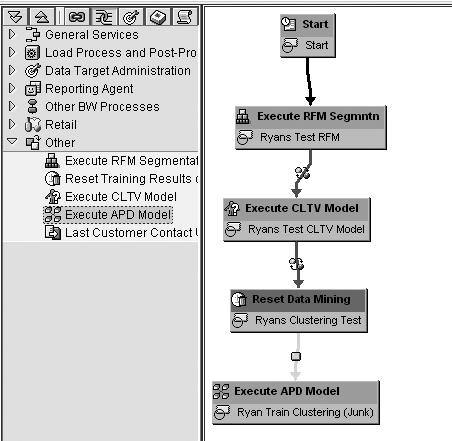
Figure 1
Custom process types displayed in transaction RSPC
This solution implements most of the interfaces (optional and mandatory) available to use in custom-defined process types. This provides the most functionality to the process chain. Table 1 details which interfaces are implemented for each process type.
| IF_RSPC_TRANSPORT |
Yes |
Yes |
No |
No |
| IF_RSPC_MAINTAIN |
Yes |
Yes |
Yes |
Yes |
| IF_RSPC_GET_VARIANT |
Yes |
Yes |
Yes |
Yes |
| IF_RSPC_GET_STATUS |
Yes |
No |
Yes |
Yes |
| IF_RSPC_GET_LOG |
Yes |
Yes |
Yes |
Yes |
| IF_RSPC_EXECUTE |
Yes |
Yes |
Yes |
Yes |
| IF_RSPC_CHECK |
Yes |
Yes |
Yes |
Yes |
| IF_RSPC_CALL_MONITOR |
Yes |
No |
No |
No |
| IF_RSPC_CONTEXTMENU |
No |
No |
No |
No |
| IF_RSPC_GET_DEFAULT_CHAIN |
No |
No |
No |
No |
| IF_RSPC_GET_INFO |
No |
No |
No |
No |
|
| Table 1 |
Interfaces implemented for each custom process type |
Depending on your requirements, you may not necessarily need to use all four of these process types. For example, you may be using APD models, but you might not yet be using any data mining or CRM Analytics applications. Therefore, you may only want to make the process type to execute an APD model available. This article is structured in such a way that you can pick which of the four process types you wish to implement. This article outlines eight items to implement. The items each contain a series of steps. If, for example, you are only interested in creating a custom process type for APD, then you are told which items and steps you need to implement. I explain the eight higher-level items that you need to create below.
Overview of Items
Item 1. Create custom search help objects for process types. This item is designed to provide proper F4 help for your custom process types. For example, when you want to use the APD process type in a process chain, F4 help allows you to select an available APD model in your system.
Item 2. Create custom search help objects for a new customizing table. The purpose of item 2 is to provide appropriate F4 help control when creating table entries in this new customizing table.
Item 3. Create a new table with table maintenance. In item 3, you create a new table that allows you to create some customizing entries. This table is used for the RFM and CLTV models only. It allows a number of settings to be maintained about the execution behavior of these jobs (i.e., it allows the user to define settings for parallel processing if required).
Item 4. Create a message class. This item is designed to store all of the appropriate error messages that the system may need to raise at any point in time.
Item 5. Create an ABAP program. This ABAP program is called for the new process types that run asynchronously (i.e., APD models, RFM segmentation, and CLTV modeling). This program notifies the calling process chain that the background task has completed. This in turn tells the process chain that it can process the next node in the chain.
If an error occurs during the processing of this program, then the system cannot notify the chain. Therefore, in this situation, the system automatically raises a short dump. The comments added inside the program, as well as in the method IF_RSPC_EXECUTE~EXECUTE of the APD class ZZCL_RSPC_APD (that you’ll create by following the detailed instructions at www.BWExpertOnline.com), contain a much more detailed explanation.
Item 6. Create seven function modules. These function modules return the text description of various objects (such as an APD model) and perform other functions such as checking whether a certain object is active.
Item 7. Create four ABAP Object-Oriented (OO) classes. These classes contain the bulk of the logic for the process types. There is one new class for each process type. All of these classes implement the process chain interfaces provided by SAP.
Item 8. Create table entries for new process types. Here, the system updates the table containing the list of process types used in process chains to include four new entries, one for each of the new process types.
Each of these eight items consists of a series of steps. You can find detailed instructions for each item in the download available at this link. Each step in the item describes what needs to be done (in a “How To” approach). Table 2 describes which items and steps you need to implement for each process type. If you wish to implement all four process types, then you need to implement all items and steps.
| APD model |
1
4
5
6
7
8 |
1 – 5, 21 – 24
All
All
1 – 20
1 – 7
1 – 2 |
| Reset data mining training |
1
4
6
7
8 |
6 – 10, 25 – 28
All
1 – 3, 21 – 31
8 – 15
1, 3 |
| CLTV model |
1
2
3
4
5
6
7
8 |
11 – 15, 29 – 32
All
All
All
All
1 – 3, 32 – 37
16 – 23
1, 4 |
| RFM segmentation |
1
2
3
4
5
6
7
8 |
16 – 20, 32 – 36
All
All
All
All
1 – 3, 38 – 43
24 – 31
1, 5 |
|
| Table 2 |
Items and steps to implement for each individual process type |
Note
For information on the basics of CRM Analytics, data mining, and APD, search the BI knowledgebase on this site. I recommend the introductory article to CRM Analytics,
“mySAP CRM Analytics Harnesses SAP NetWeaver BI Analytical Capabilities,” by Ned Falk.
SAP provides a generic framework for process chains (that I use in this article). The documentation for this is at
https://help.sap.com. Follow menu path
SAP NetWeaver>SAP NetWeaver 2004s>SAP NetWeaver by Key Capability>Information Integration>Business Intelligence>Data Warehousing>Data Warehouse Management>Process Chain>Process>Application Process>Implementing your own Process Type.
You will find useful background knowledge in the SAP class BW380, Analysis Process and Data Mining (for SAP NetWeaver 2004s). Also, the SAP class BW360, SAP BW Performance and Administration (for BW 3.5) or BW360, BI Performance and Administration (for SAP NetWeaver 2004s) covers the fundamentals of process chain development. These are advanced BI classes, so be sure to check the course prerequisites. For further details, visit
www.sap.com/useducation.
Ryan Leask
Ryan Leask currently runs the SAP BusinessObjects Planning and Consolidation solution management team for SAP, based out of Palo Alto, CA. Prior to this position, he led the EPM solution architecture team with a main focus on the design of SAP BusinessObjects Planning and Consolidation 7.0, version for SAP NetWeaver. Ryan has also worked on SAP xApp Analytics, SAP NetWeaver Visual Composer, SAP NetWeaver BW, SAP SEM, ABAP, SAP CRM, analytics/data mining, and whatever else seemed interesting. He has also co-authored SAP xApp Analytics (SAP PRESS, 2006), written many articles, and presented at numerous conferences.
You may contact the author at ryan.leask@sap.com.
If you have comments about this article or publication, or would like to submit an article idea, please contact the editor.



 Premium