Discover some best practices to help you organize your credit management in a way that benefits the supply chain.
Key Concept
A credit control area is an organizational unit you use to establish your credit management protocol in Accounts Receivable and Sales and Distribution. Within it, you set and control credit limits for your customers. A credit control area may contain multiple customer company codes, but you can assign each company code to only one credit control area.
Credit management is a vital part of any sales organization. I’ll look at credit limit calculation and
show how you can organize your credit management using your SAP R/3 or mySAP ERP Central Component (ECC) system. The aim
is to create a sensible way to finalize the design on the financial side without unduly hampering the supply chain.
Organizing your credit management involves three steps. First, define your credit control area by deciding how to
manage credit. Then, determine how to set up new customers and define default credit limits. Finally, assign the credit
control area to one or more company codes, depending on your requirements.
This functionality has been around since R/3 Release 3.0. The prerequisite is the customizing of automatic credit
checks in the sales module, which I covered in the first article in this series.
Define Credit Control Area
Mapping your credit control organization to R/3 and ECC means you decide at which level you monitor credit (credit
control area) and group customers and credit clerks. The credit control area is your fundamental design decision in the
SAP Financials module. See Figure 1 for a comparison of credit control on company and national
levels.
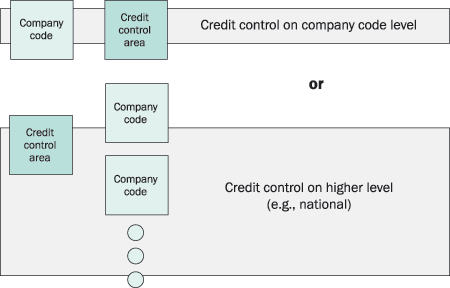
Figure 1
Set up your credit control area
In this step you decide whether to manage credit by company code or by a grouping of company codes. The
choice depends on your organizational structure. Typically, companies manage credit on a national level, in which case
grouping all company codes in national credit areas seems logical. However, if you want to manage your credit globally,
you need one global credit control area. Other possibilities include deriving the credit control area from the sales
organization or the payer master record (billing tab).
This is an area where a wrong decision can damage the efficiency of your supply chain. For example, if you
are dealing with global customers and credit control is at a local level, the myriad of local financial officials dealing
with the same customer can create unwanted friction and loss of time. During the design phase it is vital to stress that
the organization of credit control should follow the structure of your customer base as much as possible. Just opting for
the company code level because it is logical from a financial point of view can actually damage your business.
Define credit control areas in customizing via menu path Enterprise
structure>Definition>Define credit control area. Figure 2 shows the initial customizing
screen.
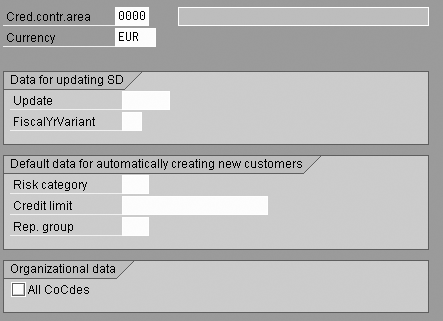
Figure 2
Customize the credit control area
After you decide which level of credit control you want, you must determine how you define credit exposure
by choosing the appropriate setting in the Update field in Figure 2. Defining the credit exposure is the
key to your calculations in credit management. You have three options for the Update field, shown in
Figure 3:
- 000012 starts with selecting the scheduled quantities in the sales order. As long as a
sales order line is not scheduled, the value is not included. Then the logic follows the sales flow.
When you create a delivery, the open sales order value decreases and the open delivery value increases.
When you bill a delivery to the customer, the open billing document value replaces the delivery value. When the system
creates the financial document, it replaces the open billing document value automatically with the value of the accounts
receivable open item.
This approach is based on the idea that a credit risk is created the moment you schedule a sales order
item. This is valid if the time between scheduling and actual delivery is short. If scheduled lines sit in the system for
a long time, this is not a good choice. In those cases it is better to place the risk at the start of the delivery
process.
Including sales order value leads to an overabundance in credit blocks, which is undesirable from a
supply chain point of view. It is important that those responsible on the financial side understand that this option means
extra — and not always effective — work. If sales orders are included, but not valid because of long lead
times, the responsible financial clerks must judge each case manually. This goes against the idea of efficient and
effective credit control.
- 000015 has the same logic as 000012, but in this case the calculation
starts when the system creates the delivery process. This definition of exposure is more to the point in cases in which
sales orders are present in the system for a long time before any action is required.
- 000018 has the same logic as 000012, but credit exposure starts when
the system creates the sales order. Also, the system does not consider the schedule line, which contains the details of
the scheduled delivery to the customer. It can differ from the initial quantity in the related sales order line. In this
case the order defines the risk. This method is suitable in an environment of fast-moving goods in which you execute sales
orders right away. In all other situations, this calculation method can cause a loss in efficiency and make some figures
difficult to interpret. Also, it is rare to find a case in which an unscheduled sales order really is a credit risk.

Figure 3
Select one of these options to define credit exposure
Set Up New Customers
Settings for new customers is another important aspect of the credit control area. In general it takes some
time for a credit department to define a tailor-made credit limit, which can result in delays. Also, in business areas
with large numbers of relatively anonymous customers, companies generally tend to avoid implementing specific limits.
In both scenarios, you need a default credit limit for new customers, since it is not possible (in the case
of limit setup) or practical (in the case of large numbers of customers) to define single limits quickly enough. The
settings for new customers allow you to define a default limit. You also can assign a default risk group. The risk group
is one of the elements that define how the system reacts (see the first article in this series for more information). For
example, you may treat a new internal customer or a key account differently than an unknown, small newcomer.
Finally, you can assign a new customer to a default credit representative group. This is an efficient way
of linking all new customers to dedicated members of the credit department. In general it is not a good idea to put too
low a value in the default credit limit if you are working with customers on a lengthy basis. At the start of the
relationship, you do not want an overdose of red tape and the risk of late deliveries.
Assign the Credit Control Area
After you have finalized your settings, you must assign the credit control area to one or more company
codes. The choice should depend on the level of credit management you want. If credit management is independent for each
company code, you define and assign a separate area to each company code. However, if credit management is on a higher
level, you can assign one area to a group of company codes.
Assign the credit control area via menu path Enterprise structure>Assignment>Assign company
code to credit control area. Be careful not to assign company codes that were created for system reasons. For
example, a financially irrelevant company code might be linked to a sales organization and the sales order could affect
the credit exposure calculation. This could happen if you correct the company code for logistic reasons only. You can
check if such a company is linked to a credit control area in the same screen.
The system offers three alternatives to derive the credit control area. No matter which option you choose,
you must first assign the credit control area to provide a default value.
With the first alternative, derive the credit control area from the sales organization by following menu
path Enterprise structure>assignment>sales and distribution>assign sales organization to credit control
area. The advantage of this method is that the system deals with customers according to the way you set up your
sales, rather then according to the financial organization of your company. By choosing this option, you also must assign
the credit control area to the relevant company codes (default value).
For this method, it is vital to organize the credit department along similar lines. To ensure this, you
must tackle two areas of possible dispute:
- Credit details for any customer (open items) are always registered on a company code level. If you
assign a credit control area to a sales area, you must analyze customer positions for the relevant group of company codes.
Also, the financial department needs to be aware of the mapping company code and sales area involved.
- Customers receive a monthly account statement detailing their Accounts Receivable positions with your
company. Again, these statements are normally on a company code level, which complicates discussion about credit issues.
It might be useful to discuss the possibility of using accounts statements that include all company codes concerned.
The second alternative is to derive the credit control area from the customer master (the payer’s
Sales Area Billing Documents tab). The value assigned to a customer overwrites the default from the
assignment credit control area and company code. This allows for flexibility in your credit control setup. For example,
assuming that you have to define different payers for different distribution channels, this approach allows you to
differentiate on that level. A word of caution, however: Do not go overboard on too detailed a setup. This complicates the
process of document release and could hamper an efficient and effective process.
Finally, as a third alternative SAP provides user exit SAPFV45K_001 to derive the credit
control area in a self-defined way if the opportunities provided do not cover your needs. If you want to use any of these
possibilities keep in mind the proper sequence of derivation: user exit, customer (payer) master record, sales
organization, and company code. The company code always supplies a default value.
Additional Tips
Now you can make detailed credit management settings in the credit management area via IMG menu path
Financial Accounting>Accounts receivable>Credit management. I’m going to mention a few areas
you might want to explore. Each of these is a subsequent level on this menu path on the IMG.
- Assign Permitted Credit Control Areas to Company Code. You can assign other credit
control areas to a company code apart from the default one. After doing this, enter the alternative area in the financial
document, as shown in Figure 4.
In my opinion, this process is very hard to control and nearly always leads to misunderstandings and
unclear figures. If you need to exclude transactions, it is better to investigate the option of excluding specific
reconciliation accounts from updating credit limits via IMG menu path Financial Accounting>Accounts
receivable>Credit management>Business Transaction>Define Reconciliation Accts Without Credit Management
Update.
- Define Credit Representative Groups and Define Reconciliation Accts Without Credit Management
Update. In my opinion, the only important settings in this area of the IMG are the risk category and the credit
representative group. The risk category is part of the key that defines all automatic credit checks (Figure
5). I explained in detail how this works in the first article in this series.
You can use the credit representative group to manage groups of customers and to link them to a specific
member of the accounts receivable department. In some cases the credit representative is mentioned on an invoice,
depending on the system setup. I advise you to use generic titles for these groups (e.g., credit representative key
accounts) rather than personal names, so you don’t need to change it every time a different person is assigned to
the task. Using credit representative groups can facilitate the communication between logistic and financial departments.
For example, it is easy to remember that you need group A for key accounts. The alternative of phoning the credit
department and finding out is more cumbersome.
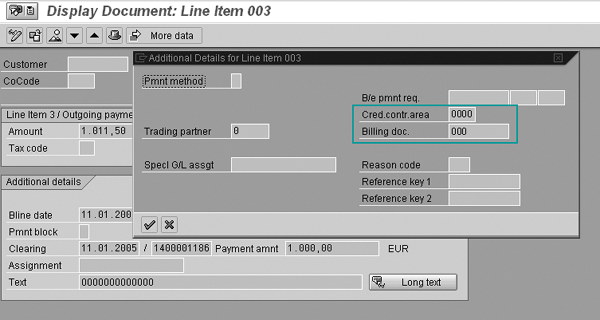
Figure 4
In the Additional Details for Line Item level, you can add a different company code
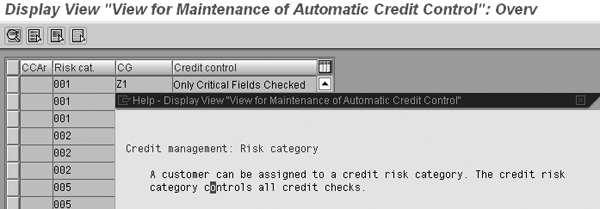
Figure 5
Risk categories defined per credit control area (CCAr). The help text indicates the key role of the risk category in automatic credit control.
The remaining settings in the IMG are of no immediate concern and are fairly well documented. Those under
Business transaction are mainly concerned with line layouts and the buckets used in reporting.
Dr. Stef G.M. Cornelissen
Dr. Stef G.M. Cornelissen, MBA, is an experienced international SAP business consultant from the Netherlands with certifications in FI, CO, and SD. He took part in important international projects involving the large Dutch multinationals. Before specializing in SAP, he worked as a management consultant and was a senior advisor to the Board of Directors of the University of Nijmegen. Stef's academic background is in business administration, economics, and organizational science. He is the owner of Bowstring BV and principal partner at Sperry Associates.
You may contact the author at info@bowstring.nl.
If you have comments about this article or publication, or would like to submit an article idea, please contact the editor.