Through written instruction and a collection of video demos, learn how to extract data from SAP BusinessObjects Planning and Consolidation, version for SAP NetWeaver and store it in SAP NetWeaver BW without writing complex ABAP code or logging on to the SAP NetWeaver back end to start the extraction.
Key Concept
Data Manager is an SAP BusinessObjects Planning and Consolidation module that helps you move data into the planning and consolidation system, copy and move data within and across applications, and export data from an application by means of packages. Data Manager packages are based on process chains, which are sequences of processes that are scheduled to wait in the background for an event. Some of these processes trigger a separate event that can, in turn, start other processes.
When SAP BusinessObjects Planning and Consolidation, version for SAP NetWeaver was released, a promising feature was the ability to consume the data in planning and consolidation applications and use it for comparative analysis in SAP NetWeaver BW. This data must remain consistent between the two applications.
For example, business users often want to report actual revenue or volume against planned revenue or volume. Users can also plan targets and budgets in SAP BusinessObjects Planning and Consolidation and compare the targets against actual revenue.
Since SAP BusinessObjects Planning and Consolidation, version for SAP NetWeaver runs on top of SAP NetWeaver BW, this data extraction should have been fairly straightforward. However, SAP BusinessObjects Planning and Consolidation 7.0 and 7.5, versions for SAP NetWeaver do not provide such built-in functionality. There are options available, but each has its own limitation:
- Retraction Business Add-In (BAdI): SAP BusinessObjects Planning and Consolidation 7.5, version for SAP NetWeaver allows you to use a retraction BAdI for the extraction, but doing so requires ABAP OO coding and makes it less flexible when changes are requested by business.
- Open hub: Via SAP NetWeaver BW functionality, this step lets you use the InfoCube created by the planning and consolidation application to extract data to either a flat file or table. The drawback is that the user needs access to the back-end SAP NetWeaver BW system and requires knowledge to modify SAP NetWeaver when changes are requested.
- Data transfer process (DTP): You can create a DTP on the InfoCube generated by the planning and consolidation application to extract data to other InfoProviders. However, the creation of a DTP on the InfoCube leads to issues during transports from development to production and application copy in SAP BusinessObjects Planning and Consolidation, version for SAP NetWeaver.
I propose a custom solution that enables the extraction of data within the SAP BusinessObjects Planning and Consolidation, version for SAP NetWeaver Data Manager package, while providing selection criteria and the ability to add business logic. Unlike dumping the data in a flat file or using open hub, the functionality is controlled within the planning and consolidation application, and it does not require a user or administration to log on to SAP NetWeaver BW to carry out the activity.
The solution addresses the business need to get data, either periodically or on-demand, from the planning and consolidation application to SAP NetWeaver BW, and monitor this data. The data from the target data store can be extracted via a DTP to harmonize it with SAP NetWeaver BW data, and it can be further updated to InfoProviders for reporting.
Click the video clip below to see my complete solution in action.
The Easy Way to Get Data from Planning and Consolidation to SAP NetWeaver BW: Solution Demo
Through words and detailed video demos, I provide step-by-step instructions to create my custom solution.
Solution Details
The custom solution consists of the following:
Mechanism to Extract Data
You must create the mechanism to extract data from SAP BusinessObjects Planning and Consolidation, version for SAP NetWeaver and store it in SAP NetWeaver BW. This action requires the creation of a query on a planning and consolidation MultiProvider. You use this query as a DataSource in the Analysis Process Designer (APD), and store the data returned by the query in a direct update DataStore object (DSO).
Note
The APD can only use a direct update DSO to store data. The direct update DSO is different from other DSOs: When new data is loaded into a direct update DSO, the old data is deleted automatically. Also, a direct update DSO does not require a subordinate identifier activation.
Since the APD does not support ready-for-input variables, you need to modify the BEx query to read the values for variables via customer exit from a custom table. You then need to move the data from the direct update DSO to a standard DSO or other InfoProvider to store the data, so create a DTP, which can operate in full upload mode.
The standard DSO takes care of the delta updates. You can consume data directly from the standard DSO, by BEx query, or can use the standard InfoCube in a MultiProvider to combine it with other SAP NetWeaver BW data for comparative analysis.
Trigger for the Extraction
Next, create functionality for the extraction to be triggered and monitored within SAP BusinessObjects Planning and Consolidation, version for SAP NetWeaver from Data Manager. This step requires the creation of a new process type, which can be invoked via process chain from the Data Manager package. The process type captures the selection made by a user in Data Manager, and writes data to a transparent table ZBPCVARIANT APD.
The process type requires two ABAP classes. To make it fast and easy, the definition of these class files are provided in XML format and a program can be used to create these classes. Creating this class program is beyond the scope of this article. The data from this custom table is read by BEx Query customer exit variables to get the selection criteria on which the query data is filtered on. The process type uses the following convention to write data to transparent table ZBPCVARIANTAPD:
<<Appset Name>>_<<Application Name>>_<<Dimension_Name>>
For, example, in appset APSHELL_BK, Application Planning, if the user selects 2008.FEB and 2008.MAR on category dimension in the Data Manager package, the following entries are written to the custom table shown in Table 1.

Table 1
Entries in transparent table ZBPCVARIANTAPD
You need to create two process chains and manager packages for writing the selections from the Data Manager package to transparent table ZBPCVARIANTAPD and for getting the data to SAP NetWeaver BW, respectively. Then, connect them via a Data Manager package link in planning and consolidation to execute sequentially.
The first Data Manager package captures the selections and writes them to a custom table, and the second one triggers an SAP NetWeaver BW process chain, which executes the APD process and then executes a DTP to move the data from source to target DSO. The package link can be scheduled by providing the selection in Data Manager, and can also be executed on demand.
Figure 1 shows the relationship between the different components of the solution.
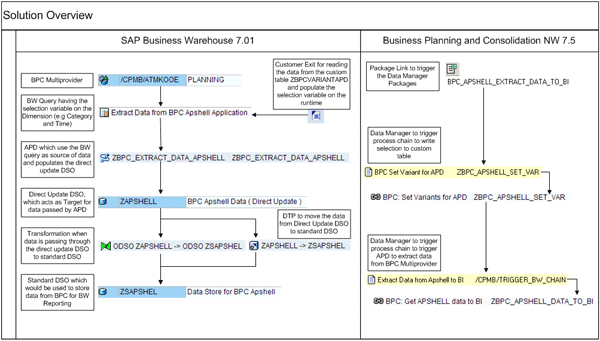
Figure 1
Components and their relationship in the custom solution
Details About Creating the Custom Solution
I use the copy of the APSHELL appset (APSHELL_BK) in SAP BusinessObjects Planning and Consolidation, version for SAP NetWeaver to develop the solution.
Start by creating the following components:
The Easy Way to Get Data from Planning and Consolidation to SAP NetWeaver BW, Step 1: Create a Custom Table and BEx Query
The Easy Way to Get Data from Planning and Consolidation to SAP NetWeaver BW, Step 2: Create Target InfoProviders
The Easy Way to Get Data from Planning and Consolidation to SAP NetWeaver BW, Step 3: Create Process Chains
- Create an SAP BusinessObjects Planning and Consolidation, version for SAP NetWeaver Data Manager package. Click the video clip below for details about creating this component.
The Easy Way to Get Data from Planning and Consolidation to SAP NetWeaver BW, Step 4: Create a Data Manager Package
Here are the scripts for the DataManager package:
- Name of the Data Manager Package: BPC Set Variant for APD
PROMPT(SELECTINPUT,%SELECTION%,,"Select the members for Variant","%CATEGORY_DIM%,%TIME_DIM%")
TASK(ZBPC_SET_VARIANT_FOR_APD,SELECTION,%SELECTION%)
- Name of the Data Manager Package: Extract Data from Apshell to BI
TASK(/CPMB/EXECUTE_BW_CHAIN,CHAIN_ID,ZBPC_APSHELL_DATA_TO_BI)
A Review of Your Results
Upon successfully creating the above components, you have a solution to extract data from SAP BusinessObjects Planning and Consolidation, version for SAP NetWeaver. In order to customize the solution, you need to create new BEx queries on top of the MultiProvider for the planning application from which you want to extract data and recreate the Data Manager packages and package links under the application. You can run the package links on demand or schedule them.
This custom solution provides insight on creating process chains to enhance the functionality of Data Manager packages and offers alternative ways for SAP NetWeaver BW functions to use the data from SAP BusinessObjects Planning and Consolidation, version for SAP NetWeaver.
Ashish Narway
Ashish Narway is an SAP BusinessObjects Planning and Consolidation, version for SAP NetWeaver architect, certified SAP NetWeaver BW Solution consultant, SAP financial and controlling solution consultant, and Project Management Professional (PMP) with more than 13 years of experience. In his tenure with Tata Consultancy Services, Limited, he has successfully led planning and consolidation and SAP NetWeaver BW implementations, as well as upgrade and support projects for large, multinational companies in the high tech, industrial machinery, construction, telecommunications, and manufacturing Industry industries.
If you have comments about this article or publication, or would like to submit an article idea, please contact the editor.