During the objective setting and appraisal process, you need to protect sensitive personnel data. By using HR standard authorizations in combination with customizing settings that restrict appraisal document access, you will be able to set up a secure system in which only legitimate users can access sensitive data. You first need to understand the use of mySAP ERP HCM standard authorizations.
Key Concept
The SAP Performance Management system is based on the Objective Setting and Appraisals (OSA) component. It is integrated with Personnel Planning components such as Organizational Management, Personnel Development, and the SAP Learning Solution. These components use the general authorization checks from the Personnel Planning components. As a consequence, the OSA component uses the same authorization objects and same authorization checks. Only one authorization object, P_HAP_DOC, is specific to OSA. It is used to check authorizations for accessing appraisal documents.
With the Performance Management component, mySAP ERP HCM supports users in implementing competency assessments or performance appraisal processes. The results often feed into compensation planning, strategic employee development, or succession planning programs that safeguard top-level key positions. This data is highly confidential and requires strict authorization handling.
In Performance Management processes, the object type person is the object type most often used for appraisers and appraisees. Therefore, the standard authorization checks for persons are relevant. In part 1 of this series, we explain which standard roles are applicable for the Objective Setting and Appraisals (OSA) component, which standard HR authorization objects are relevant for setting up a secure appraisal process, and how to configure them. Part 2 will explain OSA-specific structural authorizations. A basic understanding of HR data models, roles, and authorization maintenance is required.
In addition to authorization roles and objects, OSA-specific customizing settings can be used for controlling the access rights in this application. These aspects will also be covered in subsequent articles. Our explanations apply to R/3 Enterprise HR Extension Set 1.10 and 2.00 as well as to mySAP ERP 2004.
SAP Standard Roles for OSA
When you implement authorizations, you use roles, which are assigned to users. Roles contain the authorizations that allow users to access transactions, reports, Web-based applications, and so on. The roles also contain the user menu that is displayed after they log on to the SAP system.
Standard roles delivered by SAP can be used as templates to facilitate the authorization setup. The OSA-specific roles contain the authorization objects required for OSA. You can tailor them to your needs via transaction PFCG (role maintenance). Copy these roles to a customer-specific name space and make the necessary changes. When you enter a new name, note that it should not be an SAP-specific name (SAP,” _”). This is to ensure that you can make a clear distinction between customer-specific roles and standard SAP roles.
The following SAP standard roles are delivered for OSA:
• SAP_HR_HAP_ADMINISTRATOR (Administrator — appraisals and objective setting agreements)
• SAP_HR_HAP_EMPLOYEE (Employee generic — appraisals and objective setting agreements)
• SAP_HR_HAP_MANAGER (Manager generic — appraisals and objective setting agreements)
How to Configure Authorization Objects for OSA
The following authorization objects enable users to access the OSA application:
• S_TCODE, P_TCODE (transaction authorizations)
• PLOG (access to objects in the personnel planning database)
• P_HAP_DOC (access to appraisals)
• P_ORGIN/CON (access to HR master data)
• P_PERNR (access to HR master data)
The fields in the authorization objects enable you to control which activities (display, edit, delete), which object type (persons, appraisal templates), and which content (infotypes) are permitted to the user with the corresponding role. We’ll now give more detail on each of the objects and show how to configure them.
Authorization Objects S_TCODE and P_TCODE
Regardless of the application, the authorization object S_TCODE is used to check authorizations for starting the transactions defined for an application. The authorization object P_TCODE is used to check the authorization for starting some HR transactions. The additional check using P_TCODE provides added security for personnel-related data and is therefore used for numerous transactions in HR applications (such as PA40, PHAP_ CHANGE_PA). Generally P_TCODE is used in HR where HR-specific authorization objects are not checked when a transaction is called.
For an overview of the transactions in which the authorization object P_TCODE is used in the SAP system go to Tools > ABAP Workbench > Development > Other Tools >Transactions. Choose Utilities > Find. In the next menu, choose Edit > All Selections. Use the following selection criteria: Transaction field: P*, Authorization Object: P_TCODE. The search result gives you the list of transactions that are checked by the authorization object P_TCODE.
Required Settings for OSA
The OSA application for personnel appraisals is handled with transactions with the naming convention PHAP_*PA. These transactions need to be entered into the transaction code field according to the transactions a user is allowed to use. See Table 1 for a list of transactions relevant for personnel appraisals. For administrators, you must also include transactions starting with OOHAP_*.
|
Overview of transaction codes for OSA
|
| Transaction code |
Description |
| PHAP_CATALOG_PA |
Used to create and maintain appraisal templates |
| PHAP_PREPARE_PA |
Used to mass-create appraisal documents |
| PHAP_CREATE_PA |
Used to create a single appraisal document |
| PHAP_SEARCH_PA |
Used to report on one or more appraisal documents |
| PHAP_CHANGE_PA |
Used to select and modify existing appraisal documents |
| PHAP_ADMIN_PA |
Administrator transaction that allows the user to correct problems that occur during the business process. It can also be used for problem solving during technical implementation. |
| OOHAP_SETTINGS_PA |
Used to maintain the relevant OSA settings within table T77S0 |
| OOHAP_BASIC |
Used by the administrator to configure general settings such as available BAdI implementations, columns, and status process buttons |
| OOHAP_VALUE_TYPE |
Gives an overview of all the existing quantity, quality, and irregular quality value lists. You can also create new value lists within this transaction. |
| OOHAP_CAT_GROUP |
Administrator transaction, used for maintaining category group settings. SAP recommends these settings should be maintained via PHAP_CATALOG_PA to ensure business process correctness. |
| OOHAP_CATEGORY |
Administrator transaction, used for maintaining category settings. SAP recommends these settings should be maintained via PHAP_CATALOG_PA to ensure business process correctness. |
|
Table 1
|
Transactions relevant for personnel appraisals |
All the PHAP_*_PA transactions mentioned in Table 1 are restricted to the OSA process. Each transaction has a counterpart without ‘_PA’ that enables the use of every other application using the technical OSA component. The OOHAP_* transactions are valid for all applications using the technical component used within OSA; the only exception is transaction OOHAP_SETTINGS_PA, which is only relevant for personnel appraisals.
Authorization Object PLOG
Authorization object PLOG checks authorizations for the fields in Personnel Planning components (Organizational Management, Personnel Development, SAP Learning Solution, Performance Management). For OSA the settings described in Table 2 are required as a minimum.
| Field Name |
Meaning |
Minimum Settings for OSA |
| INFOTYP |
Infotype |
1000, 1001, 1002, 1048, 5020, 5021, 5022, 5023, 5024, 5025, 5026 |
| ISTAT |
Planning status |
4, 3 |
| OTYPE |
Object type |
VA (appraisal template), VB (criteria group), VC (criterion) |
| PLVAR |
Plan version |
* (if necessary, restrict customer specific) |
| PPFCODE |
Function code |
Change for Customizing/administrators, Display for end users |
| SUBTYP |
Subtype |
0001, 5020, A605, A606, A607, B605, B606, B607 |
|
Table 2
|
Minimum settings for authorization object PLOG |
The personnel appraisals, which are stored and maintained in the HR systems, are based on appraisal templates (object type VA). These appraisal templates are set up in customizing via transaction PHAP_CATALOG_PA. These customizing settings are stored in different infotypes (e.g., description, layout, or columns), as shown in Figure 1.
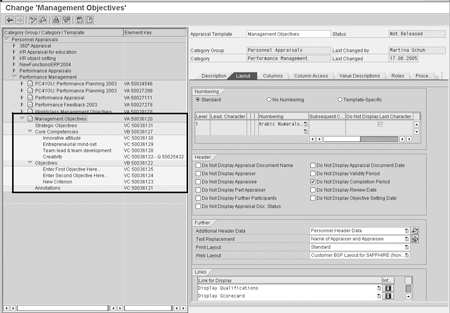
Figure 1
Example settings for the appraisal template Management Objectives. The objects used to build up the appraisal template are displayed on the left side of the screen.
End users who maintain the appraisals for the employees (e.g., managers or HR administrators) need to be able to read these settings and structures of the appraisals. Therefore, they must have at least display authorization. If the appraisal templates include further object types (such as qualifications), additional authorizations are required.
Authorization Object P_HAP_DOC
Authorization object P_HAP_DOC is used to check authorizations for accessing appraisal documents. This authorization object is specific to OSA. Table 3 describes the minimum required settings for OSA.
| Field Name |
Meaning |
Minimum Settings for OSA |
| ACTVT |
Activity (display, change, delete) |
* (if necessary, restrict customer specific) |
| PLVAR |
Plan version (default value 01) |
* (if necessary, restrict customer specific) |
| HAP_CAT_G |
Appraisal category group ID (determines the appraisal category groups that a user can access) These appraisal category groups are stored in table T77HAP_C_GRP. The category group for personnel appraisals is 00000001. See SAP note 497773. |
00000001 (for personnel appraisals) |
| HAP_CAT |
Appraisal category ID (determines the appraisal categories a user can access. The customer-specific appraisal categories are created in transaction PHAP_CATALOG_PA and are stored in table T77HAP_C. You can view the numbering of the categories in transaction OOHAP_CATEGORY) |
* (if necessary, restrict customer specific) |
| HAP_TEMPL |
Appraisal template ID. Appraisal templates are of the object type VA and are created in the appraisal template catalog (transaction PHAP_CATALOG_PA). In this field, enter the eight-digit object ID of the relevant templates. You can find the object ID for each template in the Appraisal Template Catalog This field dictates the appraisal templates a user can access. |
* (if necessary, restrict customer specific) |
| PROFL |
Authorization profile. You only use this field if structural authorizations are to be used in OSA. |
* (if necessary, restrict according to your structural authorization concept) |
|
Table 3
|
Minimum settings for authorization object P_HAP_DOC |
* = placeholder for all possible entries
You should not assign the authorization object P_HAP_DOC on its own since it is only effective when used in combination with other authorization objects. You must assign it with the authorization objects PLOG and P_ORGIN(CON) when implementing processes for personnel appraisals. The authorization object PLOG enables users to access appraisal templates and the criteria they contain. The authorization object P_ORGIN(CON) enables users to access personnel data.
Authorization Objects P_ORGIN/P_ORGINCON
Authorization object P_ORGIN checks the authorization for accessing HR master data. The checks are run when HR PA infotypes are processed or read. In OSA, the persons for whom the user is allowed to process appraisal documents must have been given authorization by using the authorization object P_ORGIN. Table 4 describes the minimum required settings for OSA.
| Field Name |
Meaning |
Minimum Settings for OSA |
| INFTY |
Infotype |
Usually, 0000, 0001, 0002 (depending on the processes for which the user is responsible) |
| SUBTY |
Subtype |
* |
| AUTHC |
Authorization level (such as read, write, or matchcode) |
Read and matchcode |
| PERSA |
Personnel area (from infotype 0001) |
(depending on the organizational area for which the user is responsible) |
| PERSG |
Employee group (from infotype 0001) |
(depending on the organizational area for which the user is responsible) |
| PERSK |
Employee subgroup (from infotype 0001) |
(depending on the organizational area for which the user is responsible) |
| VDSK1 |
Organizational key (from infotype 0001) |
(depending on the organizational area for which the user is responsible) |
|
Table 4
|
Minimum settings for authorization object P_ORGIN |
* = placeholder for all possible entries
The authorization object P_ORGIN provides the user with the necessary authorizations to access personnel data. This authorization object is mandatory for accessing personnel data, even if you also use structural authorizations.
To assign authorizations for accessing infotypes in the authorization object P_ORGIN, you do not need to assign specific infotypes for OSA. From a technical perspective, it is sufficient in OSA if a person is included in the fields PERSA, PERSG, PERSK, or VDSK1.
However, to ensure consistency for the user, it is beneficial to provide the user with authorizations for the 0000 (actions), 0001 (organizational assignment), and 0002 (personal data) infotypes for the persons for whom the user is to process appraisal documents. This allows them to display additional personnel data in the appraisal document or when searching for persons with particular infotype values. It would not be logical for a user to be able to process a person’s appraisal document but not read the organizational assignment.
You can use authorization object authorization object P_ORGINCON if structural authorizations are to be checked in context when checking the authorization to access HR master data. Structural authorizations perform the same function, from a business point of view, as general authorizations in mySAP HR and other SAP components. They control access specifically to data that is stored in time-dependent structures (organizational structures, business, qualifications catalog, etc.). You can grant authorizations for objects that are stored in a hierarchical structure using the structural authorization check. If you specify a root object, you can determine that all objects in the hierarchy under this specified object may also be changed, for example.
The authorization object P_ORGINCON is used for the authorization check for personnel data integrated with structural authorizations, which restrict the access to persons from a specific organizational structure. The check is run when HR infotypes are processed or read. The authorization object is composed of the same fields as the authorization object P_ORGIN and also includes the PROFL field (structural profile). Running the check against this object enables user- specific contexts (using Organizational Management) to be depicted in HR master data. See Figure 2 for an example of a context-sensitive authorization check.
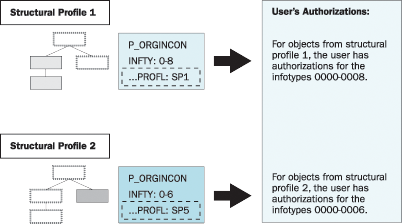
Figure 2
Differentiation of authorizations of a user on an employee’s infotypes by organizational structures
The checks are made context-sensitive by controlling the various structural sets of persons to different contexts, as shown in Figure 2. The context sensitivity is achieved by differentiating the authorization of a user on an employee’s infotype with the help of the organizational structure. That means that the Structural Profile 1 gives a user access to infotypes 0000 through 0008 for all employees assigned to the organizational units marked in the left part of the organizational structure. The same user also has another structural profile: Structural Profile 2. This second structural profile grants the user access only to infotypes 0000 through 0006 for the employees assigned to the organizational unit shown in the right part of the organizational structure. As a consequence, the user has different authorizations on employee data, depending on the organizational structure to which the employee is assigned.
The PROFL field determines the structural profiles the user can access for a particular context. These structural profiles must be assigned to the user in table T77UA. Instead of assigning the structural profiles for each separate user in table T77UA, you can also implement the Business Add-In (BAdI) HRBAS00_GET_PROFL. This BAdI is a good alternative when you can determine via a set of criteria which structural profiles need to be assigned for a large group of users.
The example source code in the standard system determines the user’s structural profiles by reading the values entered for the authorization object P_ORGINCON in the user master record. You can also use the structural authorizations in the authorization object P_ORGINCON in combination with the structural authorizations in OSA. This will be explained in the next article.
Authorization Object P_PERNR
This authorization object is used to control the user’s access to his or her own personnel number and the related HR data separately. The personnel number is assigned to the user in infotype IT0105 (communication infotype), subtype 0001 (system user name). Access to an employee’s own master data is used primarily in Employee Self-Service (ESS) scenarios in which the user has only access to his or her own master data to maintain or display this information. To enable access authorizations for the employee’s own personnel number by using the authorization object P_PERNR, the main switch must be activated in table T77S0 (transaction OOAC, switch AUTSW/PERNR). Table 5 describes the required settings for OSA.
| Field Name |
Meaning |
Minimum Settings for OSA |
| INFTY: |
Infotype |
Dummy — depends on the ESS scenarios used outside of OSA |
| SUBTY: |
Subtype |
Dummy — depends on the ESS scenarios used outside of OSA |
| AUTHC: |
Authorization level (such as read, write, matchcode) |
* (if necessary, restrict customer specific) |
| PSIGN: |
Interpretation of own personnel number (“I”, include own personnel number, “E”, exclude own personnel number) |
I (Include) |
|
Table 5
|
Minimum settings for authorization object P_ORGIN |
* = placeholder for all possible entries
If you use the authorization object P_PERNR, the authorization object P_ORGIN/CON is superfluous. That is, a user who is to be permitted to access his or her own personnel number only (for example, for ESS scenarios), is given all the authorizations required using the authorization object P_PERNR. Therefore, an additional setting for the authorization object P_ORGIN/CON is not required. This also applies to OSA. However, if you have users that need access to other records besides their own, P_ORGIN is not superfluous; it is very much required.
Bianka Piehl
Bianka Piehl has been working as HR Consultant since 1999, joining SAP HR Consulting 2003. Her consulting activities were focused on the areas of Organizational Management, Personnel Development and Performance Management, including related Self-Service scenarios. Since May 2005 she is working for SAP Solution Management, being responsible for Shared Services in HCM.
You may contact the author at bianka.piehl@sap.com.
If you have comments about this article or publication, or would like to submit an article idea, please contact the editor.

Martina Schuh
Martina Schuh joined SAP in 1999. She has been dedicated to the subject of HCM Analytics from the outset. Since 2001 she has been product manager for HCM Analytics and Talent Management, including Employee Performance Management and Succession Planning.
You may contact the author at martina.schuh@sap.com.
If you have comments about this article or publication, or would like to submit an article idea, please contact the editor.
Maurice Hagen
Maurice Hagen started at SAP in 2000 as a developer for Dutch Payroll. In 2001 he joined the Performance Management project where he has been involved from the start with the specification, design, and development of the Objective Setting and Appraisals module.
If you have comments about this article or publication, or would like to submit an article idea, please contact the editor.