Based on numerous Fortune 500 implementations, this article details the SAP mappings and settings to be made in various scenarios in the aftermarket business. It shows how to meet the challenges using standard SAP systems, avoiding a lot of custom development. Although it is written with the automotive aftermarket in mind, it can benefit other manufacturing industries that have similar scenarios.
Key Concept
In a big manufacturing company and especially in the automotive aftermarket business, it is common to face business complexities as most of the parts are externally procured from numerous suppliers and are managed in a third-party warehouse. Subcontractors and packagers can also be involved. The aftermarket business is also known as the after sales service parts market.
- The supplier ships goods to a company-owned warehouse.
- The supplier ships goods to a third-party warehouse.
- The supplier ships goods to a subcontractor and the subcontractor ships them to a company warehouse.
- The supplier ships goods to a subcontractor and the subcontractor ships them to a third-party warehouse.
- The supplier ships goods to a packager for packaging before they are received in a company or third-party warehouse.
- The supplier ships goods to a subcontractor and the subcontractor ships them to the packager before they are received in a third-party warehouse.
- Goods are shipped directly from the supplier to the customer.
- Goods are shipped from a third-party warehouse to the customer.
- Goods are supplied by the company’s own manufacturing facility.
- Same goods are imported from different countries.
- Shipping consignment stock of a material to a customer from a company warehouse.
- Shipping consignment stock of a material to a customer from a third-party warehouse.
I’ll explain each of the above scenarios with SAP configuration and customization. I’ll also be using Electronic Data Interchange (EDI) messages in each scenario. One note on terminology: When I refer to a company warehouse, I mean that it is integrated with the core SAP system, whereas a third-party warehouse is not integrated with the core SAP system and therefore may or may not be using SAP functionality.
In this era when so much emphasis is put on cost cutting, EDI has become an integral part of all logistic communications. When all other modes of communication including post, fax, and emails need a lot of manual intervention as all the data entry is made manually, EDI updates tables appropriately with all the data processed by the system. Because most companies are using EDI to communicate with their partners, EDI is used in all the following scenarios. I am including a brief explanation of the process flow for outbound and inbound EDI communications.
EDI Outbound Process Flow
When in an EDI-enabled application such as an SAP system an application document is created, an output program is triggered by selection parameters — for example, a purchasing organization, vendor, or document type (Figure 1). An example of an application document is a purchase order (PO). This output program triggers an outbound IDoc. The outbound IDoc is converted to an EDI document by an EDI subsystem. This EDI document, which is in text, SML, XML, or any other EDIFACT format, is transmitted to a vendor system. In Figure 1 the box on the left with EDI-enabled application, Selection program, and Outbound trigger program represents the actions that take place in the SAP system.
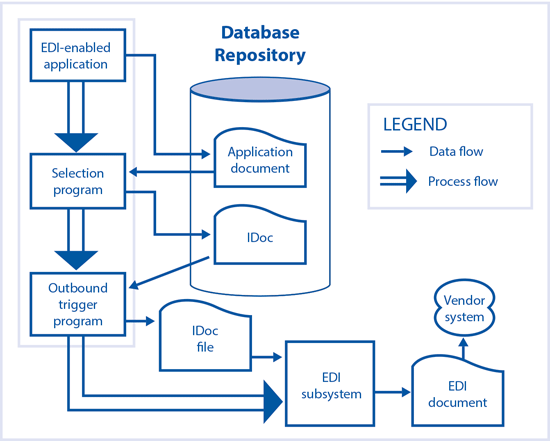
Figure 1
Outbound EDI process flow
Inbound EDI Process Flow
When an EDI document is received in an EDI subsystem, it converts it to an IDoc file. IDoc files are processed by an inbound trigger program (function module). This function module is triggered by selection parameters maintained in a partner profile setting. The IDocs are then posted in the SAP system (Figure 2). In Figure 2 the box with the EDI-enabled program, Posting program, and Inbound trigger program represents the actions that take place in the SAP system.
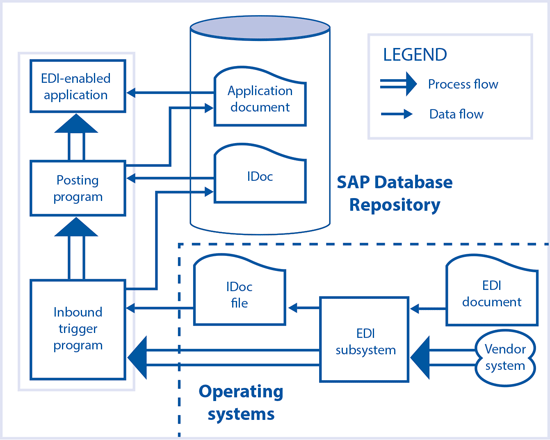
Figure 2
Inbound EDI process flow
Scenario 1: The Supplier Ships Goods to a Company-Owned Warehouse
Figure 3Figure 3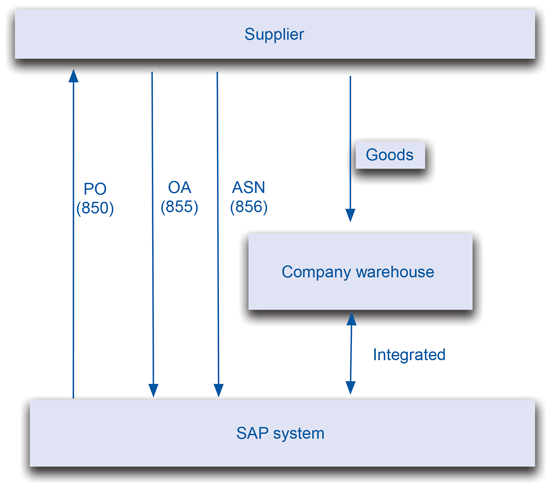
Figure 3
The supplier ships the goods to a company warehouse
When an EDI message 855 is received for a PO, the Confirmations tab of the PO is updated with a confirmation category of AB (Order acknowledgement) as shown in Figure 4. You reach Figure 4 by using transaction code ME23N > PO Item > Confirmations tab.

Figure 4
Confirmations tab in a PO
The confirmation control key (CCK) plays a vital role in PO-based goods receipts and inbound delivery-based goods receipts (Figure 5). You can configure CCK by following IMG menu path Materials Management > Purchasing > Confirmations > Set up confirmation control.

Figure 5
Confirmation control (Conf. Control) key
When the goods are ready for dispatch, the supplier sends an advance shipping notification (ASN) to the company through EDI message 856. The EDI message 856 has an IDoc with the basic type of DESADV. When a company’s SAP system receives EDI message 856, it does some validations and processes the IDoc as explained in the section on EDI messages.
The message is updated in the PO under the Confirmations tab with confirmation category LA (Shipping Notification). All the shipping details are updated in the Confirmations tab.
Upon receipt of an EDI message 856, an inbound delivery is created in the SAP system to receive the material that is shipped from the supplier. When the supplier ships the goods and the goods physically reach the company premises, a goods receipt needs to be performed in the SAP system.
Scenario 2: The Supplier Ships Goods to a Third-Party Warehouse
This also is a very common scenario: A company does not maintain its own warehouse and uses third-party warehouse services for keeping its goods (Figure 6). The third-party warehouse is connected to the company but not with the vendor supplying the goods.
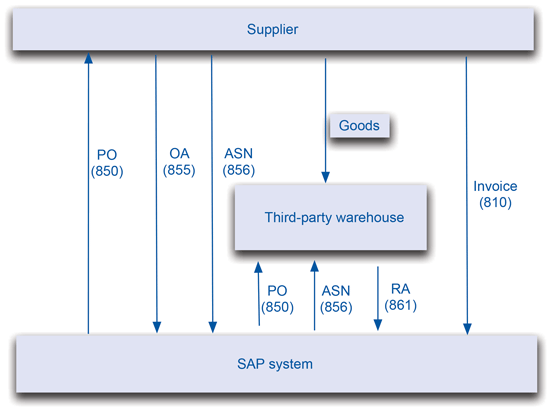
Figure 6
The supplier ships the goods to a third-party warehouse

Figure 7
Delivery address in a PO
An EDI system is configured in such a way that it creates two outputs (850), one transmitted to the supplier and the other transmitted to the third-party warehouse (Figure 8). The third-party warehouse receives the PO details in order to receive the goods.
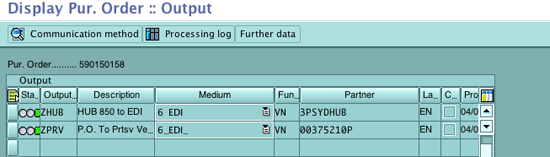
Figure 8
Multiple outputs for the same PO
The order acknowledgement is received from the main supplier to acknowledge the PO. When the goods are ready to dispatch, the supplier sends an ASN (856 ASN) to the company. As the supplier is not connected to the third-party warehouse, the same ASN information needs to be forwarded to the third-party warehouse. This can be done in two ways:
- Use a function module to process the inbound EDI message 856. The function module creates an outbound IDoc for forwarding ASN information, with the receiver’s details as the third-party warehouse. The IDoc is then forwarded to the third-party warehouse, which can receive the goods based on ASN information or against the PO as instructed by the company.
- Create a message output of inbound delivery, which was created based on the ASN received from the main supplier. The output in turn generates the outbound IDoc that forwards the information to the third-party warehouse.
When the third-party warehouse actually receives the goods, it does a goods receipt and forwards it to the company through RA (EDI message 861) messages. The final goods receipt happens in the SAP system at the receipt of the EDI message 861. Finally, the invoice is received from the supplier through an EDI message 810.
Third-party warehouses are not part of the SAP system and require no settings to be done in the system. They are separate entities and communicate through EDI. The inventory management movements are communicated along with all the other details through relevant EDI messages. Appropriate SAP movements happen when these messages are received and processed.
Scenario 3: The Supplier Ships Goods to a Subcontractor and the Subcontractor Ships Them to a Company Warehouse
This kind of scenario arises when subcontracting work is also involved in the loop (Figure 9). First the supplier supplies goods A and goods B. Instead of supplying goods to the company and the company supplying them to the subcontracting vendor, the supplier directly supplies goods to the subcontracting vendor to save the transportation cost. The subcontracting vendor consumes both the goods A and B, produces product AB, and ships AB to the company directly.
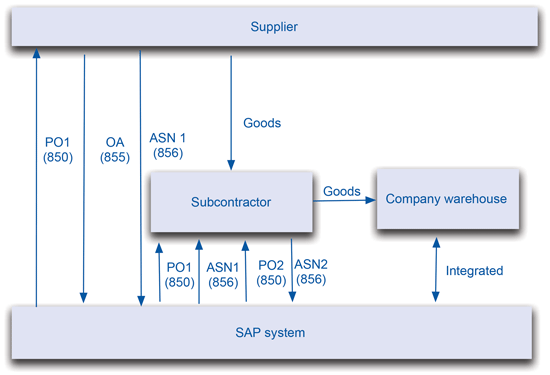
Figure 9
The supplier ships the goods to a subcontractor and the subcontractor ships them to a company warehouse
This process starts with a PO (e.g., PO1), which is created for goods A and B to be supplied from the main supplier to the subcontracting supplier. This is the normal PO, which has the vendor as the main supplier and the delivery address as the subcontractor’s address. The PO1 is transmitted to both the main supplier and the subcontractor. This PO1 is transmitted to the subcontractor so that it can receive goods against this PO.
Now you need to create another PO (e.g., PO2) and link it to PO1 through reference fields. Follow menu path ME22N > Header > Communication > Your Reference. In Figures 10 and 11 both the POS 590125860 and 590150158 are linked through the Your Reference field. 590125860 is in the Your Reference field of PO 590150158 and 590150158 is in the Your Reference field of PO 590125860.

Figure 10
PO header Commmunication tab showing reference fields

Figure 11
PO reference field in a PO
The subcontracting PO (PO2) is transmitted to the subcontractor that receives items A and B as components. Components A and B are assigned to AB in the bill of materials (BOM) in the SAP system.
When the goods are ready and the main supplier ships them, the supplier sends an ASN to the company. This ASN is forwarded to the subcontractor so that it is ready to receive items A and B. You can forward the ASN in two ways:
- When the company receives the ASN, an inbound delivery is created in the background. If an output type is set up, then an output is created for the inbound delivery. This output generates an outbound IDoc. The structure of the outbound IDoc can be the same as the structure of the inbound ASN IDoc or it can be different based on configuration.
- Modify the function module that processes the inbound ASN IDoc and generates an outbound ASN IDoc. This is done when an inbound delivery is not created in the system and no goods receipt is done against the ASN.
When goods arrive at the subcontractor’s premises, the subcontractor then does a goods receipt and sends the goods receipt information through RA EDI message 861. When EDI message 861 is received at the company, a statistical goods receipt is performed. This means a goods receipt is done without receiving the goods and issuing those items to the subcontractor as components of AB against PO2. You can close PO1 because full goods receipt is done. If you go to a PO and click the Material Data tab, you see a Components button (Figure 12). If the BOM is maintained, it is populated automatically in the PO. If BOM is not maintained then you can manually populate it in the PO (Figure 13) through transaction code ME21N or ME22N and following menu path Item > Material Data > Component.

Figure 12
Components button in a PO in a subcontracting PO

Figure 13
Components in a PO
The subcontractor performs the work on items A and B and produces AB. When item AB is ready then it sends an ASN for AB item. An inbound delivery is created on the inbound ASN. When the final item is received, a goods receipt is done against the PO or ASN. You can create a BOM by using transaction CS01 (Figure 14). In a BOM, the higher hierarchy material is called the parent and the lower one is the child. The child material is consumed to make a parent material. In my example A and B are the children, which are used to make AB material, which is called the parent. The components are assigned to the assembly or end product in the BOM. You can display the BOM via transaction code CS03 (Figure 15).
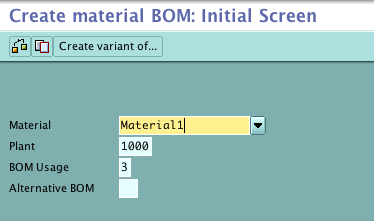
Figure 14
BOM creation screen
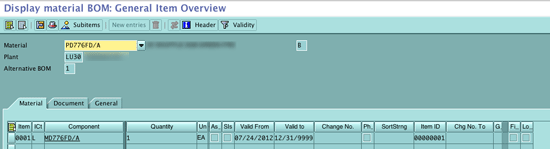
Figure 15
BOM showing parent and child material relaitonship
Scenario 4: The Supplier Ships the Goods to a Subcontractor and the Subcontractor Ships Them to a Third-Party Warehouse
This scenario is the same as the previous one except the subcontractor supplies material to a third-party warehouse instead of supplying directly to the company premises (Figure 16). The subcontracting PO (PO2 in the earlier scenario) is transmitted to both the subcontractor and the third-party warehouse.

Figure 16
Supplier ships the goods to a subcontractor and the subcontractor ships them to a third-party warehouse
When the subcontractor prepares the goods and is ready to ship them to the third-party warehouse, the subcontractor sends the ASN to the company and the company forwards the ASN to the third-party warehouse in the same way it forwarded the ASN from the main supplier to the subcontractor. When the final goods (AB) reaches the third-party warehouse, the third-party warehouse does a goods receipt and forwards the goods receipt information to the company through EDI message 861. On receipt of the EDI message 861, the goods receipt is done in the SAP system.
Scenario 5: The Supplier Ships the Goods to a Packager for Packaging Before They Are Received in a Company or Third-Party Warehouse
Sometimes the material requires special packaging that cannot be done either in house or by the supplier. There are some specific vendors for this. This scenario (Figure 17) can be compared with the subcontracting scenario described above (scenario 4). The only difference is that in packaging the material number does not change after the work is performed so the same material is at the parent and child level (Figure 18).

Figure 17
The supplier ships the goods to a packager for packaging before the goods are received in the company warehouse
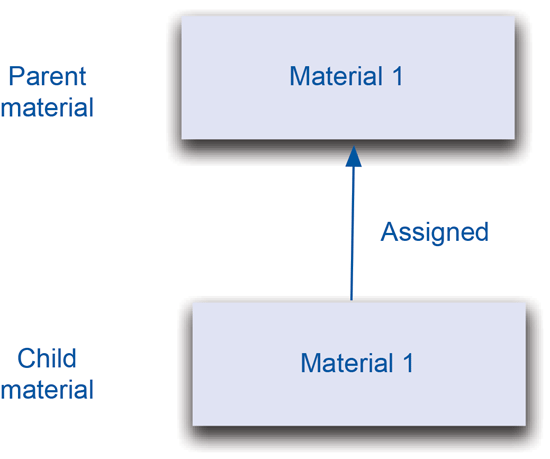
Figure 18
A packed item has the same material number as an unpacked one
You can create a BOM and assign the same material as parent and child levels. You can do it in a PO too by putting the same material in the component overview (Figure 19).
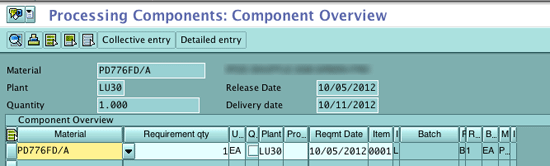
Figure 19
The subcontracting PO has the same material as parent and child
Scenario 6: The Supplier Ships the Goods to a Subcontractor and the Subcontractor Ships Them to a Packager Before They Are Received in the Third-Party Warehouse
This is an even more complex scenario, combining subcontracting and packaging together. This can happen when more than one subcontractor is involved in the manufacturing — for example, a part needs to be anodized and then painted before it is packed (Figure 20).
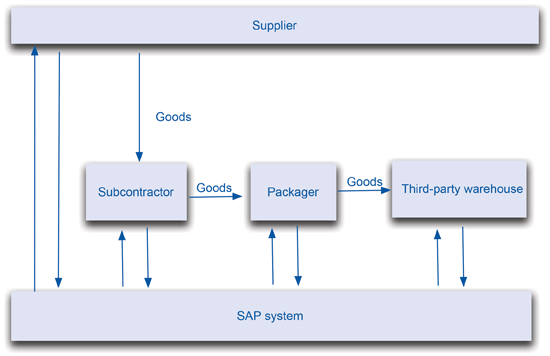
Figure 20
The supplier ships the goods to a subcontractor and the subcontractor ships them to a packager before they are received in a third-party warehouse
Scenario 7: Goods Are Shipped Directly from a Supplier to the Customer
This scenario is common in the automotive industry. Some automotive parts are directly shipped from the original equipment manufacturer (OEM) under the company’s brand name to the dealers (Figure 21). This happens when a supplier agrees to ship the part directly to the end customer as if it is supplied by the company with which the customer placed the order. This saves transportation, packaging, and administrative costs.

Figure 21
Goods are shipped directly from a supplier to a customer
In a situation like scenario 1 when a finished good is externally procured, the goods are first shipped from the supplier to the company in its own packaging. When the goods are received by the company, they are unpacked, repacked in the company packaging, and then sent to the end customer.
If the goods are directly shipped to the end customer then transportation cost is reduced, as the company needs to pay for transportation only from the supplier to the customer instead of the supplier to the company and then from the company to the supplier. It does not require unpacking and repacking so a lot of the packaging cost is also saved. It also saves administrative costs, which include coordination and inspection costs.
This is more like a direct-ship scenario in the standard SAP system. In this scenario, a PO is received from the customer. A sales order is created on the customer PO. The purchase requisition is automatically created in the background. You can find the purchase requisition number in the Schedule lines tab of the sales order (Figure 22).

Figure 22
Purchase requisition in a sales order
When the purchase requisition is converted to a PO, the PO is created with the item category as S (third party) as shown in Figure 23.
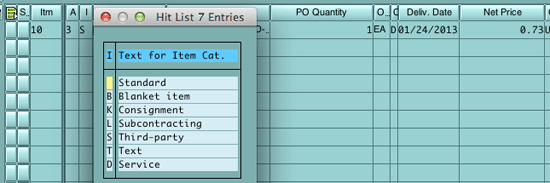
Figure 23
PO with item category
The PO with item category S is sent to the main supplier, which indicates that the item needs to be supplied to the end customer directly. You can find the delivery address in the Delivery Address tab of a PO (Figure 24).

Figure 24
Delivery address in a PO
Scenario 8: Goods Are Shipped From a Third-Party Warehouse to the Customer
This scenario occurs when a customer places an order and the item is stored in a third-party warehouse (Figure 25). It shows delivery-to-ship (DTS), warehouse shipping advice (WSA), and warehouse advice of inventory (WAI). The company advises the third-party warehouse to ship the material to the customer through DTS (EDI message 940). The EDI message 940 essentially instructs the warehouse on what to ship, how much to ship, and when to ship it. Specific information provided in this transaction set may include:
- Manufacturer information
- Delivery date
- Item descriptions and quantities
- Ship-to information (such as location name and address or contact)
- Bill-to information
- Shipment method information
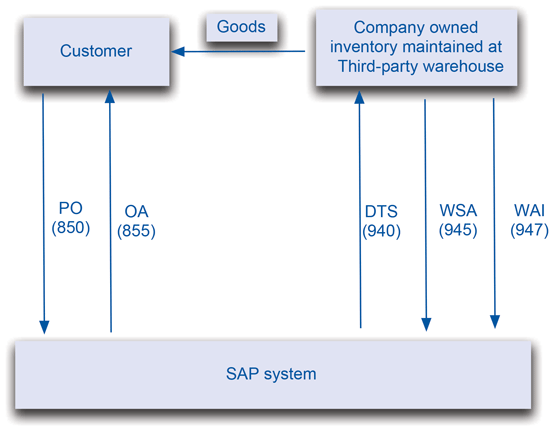
Figure 25
Goods are shipped from the third-party warehouse to the customer
Once the order has shipped, a WSA (EDI message 945), is sent by the warehouse to provide the shipment details. The EDI message 945 provides confirmation of a shipment.
At times there can be a mismatch between the warehouse stock maintained in the warehouse and the stock maintained in the SAP system. You can use WAI EDI message 947 to inform a warehouse or depositor of a quantity or status change to inventory records. An inventory adjustment is made based on the EDI message 947.
Scenario 9: Goods Are Supplied by the Company’s Own Manufacturing Facility
In this scenario one of the items is supplied by an external vendor as well as by its own manufacturing facility. The production planning module is not generally used in the aftermarket business. The solution to this complexity is to create a vendor and associate it with the plant by using transaction code MK02 and following menu path Purchasing Data > Extras > Add. Purchasing data (Figure 26).
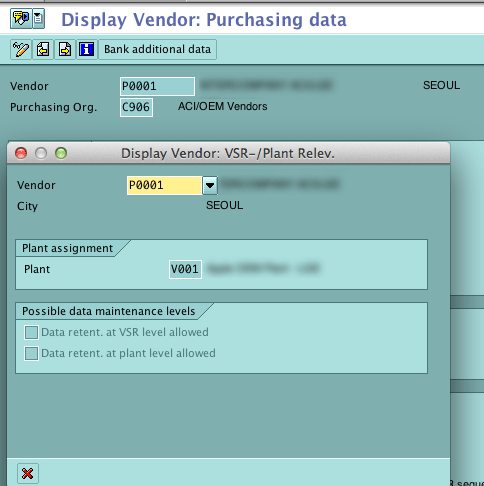
Figure 26
Plant assignment in the vendor master
Scenario 10: Same Goods Are Imported from Different Countries
Sometimes two different vendors supply a material. Both vendors could have manufacturing facilities in two different countries. Sometimes a single vendor has two manufacturing facilities in two different countries. This may require some differentiation between stocks received from different countries. This is very common in the aftermarket business.
You can handle this situation in two steps, both of which are outside the scope of the article:
- The valuation of the stock can be handled through split valuation
- The inventory part can be handled through batch management
Scenario 11: Shipping Consignment Stock of a Material to a Customer from a Company Warehouse
It may be the case that vendors agree to keep their material as consigned stock (Figure 27). When there is a requirement for the material, a consignment PO is raised and material is received against it. The material stock is transferred from consignment stock to the company’s own stock in a background process.
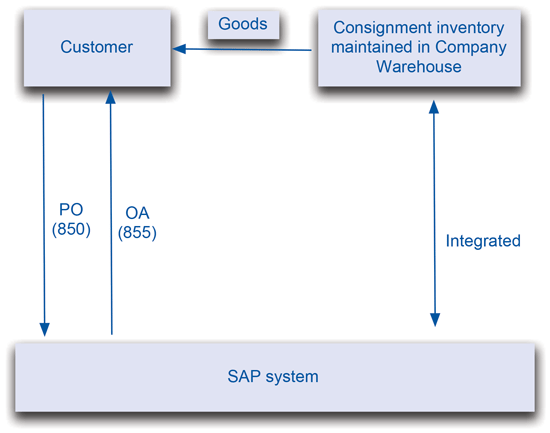
Figure 27
Shipping consignment stock of a material to a customer from a company warehouse
The item category for consignment PO is K (Figure 28). The material is always shipped to the customer from company-owned stock.
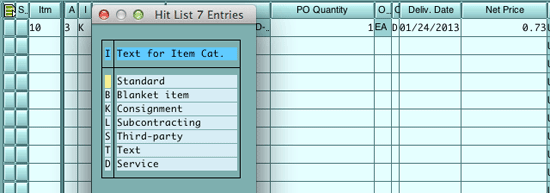
Figure 28
Item category in a consignment PO
Scenario 12: Shipping Consignment Stock of a Material to a Customer from a Third-Party Warehouse
In this scenario consignment material is kept at a third-party warehouse (Figure 29). Whenever there is a requirement from a customer, the warehouse needs to be directed to ship the material to the customer.

Figure 29
Shipping consignment stock of a material to a customer from a third-party warehouse
The main challenges, which are often faced from both a business and an SAP system point of view, are that:
- The correct quantity of stock is shipped.
- The correct vendor stock is shipped.
- The third-party warehouse inventory is in sync with the company’s inventory maintained in the SAP system.
The first two challenges are taken care by DTS EDI message 940, which is communicated to the third-party warehouse. The vendor number, quantity, and material number are all included in EDI message 940 along with other required information. When the material is shipped, the warehouse sends the WSA EDI message 945 to confirm the shipment. The third challenge of reconciling the inventory is done by WAI EDI message 947.
Sandeep Kumar
Sandeep Kumar is a lead consultant with Infosys with more than 17 years of experience working in the automotive, aeronautical, and hi-tech manufacturing industries. He specializes in implementing SAP in the manufacturing industry domain. He holds a master's degree in financial management and a bachelor’s degree in production and industrial engineering.
You may contact the author at skumar0518@gmail.com.
If you have comments about this article or publication, or would like to submit an article idea, please contact the editor.