A small enhancement to the SAP E-Commerce text process allows you to make it easier to adjust static Web text, such as the text on buttons. This gives you the opportunity to implement a custom translation process that fits your individual requirements, enabling global companies to provide the same Web experience to all customers, regardless of language.
Key Concept
SAP E-Commerce consists of several elements. The model talks with the SAP CRM and SAP ERP system, which feeds the Web shop with data. The controller controls the application’s action flow, deciding what happens and in what order. The view makes everything accessible by a graphical user interface. This approach of dividing an application into a model, view, and controller is called the MVC design pattern.
If you have experienced an SAP E-Commerce project life cycle, you might have touched the sensitive topic of changing texts. For example, if your company has both an English Web page and a German Web page, you want to be able to offer your customers the same Web experience in both languages. You have to differ between texts related to products and customers (e.g., product pricing and descriptions) on the one side and static Web shop texts (e.g., button captions and labels) on the other side.
Product descriptions and customer data are always delivered from the SAP CRM/SAP ERP back-end system. You can change these texts very quickly — after changing the texts in the back end, the new texts are available in the Web shop. However, changing static texts in your Web shop counts as a modification of source code. As a result, you must run through a complete release process, including test and production transports, just to change a text.
Rather than following the complete release process each time you need to change a text, we can show you how to change your static Web shop texts within 10 minutes. Through a comparison of the current and new development processes you will see how you can save time and resources without violating rules and guidelines for SAP E-Commerce development. We will not offer a technical deep dive, but a bird’s eye view on what you can achieve and how.
Texts and the View
First, it’s important to understand what changing static Web shop texts means. For this process, we focus on the view component of the Model View Controller (MVC). The view is the interface between the user and the application. In general, the best view is an intuitive one appearing, of course, in the user’s native language.
This may not sound complicated, but you have to take into consideration that the SAP E-Commerce application uses more than 3,000 Web shop texts. Most organizations typically set up an international Web shop that supports 10 languages or more. This requires a well-structured method for organizing all these texts to avoid confusion.
Nearly every readable text in the Web shop is identified by a language key. For example, in the Web shop login screen, the English button label User ID (Figure 1) and the German button label Benutzer-ID (Figure 2) are internally identified by the string um.clc.login.jsp.userid (Figure 3). Every language key needs to be translated into all supported languages and stored within a resource bundle. These resource bundles are stored in the SAP E-Commerce development project as part of the SAP NetWeaver Development Infrastructure (NWDI).
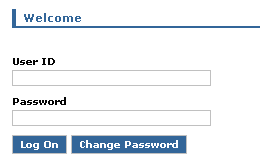
Figure 1
English version of the Welcome screen

Figure 2
German version of the Welcome screen

Figure 3
The string um.clc.login.jsp.userid identifies the User ID field
Traditional Translation Process with Resource Bundles and SAP NWDI
From a software logistical point of view, changing static Web shop texts is the same as changing a business process. You have to create a production transport to activate any changes — even correcting a typo. Unfortunately, this takes a lot of time, and a production transport means downtime for the productive Web shop application. This makes it nearly impossible to change a typo after going live without having some other pending bug fixes. The relationship between benefit and effort is simply out of balance.
Unfortunately, typos are not the only cases in which you may need to change a text. For example, the marketing team wants to keep the images, promotional messages, and texts — in short, the whole content — dynamic and up-to-date. To enable the marketing team to manage texts dynamically in SAP E-Commerce, you need to change the common language mechanisms. Otherwise, every changed text requires another production transport.
A Better Option: Translation with an Extension
What is needed is a new approach that allows more flexibility. This new approach must be compliant with existing rules and guidelines for extending SAP E-Commerce. In this section we provide an overview of the steps involved. The following section contains more details that you may want to share with your SAP E-Commerce development team.
First, let us explain what we want to achieve. Everything related to development, change requests, and SAP NWDI transports should be eliminated. Instead, those who need to change texts should be able to do so in a common environment, such as SAP CRM. They should be able to change Web shop texts, re-check the changes, and publish them so they become active for the productive Web shop.
To extend the Web shop text translation mechanism for all static texts, you need an enhancement that allows you to overwrite the standard texts with customer-specific translations. Overwriting these texts should not take place within the development project, but the new texts should be delivered as data to be displayed in the Web shop (just like product descriptions).
The process we’ll show you only requires four steps to change static Web shop texts. It does not require Java development or SAP NWDI transports, which simplifies the process. Here are the four steps in the process:
Step 1. Identify the text to change. In our example, we want to change the name of the User ID field in Figure 1.
Step 2. Identify the language key. You can view the language keys instead of the translated texts by passing an additional URL attribute — translate.show.key.only=true — to the init.do action when starting SAP E-Commerce. This allows you to specify that the application just displays the language keys, instead of the translated texts, as shown in Figure 3.
Step 3. Add the new text. Go into a custom ALV grid (if you are working with an SAP system as the back end), add a new line by clicking the add icon  , and enter the language key from step 2 and the new text you want to use (Figure 4).

Figure 4
Add the new text to an ALV grid
Step 4. Check the changes. After refreshing the Web browser, the new text appears (Figure 5).
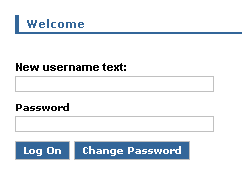
Figure 5
Check the new text
Technical Process Required for Setup
To be able to follow the four steps to change a static text, you need to extend the Web shop text translation mechanism. This is a process that your SAP E-Commerce development team must carry out to enable you to change texts.
Step 1. Identify the system you want to use as the data source. We’ll use the example of marketing employees who want to change Web shop texts.
This process can differ in detail for each organization. In some companies, the marketing department may already use professional applications for translations or even whole translation workflows. Other companies may want to reuse existing applications such as Microsoft Excel or the SAP CRM back end. To meet these varying requirements, we use a generic data source.
Figure 6 shows a list of potential data sources that provide texts.
- SAP CRM: Language keys are administered in SAP CRM. This system is useful for creating individual texts related to campaigns, for example. With this system, in addition to creating the application for changing and storing the texts, you also have to create the function module to deliver the texts into the Web shop.
- Microsoft Excel: You can also change and store texts using an Excel spreadsheet. The benefit of the Excel approach is that the resource bundles within SAP E-Commerce are plain text files, such as CSV files. You can modify these files using Excel and reuse them in the SAP E-Commerce application without any conversion.
- Service-oriented architecture (SOA): Another idea is to query language keys from a non-SAP system via a Web service call. This would enable the marketing team to administer text changes and the corresponding workflows.

Figure 6
Potential data sources
Step 2. Prepare SAP E-Commerce to receive the new translated texts from the selected data source. Figure 7 provides an overview of the involved components and actors without any modifications to the system. It includes all the components that are involved in the translation process, except those related to transportation.
- Data source: Files that contain the translated texts
- Editor: Application used to modify and activate changed language files
- Runtime: Read and display language files and texts
- SAP CRM: A common back-end system
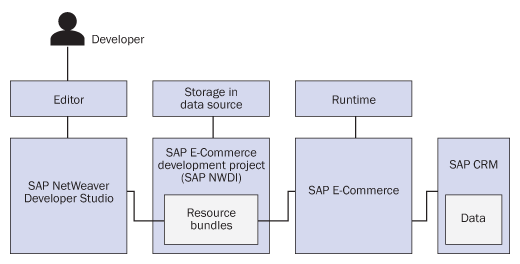
Figure 7
Involved applications
As you can see, the developer controls the editor component. This is the cause of the inflexibility when enhancing text. What you need to do is replace (or at least extend) the editor and data source components. We recommend that you only extend these two components. Then only modified keys are stored in the new data source. By extending the editor and storage components instead of replacing them, you avoid having to import all the language keys to the new storage data source.
To do this, you need to implement a logic that overwrites the original SAP E-Commerce language key mechanism (Figure 8). When the view component asks for a language key, the new logic checks if someone has changed the requested key in the new data source. If the key is not available in the new storage, the system applies the old logic and returns the unmodified value.
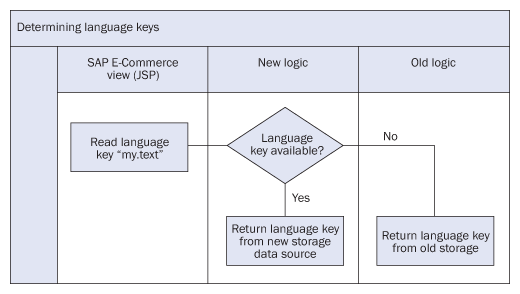
Figure 8
Extending approach for determining language keys
Implementing this new logic is not difficult for an E-Commerce developer. The central class com.sap.isa.core.MessageResourcesFactory creates objects of the type com.sap.isa.core.MessageResources, which the system uses to get the corresponding text for a language key (Figure 9).
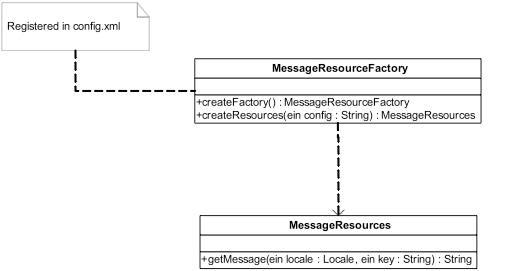
Figure 9
Simplified structure of MessageResourceFactory and MessageResources
MessageResourcesFactory is registered in the config.xml file (as well as other configuration files) that you can find in different development components. These configuration files are the central Apache Struts locations for defining the application behavior. (Struts is a free open-source framework for creating Java Web applications.) You use these files to declare objects and resources and to define the application flow. Figure 10 shows the declaration of a MessageResourceFactory in the config.xml file. The underlined parameter defines the resource files to load.
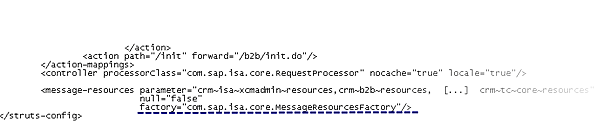
Figure 10
Sample declaration of MessageResourceFactory in config.xml
For our new logic, we replace the original MessageResourceFactory with a custom Z_MessageResourceFactory implementation. This new factory class creates Z_MessageResources instances. The Z_MessageResources extend the original MessageResources and behave as shown in Figure 11.
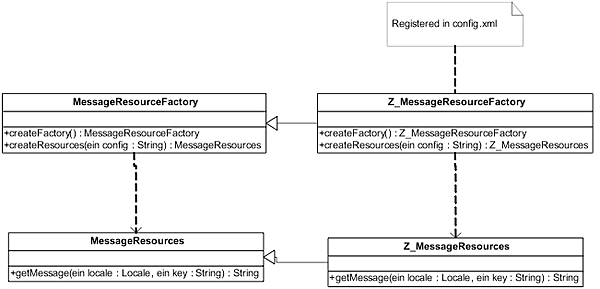
Figure 11
Extended implementation of MessageResourceFactory and MessageResources
Figure 12 shows what the process described in Figure 11 looks like in a real implementation.

Figure 12
Sample getMessage implementation
This implementation example shows how the new logic works. In the first line, we try to retrieve the text with the getString method of the languages object. This class represents the bridge to our new storage. The getString method checks if it can find the resource key given in the variable id for the language defined in the variable locale.
When this method does not return a text, then you refer to the old translation mechanism by calling the getMessage method of the original MessageResources class. The implementation of the getString method varies depending on the type of approach you are using for the new storage.
Ludwig Hunecke
Ludwig Hunecke is a development consultant working at SYCOR GmbH. His daily work focuses on solutions within the range of SAP E-Commerce, SAP WebDynpro, JSE/J2EE, and SAP NetWeaver Development Infrastructure. In the past four years, Ludwig has designed and implemented diverse requirements for multiple customer projects.
You may contact the author at ludwig.hunecke@sycoramericas.com.
If you have comments about this article or publication, or would like to submit an article idea, please contact the editor.
Martin Walter
Martin Walter is a development consultant at SYCOR GmbH with two and a half years of SAP E-Commerce experience. His studies of commercial information technology is the basis for his work, which is focused on consulting and project management in the field of SAP E-Commerce and SAP NetWeaver Development Infrastructure as well as ABAP and Java developments.
You may contact the author at Martin.Walter@sycoramericas.com.
If you have comments about this article or publication, or would like to submit an article idea, please contact the editor.