Evaluate several processes that allow you to delete data in BW, including archiving, selective deletion, delete and change log requests, and deletion of Persistent Staging Area data and master data.
Key Concept
Rolling off data from a data target means deleting data from a data target in a rolling manner. Instead of simply deleting all the data at once, you can roll off the oldest parts at a set interval of time.
Sizing is one of the most important aspects of BW design. When a data target grows too big, performance often deteriorates. You can manage performance for data targets with large volumes by partitioning, compressing, or aggregating. However, you still need to manage the size of data targets because BW does not have enough room to keep the history of your source systems. Therefore, you must devise a strategy to roll off data from your data targets.
In a typical data warehouse environment, you must keep historical data from three months to 10 years depending on the data target’s granularity. For a data target with calendar day granularity, usually the retention period is three months to a year. For a data target with calendar month granularity, the retention period can be longer — three to five years. For a data target with calendar year granularity, you may keep up to 10 years of data.
BW contains no clear-cut functionality to automate the process of rolling off data from data targets. I will show you how to use BW’s tools to design a solution to roll data off from data targets seamlessly and automatically. There are no specific requirements or prerequisites other than those I’ll explain later.
The process you choose depends on your data target (master data, ODS, or Info-Cube) and your update mode. Possible update modes include delta, pseudo-delta (full, but with selections to force delta), or full. Use pseudo-delta when it is impossible to create a generic delta extractor — instead, write code in the InfoPackage selections to get updated data only. Let’s explore the functionality that BW provides to roll off data from data targets.
Archiving
This standard SAP functionality lets you roll off data from your data targets and store it in another storage medium such as tape in the form of flat files. The first step of this two-step process writes data into a flat file. The second step deletes the data that the system just copied. Since you first back up the data, then delete it, you run no risk of losing data because the system verifies the archive files of the write job before deleting any files.
You can archive using transaction SARA (Figure 1). First, create an archiving object within the data target maintenance. You can get to it by right-clicking on the data target and selecting Change or simply double-clicking on the data target. Schedule the archiving session, and then monitor the job.

Figure 1
Archive using transaction SARA
The Extractor Checker (RSA3) can perform elementary reporting on archived data. Please note that this is by no means a reporting tool. Deleting data targets in archiving is the same as selective deletion. This means that deleting data from data targets in archiving does not transfer the data into another data target in the system. In an ODS, the process only deletes data from the active table. In an InfoCube, the process only deletes data from the E and F fact tables.
Note
One alternative to archiving is near-line storage (NLS), which relocates data from online storage to a secondary storage system. NLS uses storage media such as optical, tape, or Integrated Drive Electronics (IDE) hard disk. In SAP NetWeaver 2004s, you can read NLS data using a query without reloading the data.
To learn more about archiving, see Gary Nolan’s three-part series in
March,
April, and
May 2006. For more information about fact tables, refer to Gary Nolan’s June 2005 article, “
InfoProvider Compression: What It Is and When to Do It.”
The advantages of archiving include the fact that the process decreases the amount of data that your system must store. You can still retrieve this data. In addition, archiving is a standard SAP functionality that is easy to use and safe.
Archiving does present some disadvantages, however. Because archived data no longer exists in the BW system, it is generally unavailable for query reporting. However, SAP NetWeaver 2004s includes the capability to read NLS data using a query without reloading the data.
You need to enable the database archive load setting into the InfoCube to retrieve data, which requires some development effort. You cannot archive master data or Persistent Staging Area (PSA) data because it’s unavailable. You should archive when you want to restrict system growth. It’s also a good choice for data that you may need to bring back into the system, especially when it’s InfoCube or ODS data.
Selective Deletion
Selective deletion allows you to selectively delete data from data targets based on the values of the characteristics. You can access this feature by following menu path Data Target>Manage or using transaction DELETE_FACTS (Figure 2).

Figure 2
Data Target Manage screen
Although you cannot schedule selective deletion as a periodic job, you can build a new process type to incorporate it into your process chain. Use the function module RSDRD_SEL_DELETION to build your process type.
When BW deletes data from an ODS, it only removes active table data; when it deletes InfoCube data, it only removes fact table data. Selective deletion reduces the data that BW must store. Because of its simplicity, you can combine selective deletion with the other processes I will explain below.
Selective deletion requires significant development, however. When using this method, you run the risk of accidentally deleting data and not being able to recover it since it is a straight deletion process.
You should use selective deletion when you want to restrict system growth and you do not need to keep old data. This varies by businesses, but usually people do not care about data older than five years. Also, you should ensure that your process protects your data so that you do not delete it accidentally (i.e., process chain and job dependency). Be very careful and make sure that all business owners approve any archiving or deletion process. Selective deletion works best with InfoCube or ODS data. You cannot use this method with master data.
Delete Requests
Another option you can choose is to automatically delete data by requests. In each InfoPackage for a flex update, you have the option to either delete current requests in the data target that match your criteria or delete the entire contents of the data target. This deletion occurs before the new load.
If you always have a full load, which is quite common, especially when a delta extractor is not available, check the Delete entire content of data target box (Figure 3). If you have a full load with pseudo-delta functionality, you might want to use the options available in the Automatic Loading of Similar/Identical Requests (from the data target) column (Figure 3). This means that you might restrict the selections in the InfoPackage to get only the update/new data because a delta extractor is not available.

Figure 3
Select the Delete entire content of data target check box when you have a full load
For example, let’s say you load current year data using an ABAP routine in the selection criteria every month. In January 2005, you loaded all existing 2005 data, and in February 2005, you loaded all of 2005 again. To delete the January requests, check this option to bring up the window shown in Figure 4. To ensure that the system deletes the January requests, you must also choose the Delete Existing Requests... settings shown in Figure 4.

Figure 4
Choose these settings to eliminate repetitive yearly data in BW
Deleting requests is easy and requires no extra development. SAP provides the process chain and process type. When you build a process chain, SAP delivers a process type for deleting requests out of the box.
Deleting requests offers limited functionality, however, and does not work for ODS or master data. You should use delete requests when you have full loads (even if they are pseudo-deltas) and when you need to delete data from InfoCubes.
Other Types of Deletion
Delete PSA Data
This process enables you to delete requests from the PSA, reducing the volume of data in the PSA. Since the system also stores the change log as a PSA table, you can use this function to delete change log records, a common requirement that I will discuss after PSA deletion. This process applies only to ODS. Having fewer records should improve system performance.
I recommend that you delete data from the change log for an ODS object in the following situation: You have already loaded several requests into the ODS object that you no longer require for the delta update and do not use for an initialization from the change log.
Note
If a delta initialization for the update exists in connected data targets, update the requests before deleting the relevant data in the change log. Only delete data from the change log when you have no future changes for those records. Otherwise, BW might incorrectly update data in your connected data targets.
If you have problems locating your change log request in the PSA tree, follow menu path Goto: Settings>Display generated objects. Activate this setting to see the change log entries.
To manually delete data from the PSA, you can choose PSA in the left pane of Administrator Workbench (transaction RSA1) under Modeling. In the right pane, select your PSA and expand it to display application components, InfoSources, and PSA tables. Choose one and right-click to see the context menu. Choose Delete (Figure 5).
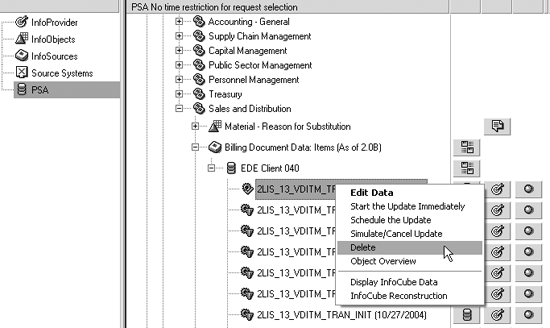
Figure 5
Right-click and choose Delete to manually delete PSA data
To delete data from the change log, go to the ODS object administration by right-clicking on an ODS and choosing Manage. Then, choose the main menu path Environment>Delete Change Log Data (Figure 6).
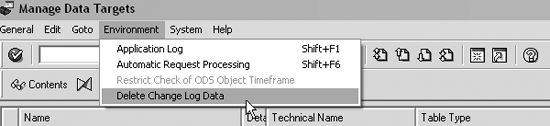
Figure 6
Delete data from the change log
Process Chains
In BW 3.0, process chains enhance and improve automatic process control. SAP recommends that you only use process chains for schedules of connected processes that you must redefine. If you want to automatically delete requests from the PSA, you can include an appropriate process variant in a process chain.
To create a process chain, go to transaction RSPC to see Figure 7. You can create a process variant to delete requests from the PSA by dragging a process type to the right window pane. A window pops up asking you to define the process variant that you just created.
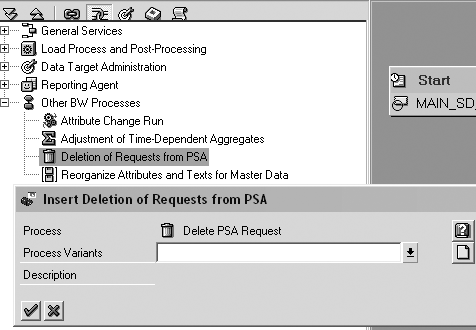
Figure 7
Include an appropriate process variant in a process chain
Delete Data from Master Data
When master data is still in use, obviously you should not delete it. To delete unused data from master data, right-click to go to the context menu of an InfoObject, and choose Delete master data (Figure 8).
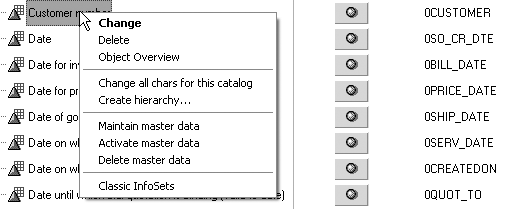
Figure 8
Delete unused master data from the context menu of an InfoObject
This option runs program RSDMD_DEL_BACKGROUND. It’s impractical to click on each and every InfoObject context menu to clean up master data in the system, so I recommend that you create a shell program based on this program. You can configure your program to run regularly and peruse all the InfoObjects in the system. To run this program, enter the InfoObject name in the selection window. You can get the list of all InfoObjects in the system from table RSDIOBJ, a directory of all InfoObjects.
You can even ensure that you delete any unused dimensions IDs in all the Info-Cubes in the system at the same time by checking the entry DEL_UNUSED_DIMS in table RSADMIN. This will take longer, but you will do a better job cleaning up your system. Look at SAP note 824025 for further information.
July Hartono
July Hartono has more than six years of experience as an SAP BW consultant. Currently with Alpha Net Consulting, LLC, she has helped several large clients implement BW. Data conversion and extraction, development of custom DataSources, and data modeling are among her best skills. July received mySAP.com Delta Certification for Business Information Warehouse in 2003.
You may contact the author at julyhartono@sbcglobal.net.
If you have comments about this article or publication, or would like to submit an article idea, please contact the editor.




