Learn a few selected application controls in the order-to-cash area and their importance from an audit perspective. Understand mitigation measures in case these controls are inadequate.
Key Concept
Maintaining robust safeguards and controls around your organization’s revenue recognition processes is critical not only for accurate financial reporting but also to ensure that you are prepared to answer questions from your IT auditors.
Order-to-cash (OTC) is one of the most common and critical business processes for any company that sells a product or service. It consists of all the subprocesses and activities starting from the time a product or service is ordered to the receipt and proper recording of payment by the company. Key activities include sales order creation, shipping, delivery, recording of the issue of goods, billing the customer, and the receipt and recording of the payment. Based on a description of activities, it should be quite obvious that OTC processes play a very important role in generating a company’s revenue and profits.
Companies that use standard SAP ERP Central Component (SAP ECC) or SAP R/3 systems for their OTC processes need to implement strong controls to mitigate the risk of mistakes and fraud, as these processes straddle key modules such as sales and distribution (SD) and Accounts Receivable (AR).
I’ll show you six scenarios in the SAP system in which you can implement controls to help safeguard your OTC processes. All scenarios and screenprints pertain to an SAP ECC 6.0 system, but the concepts and controls apply to earlier SAP systems as well.
Scenario 1: If payments are not properly entered into your SAP system or are incorrectly processed, revenues may be misstated.
Mitigation 1: It is important to ensure that only authorized personnel are able to post payments in the SAP production system. There are numerous ways in which you can post payments into the SAP system, including partial payments, down payments, and incoming payments. You need to scrutinize access to payment-related transactions and take steps to ensure that the level of access to these transactions is commensurate with the user’s job responsibility in the organization. Ideally, companies should have a detailed matrix that maps the SAP user’s job responsibilities to activities and transactions within the SAP system. You therefore must compare the access results that you obtain in the SAP system with this matrix. If any inappropriate access is detected, auditors will look for supporting documentation explaining the exception. If supporting documentation is not available, you should make note of this in your official audit report.
Incoming payments in the SAP system are broadly applied in two ways: either directly on an individual basis or via lockbox processing in which a bank accepts payments from the customer, collects and aggregates them based on common characteristics, and then applies these payments in the SAP system in batch mode. Lockbox processes that affect the SAP system have various transaction codes associated with them. Therefore, it is important that only appropriate personnel have access to such codes.
The transaction codes that should be within scope are:
- FBZ3: Incoming payments fast entry
- F-06: Post incoming payments: header data
- FBZ1: Post incoming payments: header data
- F-39: Clear customer down payment: header data
- F-36: Bill of exchange payment: header data
- F-28: Post incoming payment from customer
- F-29: Post customer down payment: header data
- F-30: Post with clearing: header data
- FBA2: Post customer down payment: header data
- F-26: Incoming payments fast entry: header data
- F-04: Post with clearing: header data
- FLB2: Post lockbox file
Note
In SAP systems, you often find more than one transaction code that carries out the same function. Sometimes certain transaction codes whose purposes seem to be identical are obsolete, but companies continue to use them. It is therefore all the more important that all related transaction codes (such as the list above that contains many similar ones) are checked for appropriate access and that no assumptions are made about whether certain transaction codes are being used or not.
Scenario 2: It is not unusual to have outstanding customer balances (in your company’s AR subledger) that for a variety of reasons have to be written off. They have a direct impact on your company’s financials because your income will be lower than if a given amount was not written off. Therefore, customer write-offs should be handled with caution and only by those with authorization.
Mitigation 2: You can carry out customer write-offs in your SAP system using various transactions. All the steps outlined in scenario 1 (and mitigation 1) should be implemented for this scenario. The difference for this scenario is that the transaction is different. The IT security team should check the following transactions for appropriate access by users – your IT auditor is likely to do the same:
- FB15: Assignment of open items
- FB1D: Clear customer: header data
- FB17: Edit assignment of open items
- F-32: Clear customer: header data
- F.13: Automatic clearing
Scenario 3: Billing or customer invoicing is an important component of OTC. It is therefore important that billing take place in the correct accounting period. Otherwise, an enterprise’s accounts receivable may be understated. It also means that the enterprise’s revenues can potentially be understated thereby leading to financial misstatements.
Mitigation 3: One of the most common ways of creating customer billing documents and invoices is in response to a sales order. Billing should be carried out regularly, but you should not necessarily assume that all customer invoices are being billed regularly. Use transaction V_UC and check the Billing document field to see a list of all the incomplete SD documents (Figure 1). They show up as incomplete because they have not been billed. You should run this report regularly. Running it daily is a good practice.

Figure 1
Display a list of incomplete SD documents
Also, to ensure that customers are being billed regularly, you need to run transaction VF04 (maintain billing due list) regularly. This transaction enables the creation of billing documents and invoices for both delivery and order-related billing. You should carry out this activity as part of your period-end closing.
Scenario 4: It is likely that goods and services are sold to customers with weak credit history. When that is the case, there is a good likelihood of such outstanding customer balances having to be written off. This means that AR and revenues are overstated. Therefore, it is important that enterprises follow strong practices to ensure that only credit-worthy customers are sold goods and services.
Mitigation 4: You need to carry out appropriate configuration in the SAP IMG in the customer credit control areas. There should be procedures in place to ensure that new customers are created with a credit block and this credit block should be removed only after the relevant approvals are secured.
Follow IMG menu path Enterprise Structure > Definition > Financial Accounting > Define Credit Control Area or use transaction OB45 (Figure 2). Two areas are relevant from a security and controls standpoint: the Data for updating SD section and the Default data for automatically creating new customers section.
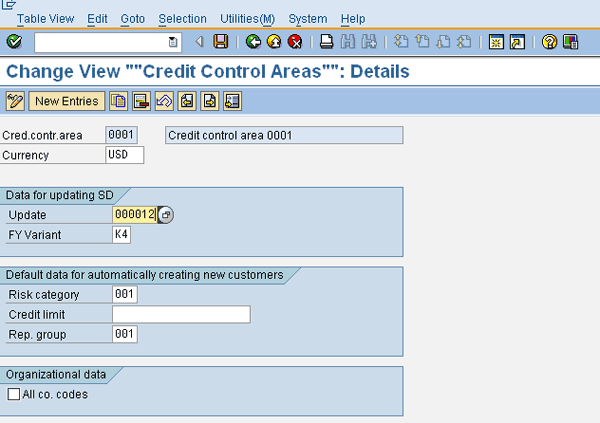
Figure 2
Configuring credit control area
In the former area, you should select either 000012 or 000018 from the drop-down list in the Update field. Which one you select depends on business requirements: When you choose 000012, in the sales order, the open order value from the delivery-relevant schedule lines is increased. For a delivery document, it reduces the open order value from delivery-relevant schedule lines and increases the open delivery value. In the billing document, open delivery value is reduced and open billing document value is increased and in the FI document, it reduces open billing document value and increases open items value. When you choose 000018, in the sales order, open delivery value is increased, in the billing document open delivery value is reduced, and open billing document value is increased, and in the FI document, open billing document value is reduced and open items value is increased.
By selecting either one, you ensure that an automatic credit check is carried out. This means that when a sales order is created for a customer for the relevant credit control area (0001 in this case), the sales order amount is subjected to a customer credit check. Usually, this is what companies want. If for some reason you do not want to perform this check, leave the field blank or enter 000015. If you choose 000015, the automatic credit check is not carried out because 000015 is not relevant to sales orders and billing documents. It’s relevant only to deliveries and FI documents. When this update group is selected, in the case of delivery documents, both the open delivery value and the open billing document value are increased. For FI documents, open billing document value is reduced and open items value is increased.
In the latter area, make sure that there is a Risk category assigned and a Rep. (representative) group assigned, and that the Credit limit is left blank. Be aware that when a new customer is created in your SAP system, it will be assigned these values, so it’s important that you configure these properly.
You should also make sure that the business has manual procedures in place that require that appropriate personnel in the credit representative group to do a customer credit check before the credit block is removed.
Scenario 5: You need to update the general ledger with all AR postings for your general ledger to be synchronized with your AR subledger (and other subledgers). If this does not happen, it is likely that your AR will be understated, as well as your revenues.
Mitigation 5: In the SAP system, automatic updating of the general ledger from the AR subledger takes place via the reconciliation account. However, how do you ensure that a reconciliation account (an appropriate one) is used when a transaction is made to a customer (and thereby an AR subledger entry is created and an appropriate general ledger account is updated)?
Follow IMG menu path Financial Supply Chain Management > Cash and Liquidity Management > Cash Management > Master Data > Subledger Accounts > Customer Control > Maintain Customer Account Groups or use transaction OBD2. Once you are on the first screen, double-click the row with the 0010 group number. This is the account group for customers. It takes you to the next screen, where you double-click Company Code Data. This takes you to the next screen, where you double-click Account Management to bring up the screen in Figure 3. It is for maintaining field status groups.
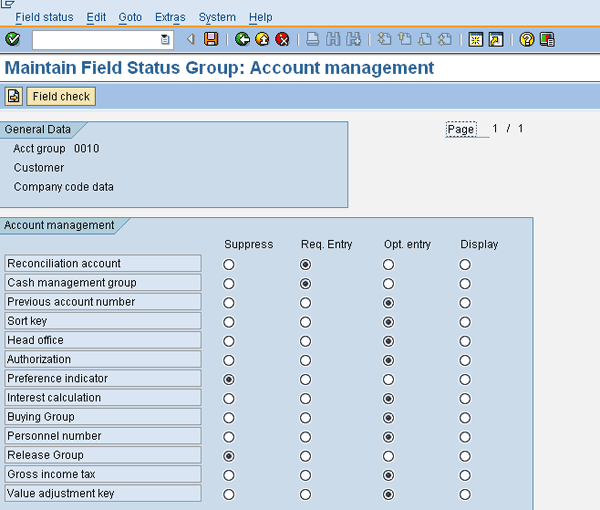
Figure 3
Making reconciliation account mandatory for customer account group
Make sure the Req. Entry radio button is selected for Reconciliation account. This makes this field mandatory for entry whenever you create a customer (master), thereby ensuring that each time a financial posting is made involving this customer, this reconciliation account, and ultimately the corresponding general ledger account, is updated.
Scenario 6: In scenario 3, I dwelled on the importance of regularly billing customers to avoid understating your AR. It is equally important to make sure that no overbilling is going on either by mistake or with malice. Overbilling can happen via transactions VF01 or FB70 – when you create a billing document, you may inadvertently bill your customer for an amount greater than the agreed-upon amount (usually in the sales order). In recent years, there have been a lot of occurrences in the latter category and in some instances companies have imploded, thereby destroying shareholder value (not to mention other serious problems). It is not only good practice to make sure that your enterprise is taking appropriate measures to mitigate the possible occurrence of billing fraud but also an imperative in this day of Sarbanes-Oxley compliance.
Mitigation 6: Billing transactions should be restricted only to the appropriate personnel. In the SAP system, billing can be done in various forms using a variety of transaction codes. While this increases flexibility from a user standpoint, it also creates vulnerabilities and increases the potential incidence of fraud. The following transaction codes should be accessible to only a small subset of users:
- VFRB – Retro-billing
- VF01 – Create billing document
- VF02 – Change billing document
- FB75 – Enter customer credit memo
- F-27 – Enter customer credit memo: header data
- VF11 – Cancel billing document
- VF04 – Maintain billing due list
- F-22 – Enter customer invoice: header data
- VF06 – Create background jobs for billing
- FB70 – Enter customer invoice
As explained in other mitigation scenarios, mitigation of this control risk first requires a review of who has access to each of these transactions and whether such access is in conformity with the user’s job responsibilities. If situations of unwarranted access are detected, they need to be addressed. Also, you should look for supporting documentation explaining the exception. If supporting documentation is not available, you should make note of this in your official audit report.
Anurag Barua
Anurag Barua is an independent SAP advisor. He has 23 years of experience in conceiving, designing, managing, and implementing complex software solutions, including more than 17 years of experience with SAP applications. He has been associated with several SAP implementations in various capacities. His core SAP competencies include FI and Controlling FI/CO, logistics, SAP BW, SAP BusinessObjects, Enterprise Performance Management, SAP Solution Manager, Governance, Risk, and Compliance (GRC), and project management. He is a frequent speaker at SAPinsider conferences and contributes to several publications. He holds a BS in computer science and an MBA in finance. He is a PMI-certified PMP, a Certified Scrum Master (CSM), and is ITIL V3F certified.
You may contact the author at Anurag.barua@gmail.com.
If you have comments about this article or publication, or would like to submit an article idea, please contact the editor.




 Premium