Find out about three programs that help you analyze all the components of a query, simulate SAP NetWeaver BW data for testing or prototyping, and keep track of transformations applied to source data in your BW system.
Key Concept
A utility program provides abilities that supplement the application on the back end, such as the automation of certain activities, conversions, and performance tuning. SAP NetWeaver BW 7.0 provides numerous utility programs — you just have to know where to find them.
Every SAP component or application comes with utility programs that provide capabilities beyond what is visible in the SAP menu or IMG. These are largely unknown primarily because they are either undocumented or insufficiently documented. The small percentage of users that does know of them stumbled upon them, because documentation generally does not exist for such utility programs. The net outcome of this situation is that the inherent capabilities of SAP are not fully used, and worse, your company may be investing time and money reinventing the wheel.
SAP NetWeaver BW has a comprehensive set of such utility programs. With each successive release, more become available. However, I have noticed that they are used very infrequently and in some cases, never. Note that many of these utility programs are extremely specialized in their purpose with very basic selection screens and user interfaces. The value proposition of these utility programs is not so much in their user interface but in their ability to carry out specialized tasks with minimal fanfare. Here are three such programs that I find very useful.
Note
Editor's note: You can listen to Anurag Barua discuss this article on his Insider Learning Network podcast. For your convenience, we have also posted a transcript of the podcast on Insider Learning Network. Program RSRQ_QUERYDEFINITION
Program RSRQ_QUERYDEFINITION displays comprehensive information about a query’s components and properties. I find using this program to be more convenient than using BEx Query Designer or BEx Analyzer, which require a lot of navigation and a good understanding of their features. This program provides selection options that help you get a complete overview of the components of a query. By viewing all the components of a query, you can quickly decide whether it meets your business and reporting needs. If the query only partially meets your needs, you can determine what you need to do to close the gap.
Figure 1 shows the selection screen that is displayed when you run this program for a particular query. Using the drop-down menu in the Query field you can select the query whose components you want to analyze.
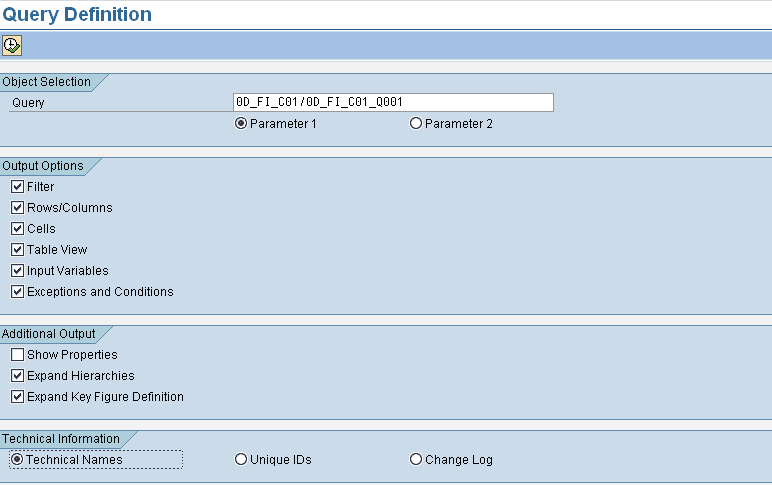
Figure 1
Selection screen for program RSRQ_QUERYDEFINITION
You can select one or more of the output options depending on the type of components you want displayed in the results. If you want a compressed view of the query components, do not check any of the boxes in the Additional Output section. If, for example, you check the Show Properties check box, you receive more information because you see every single property for every element in your query.
Figure 2 shows the main part of the output results set when you run this program as it is shown in Figure 1, but with all the boxes in the Additional Output section unchecked.
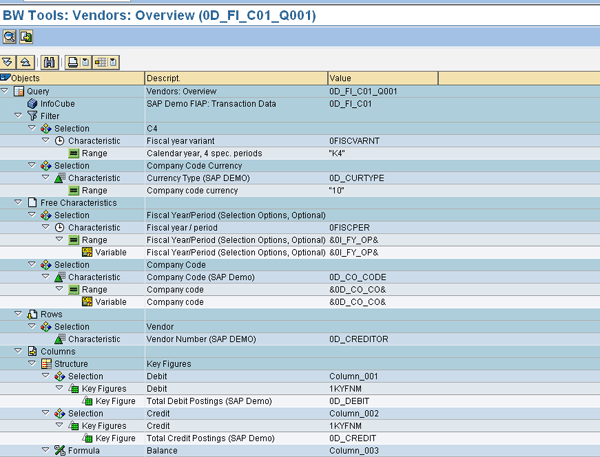
Figure 2
Results from running the program for standard SAP query 0D_FI_C01_Q001
Program CUBE_SAMPLE_CREATE
Often when you are prototyping or doing a demonstration in a development or sandbox environment, you want to show results rapidly. Although your data model is already created or available, you may not have the luxury of extracting information from a source system or copying data from another BW system. Program CUBE_SAMPLE_CREATE comes in handy for populating an InfoCube with data either manually or randomly. It provides a shortcut method of populating your prototype with sample data for demonstrating, testing, or validating a proof of concept.
However, this program should be used with the utmost caution. I am not advocating its use in a production environment. An SAP NetWeaver BW system should never be treated as a data entry system. That being said, the need to quickly prototype SAP NetWeaver BW solutions in a sandbox or development environment is a value proposition for SAP NetWeaver BW. It can expedite the delivery of a prototype you may have created by activating and applying standard BI Business Content.
When you execute this program, you see a selection screen similar to the one in Figure 3. You enter the technical name of the InfoCube that is part of your prototype. In my example, I entered the name of a custom InfoCube, ZBPUR_C01. You also need to specify the number of data records you want. In the Mode section, select one of the three options. I recommend the Generated Values mode because this is straightforward and the most automated.
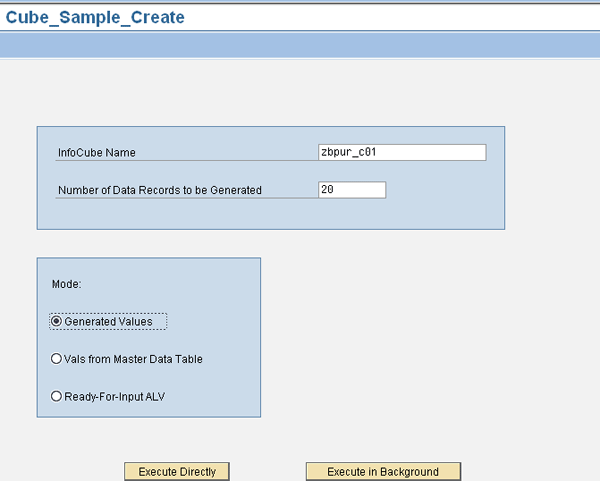
Figure 3
Selection screen of program CUBE_SAMPLE_CREATE
You can execute this program in the foreground by clicking Execute Directly or in the background by clicking the Execute in Background button. If you are generating a small dataset, you can run it in the foreground. Upon completion, you see the list of records that was created. A new Request ID (7634 in this case) has delivered 20 new records to this InfoCube (Figure 4). If you need to delete this Request ID (and these newly generated records), highlight the specific row and click the Delete button.
Tip!
You can also check for the loads and the records by going into the maintenance of this InfoCube, running transaction RSA1, and navigating to the relevant InfoCube. Then, with the InfoCube highlighted, right-click and select Manage from the context menu.
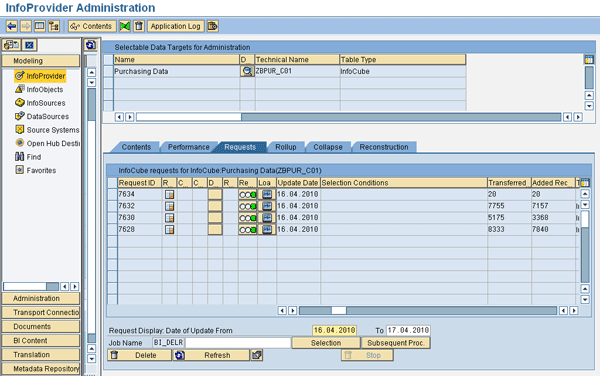
Figure 4
InfoCube maintenance showing newly generated records
Program RSAUOVERVIEW
Program RSAUOVERVIEW is a handy utility for BW technical personnel. In most companies running SAP NetWeaver BW, it is common for a BW developer to create numerous update rules (for various data targets). Once that list grows, it becomes hard for each individual to keep track of all the update rules. Good documentation on update rules may help mitigate this situation, but realistically speaking that’s often not maintained or readily available.
In such cases, this program is useful because it provides users with the ability to browse update rules by user and then navigate directly to the update rule maintenance of that particular data target. This is helpful in understanding what transformations your source data has undergone in the SAP NetWeaver BW environment.
This program is also useful from an audit perspective to manage and monitor user changes. Furthermore, you can use the program to troubleshoot. For example, if an update rule causes an issue, you can easily find out who the author of the rule is. When you execute the program, you see the selection screen shown in Figure 5.
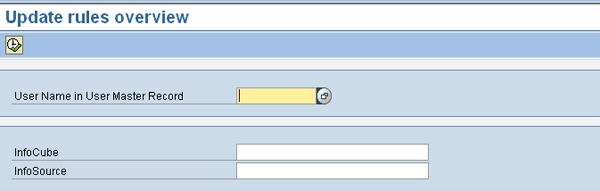
Figure 5
Selection screen of program RSAUOVERVIEW
Although you have the option of entering or selecting the user name, it is not mandatory. If you keep it blank, you see all the update rules created by all the users in the InfoCube or InfoSource you specify, provided you enter the names of the InfoCube and InfoSource. I am running this for a particular user and keeping the InfoCube and InfoSource fields blank because I’m interested in seeing all the update rules maintained by this particular user. The results are shown in Figure 6 (note that I have intentionally hidden the user name column, which would be on the left side of the screen). You can navigate directly into update rule maintenance for any InfoCube on this list by clicking the execute icon in the relevant row.
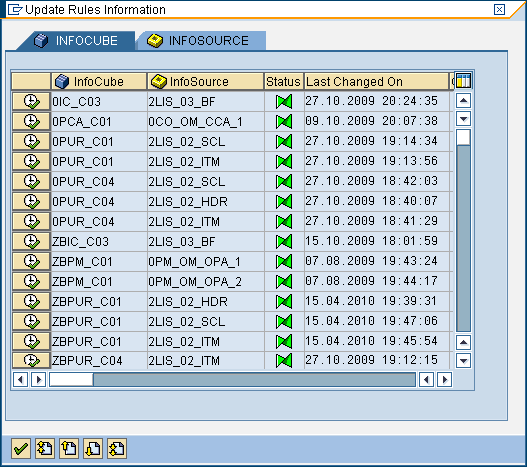
Figure 6
Output from running a query for a particular user
Anurag Barua
Anurag Barua is an independent SAP advisor. He has 23 years of experience in conceiving, designing, managing, and implementing complex software solutions, including more than 17 years of experience with SAP applications. He has been associated with several SAP implementations in various capacities. His core SAP competencies include FI and Controlling FI/CO, logistics, SAP BW, SAP BusinessObjects, Enterprise Performance Management, SAP Solution Manager, Governance, Risk, and Compliance (GRC), and project management. He is a frequent speaker at SAPinsider conferences and contributes to several publications. He holds a BS in computer science and an MBA in finance. He is a PMI-certified PMP, a Certified Scrum Master (CSM), and is ITIL V3F certified.
You may contact the author at Anurag.barua@gmail.com.
If you have comments about this article or publication, or would like to submit an article idea, please contact the editor.





 Premium