Learn a new method for automatically aggregating data that replaces the laborious task of manually aggregating this kind of data. This technique generates additional new semantic levels of characteristics as description keys. Using these new semantic characteristic keys, users can easily generate reports with any existing descriptive text without duplications.
Key Concept
A semantic type key is defined for report display. It grants unique key values for the exact same text string. In this way, when text searching, the same text string is aggregated into one row due to its unique value of semantic key.
Text searching is a common requirement for businesses. However, text display characteristic keys generate duplicate rows in reports, requiring business users to have to do additional manual aggregation. I show a new method for aggregating data using semantic keys that automatically eliminates duplicative rows. Because semantic keys give unique key values for the same text strings, when text searching is performed, the same text string is aggregated into one row due based on this unique key.
Although an SAP CRM example is used in this paper, the concept can be easily extended to all other modules. This technique generates additional new semantic levels of characteristics as description keys. By using these new semantic characteristic keys, business users can generate reports with any existing descriptive text without duplications.
I use a hardware producer as my example. In this scenario, the products are laptops and PCs, and XP or Windows 7 is the software installed on them. If there are issues with the products, and they are caused by the OS compatibility or OS itself, then the ticket registrar considers the issue symptoms with regard to the OS and further traces the issue to see which OS (XP or Windows 7) caused the problem.
The main purpose of BI reports is to provide intuitive and clear enterprise production issues that, in turn, help top-level management efficiently guide and control production quality and quantity. A BI report usually displays (or is drilled down to) characteristic symptom category keys, product keys, and component keys. However, the business team and managers do not care about these technical keys. Sometimes they just need answers to simple questions, such as “How many units have failures in OS XP or Windows 7 when customers open the shipping boxes?” or “How many units have failures on OS XP?”
To get the answers to these types of questions, you cannot just run BI reports because all BI reports usually use characteristic keys for presenting, filtering, and drilling down. The reports do not support searches that use text such as XP or Windows 7. To obtain corresponding text string-related data such as this, business users need to manually aggregate data from duplicated rows for the text strings with certain characteristics into a single row. The aggregation is based on the same text descriptions, and the data is obtained by downloading reports to Excel files or by using analyzer-generated workbooks. Therefore, the workload is a big burden for the business users. Figure 1 shows the current text-searching report scenario.

Figure 1
The current text-searching report requires a manual aggregation step
I explain a new method for automatically aggregating data so that users no longer have to undertake the laborious task of manually aggregating this kind of data. This technique generates additional new semantic levels of characteristics as description keys. By using these new semantic characteristic keys, business users can easily generate reports with any existing descriptive text without duplications. In this way, manual aggregation operation workloads for business users are dramatically reduced. Figure 2 illustrates this new aggregation method using semantic keys.
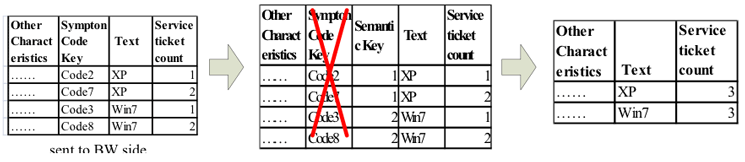
Figure 2
The new automatic aggregation method using semantic keys
As you can see, the new method does not use the original symptom code keys. Instead, the new semantic keys reflect the same text values that are used in BI reports. Because the same text has the same semantic keys, the manual aggregation step is eliminated.
Scenario
In my scenario, I use an SAP CRM computer product service ticket report as my example to show how to solve this issue. However, this method can be used for any SAP modules to resolve similar issues.
In the SAP CRM service ticket module, there are multiple characteristics called symptom codes that are used for solution searching. When customers report product issues, customer service representatives register the issues in the system using predefined symptom codes based on the symptoms the customer described. An example of three levels of symptom code keys (on the CRM system side), along with their text description columns, is shown in Table 1.
| First-level symptom code key |
First-level label |
Second-level symptom code key |
Second-level label
|
Third-level symptom code key
|
Third-level label
|
L1_01
|
PSG
|
Code1
|
OS |
Code2 |
XP |
L1_01
|
PSG
|
Code1
|
OS |
Code3 |
Windows 7 |
L1_02
|
IPG
|
Code4
|
OS |
Code7 |
XP |
L1_02
|
IPG
|
Code4
|
OS |
Code8 |
Windows 7 |
Table 1
Examples of three levels of symptom code keys and their master data
These symptom codes and symptom code keys master data are inherited from SAP CRM and loaded into the SAP Business Warehouse (SAP BW) side via extractions and transformations. Table 2 shows the sample service ticket (ST) transaction data loaded into SAP BW. It contains service ticket keys from ST1 to ST6. The second and third columns are their corresponding second and third levels of symptom code keys. As you can see, many service tickets are issued for the same or similar hardware or software defects. Therefore, they probably share the same symptom code keys even though the issues may affect different customers. In the example, ST2 and ST3 have the same symptom code key Code7, and ST5 and ST6 share the another set of same symptom code key Code8.
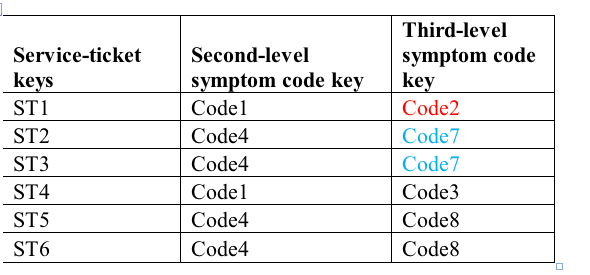
Table 2
Sample service ticket transaction data in the SAP BW system
The SAP BW system uses and displays the same set of symptom codes as the SAP CRM system.
As a result, in Table 2 you can see in the service ticket rows ST2 and ST3 have the same third-level symptom code key value, Code7.
The reports generated based on this transaction data is shown in Table 3. If the report’s third-level symptom code key option is Display Text (e.g., text only from selections of keys and text, text and keys, and keys only and text only), there will be two rows of XPs. The first row is for third-level symptom code key Code2 and the second row is for third-level symptom code key Code7. Since ST2 and ST3 both have Code7, the second row service ticket count value is 2. Based on the requirements, the expected result is to have only one row of XP text with a service-ticket count value of 3. In this case, none of the other attribute values matter—this method only considers the correct text data for automatic aggregation.
| Third-level text |
Service-ticket count |
| XP |
1 |
| XP |
2 |
| Windows 7 |
1 |
| Windows 7 |
2 |
Table 3
An SAP BW report using the data from Table 2 with the third-level symptom code keys, displaying selected text only
Figure 3 shows an SAP BW report that corresponds to the data contained in Table 3. As you can see, because the associated descriptions in Table 3 do not have any keys, the system uses the symptom code keys instead. As a result, duplicate service ticket count key figure values are produced. The multiple rows of service ticket counts are caused by the multiple rows symptom code keys. Although the Overall Result number is correct, the Key Figures and Category IDs contain duplicative data.
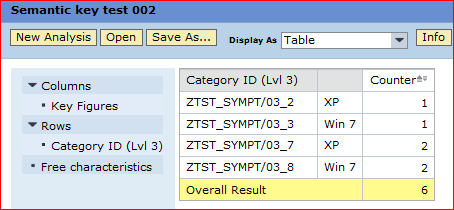
Figure 3
A sample SAP BW report with the third-level symptom code keys, where the display key and text are both selected
To avoid creating reports with duplicate data with the same label, you need to create a new key column for each text column in the transaction data as well as in the corresponding master data. This step ensures that the labels for each piece of text data can be processed independently from their symptom keys. In this case, new InfoObjects need to be created for each level—levels one, two, three, four, and five. In Table 4, the level three semantic key, ZSYMKEY3, is used in the master data example.
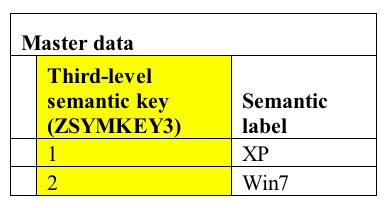
Table 4
A master data table of new semantic keys of symptom category level three
Table 5 shows how the new master data is used. The source data from the SAP CRM system is still the same as in the first scenario. To illustrate the solution, a new column for the third-level semantic key ZSYMKEY3 is added to Table 4 in Table 5. As you can see, the new values 1 and 2 are populated according to the description values, not based on the third-level key column values.

Table 5
The three levels of symptom code keys along with their text descriptions and third-level semantic key columns in the SAP CRM system
Because you cannot change tables on the SAP CRM side, the new third-level semantic key ZSYMKEY3 column can be added only in the extractor or on the BW side. In our scenario, we decided to add it into the DataStore Object (DSO) first and then transfer it into the InfoCube. This step facilitates the design and implementation on the SAP BW side. To implement these changes, the new InfoObject third-level semantic key (ZSYMKEY3) in the DSO needs to be created first. The transformation routines dynamically look up the semantic master data table and automatically populate the transaction data with the right semantic key values from the semantic master data table. Table 6 illustrates a service-ticket DSO that switches the master data into transactional data.
BW transaction code data
|
Service-ticket DSOs
|
Second-level key
|
Second-level (ZSYMKEY3)
|
Third-level key |
ST1
|
Code1
|
1
|
Code2 |
ST2
|
Code4
|
1
|
Code7 |
ST3
|
Code4
|
1
|
Code7 |
ST4
|
Code1
|
2
|
Code3 |
ST5
|
Code4
|
2
|
Code8 |
ST6
|
Code4
|
2
|
Code8 |
Table 6
The third-level semantic key (ZSYMKEY3) column is populated with the correct values in the service-ticket DSO
Next you need to add the third-level semantic key (ZSYMKEY3) into the BEx Query. In the report output shown in Table 7, both the text and key values of the semantic InfoObjects are displayed. The result shows the aggregated text for the service-ticket counts with the corresponding labels of the symptom codes. These BEx Query results show that the design meets the business requirements.
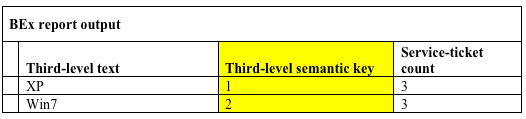
Table 7
The test report results
The new display of the BEx Query report results, based on the automatically loaded data generated by the improved transformation (Table 6), is shown in Figure 4.
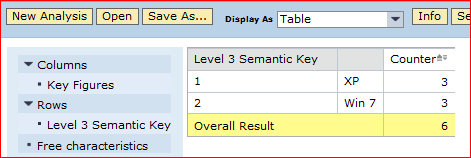
Figure 4
The new BEx Query report results without the duplicative data
Figure 4 only shows the third-level semantic keys in order to simplify the example. However, the SAP CRM module contains all five levels of symptom keys and therefore all level semantic keys can be implemented in this same way.
Implementing the Semantic Keys
In this section I provide the detailed steps to implement the semantic keys.
The first step is to create all necessary semantic key InfoObjects as follows:
ZSYMKEY1 – It contains ZSYMKEY1 char (10) and text (50)
ZSYMKEY2 – It contains ZSYMKEY2 char (10) and text (50)
ZSYMKEY3 – It contains ZSYMKEY3 char (10) and text (50)
ZSYMKEY4 – It contains ZSYMKEY4 char (10) and text (50)
ZSYMKEY5 – It contains ZSYMKEY5 char (10) and text (50)
Append five new semantic key fields—ZSYMKEY1, ZSYMKEY2, ZSYMKEY3, ZSYMKEY4, and ZSYMKEY5—into the InfoObject CRMCC_CAT as additional attributes. These are shown in table /BI0/PCRMCC_CAT (Figure 5).

Figure 5
Add the new semantic keys to the InfoObject 0CRMCC_CAT as new navigational characteristics
To populate the attributes ZSYMKEY1, ZSYMKEY2, ZSYMKEY3, ZSYMKEY4, and ZSYMKEY5 in the master data InfoObject 0CRMCC_CAT, you need to obtain the data via a data source to read the SAP CRM table CRMC_ERMS_CAT_CA. Because you need the logic to get the latest GUID, you need to create view ZV_CRMC_ERMS_CAT_CA for this purpose. The view details are shown in Figure 6.

Figure 6
View ZV_CRMC_ERMS_CAT_CA details
The next step is to write code for a start routine in the transformation from the SAP CRM data source (0CRO_CATEGORY_TEXT) to the master data InfoObjects (ZSYMKEY1 to ZSYMKEY5). To keep it simple, we use ZSYMKEY3 as our example. The sample start routine is shown in Figure 7.
****
**** RSDS 0CRM_CAT_CATEGORY_TEXT ZTEST_D01 -> IOBJ ZSYMKEY3
**** transformation:
**** Sample Start routine for ZSYMKEY3 text:
**** Since the text will be used as key value to populate the
**** semantic master data key values, need validate all
**** string characters.
DATA: T_ALL(100) type C,
T_VAR1(45) type C value 'ABCDEFGHIJKLMNOPQRSTUVWXYZ abcdefghijklmnopq',
T_VAR2(50) type C Value 'rstuvwxyz 0123456789 ''"@#$%^&*()_-+=:;/?|,.'.
.
DATA: tmp_PACKAGE type _ty_t_SC_1.
DATA: l_tabix TYPE sy-tabix.
data: TEXT(60) TYPE c.
CONCATENATE T_VAR1 T_VAR2 into T_ALL.
DELETE SOURCE_PACKAGE WHERE VALID_TO_DATE LT SY-DATUM and LANG NE 'E'.
SORT SOURCE_PACKAGE BY CAT_LABEL.
DELETE ADJACENT DUPLICATES FROM SOURCE_PACKAGE COMPARING CAT_LABEL.
tmp_PACKAGE[] = SOURCE_PACKAGE[].
LOOP at tmp_PACKAGE assigning <SOURCE_FIELDS>.
l_tabix = sy-tabix.
*check if all characters are valid.
IF NOT <SOURCE_FIELDS>-CAT_LABEL CO T_ALL.
delete tmp_PACKAGE index l_tabix.
* TEXT = 'Text value contains invalid characters'.
* SY-MSGV1 = TEXT.
* MESSAGE TEXT TYPE 'I'.
monitor_rec-msgid ='InvalidText'.
monitor_rec-msgty = 'I'.
monitor_rec-msgno = 000.
monitor_rec-msgv1 = datapackid.
monitor_rec-msgv2 = 'Text value contains invalid characters'.
monitor_rec-msgv2 = <SOURCE_FIELDS>-CAT_LABEL.
Append monitor_rec to MONITOR.
ENDIF.
ENDLOOP.
SOURCE_PACKAGE[] = tmp_PACKAGE[].
SELECT * FROM /BIC/TZSYMKEY3 INTO TABLE lt_symkey.
loop at lt_symkey assigning <ls_symkey>.
translate <ls_symkey>-TXTLG to upper case.
endloop.
sort lt_symkey by TXTLG.
SELECT MAX( /BIC/ZSYMKEY3 ) INTO lv_key FROM /BIC/TZSYMKEY3.
Figure 7
Sample start routine code for the ZSYMKEY3 transformation
A sample update routine in the same transformation is shown in Figure 8. This ABAP code contains semantic key master data internal table data look-up logic.
****
**** ZSYMKEY3 Update routine:
****
CLEAR: lv_key.
FIELD_SYMBOLS : <ls_symkey> TYPE ls_cattxt.
data: tmp_tx type c length 60.
tmp_tx = SOURCE_FIELDS-CAT_LABEL.
translate tmp_tx to upper case.
READ TABLE lt_cattxt assigning <ls_symkey>
WITH KEY CRMCCCATID = SOURCE_FIELDS-CAT_ID_LEVEL_5
CRMCCSCHID = SOURCE_FIELDS-ASP-ID
binary search.
IF SY-SUBRC = 0.
SELECT SINGLE /BIC/ZSYMKEY3 INTO lv_key FROM /BIC/TZSYMKEY3
WHERE TXTLG = <ls_symkey>-TXTLG.
IF SY-SUBRC = 0.
RESULT = lv_key.
ELSE.
RESULT = 0.
ENDIF.
ENDIF.
Figure 8
Sample update routine code
The sample code in Figure 8 is used for only level-three semantic key transformations. However, other transformations are similar. The sample is for illustration purposes only—it cannot work without variables declarations. The five master data fields should be loaded daily. If there is not any new data coming in, then it is kept as is and no new records are added. If any new version of the master data comes in, then the old data is completely overwritten.
The transformation RSDS ZCRM_CAT_CATEGORY_ATTR > IOBJ 0CRMCC_CAT is enhanced as follows:
- Create internal tables lt_ZSYMKEY1, lt_ZSYMKEY2, lt_ZSYMKEY3, lt_ZSYMKEY4, and lt_ZSYMKEY5 from InfoObjects ZSYMKEY1, ZSYMKEY2, ZSYMKEY3, ZSYMKEY4, and ZSYMKEY5, respectively, in the start routine. They are prepared for and used in the update rules.
- Create internal table lt_0CRMCCCATID_tx from the /BI0/TCRMCCCATID table in the start routine. The internal table should have fields CRM_CCSCHID and CRMCCCATID, and attribute ZSYMKEY1, ZSYMKEY2, ZSYMKEY3, ZSYMKEY4, ZSYMKEY5, and TXTLG. A loop in the start routine of the transformation (RSDS ZCRM_CAT_CATEGORY_ATTR > IOBJ 0CRMCC_CAT) executes the update operation on the fields of ZSYMKEY1, ZSYMKEY2, ZSYMKEY3, ZSYMKEY4, and ZSYMKEY5, respectively. By comparing the text values with the values in the text view ZV_CRMC_ERMS_CAT_CA, the attribute ZSYMKEY1, ZSYMKEY2, ZSYMKEY3, ZSYMKEY4, and ZSYMKEY5 are populated.
- Table 0CRMCC_CAT- ZSYMKEY1 initially should be blank. A new key value of ZSYMKEY1 reads from the internal table lt_0CRMCCCATID_tx and is used to update table 0CRMCC_CAT- ZSYMKEY1 in the update rule. Similar update rules are incorporated in the 0CRMCC_CAT-ZSYMKEY2, 0CRMCC_CAT-ZSYMKEY3, 0CRMCC_CAT-ZSYMKEY4, and 0CRMCC_CAT- ZSYMKEY5 fields.
The following steps need to be done on the query side:
- Include InfoObjects ZSYMKEY1, ZSYMKEY2, ZSYMKEY3, ZSYMKEY4, and ZSYMKEY5 in the service-ticket queries. Set the display property to Text.
- Change the following characteristics to free characteristics( because you don’t want to display those characteristics if you use text searching): 0CRMCC_CAT__0CRMCCCAT01, 0CRMCC_CAT__0CRMCCCAT02, 0CRMCC_CAT__0CRMCCCAT03, 0CRMCC_CAT__0CRMCCCAT04, and 0CRMCC_CAT__0CRMCCCAT05.
One important step for the text searching is to provide all of the available text values in the corresponding F4 selection. Figure 9 shows the F4 Business Add-In (BAdI) code for the ZSYMKEY3text search selection. However, the codes for ZSYMKEY1 to ZSYMKEY5 are similar.
IF I_STEP = 1.
select CRMCCCAT03 from /BI0/PCRMCC_CAT into table it_PCRMCC_CAT
WHERE CRMCCSCHID = 'Z_SYMPTOMCODE'.
delete it_PCRMCC_CAT where CRMCCCAT03 is initial.
** Get all long text being used for Level 3 symptom code after this step.
select CRMCCCATID TXTLG from /BI0/TCRMCCCATID
into table it_TCRMCCCATID
for all entries in it_PCRMCC_CAT
WHERE CRMCCSCHID = 'Z_SYMPTOMCODE' and
CRMCCCATID = it_PCRMCC_CAT-CRMCCCAT03 and
DATETO GE SY-DATUM and
LANGU EQ 'E'.
delete it_TCRMCCCATID where CRMCCCATID is initial.
SORT it_TCRMCCCATID BY CRMCCCATID.
DELETE ADJACENT DUPLICATES FROM it_TCRMCCCATID
COMPARING CRMCCCATID.
select /BIC/ZSYMKEY3 AS ZSYMKEY3 TXTLG
from /BIC/TZSYMKEY3 into table it_TZSYMKEY3
WHERE LANGU EQ 'E'.
DELETE it_TZSYMKEY3 where ZSYMKEY3 is initial.
SORT it_TZSYMKEY3 BY TXTLG.
DELETE ADJACENT DUPLICATES FROM it_TZSYMKEY3 COMPARING TXTLG.
SORT it_TCRMCCCATID BY TXTLG.
DELETE ADJACENT DUPLICATES FROM it_TCRMCCCATID COMPARING TXTLG.
insert the first line as value '#'.
l_s_range-sign = 'I'.
l_s_range-opt = 'EQ'.
l_s_range-low = '0000000000'.
APPEND l_s_range TO tab.
Loop get the semantic key values for each long text being used
for Level 3 symptom codes. Insert them into the result table.
LOOP at it_TCRMCCCATID ASSIGNING <FS_TCRMCCCATID>.
READ TABLE it_TZSYMKEY3 ASSIGNING <FS_TZSYMKEY3>
WITH KEY TXTLG = <FS_TCRMCCCATID>-TXTLG
BINARY SEARCH.
IF sy-subrc = 0.
l_s_range-sign = 'I'.
l_s_range-opt = 'EQ'.
l_s_range-low = <FS_TZSYMKEY3>-ZSYMKEY3.
APPEND l_s_range TO tab.
ENDIF.
ENDLOOP.
ENDIF.
Figure 9
The F4 BAdI code for level-three semantic text key text search selection
In Figure 9 the F4 text key BAdI ABAP code is for the level-three semantic text key only; however, other levels of F4 text key BAdI codes are similar.
Note
To make sure these codes keep working correctly, the order for executing
the loading processes is very important. First, execute the symptom
code master-data loading. Second, load the semantic key master data. The
transaction data should be loaded after the previous two data load
processes are complete.
Use Cases
A user runs a report—for example, an Escalation Daily Report. After the report opens in the screen, select the filter for the top category by pressing F4 under the Top Category column. This opens the F4 window that displays all the selectable unique category keys and texts.
Next, you need to determine if only text should be displayed when using the F4 key. In this case select the Text option since you only want the text to be displayed (not the key).
Select the product category and execute the Escalation Daily Report. After the report is open, pull out the Responsible Service Organization drill-down characteristic from the report and insert the Top Category drill-down characteristic into the report using the drag-and-drop functionality. Now execute the new Escalation Daily Report with these new attributes.
Once you have made these changes and run the new report, the new aggregated result (after searching the service-ticket numbers in category 2) using the semantic key method is produced. The report displays the new aggregated Dark Screen text, as shown in Table 8.
| Top category text — ZSYMKEY2 |
Number of service tickets
|
Dark screen
|
10
|
Table 8
The new aggregated search results using the semantic key and the text Dark Screen
| Top category key — 0CRMCC_CAT__0CRMCCCAT02 |
Top category text — ZSYMKEY2 |
Number of service tickets |
Z_SYMPTOMCODE/L2_ZC01_H_001
|
Dark Screen
|
6
|
Z_SYMPTOMCODE/L2_ZC0A_S_001
|
Dark Screen
|
4
|
Table 9
The semantic key method can be used with non-semantic keys for different purposes
When you drill down the key column 0CRMCC_CAT__0CRMCCCAT02, you can see the results as shown in Table 9. The new aggregated results drill down the service-ticket numbers in category 2 and with the semantic key method. The new aggregated results also drill down with the category key in level 1. The Dark Screen row then splits into two rows. In this way, semantic keys can be used for mixing with non-semantic keys for a specific purpose.
You can also drill down using the Product Category from Figure 9 as the result. The new aggregated results include the Product Category Key, Category Level 2 Keys, and Semantic Key columns. The result data is shown in the Table 10.
Product category
|
Top category key — 0CRMCC_CAT__0CRMCCCAT02 |
Top category text — ZSYMKEY2 |
Number of service tickets
|
HG01
|
Z_SYMPTOMCODE/L2_ZC01_H_001
|
Dark Screen
|
6 |
SG01
|
Z_SYMPTOMCODE/L2_ZC0A_S_001
|
Dark Screen
|
4 |
Table 10
The semantic key method can be used with non-semantic keys, as well as product-category keys
Pinckney Ma
Pinckney Ma is an independent SAP NetWeaver Business Warehouse (SAP NetWeaver BW) consultant. Previously, he worked as a senior consultant at BearingPoint and Knightbridge. Pinckney is certified in SAP BW 3.5 and SAP NetWeaver BW 7.0. He earned his Ph.D in computer engineering and has 20 years of IT experience, including over 10 years in data warehouse and SAP NetWeaver BW implementation experience. He has worked on SAP NetWeaver BW implementations in many areas, as well as other SAP modules including FI, CO, profitability analysis (CO-PA), sales and distribution (SD/OTC), Advanced Planning & Optimization (APO), materials management (MM), SAP BusinessObjects Global Trade Services, and Flexible Real Estate Management (RE-FX).
You may contact the author at Pinckney.ma@gmail.com.
If you have comments about this article or publication, or would like to submit an article idea, please contact the editor.
Luke Ma Sun
Luke Sun is an independent SAP BI consultant. He is certified in Business Intelligence with SAP NetWeaver 7.0 and Application Associate – SAP HANA. He has over 5 years of experiences in various SAP BW and BI implementation and support projects.
If you have comments about this article or publication, or would like to submit an article idea, please contact the editor.