Anyone who works with the Credit Management module knows that previously approved sales orders sometimes end up on Credit Managers' hold lists a second time. This unwanted outcome is due to two "default" settings in the Credit Management module. This article discusses these settings and shows you how you can implement your own preferences for when you would, and would not, like R/3 to double-check the edits that a Customer Service Rep is making to a sales order that had previously been on credit hold.
For those who deal with the Credit Management module, seeing previously approved sales orders end up on Credit Managers’ Credit Block Hold lists a second time can be a source of frustration. This article explains why R/3’s online Credit Management settings cause this unwanted outcome and what you can do to avoid it. Although primarily aimed at developers, this article will prove beneficial whether you are a technical (ABAP) resource, a functional team member, an end user, or even an R/3 project manager. To keep up with the commentary that follows, you do not need to "speak" ABAP. We’ll keep the technical talk surrounded with enough functional talk, so that anyone who is interested in R/3’s online Credit Management module can follow along.
Specifically, the article identifies two "default" settings in the Credit Management module that look harmless ("No credit check" and "Number of days") , but which actually lead to a strange symptom of already-approved sales orders showing up on Credit Managers’ Credit Block Hold lists a second time.
Once these two settings are explained, it becomes clear that you have options for implementing your own preferences as to when R/3 should double-check the changes that a Customer Service Rep is making to a sales order that had previously been on credit hold.
Previously Blocked-And-Then-Approved Sales Orders — You Are in Charge!
Imagine someone creates a sales order (let’s say, Sales Order #123) that triggers an automatic block due to the online Credit Control rules your company has set up in R/3. Then, one of your company’s credit managers reviews and approves (releases) Sales Order #123. If, after that, an end user makes changes to the data in this Sales Order, under what circumstances would you like R/3 to compare it against your online Credit Control rules a second time, thus most likely leading to a second automatically generated credit hold?
A. Always, even if the only value changed is simply a text field.
B. Never, even if the value changed is the Price, the Terms of Payment, or the Shipping Date.
C. Sometimes, but only if the values that were changed directly increase the total "Net Price" of the sales order. Changes to Terms of Payment, Shipping Date, or even Unit Price should not lead to a "Yes" decision on double-checking, if those changes do not lead to an increase in Sales Order 123’s total "Net Price" value.
D. Something other than Option A, B, or C. For example, always perform double-checking when the Terms of Payment are changed, even if the total "Net Price" is unaffected.
The Technical Side: The Puzzle Pieces Identified
Note
For illustration purposes, this example was done in an SAP 4.0 environment. Please note that the technical names can differ based on the version of SAP you are using.
Beware of Innocent-Looking Customization Settings
In general, the pieces to the many design mysteries of "Credit Management Hold vs. the Sales Order’s Data Entry" can be divided into seven constants and five variables (which are depicted later). But, first, for our purposes here, we want to pay special attention to two settings in just one of those puzzle pieces. These are visible in the example of Configuration Table T691F shown in Figure 1: the "No credit check" field and the "Number of days" field.
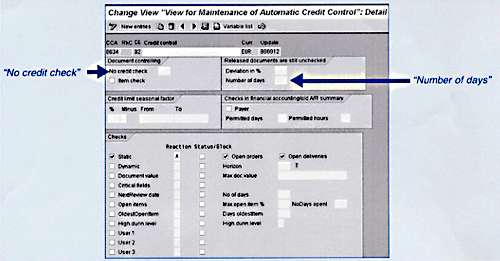
Figure 1
Configuration Table T691F
- "No credit check": This text description is an abbreviation. The "No" actually means "Number." Believe it or not, this text refers to the field that contains the unique identifier for custom ABAP code called a Requirement.1
This ABAP code would, of course, contain your rules for how Automatic Credit Control is supposed to react to end users creating and/or changing sales orders. The R/3 default rules would be ignored.
- "Number of days": What this field is trying to indicate is that whatever value you type in here — including the blank value!!! — becomes the number of days after a blocked sales order has been released. Changes to that sales order can then be saved without a second credit check occurring on the Credit Checking options that your company has activated (in the example shown in Figure 1, only the "Static" checking option is active).2 When your implementation team leaves the field blank, R/3 interprets that blank as a zero! And, as shown in Figure 2, zero days does not mean zero time. It means less than 1 day. The blank value (interpreted as a zero) is added to the sales order’s "Released On" date value (field XVBAK-CMFRE in Figure 2) to yield the "VALID_TO" control value.

Figure 2
Adding the "Zero Days" Setting Value from Table T691F to the Sales Order’s Release Date
-
If this control value, then, is the same day as today (i.e., "GE SY-DATUM" means greater than or equal to the system date of the server), then a second control value called "NO_CHECK" is set to "TRUE" (this will be recorded as merely an "X").
As shown in Figure 3, this becomes important because the "NO_CHECK" control truly means "do not perform a credit check." The presence of the "X" causes the "IF" statement to fail, and therefore the program skips all the follow-on commands, including the command to perform the "Static" credit check.
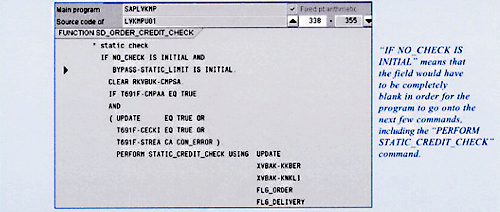
Figure 3
An Active (value ="X") NO_CHECK Control Leading to the "Static" Credit Checking Routine Being Skipped
If you keep in mind the explanations I’ve just offered regarding these two T691F settings, it should now be clear how you can create an "Option D" ABAP remedy, as discussed earlier.
1. First, you have to determine the "double-checking" rules that you want R/3 to enforce.
2. Next, you (or an ABAP person) need to create those rules in the form of a custom Requirement (i.e., ABAP code).
3. Then, you type this Requirement Statement’s identifier into the "No credit check" field of table T691F.
There will be one view of table T691F for each combination of "Risk Category" + "Credit Group" that is in scope at your company. A "Risk Category" value of " " (i.e., blank) is a valid value.
An important note is that your custom ABAP code does not supercede the "Number of days" setting. So, if that setting leads to the NO_CHECK control being set to TRUE (refer to Figure 2), then as shown in Figure 4, the custom ABAP code actually does not even get called.
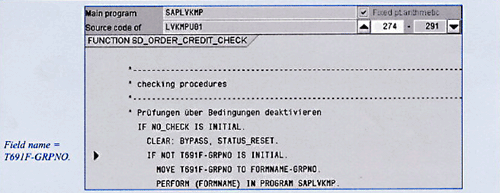
Figure 4
The NO_CHECK Control Taking Precedence over the Custom ABAP Code
Finally, you should note that the "Deviation in %" setting in Table T691F takes precedence over any custom ABAP code. (It is also shown back in Figure 1; and in Figure 2, it shows up as field T691F-CRPRC.)
To demonstrate the importance of this field, let’s say you put the value "15" there. Then, the total dollar value of the sales order can increase by up to 15 percent, and the NO_CHECK control can still be set to TRUE — thus avoiding a second credit check on that sales order. (As you can see in Figure 2, though, the "Number of days" field setting would also still need to be considered.)
In my example, if the total dollar value of the sales order increased by just 12 percent, but the VALID_TO control date was not equal to or greater than the current system date, then the NO_CHECK control would not get set to TRUE, thereby allowing the credit checking process shown in Figure 3 to be called. (Note that at that point, your custom ABAP code would also be read by the programs, and could still possibly prevent the double-checking seen in Figure 4.)
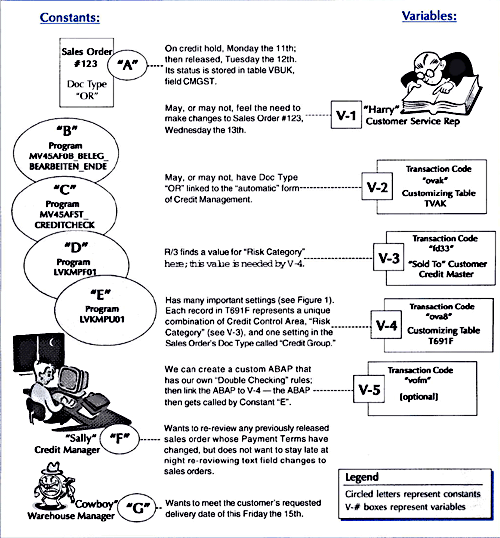
"To Double-Check: Yes/No"? Understanding the Variables and Constants
The Functional Side: The Puzzle Pieces Identified
A Quick Lesson in How the Online Credit Management Is Triggered:
Now that you know about a couple of options for establishing your own "To Double Check: Yes/No" preferences in R/3, it might help for me to quickly list the clever way that the Credit Management sub-module interacts with the Sales Order’s end users. That should help you to understand the sequence in which the various settings are considered.
Active vs. Not Active Rules Depend on the Customer # and the Sales "Order Type"
When it comes to the role that our settings will play, the most important part of R/3 to understand is the fact that the Credit Management module contains more than 10 different kinds of checking rules, any of which may or may not be "on" (i.e., active) for any given combination of Customer + Sales Order "Order Type." Which of the 10+ possible rules are active? This answer depends on the settings that the Accounting Team felt they needed to have in place. Let’s not focus on that, so much. Instead, the key is that if even one of the active rules finds a conflict, then the sales order automatically goes on hold.
As an example of what could be interpreted by R/3 as a conflict, here is a quick explanation for two of these potentially active checking rules:
- Static Check — This is the most simple available checking rule. The total $-value of the sales order being saved is added to the existing total $-value of that customer’s Accounts Receivable balance. The grand total is then compared to a non-moving ("static") $-value that your Credit Managers decided was the maximum exposure allowed for that customer. Anything over that static value will require a Credit Manager’s formal approval.
- Oldest Open Item — If active, this rule does not care about the $-amount of the sales order being saved. Instead, it only cares about that particular customer’s unpaid invoices. It will find the oldest unpaid invoice, and then compare the age of that against the # of days your Credit Managers want to allow for that customer. Anything over that # of days’ target will require a Credit Manager’s formal approval for each and every new sales order, even if the new sales order’s $-amount does not cause the customer’s credit total to exceed the allowed total $-amount exposure.
Our Custom ABAP Goals
Assuming that we decide we need custom ABAP code, our goal is to keep things simple. Rather than ask the ABAP code to figure out which of the 10+ potentially active credit-checking rules are in play for this particular sales order (which our Customer Service Rep is changing), we will simply see what the end user is trying to change. If his or her changes are to one of the fields that we decided is sensitive (e.g., Terms of Payment), then our code allows the normal Credit Checking processing to go forward. But, if his or her changes do not involve any of our sensitive fields, then we use ABAP to set the NO_CHECK 3 control to TRUE, thereby causing the Credit Checking routines to be ignored. That achieves our goal, while also keeping the coding reasonably simple. Your R/3 system most likely comes delivered with a sample. Navigate to transaction code "VOFM," and then choose from the menubar Requirements > Credit Checks to see if one or two examples are there.4
As this article demonstrates, if we sometimes ignore an innocent-sounding field in R/3 customization (such as the "Number of days" field), we can accidentally produce dramatic surprises for the end users (e.g., a previously approved sales order failing to show up on the Credit Manager’s Credit Hold list a second time, despite a financially relevant change to the sales order’s Terms of Payment).
We also saw how the wording of a customization field in R/3 (e.g., the "No credit check" field) can fool us, merely due to the way the words were abbreviated.
What at first glance appears to be a place to prevent all credit checks actually is the field where we can link in our own custom rules regarding when and when not to ask R/3 to run an already-released sales order through the online Credit Management rules a second time.
This option allows us to avoid R/3’s default reaction of sending sales orders to our Credit Manager a second time, merely because a Customer Service Representative needed to change some non-financially relevant text or shipping dates.
4 If not, you can download my sample version at the bottom of this article.
Carla Kieffer
Carla Kieffer is a senior-level independent ABAP consultant with over 5 years of professional SAP consulting experience. She has provided ABAP expertise for clients in many industries, including manufacturing, distribution, oil and gas, hospitality, semiconductor, and government sectors. She has strong cross-functional and technical knowledge in numerous SAP modules, including FI, CO, SD, MM, and PP (versions 3.x to 4.6C). When not working, she can be found traveling or enjoying a good book in her home city of Austin, Texas. For article-related comments or general ABAP inquiries.
You may contact the author at i2c_inc@hotmail.com.
If you have comments about this article or publication, or would like to submit an article idea, please contact the editor.





 Premium