In some companies, a transactional system such as R/3 may no longer be enough to handle all HR reporting needs. Evaluate certain circumstances in which a BW system can more effectively cater to a particular reporting requirement.
Key Concept
To create a comprehensive reporting environment in SAP HR, you need support from your SAP BW environment. If you diligently analyze, design, and build the online transaction processing (OLTP, in this case SAP HR) and online analytical processing (OLAP, in this case SAP BW) systems, they can coexist in harmony. Although the SAP-delivered business content in BW is a good starting point, you may need to build new InfoProviders (objects into which you load data, including InfoCubes and operational data store [ODS] objects) for HR reporting in your BW system. Developing the new InfoProviders requires that you understand several factors: the reporting and drill-down requirements and the nature of data, especially legacy data.
You can develop your HR reporting strategy to take advantage of the strengths of both the online analytical processing (OLAP) SAP BW system and the online transaction processing (OLTP) SAP R/3 or mySAP ERP Central Component (ECC) system. While you can still conduct many HR processes in your R/3 or ECC system, BW, with its standard SAP BW business content for HR, is better suited for many analytical tasks. I’ll give an overview of the factors to consider in selecting a reporting option and show how legacy data migration affects your decision.
Note
This article refers to both SAP HR and BW, including delivered business content in HR and Payroll (PY). I’ll refer to R/3 as the transaction system, although my discussion typically applies to most SAP HR versions (R/3 4.6, 4.7, and ECC). Most BW references apply to BW 3.5. I recommend that you refer to standard SAP BW documentation at help.sap.com (follow the links for SAP NetWeaver>Prior to SAP NetWeaver 2004>SAP Business Info. Warehouse>[language and version]) to understand standard BW concepts such as InfoProviders, InfoCubes, and operational data store (ODS) objects.
OLTP versus OLAP
First, let’s understand how to match typical HR reports to the appropriate environment. Figure 1 presents both the OLTP and OLAP ends of the reporting spectrum from left to right. As reporting needs move from transaction-based reports to reports that summarize executive information or support decisions, the environment shifts from OLTP to OLAP. For example, you can process your payroll with R/3, but you may need BW to create a management cockpit.

Figure 1
As reports grow more complex, you need to rely on OLAP capabilities to a greater extent
Table 1 classifies typical SAP HR reports that you can execute in an OLTP environment. Table 2 maps HR reports that are better suited to an OLAP environment.
| PA |
• Master data changes during a payroll period
• Employees hired/left during a pay period
• Infotype-based reporting to carry out data checks |
| PY |
• Wage Type Reporter
• Payroll journals
• Pay period-based data analysis
• Overtime in a particular pay period |
| BN |
• Current benefit plans enrollment and costs reporting
• Life-event based reporting in current pay period |
|
| Table 1 |
SAP HR reports geared toward an OLTP environment |
| PA |
• Historical reporting of organizational changes
• Reporting consisting of both historical data and transactional data
• Post-merger/acquisition reporting |
| PY |
• Data analysis using Accounts Payable (A/P)
• Vendors and funds from Funds Management
• Last five years of data analysis on earnings and deductions
• Special Purpose Ledger (Release 4.6) document number-based drill-down reporting |
| BN |
• Historical trend analysis on benefits costs and employee enrollment
• Reports combining PA infotypes and benefits deduction wage types |
|
| Table 2 |
SAP HR reports designed for an OLAP environment |
Reporting Period
The reporting period is another factor that contributes to whether you should report from a transactional system or BW system. Each implementation typically has its own written or unwritten policies and rules around data management. In some cases, companies keep all their data in the OLTP processing system, while some move the data into an OLAP system. Therefore, the reporting period varies depending on the movement of data from the two types of systems. If all the data continues to be in the OLTP system, then the hardware sizing and system performance should support the reporting requirements. For instance, if users start running large HR/Payroll reports during normal business hours, then your system needs to handle that. Base your decision of where to store your data on this movement of data and associated dates.
Archiving and Legacy Data
Users often resist moving any data from the OLTP system to the OLAP system. Most companies archive HR data and move it offline after every two or three years or so. The time frame depends on disk space, performance, and reporting requirements. User fears often emerge due to many factors:
- HR data’s date sensitivity and event-driven nature
- Ad-hoc reporting to management and fast turnaround time requirements
- Comfort level with normal HR reporting and query tools such as InfoSet Query and Wage Type Reporter
- Resistance to learn another tool such as Business Explorer (BEx) Analyzer in BW
Consider your HR structures, security, and authorization when deciding what to move to an OLAP system. Organizational factors such as virtual boundaries about sharing data or reporting in particular organizational units can present challenges, especially when running a single instance of SAP HR only. SAP’s enterprise structures and organizational structures affect this issue. Users sometimes become confused about how security and authorization play a role in reporting. For example, when security is divided using personnel areas or subareas, the same boundaries also restrict reporting. Remember that HR structures exist in your OLTP system, while your OLAP system can lack the structures if there is legacy data in the OLAP system. For instance, you can load legacy data in an OLAP system with legacy structures while your OLTP system has the new HR structures. In situations like this, you should ensure that BW security and authorization cater to the legacy structures, too.
Many new SAP users, especially government implementations, want to bring over historical data that is from seven to 10 years old. This creates a challenge for implementation teams, especially around HR structures and reporting that cut across historical and SAP data. Most new users decommission the legacy system, so they want a new home for all legacy data. The legacy HR systems may fall into one of the following categories:
- Legacy HR application functionality that standard SAP HR functionality already fulfills. For example, certain infotypes in SAP already store this data, such as infotype 0105 for email addresses.
- Legacy HR application functionality that the implementation team identified as a gap during a gap analysis. You might create custom infotypes to bridge the gaps.
- Legacy HR application functionality when you no longer require the old functionality, but just the data
HR enterprise structures can be a very important factor in the nature of reporting and data analysis. For more information about structures, refer to my HR Expert article “Design Dynamic SAP HR Structures — and Diagnose and Repair Faulty Ones” from October 2006. Later, I’ll discuss adding HR structure elements such as personnel areas to BW InfoProviders. Some objects, such as the Benefits InfoProvider, contain none of the fields related to enterprise structures. While you can analyze a BN area, you cannot create a report based on personnel area or subarea.
How to Decide Between OLTP and OLAP
It’s easy to decide whether to use R/3 or BW if the report falls clearly into an OLTP or OLAP category. What about reports that fall somewhere in the middle? You can use the decision tree in Figure 2 to guide you. You can come up with your own decision tree similar to Figure 2 with decision criteria that are right for your organization.
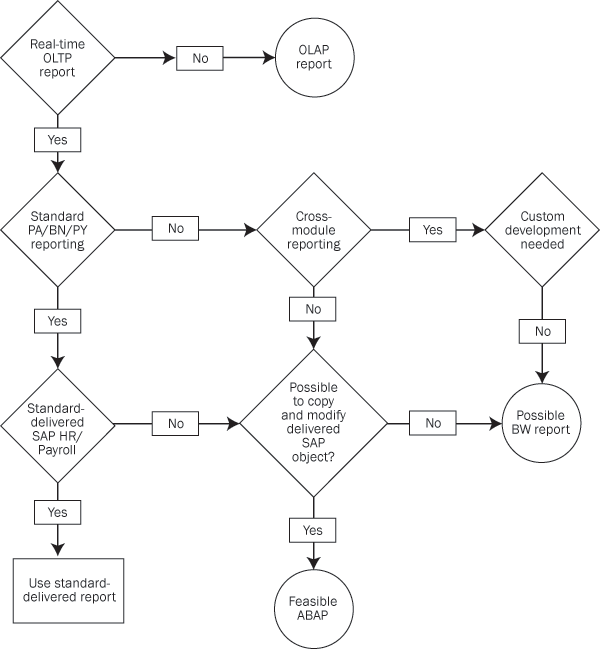
Figure 2
OLTP or OLAP decision tree
When to Report in OLTP
You should report in your transactional system in many routine situations. For example, if you have no legacy or historical data challenges, then R/3 should do the trick. In addition, smaller implementations that can afford to keep transactional data online for longer periods should take advantage of this data and create R/3 reports.
Similarly, R/3 reports work well when dealing with fewer users with an insignificant gap between the typical three types of users. These are occasional users who are functional analysts or management; data analysis users such as OLAP analysts or institutional researchers; and report creators and authors including administrators and HRIS staff. However, if a large knowledge gap exists among these three types of users, then you may require more than R/3.
Additionally, users can generate many different standard and custom reports with Wage Type Reporter, payroll journals, HIS, compliance reports, and InfoSet Query in R/3. I’ll explore each type of functionality in more detail.
Wage Type Reporter
Wage Type Reporter (H99CWTR0) is part of the standard R/3 system. It’s a good tool when you want to analyze payroll results in a single pay period without complex retroactive accounting. Users commonly complain that Wage Type Reporter output becomes difficult to interpret for retroactive accounting. Some of the users resort to payroll journals in that situation, but are not completely satisfied.
Remember that you cannot go beyond the payroll results that you have in your R/3 system. You can select multiple wage types and then download the report in Microsoft Excel or Access to perform deeper data analysis. Payroll departments are often concerned about such data downloads due to sensitivity of the data. On one hand, they face a challenge of not having a good reporting tool, while on another, they do not want users to download and manipulate the data in Microsoft Excel or Access. Starting with R/3 4.7 as well as specific Support Packages in Version 4.6, the Wage Type Reporter selection screen contains more period selection fields to help you compare two periods.
Payroll Journals
Like Wage Type Reporter, payroll journals provide payroll results analysis using R/3 payroll data. They have similar limitations as Wage Type Reporter for payroll periods, retroactivity, and combining PA data with payroll results. Unlike the ABAP program Wage Type Reporter, payroll journals are easy to customize because of HR Forms. The customization of these forms is almost inevitable since the SAP-delivered forms such as UJS1 and UJD1 are not useable in their delivered state. Figure 3 presents the standard forms for payroll journals. The figure also shows you that the payroll journals use a set of four forms for heading, details, totals, and continuation. When you are customizing the forms, you almost have to balance the four forms together. The customization process becomes iterative and time consuming as well.
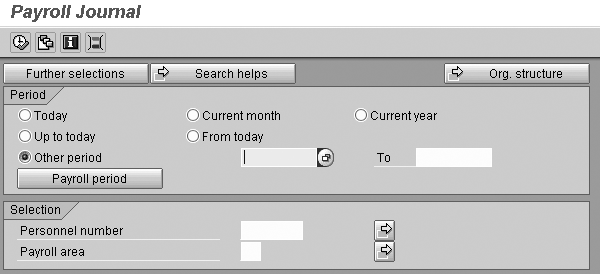
Figure 3
Payroll journals offer customizable payroll results analysis
HIS Reports
Some HR users ignore or do not take full advantage of the HIS reporting tool. HIS allows you to combine the structures from Organizational Management (OM) with reports from other modules, such as PA and BN. This allows you to run reports at the organizational unit level using data from PA or BN. The graphical user interface (GUI) makes it more user friendly. Figure 4 shows the graphical organizational units on the left side of the screen and the PA reports on the right side.
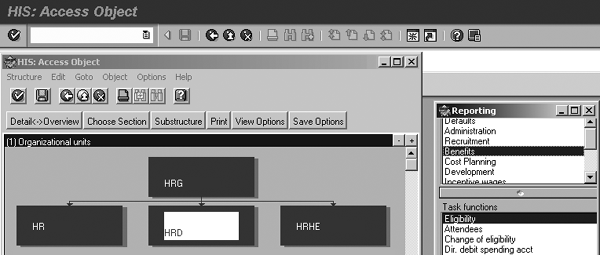
Figure 4
HIS reports combine data from OM, PA, or BN
Compliance Reports
Your SAP transactional system remains the best place to generate compliance reports. You can use R/3 to generate most standard compliance reports, such as US Equal Employment Opportunity (EEO), affirmative action program (AAP), garnishment letters, and Tax Reporter State Unemployment Insurance (SUI) and 941 reports.
InfoSet Query
As Figure 5 shows, InfoSet Query allows you to select infotypes and create a formatted report. Users often find it difficult to access payroll data in InfoSet Query. You can use PY infotype 04xx series (0402, 0403, 0447, 0497) to load data in infotypes and then use them through InfoSet queries. The IMG contains nodes for setting up these infotypes. You also need to consider disk space and system performance.
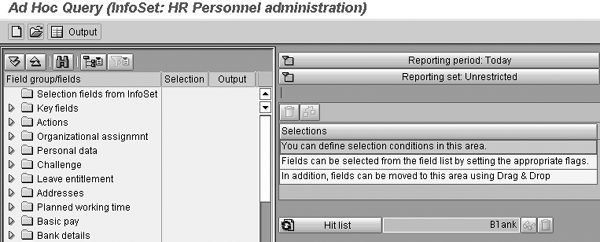
Figure 5
InfoSet Query creates formatted reports based on infotypes
When to Report in BW
In many complex situations, users struggle to create R/3 reports. In such cases, BW is a better choice. Let’s examine some of the scenarios for reports that you can create in BW.
Scenario 1: Standard Reports
SAP BW is delivered with business content (pre-configured objects) that includes the InfoProviders for various HR submodules. Users can create queries using the delivered business content if the delivered ODS object or InfoCube has the required data elements. For instance, the delivered Benefits InfoCube allows you to create a query for employees in a particular plan with deduction amounts.
Scenario 2: Custom Development
In this scenario, you either modify the delivered business content (copy the objects and change them) or create completely new InfoProviders. In BW, you can create a report that combines legacy data and SAP data after go-live. For example, BW can combine PA infotypes (data that is not in payroll cluster tables like WPBP) with payroll results for reporting. HR professionals in the public sector can use BW to read payroll results and detour reports to Funds Management (PSM-FM) to drill down.
In addition, BW can report training costs based on business event attendance by employee and the actual payroll costs spent during the training. BW also can create a summary report of labor cost distribution without the capability to drill down to employee payroll results. BW also performs trend analysis and graphical representation of HR data with drill-down capability using historical data.
These and other similar reports require complex custom development in SAP R/3, so BW may be more logical in these scenarios. In addition, you might choose BW when you face some of the common challenges in SAP HR application custom development listed here. For instance, if you lack skilled resources familiar with different SAP HR environments, then BW might be your best bet. Since SAP PA, OM, BN, and PY modules require deeper internal knowledge — for example, of logical databases and cluster tables — you may not be able to get resources with skills in all or many of these areas.
It may seem as if SAP BW is a magic wand. Unfortunately, that is far from the truth. The HR-BW implementation has its own pain points too. Here are the major points to consider:
- Designing the new InfoProviders is tricky! Besides functional HR knowledge, you need to bring data modeling expertise to the table. It is my experience that creating ODS objects is easier than InfoCubes, relatively speaking.
- If you are creating new InfoProviders or if SAP-delivered data extractors (to extract data from R/3 to send to BW) are not sufficient to extract data, then you need technical resources to develop the new extractors. Additionally, designing new queries using BEx Query Designer presents challenges. Users can create inefficient queries and degrade BW performance.
- In many cases, HR InfoProviders have no delta functionality, which is an incremental data load that brings changes only. If you load the data up to 12/31/2006 and again on 01/31/2007, then BW only loads the delta between 12/31/2006 to 01/31/2007 when you run data extracts. However, BW lacks the delta for many HR InfoProviders, which demands that BW execute a full load every time. It results in long load times and drains system resources.
- Turning on standard business content also requires time and resources. Activating business content takes a little longer than you may imagine. It is a good idea to use business content to prototype or pilot the work before you embark on a big custom development in BW for HR.
- Most InfoSet Query reports are based on infotypes. If this limits your reporting ability, then you may need to turn to BW. If you rely too heavily on your ABAP team for custom development, then you may find a better solution in BW. For example, PY, PSM-FM, and labor cost reporting may be easier in BW.
Create a reporting blueprint/design document around HR and payroll reporting could help you make important decisions regarding OLTP and OLAP areas. Also, the blueprint helps you to decide whether to use standard business content in BW for HR, and if so how much.
Note
Satish Badgi will present a session at HR 2007 from March 12 to 14 in Las Vegas called “What you need to know to create SAP HR structures properly and repair faulty designs.” For more information about HR 2007, visit
www.saphr2007.com. SAP BW HR Business Content
BW 3.0 and 3.5 contain standard HR business content, much of which is useful for HR reporting work. Figure 6 shows the InfoProviders from delivered HR business content. My discussion focuses on PA, BN, and PY.

Figure 6
Delivered HR InfoProviders in BW business content
Table 3 lists the InfoProviders from business content and rates their overall usability. In some cases, you may need to address your reporting needs using custom InfoProviders.
| PA |
• 0PA_C01 Headcount and Personnel Actions (InfoCube)
• 0PA_C02 Headcount (InfoCube)
• 0PA_DS04 Education (ODS) |
• Summarized picture. These InfoCubes typically are not helpful in finding infotype data changes or analysis around personnel actions.
• Education ODS does not serve much strategic value for reporting. |
| BN |
• 0PABN_C01 Benefits (InfoCube) |
• Summarized picture. These InfoCubes typically are not helpful in finding infotype data changes or analysis around personnel actions.
• Education ODS does not serve much strategic value for reporting. |
| PY |
• 0PY_C02 Payroll Data (InfoCube)
• 0PY_PP2 Posting (InfoCube)
• 0PY_PPC01 Auditing for Personnel Cost Planning
(InfoCube)
• 0PY_PPC02 Auditing for position control (InfoCube)
• 0PY_PP_C2 Posting Documents (ODS)
• 0PY_PP_C1 Auditing Information (ODS)
• 0PY_PP_C3 Auditing and posting combined (ODS) |
• Good and useful InfoProvider that fulfills most of the benefits-related reporting and data needs. Requires some customization of key figures.
• The InfoProvider does not have any of the fields related to enterprise structure. For example, you can analyze a benefits area, but you cannot report based on personnel area or subarea. |
| Personnel Time Management (PT) |
• 0PT_C01 Time data (InfoCube)
• 0PY_MC02 Time and Payroll (MultiCube) |
• Time and Payroll MultiCube is useful to report across both modules. |
|
| Table 3 |
Standard business content for HR in BW |
BW Customization Tips
Using BW to report on your PA and employee demographics areas often requires custom development of InfoProviders. Let me share some of my experiences around building these InfoProviders and queries.
Benefits InfoProvider (InfoCube)
The Benefits InfoCube 0PABN_C01 contains all of the required characteristics and key figures, so it is useful for benefits reporting. BN infotypes feed the key figures in this InfoCube as shown in Figure 7. I ran into one problem with this InfoCube when I wanted to take actual payroll deductions for benefits and combine that with plan data from characteristics of 0PABN_C01. For instance, the normal benefits deduction for an employee from infotype 0167 shows $35.65; however, the employee’s deduction has gone in arrears during that pay period. How do you create the report that shows the actual deduction in that month was not $35.65? In a scenario like this, you either need to resort to Payroll InfoProviders or modify the delivered Benefits InfoProvider to load the payroll deductions in key figures so the report can retrieve actual deduction amounts.
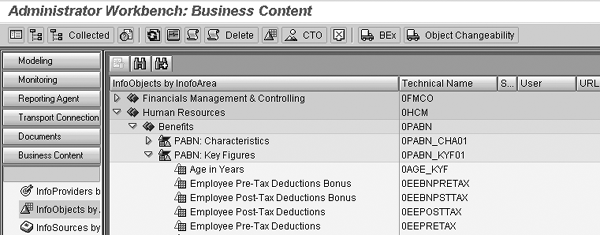
Figure 7
BN key figures
Legacy Data ODS
You should carefully plan your HR BW strategy regarding legacy data conversion. I recommend that you create an ODS object for such legacy data storage so you don’t need to worry about modeling InfoCube dimensions or creating complex validation rules. You can avoid legacy HR structure problems by dumping your legacy data into a custom ODS object. You may need many ODS objects: typically, one each for employee demographic data, payroll data, and benefits. Try to align this development with the post-go-live BW storage. For example, if you have the InfoCube 0PABN_C01 (Benefits), you may want a Benefits ODS object for legacy data. Do not forget the goal of easy reporting that combines legacy and SAP data. If you decide to create custom ODS objects, then name them the way you do in SAP R/3 with Z (e.g., ZPY_C01).
Jump Queries Between Legacy ODS and Current Data
Plan to build custom jump queries. As the name suggests, jump queries allow you to jump from one query to another. You create jump queries as you would any normal query, the difference being that one query calls another query. They may help your reporting by using both legacy ODS and post-go-live data.
Build Infotype-Based ODS Objects
To overcome the disadvantages of delivered PA business content, build ODS objects based on infotypes. Most HR users need detailed demographic reporting around infotypes and hence need an ODS object form of data. The Headcount InfoCube 0PA_C02 is not able to keep up with these challenges. Many times, users go to InfoSet queries or transaction SE16 to get data from individual infotype tables (that begin with the prefix PA) and then they use Excel or Access to perform analysis. Using that as a clue, you might create separate ODS objects for master data by module (PA, PY, BN, and PT).
Payroll
Payroll data InfoCubes and ODS objects are useful except for the time characteristics and key figures. The delivered PY InfoProviders summarize data on a monthly time line. Instead, users want the time line equal to payroll period. I recommend that you copy and modify the delivered InfoProviders to change the time characteristics.
Build MultiProviders
In government agencies or in commercial environments where different personnel areas need autonomy of data and ownership, MultiProviders can address many HR reporting challenges. Through customization, you can create ODS objects or InfoCubes for each personnel area or company code. This setup means that each company or personnel area can run its queries and the security and authorizations pertain to their individual InfoProviders. Your central office or headquarters can run a query from a MultiProvider and still report across all individual InfoProviders. Figure 8 shows a standard way in SAP BW to link multiple InfoProviders to create a MultiProvider. I linked my custom ODS objects and created a MultiProvider with all the necessary HR data.
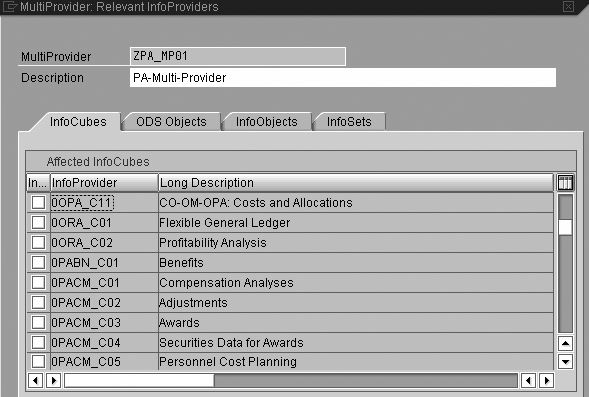
Figure 8
Create a MultiProvider by linking multiple InfoProviders
InfoSpokes
InfoSpokes are another great feature in BW. InfoSpokes are easy to create and assist users in downloading data. Earlier, I mentioned that users resort to SE16 and other download tools. InfoSpokes can assist such users in downloading data from HR InfoProviders. From Administrator Workbench (transaction RSA1), access an InfoSpoke via menu path Tools>Open Hub Service>Edit InfoSpoke. Figure 9 shows how to create an InfoSpoke using an InfoProvider — a simple process.
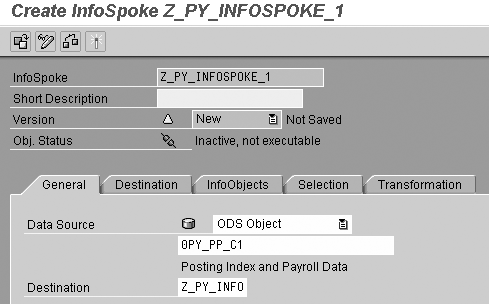
Figure 9
Create InfoSpokes from HR InfoProviders
Satish Badgi
Satish Badgi has been helping clients implement SAP ERP HCM and payroll for more than 15 years. He has been involved with large full-scale SAP ERP HCM and payroll implementations using the breadth and depth of SAP modules. Satish works for a large management and systems integration consulting firm and handles global payroll for clients. He has published two books on SAP payroll, Configuring US Benefits with SAP and Practical SAP US Payroll.
You may contact the author at sbadgi@comcast.net.
If you have comments about this article or publication, or would like to submit an article idea, please contact the editor.




 Premium