Discover how new technologies such as mobile and wearable devices, combined with business-critical data, contribute to process optimization. Learn how SAP Gateway enables secure connectivity of external systems and devices using an example from SAP Supply Chain Management (SCM) and SAP extended Warehouse Management (SAP EWM).
Key Concept
The introduction of an open and standardized Representational State Transfer (REST)-based communication protocol (OData) enables companies to combine various user interface technologies such as Microsoft Office or mobile devices in a secure way to SAP systems. OData — which is standardized by OASIS — is optimized for user-centric interaction and supported by various major software companies, including Microsoft, IBM, and SAP.
The supply chain process typically involves many groups of employees who contribute in various ways or roles, from power users working nearly all the time on planning to external contractors driving a truck and interacting very occasionally with the supply chain software.
These complex end-to-end processes add value only when the involved users reliably interact with the software. Especially — but definitely not only — for the more occasional users, an intuitive user interface embedded in the users’ day-to-day work environment has always been a requirement to increase acceptance and reduce training costs. This applies in particular to:
- Mobile scenarios in which the access to the SAP system has to happen via the mobile device of choice
- Users who work more in, for example, Microsoft Office or Microsoft SharePoint
- Use of state-of-the-art HTML5 technologies
For many years, SAP has offered tools for these requirements (Figure 1).

Figure 1
Point-to-point connections increase the development and maintenance costs
However, often an advanced level of expertise in SAP proprietary technologies was required. In addition, those integrations were developed mostly individually with different types of error logs coming from different integration technologies. This increased the complexity of operation and maintenance. All this together limited the choice of available programmers or architects and led to increased risk and costs. To overcome this situation, SAP decided to move to open standards for more and more solutions as an enabling technology between the back end and front end (Figure 2). Now, a single integration technology for user-centric scenarios provides a single entry point for maintenance and operation.
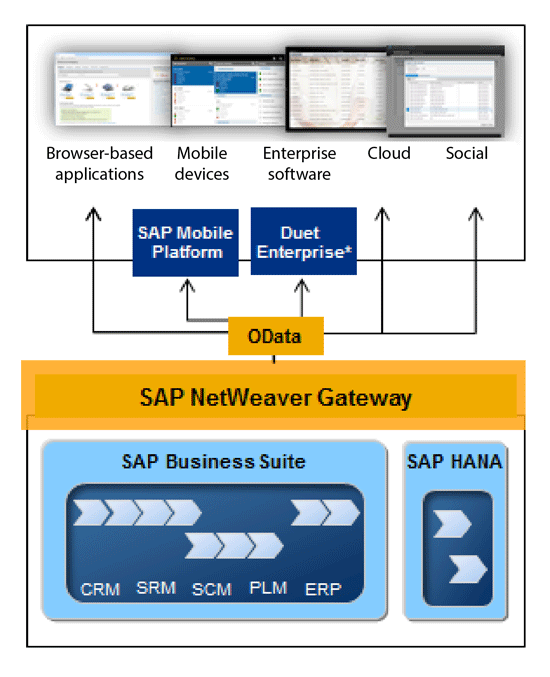
Figure 2
OData as the new data exchange standard between front ends and back ends
OData
I explain SAP Gateway technology using the example of SAP Extended Warehouse Management (EWM). The SAP Gateway add-on to the SAP Business Suite is ABAP based. It adds the capability to communicate in Representational State Transfer (REST)-based principles to existing ABAP-based products down to SAP NetWeaver releases of 7.0. The REST syntax used here is OData. OData is an open protocol that simplifies the communication between front ends and back ends across different vendors. You can access it via the http-based XML/Atom or JavaScript Object Notation (JSON).
OData fulfills these requirements:
- Follows the de facto standard for front-end and back-end communication via REST
- Provides query language support — comparable to the Open Database Connectivity (ODBC) for the Web
- Supports navigation between different entities
- Is based on open standards such as HTTP, XML, Atom, JSON
SAP Gateway
Especially in mobile scenarios — but also for desktop-based scenarios — low bandwidth and fast server response times are key requirements. Real-life scenarios at companies using SAP systems often vary (especially looking at mobile and innovative scenarios). A service tailored to the required scenario is key for the performance and scalability of the solution. Therefore, SAP made the decision not to deliver out-of-the box content, but rather to support the process of developing customer-specific services. To allow this support, SAP Gateway offers the Gateway Service Builder transaction for creating an optimized service for each use case.
Push notifications, offline support, Single Sign-On (SSO) support based on the widely used security frameworks such as X.509, SAML, or OAuth, workflow support, and many other features are available. Capabilities for monitoring and tracing plus the integration with SAP Solution Manager allow its use in large-scale environments.
SAP Extended Warehouse Management with Augmented Reality
To illustrate the new possibilities better, I list the required steps for creating a customer-specific solution for any Android-based Augmented Reality solution such as Google Glass or from other providers such as Vuzix.
I provide a high-level introduction to the topic. A real customer or partner implementation of such an end-to-end scenario would require additional effort. I cover only the major building blocks, including REST-enablement of the EWM system and the connectivity toward the Android-based device.
Google Glass and other comparable solutions of “wearables” provide the computing power of a smart phone directly inside a personal device such as glasses. Brought into a pair of glasses, the display can directly be used to interact with the smart phone. A similar approach would be the interactive functionality embedded into a watch. This type of product is summarized by the term wearable computers. Such a solution would help the warehouse worker to receive the required information, send confirmations, or provide feedback and still be hands-free. Figure 3 shows an example of a picker who can see both the normal work environment as would happen with any pair of glasses plus the additional information added to the upper right side — without disturbing the normal view.
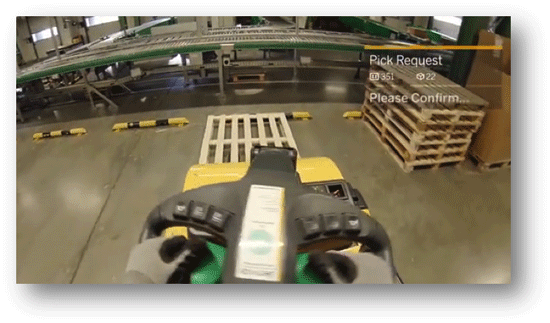
Figure 3
How the pick request is displayed
To introduce this solution, a company typically holds a workshop with all involved parties (key users, IT, front-end developers, and ABAP developers) as displayed in Figure 4.
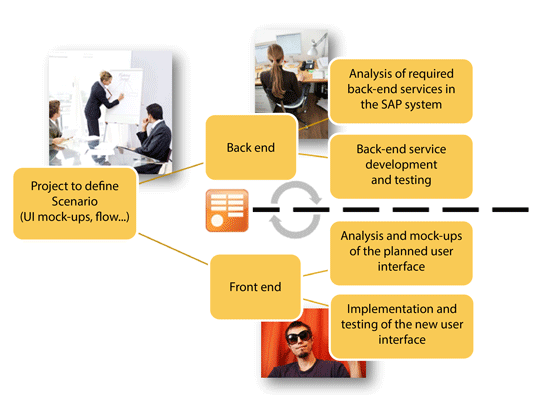
Figure 4
Overview of flow and involved parties during the development project
The outcome of this workshop is a sketch of the scenario that includes a rough description of roles, process flow, and user interfaces. The technical teams then derive requirements both for the SAP Basis team, which is responsible for the back-end systems provided by SAP, and the front-end team, which is responsible for the development of the user interfaces. The handshake between these two teams is the description of the OData service, as this OData service can be understood both in the front-end application and in the SAP back end via SAP Gateway.
Now I describe the steps on the back end (SAP Gateway) and the front end (e.g., Google Glass).
Create an OData Service
The installation of the ABAP add-on SAP Gateway provides a new tool that serves as the central workbench for all OData service-development related activities — the SAP Gateway Service Builder (Service Builder) shown in Figure 5. The tree view on the left side provides an overview of the details of the OData service. The mass maintenance view is in the middle and the message pane is below it.
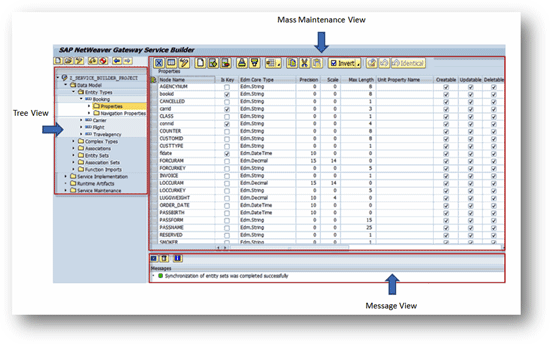
Figure 5
Overview of the SAP Gateway Service Builder
This tool is used for defining, implementing, and extending the service. Service activation, error logs, the ABAP editor, and other helpful functionality can be launched from here.
You can import the XML representation of the previously defined OData model (EDMX File) to the Service Builder simply via the context menu inside the Service Builder. In the next step, you add the required interfaces to connect the OData service to the underlying SAP logic. Figure 6 displays all the possible options for mapping the business logic to the OData service with references to the Business Object Layer (BOL), the Generic Interaction Layer (GenIL), the Semantic Application Design Language (SADL), and the Entity Data Model XML (EDMX).
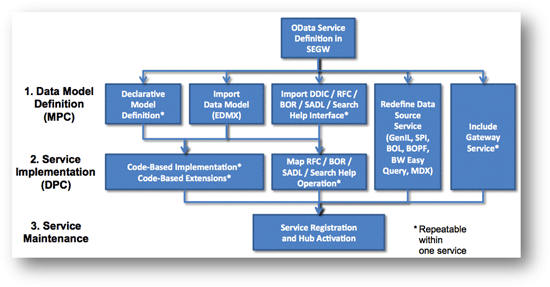
Figure 6
Overview of potential development options supported by SAP Gateway
Depending of the availability of the back-end services, several options for the creation of the required OData services are available:
- Manual coding by redefining in the class builder transaction of the ABAP OO methods for creating, updating, or deleting. SAP Gateway provides the interfaces.
- Code-free mapping of a Remote Function Call (RFC) or Business Object Repository (BOR) function modules with the OData service
- Code-free redefinition of existing SAP internal data sources (BOPF, SPI, MDX, Easy Query, GenIL/BOL)
- Code-free redefinition of existing OData service from inside or outside the SAP system. Note that this option is out of the scope of this article as it is not relevant in this scenario. No service is available for redefinition from a standard delivery of SAP such as SAP Fiori.
Manual Coding (Option 1)
If no RFC module is available, then the service has to be developed manually (code-based implementation). In this case you have to redefine the required methods of the two super-classes — /IWBEP/CL_MGW_ABS_MODEL and /IWBEP/CL_MGW_ABS_DATA. The class /IWBEP/CL_MGW_ABS_MODEL defines the attributes of the OData service. In the class /IWBEP/CL_MGW_ABS_DATA all the REST-syntax (create, update, …) is implemented.
That is all that is required. In a real project, typically most of the effort is spent here. Identifying the right RFCs and implementing all the required details such as performing queries or mass-data handling via batch calls can take some time.
Mapping from an OData Service to an RFC Function Module (Option 2)
The OData Service supports creating, deleting, and reading an item, as well as querying and updating data. If an RFC-module is available with the corresponding attributes, then for each of these possibilities, a mapping between the right SAP function module and the attributes of the OData Server has to be done via drag and drop in the Service Builder as shown in Figure 7. Here an attribute from the RFC function module on the right side is related to an attribute of the OData service coming from the left side by drag and drop.
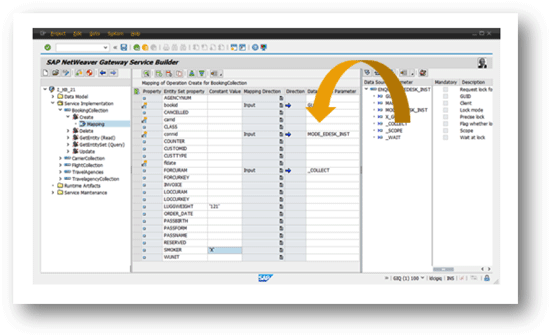
Figure 7
Mapping the OData Service definition to an RFC-enabled function module
Code-Free Generation Based on an BOPF Service (Option 3)
Many parts of EWM are based on the SAP internal Business Object Processing Framework (BOPF) that represents the various business objects. As the BOPF already supports the generation of an OData Service, this can easily be supported by a generator or assistant, which is part of the Gateway Service Builder. Figure 8 displays the assistant. This assistant asks for the name of the BOPF Service, the attributes, the relations, and the name of the resulting ABAP class. As an outcome, several classes are generated, handling the mapping between OData and BOPF. In addition, the system automatically creates all the required classes for enhancing the generated coding.
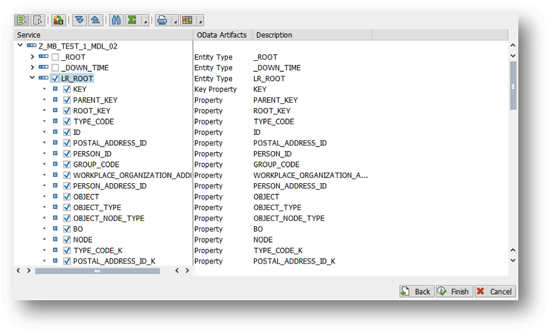
Figure 8
BOPF Generator — Wizard
Publishing the Newly Defined OData Service
Once the services are available, several options for publishing them are possible:
- Via an ABAP-based SAP Gateway Server that can be deployed either on your own server or on top of the SAP Business Suite system
- Via the SAP HANA Cloud-based HCI OData Provisioning (trial version only). This allows an easier sharing of the content, especially with external partners.
- Via the SAP Mobile Platform 3.0. This option makes sense for mobile scenarios. For example, this option adds device-specific push notification support that can be used for newly arriving workflow items.
The next step is the creation of the specific application for Google Glass that connects the device to the back end.
Connecting the Device to the SAP Back End
The communication between a device and the back end is dramatically simplified via the OData protocol, as every involved party knows exactly what to expect. This is an advantage of using open standards such as JSON and OData. Still, some aspects, including Single Sign-On, require additional attention.
Google Glass — which is not yet publicly available around the globe, but only for a restricted testing group — is running on Android. Google is already providing a preview of the Developer Kit for Eclipse here:
https://developers.google.com/glass/develop/gdk/index
The Gateway Productivity Accelerator (GWPA) is an add-on for the OpenSource-based Eclipse development environment. This is a free and very common tool to program any type of user interface (www.eclipse.org). It helps the front-end developer with the integration to the SAP back-end system. It uses OData by taking over manual steps. GWPA provides support for Java, HTML5, iOS, Android, and PHP. Figure 9 shows the choices available inside GWPA. As an example, using an Android-based device, I am using the Android Toolkit from GWPA.
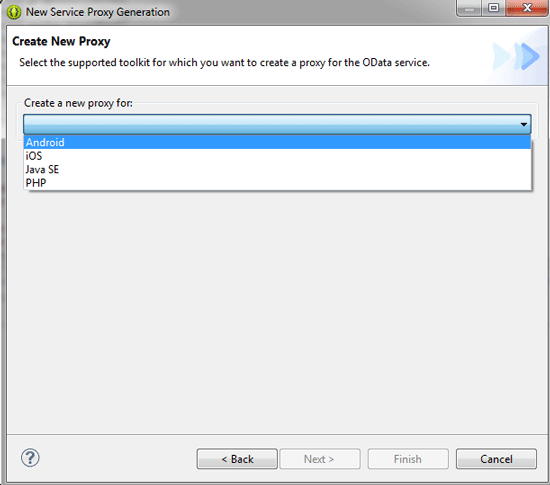
Figure 9
A proxy generator for Android
In GWPA it is possible to either generate a basic application for an Android application or to generate a simple list/detail application. The list/detail application shows a list of entries in an initial screen (such as a list of orders or a list of addresses). The next screen shows the details for a selected item. This list/detail application is based on the Android proxy objects that the wizard also could generate in the Basic Application Option, but it is enhanced with the simple list/detail user interface. This is often used in early demos to visualize a newly created OData Service.
The proxy classes generated by the Basic Application Option take over the communication between the SAP back end and the Android application. They provide the required security support (authentication and security tokens). In addition, the proxies allow an easy switch between connectivity toward SAP Gateway directly or toward an SAP Mobile Platform (SMP). GWPA connects to the SAP Gateway system and displays the list of available services from the catalog service (Figure 10). The developer can easily examine the details of the OData service. By pointing the wizard to the service that was just created, the tool can create the required source code, which then serves as a connectivity basis from the application.
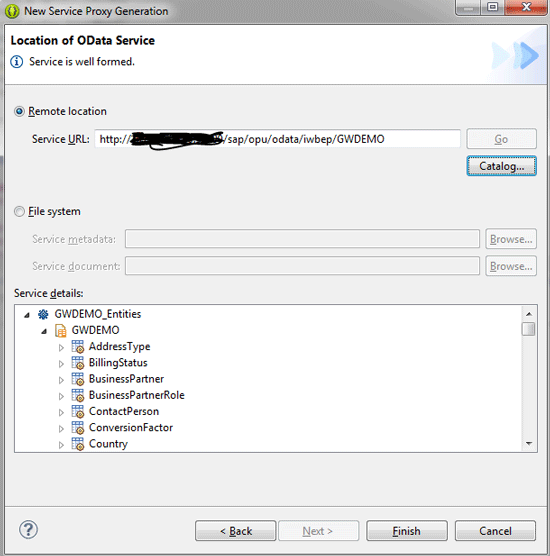
Figure 10
Select the right service
The last step is to develop the Google Glass application itself. As all the SAP-related information for create, delete, query, update, or display is already available in the proxy objects generated earlier by GWPA, the Android developer can fully concentrate on the job and can stay inside the development paradigm for Google Glass.
This step requires much specific analysis and detailed knowledge of the user-interaction paradigm of an augmented reality device such as Google Glass. Only the aspects of the undertaking that are related to the connectivity to the SAP-based back-end system are now covered.
Examples of OData and SAP NetWeaver Gateway Being Used with SAP SCM
SAP NetWeaver Gateway and the OData format are already being used at SAP in various scenarios to connect any type of front end to the SAP SCM back end. Here some examples:
- SAP Productivity Apps: native mobile applications
- Interoperability between Microsoft (Excel, SharePoint, Outlook) and SAP systems
- SAP Fiori: HTML5-based user interfaces
- SAP Lumira: analytical front end and cloud-based application
- SAP Mobile Platform: Mobile middleware serving as a basis for mobile applications
In all these scenarios, the communication between the front end (such as Microsoft Office, HTML5, and mobile apps) and the SAP SCM systems are happening via SAP NetWeaver Gateway and are based on OData. Following are six other SCM solutions that are already using SAP NetWeaver Gateway to provide improved usability.
1. SAP Demand Signal Management
This solution runs on SAP HANA and helps collect and analyze data coming from various sources such as points of sales shipments, or transactions arriving in high quantity. To provide an alternative user interface (such as mobile access, Microsoft Office, or HTML5), OData Services are required. As this solution is built using an SAP internal framework that represents the individual objects called Service Provider Infrastructure (SPI), the required Gateway services could be generated fairly easily. The strength of the OData protocol is the query syntax, which is useful for displaying the analytical data coming from the SAP HANA database. In case partners or customers also want to create their own OData services, then the procedure to generate the OData Services based on SPI objects is described in this blog: https://scn.sap.com/community/netweaver-gateway/blog/2012/11/27/how-to-create-sap-netweaver-gateway-service-for-spi
2. SAP Transportation Management (TM)
SAP NetWeaver Gateway is being used in various scenarios inside the SAP TM solution (Figure 11). Examples are several mobile apps, the HTML5-based SAP TM collaboration portal, and new simplified and role-specific HTML5-based user interfaces which are part of the SAP Fiori user interface enhancement package. The mobile app SAP Transport Notification and Status helps to communicate events and exceptions that can occur during transport.
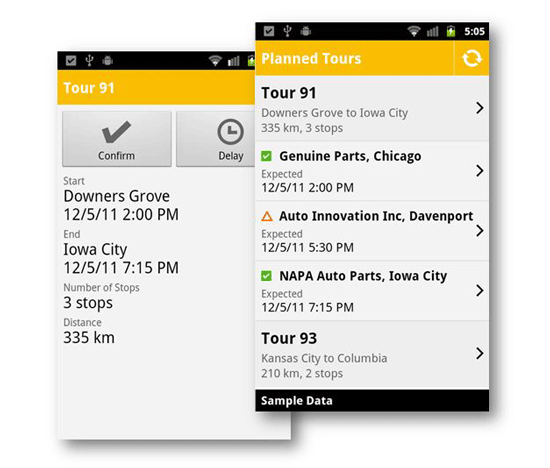
Figure 11
An example of a mobile application in SAP TM using SAP NetWeaver Gateway
The mobile application SAP Transport Tendering enables a carrier such as a trucking company to receive requests for a quotation (RFQ) for a potential freight delivery. Carriers can accept RFQs directly, reject them for a specific reason, or accept them with changes.
The SAP TM collaboration portal, which was introduced with SAP TM 9.1, provides an HTML5/SAP UI5-based user interface for carriers in the area of tendering (Figure 12). All required steps for a carrier are available via the new portal, including viewing of requests for quotations (RFQs), overview on status of quotations, accepting RFQs, rejecting RFQs, or accepting RFQs with changes.
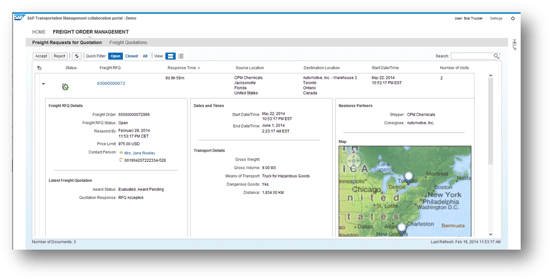
Figure 12
SAP TM Collaboration portal — an external facing B2B portal
A better insight into relevant key figures of transportation management is provided by several SAP Fiori applications that bring together analytical data from SAP HANA and data coming from the SAP SCM system by using SAP NetWeaver Gateway.
The current feature set is Forwarding Orders, Transportation Cost, Transportation Revenue, and Transportation Profit. Internally SAP TM is based on BOPF. For this BOPF there is also generic integration to SAP NetWeaver Gateway.
Regarding SAP TM, SAP was an early adopter of the Gateway technology. At the time of the creation of most of the OData services, the Gateway-BOPF integration was not yet available. Therefore, most of the OData services were created manually by redefining the Gateway interfaces in the ABAP Class Builder or by using the Gateway Service Builder. However, in more up-to-date systems, projects or solutions can use the Gateway-BOPF integration to simplify the required effort for OData service generation.
3. SAP Advanced Planning and Optimization (APO)
Similar to the SAP Fiori-related activities in SAP TM, you can also find several SAP Fiori applications for the SAP Supply Chain Info Center. The SAP Supply Chain Info Center offers operational reporting functionality, allowing companies near real-time access to supply chain planning data from SAP APO.
The SAP Supply Chain Info Center leverages SAP Fiori to offer small applications that are tailored to specific use cases based on best practices for operational reporting on SAP APO. SAP Fiori offers fast track and nondisruptive simplification of power users’ lives for supply chain planning analytics.
The analytical applications support or are planned to support the demand and supply planner role as well as the order fulfillment analyst role. Typical analytical activities such as monitoring relevant key performance indicators or status (e.g., supply shortage, projected service level,), navigating to the list of top issues, or performing a close to real-time analysis of supply chain planning data are supported (Figure 13).

Figure 13
SAP Fiori application Supply Shortage (Supply Planner)
4. SAP Supply Network Collaboration
To provide the supplier with an overview on the order-related tasks, a new home page (user interface [UI] add-on for purchase order collaboration) was introduced based on HTML5, SAP UI5, and SAP NetWeaver Gateway (Figure 14). With this technology, now the casual end user receives a better overview on the ongoing activities via a user interface and the onboarding of new suppliers is made easier by less need for training.
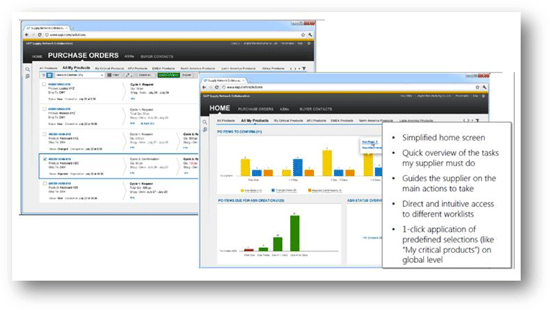
Figure 14
An example of simplified supplier home screen
In addition to the new supplier home page, SAP Fiori applications were introduced to confirm purchase orders and to display confirmed purchase orders (Figure 15).
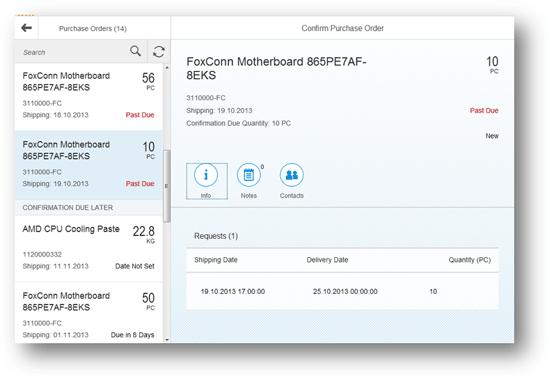
Figure 15
Confirming purchase orders via a SAP Fiori-based user interface
5. SAP Event Management
SAP Event Management provides the functionality to have the information about delays or average delivery times available (Figure 16). Analytical applications are available for end users. In various tiles, information about delayed deliveries, average delay time, average cycle time of deliveries, or compliance reporting is provided.
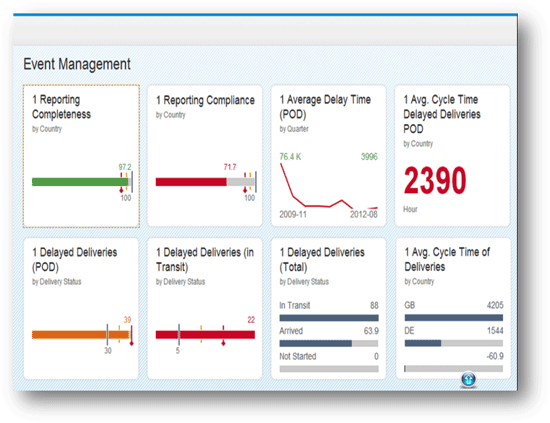
Figure 16
An example of an analytical application for SAP Event Management
6. SAP Business Warehouse
Inside SAP NetWeaver Business Warehouse, a wide range of analytical content for SAP SCM is already available. Examples are event management, inventory management, planning, sales and operations planning, service parts logistics, or order fulfilment. SAP NetWeaver Gateway provides a generator to transform Easy Query and MDX-based content into OData Services. Like the BOPF generator that I described earlier, an assistant guides the OData Service developer to easily generate the required service.
By using the generic framework SAP NetWeaver Gateway, the SAP SCM Suite now offers a variety of new and attractive user interfaces out-of-the-box with the aim to better support individual roles, mobile scenarios, or completely new scenarios.
Links
For more information refer to the following resources:
SAP NetWeaver Gateway on SAP Community Network: https://scn.sap.com/community/netweaver-gateway
SAP Homepage: https://www.sap.com/pc/tech/business-process-management/software/connectivity-framework/index.html
Self-Paced Learning: https://wiki.sdn.sap.com/wiki/display/EmTech/SAP+NetWeaver+Gateway+Self-Paced+Learning
YouTube Channel (General): https://www.youtube.com/playlist?list=PLWV533hWWvDl9IBntNQKt5xLGhWsppiDd
YouTube Channel (Tutorials): https://www.youtube.com/playlist?list=PLWV533hWWvDnO4o2psnb_QY2fP8h_Rmyh
SAP Insider Article: https://sapinsider.wispubs.com/Assets/Articles/2013/October/SPI_Column_Oct_NWU
SAP NetWeaver Gateway Book on SAP Press: https://www.sap-press.com/products/OData-and-SAP-NetWeaver-Gateway.html
Gateway Productivity Accelerator: https://tools.hana.ondemand.com/#gateway
(Martin thanks Claus Bosch, Katalin Ocsai, Markus Rosemann, Jan Rumig, and Wolfgang Walter for their great support for this article.)
Martin Bachmann
Martin Bachmann joined SAP in 1997 after finishing his university degree in mechanical engineering. He has worked in several roles, including Development, Regional Implementation Group (RIG), Industry Business Unit for SAP Automotive, and Solution Management SAP PLM – always focused on the topic of SAP PLM. In 2011, Martin joined the Product Management team for SAP Gateway, where he is responsible for the product definition for the various Gateway products.
You may contact the author at martin.bachmann@sap.com.
If you have comments about this article or publication, or would like to submit an article idea, please contact the editor.


 Premium