SAP SCM Enhanced Warehouse Management provides incremental functionality over previous SAP Warehouse Management releases. Find out about four examples of this: labor management, slotting, receipt deconsolidation, and wave management/picking task generation.
Key Concept
SAP SCM Extended Warehouse Management (SAP SCM EWM) addresses the demands of more complex facilities and offers new functionality compared to previous versions. Built on new code, SAP SCM EWM takes a new approach to warehouse management by considering the needs of the warehouse and the business.
Just a few years ago well over 30 warehouse management vendors provided software, leading to a fairly
fragmented marketplace. This was a challenge for many companies trying to establish a technology direction. Some of the
optimal functionality that business users demand, such as labor management or cross docking, seemed to come from smaller
companies that differentiate themselves by intensely focusing on the evolving demands of the warehouse.
However, this led to a disconnect between what the business wanted (the perfect vendor for a specific business
need, regardless of how many vendors that required) and what the technology department wanted (one vendor to manage and
one set of skills to develop). Additionally, over the past 24 months, the consolidation trends within the enterprise
software market started to reach the warehouse management market. As software companies discover scale matters and acquire
each other, product lines begin to overlap, forcing companies to discontinue products, often eliminating upgrade paths. As
continued consolidation is likely, businesses are starting to seek companies with scale and a product line that is likely
to be stable for many years to come.
It is in this industry environment that SAP launched SAP SCM Extended Warehouse Management (SAP SCM EWM). This step
forward in functionality has attracted attention from companies that previously believed that only niche, standalone
warehouse management vendors understood their needs and provided appropriate software solutions.
I have helped numerous clients explore the functionality surrounding SAP’s newest offering and have active
implementations underway. Drawing from that experience, I’ll provide a high-level overview of SAP SCM EWM and
explain some key capabilities that it provides. Also, I’ll differentiate SAP SCM EWM from prior releases so
companies can better understand which version best suits their needs. Finally, I’ll end with some important things
to consider before you decide to implement SAP SCM EWM. Subsequent articles will further detail specific features and
functions within this new release.
SAP SCM EWM
First let’s understand SAP SCM EWM and its relationship to other SAP warehouse management offerings.
I generally find it easiest to classify SAP’s warehouse solutions by these three categories:
SAP Warehouse Management (WM): This contains basic bin management capability that allows
companies to track where to place product and how much material is in each bin. It is the most widely implemented version
of SAP’s warehouse management and is a part of core R/3 and SAP ERP Central Component (ECC).
SAP EWM: Starting with R/3 Enterprise (R/3 4.7), SAP EWM provided the ability to add
extension sets for incremental functionality, such as task interleaving and yard management. When you enable SCM extension
set 1.1 or 2.0, SAP WM becomes SAP EWM. From a product perspective this simply means turning on SAP Task and Resource
Management (extension set 1.1) or Yard Management, Cross Docking, Value Added Services, and Dynamic Cycle Counting (all
components of SCM extension set 2.0).
SAP SCM EWM: This represents a completely new product from SAP. Whereas SAP WM and SAP EWM
were based on warehouse management concepts that have existed for over a decade, SAP SCM EWM is a completely new
development not based on the prior release’s code. It also sits on the SAP SCM server which differs from prior
releases, which reside as part of core R/3 or ECC.
Table 1 summarizes these offerings. As you can see, SAP SCM EWM is a new product in
virtually every respect (e.g., new software code and terminology). Next, I’ll delve deeper to explain more about SAP
SCM EWM and how companies are positioning it to solve their distribution issues.
- Basic bin management
- Part of core R/3 and ECC Available with Release 3.0 and later
|
- Ability to add extension sets for additional functionality
- Available with R/3 Enterprise and later
|
- Based on new code and provides new approach to warehousing
- Part of SAP SCM in the Business Suite
|
|
| Table 1 |
Comparison of SAP warehouse management offerings |
Why the Excitement About SAP SCM EWM?
SAP designed SAP SCM EWM to address issues for high-volume distribution centers (tens of thousands of lines
per day), which were a challenge for SAP’s prior offerings. Highlights of the new functionality include labor
management, slotting, receipt deconsolidation, and wave management/picking task generation.
Labor Management
Labor management is the ability to establish a standard time/duration for an activity and then measure
productivity against that standard. This becomes significantly more complicated when one considers that:
- Picks farther apart are not at the same velocity as picks closer together. You can execute five picks
within 10 feet faster than five picks within 50 feet. The travel time to move between the picks causes you to consume more
time, causing a decrease in picking velocity.
- Full pallet picks generally have a much higher efficiency from a piece count perspective than case
picks. The quantity picked measurement is generally skewed to the person picking a pallet versus the person picking a
case. A pallet generally has a higher quantity than a case.
- Speed of forklifts and other equipment in picking is a constraint on velocity. A person on a forklift
moves faster than a person dragging a pallet jack. Even if the team is processing the same picks over the same area, the
person on the forklift is likely faster.
- Lighter product is easier to pick than heavy product due to worker fatigue, especially late in the
day
- Some workers have team lead responsibility in addition to picking duties. You should not count the time
these workers spend on team-leading responsibilities against their picking productivity.
It may seem that simple probability would normalize all these factors. Over time pickers would get enough
easy and hard picks to average out with everyone else in the facility. However, this assumption is incorrect because the
probability of getting easy and hard picks is not equal. Also, only certain workers are certified for forklifts, so they
are the ones who are always on a forklift. Additionally, some of the workers may cherry-pick the easiest tasks making
their productivity look higher.
The ability to report on warehouse productivity, to store standards, and — most importantly —
normalize worker evaluations based on the characteristics of the pick represents a dramatic advance for SAP’s
functionality. Storing a standard, and normalizing workers via the standard, is the purpose of labor management. This type
of normalization was not possible in the prior version and made it very challenging to have an incentive pay compensation
structure in the warehouse. By adding this functionality, SAP closes a historical gap relative to other available
warehouse management solutions.
Slotting
Slotting is the ability to make storage recommendations for products based on factors including demand,
safety, and weight considerations. This can influence warehouse picking velocity significantly because travel time between
picks tends to be one of the highest labor costs within the warehouse. Technology solutions that reduce travel time can
accelerate picking and reduce worker fatigue.
Another example of how SAP SCM EWM can accelerate velocity is by helping to enforce “golden
zones” for case-picking compliance. The golden zone is approximately waist level, because productivity decreases
when someone has to reach low (bending over) or high (being careful not to drop something on their head or requiring a
ladder). Clearly a warehouse with bins that are only waist level is not feasible, so some items must be below or above the
picker’s waist. Slotting can help decide what items are moving the fastest, or are the heaviest, and therefore would
be most beneficial to have at waist height.
Previously companies used SAP’s placement strategies, such as fixed bin, to position product in
optimal locations. This requires a significant amount of discipline from the warehouse to review and update product
strategies regularly. Slotting is not static — demand for product changes and products are introduced and retired
regularly, which in turn drives slotting changes.
Furthermore, left unmanaged, slower-moving products eventually take over the optimal locations in the
warehouse because once the slower-moving product latches on to a bin, it stays occupied for a longer time. To understand
this, consider the demand for short lifecycle, high-demand products such as iPods. When first introduced, a model sells
quickly and effective picking dictates that you store it in an optimal location. Then an even newer model is released and
it becomes the new high seller. The older model is still in the best warehouse location, which forces you to place the
newer item in a less desirable location. Without careful attention to product introductions and velocity, this cycle
repeats until the newest, highest velocity items are in the worst possible locations. Slotting can help identify and
correct this trend.
Receipt Deconsolidation
Receipt deconsolidation is the act of breaking a receipt into a zone-based putaway. Consider this as a way
of organizing your work before starting, often with an overall perspective of what product you received and where it
should go. Similar to how a project plan can help a technology project identify the best way to accomplish something,
receipt deconsolidation staging can help organize the warehouse in putaway activities through some pre-planning before
starting the putaways. This reduces travel time, which can lead to greater warehouse efficiencies, as shown in
Figures 1 and 2.
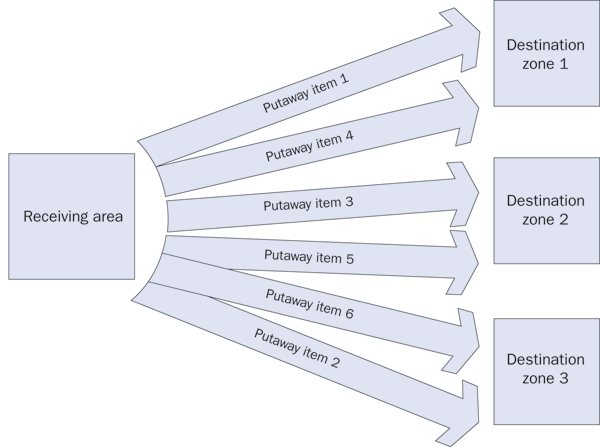
Figure 1
Without receipt deconsolidation, you must make many trips to the same warehouse zones, wasting time
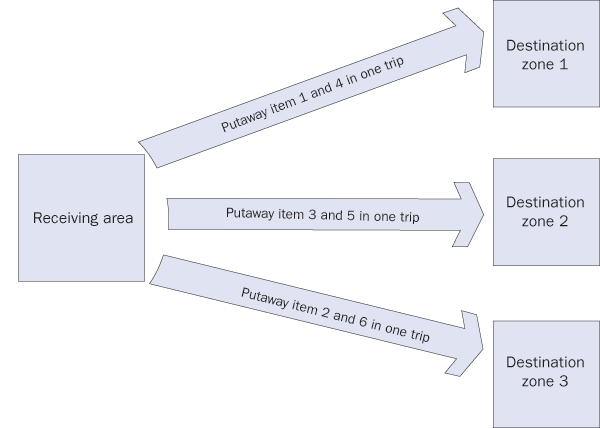
Figure 2
With receipt deconsolidation, you sort items before putaway, which means you need to make only one trip to each zone
In prior versions of SAP’s warehouse management offerings, many companies developed workarounds for
this process. One such workaround involved “virtual bins.” The user then directed putaways once an item was in
its virtual bin. This attempt to get the same visibility to required putaways was somewhat effective, but often resulted
in less transparency regarding the amount of work to accomplish. With SAP SCM EWM driving the process, greater visibility
and control are available over the entire putaway process.
Wave Management/Picking Task Generation
Although companies have released and picked multiple deliveries at a time using the SAP WM wave capability,
it often caused sub optimization because the integrity of delivery order lines is not necessarily important to the
warehouse during picking. When an entire order line is picked at one time, it is easier to manage because you process all
the material at the same time. You handle everything together and then bring it all to the dock at one time. Although this
makes things simpler, using the wave capability means the warehouse processes are compromised in an effort to simplify the
dock processes, such as staging and loading.
From a warehouse picking efficiency perspective, it might make sense to divide the work of one delivery and
merge it with the work of another delivery. One worker could then pick two deliveries in a more efficient picking process.
However, this adds complexity around grouping the work (how the waves are built) and on the dock because now you must
match the material to the correct delivery because you processed the lines for several deliveries at the same time. SAP
SCM EWM’s ability to divide work across multiple deliveries is useful because it allows workers to achieve greater
efficiency.
SAP SCM EWM also provides better control than SAP WM to even-balance tasks across workers. With SAP WM, if
you cannot subdivide one large delivery (or delivery line), then it could disrupt the distribution of work. SAP SCM EWM
allows you to split deliveries and delivery lines easily. You can then reassemble them more robustly, making it much
easier to distribute work in an even manner. This is important because an even allocation of work enables all workers to
complete their picks at the same time and ensures that orders arrive to the dock at the same time.
Implementation Considerations
Before rushing forward into an SAP SCM EWM implementation, it is important to understand that SAP has not
carried forward all the functionality from earlier SAP WM versions. Although it is SAP’s stated direction to migrate
to this platform, implying that most of the ability available today will transition to SAP SCM EWM, it is not yet a
complete replacement for prior versions. Specifically, some areas to consider include Production Planning (PP) integration
and Quality Management (QM) integration.
PP integration. SAP SCM EWM is oriented towards finished goods distribution. SAP has
disclosed plans to fully integrate it with PP, providing functionality similar to today’s WM-PP interface. However,
if you are planning to use SAP SCM EWM to supply a production line, you should be aware of which SAP version you must be
on to realize this capability when SAP releases it. This question depends on your overall SAP landscape and all the
variables that may exist within your landscape. It is best to explore this option with your SAP team or integrator.
QM integration: QM is similar to PP in there may be some ECC version requirements to
obtain complete compatibility. This decision is also highly contingent upon your overall SAP landscape. As with PP, you
should discuss this with SAP or your system integrator as the variables are significant.
With several of the simpler initial SAP SCM EWM implementations now live and several of the more complex
implementations nearing their implementation, there is significant interest in project experience around the product.
I’ve found that a background in SAP WM, while useful, is only a starting point for the project team as the
functionality has dramatically advanced. The new capabilities SAP SCM EWM provides are worth considering as you approach
your warehouse management system renewal cycle.
Chris Moose
Chris Moose is a partner in IBM's Global Business Services organization where he is the sponsor of SAP warehouse management and transportation management offerings. With worldwide responsibility for these offerings, he has helped expand IBM's delivery capabilities globally and has personally delivered projects on four different continents. His specific interests include the use of technology to address the historical fixed cost nature of supply chains enabling flexibility and then quantifying that business value with a benefits realization focus. In addition to his practice management and delivery focus, Chris is a frequent speaker at industry events as well as an author for industry magazines.
You may contact the author at chris.moose@us.ibm.com.
If you have comments about this article or publication, or would like to submit an article idea, please contact the editor.