Learn how to configure SAP NetWeaver Portal so that you can safely access it over the Internet. By carefully designing the system and considering any effects on it, you can achieve a safe and secure system that allows more simple and efficient access to data and information.
Key Concept
An Internet-facing portal is an SAP NetWeaver Portal that is accessible over the Internet from anywhere — just as a Web site is. It is not limited to intranet-only applications.
Due to the proliferation of options for high-speed access on a variety of devices, today’s workers are constantly connected to the Internet in and out of the workplace. While the growing use and acceptance of of mobile computing is the hot topic of the IT world there is still a gap that exists between the worlds of the corporate intranet and the Internet. Most organizations hide their SAP NetWeaver Portal behind their firewalls and restrict access from home or the road without the use of VPN or other cumbersome and often expensive security measures. They often do not provide access to the majority of portal users. However, allowing access over the Internet can improve HR processes and employee satisfaction by enabling employees to take charge of their data at preferred times and locations.
Mobile solutions are evolving and becoming more readily available and accessible, but the costs and efforts associated with delivering a full mobile solution can be prohibitive for some users of SAP systems. New and improved mobile solutions are expected to arrive over the next few years, and rapidly deployable cloud-based solutions are expected to reduce these implementation costs. However, an alternative that you can realize almost immediately, and which costs less to implement, is to provide access to the SAP NetWeaver Portal over the Internet. (See the sidebar titled “Typical Tasks for Remote Access.”)
Technically, allowing access to the SAP NetWeaver Portal over the Internet is a simple task: Register a domain, point it to your server, allow access through your firewall, and you’re up and running. The real challenge comes with maintaining the necessary level of security for the sensitive data contained in the SAP system. To ensure that security is effectively maintained for this sensitive data, you may need to make changes to the network architecture, maintenance processes, user administration, and support processes to protect access and to support off-site end users. I now discuss some examples of these technical changes that might be required.
Recommended Technical Changes
You have many ways to realize an Internet-facing solution that provides access to all or a portion of deployed portal content. Technologies such as filtering and federated portals allow for more limited subsets of functionality to be deployed if the scope of content and services available is to be limited. Whether the system allows full access or limits access with filtering, the general design and impacts that I discuss are applicable to the solution.
The primary changes that you need to make to the system landscape to safely connect an SAP NetWeaver Portal to the Internet are:
- Ensuring that security zones are created with firewalls
- Controlling access to servers through the use of a reverse proxy
- Segregating Internet-facing and internal systems
Additionally, I recommend that you use network security appliances and products (such as SAP Web Dispatcher) to increase your control over incoming traffic and further enhance security. Each landscape is unique and has its own requirements, so exact designs vary, but the key pieces (firewalls, reverse proxies, and segregated systems) are always a part of the solution.
Firewalls
Firewalls restrict incoming traffic. When network traffic encounters a firewall, connections are only allowed through specific ports or paths through the firewall. This limited access is to prevent unauthorized connections from being made by blocking the paths used to connect to services that should not be accessible. Most networks have a firewall between the company network and the Internet; in addition, other layers are usually added between the intranet and a more secure area containing the SAP systems.
To keep Internet-facing components separated while still allowing them to connect to the Internet and secure systems, you can use multiple firewalls to create zones in the network. A common method used is the demilitarized zone (DMZ), a zone set between the Internet and the main network that can be used as a buffer zone where Internet-facing systems can be protected from having a wide-open connection while also segregating these systems from the more-secure main network. Sometimes inner and outer DMZs are used to provide additional layers of security.
It is important to limit the ports that are open to the Internet to only the ports that the end user needs to use the portal. Ports for internal traffic between servers, management tools, development tools, or anything else that an end user outside of the network does not need are blocked to reduce the potential attack surface. The reverse proxy should only allow HTTPS over port 443 as a starting point.
I recommend leaving only these ports open inside the DMZ as a good starting point: SAP Web Dispatcher (and RFC and SAPGUI) (32NN), Message Server (36NN), and HTTPS (443NN). It is always safer to leave ports closed and open them as needed than to open things up and block them later. Network configurations vary and it is important to analyze what is in use on your network in deciding which ports need to be opened. Additionally, tracing tools such as HTTPWatch can be helpful in analyzing which ports are being used.
Reverse Proxies
A reverse proxy is another server or service used to protect network resources from possibly harmful Internet traffic. This device has one address open to Internet connections and then forwards the connections to systems inside the network. For example, assume that you wanted to connect to System A inside the network. System A does not have an address that can be seen from the Internet, and you do not want to show this private address to connections outside of the network. To accomplish an outside connection to System A, you make a connection to a reverse proxy server, such as www.reverseproxy.com, which then connects to System A. The user connecting from outside only sees the URL — in my example, www.reverseproxy.com — and is unaware of the connection on the other side of the proxy. The reverse proxy is typically placed in the DMZ so that it is the only server actually connecting to the Internet.
Segregating Systems
To achieve full segregation, the system architecture could involve having a reverse proxy in the outer DMZ, with SAP NetWeaver Portal servers or SAP Web Dispatchers placed in the inner DMZ that connect to the NetWeaver Portal servers or SAP Web Application Server in the secure area. There is no definitive rule regarding how much exposure to allow for an SAP NetWeaver Portal server, but erring on the side of less exposure and potential attack surface is always a safer option. Some designs place the SAP NetWeaver Portal server in the inner DMZ because the SAP NetWeaver Portal usually does not contain any sensitive data. You can also use additional segregation to separate portal servers from the sensitive SAP ERP Central Component (SAP ECC) system and the database.
Other Options for Enhancing Security
Many other technologies and security appliances are available to further enhance security. The reverse proxy and SAP Web Dispatcher, as well as several other available firewall products, can use whitelists and blacklists to control which addresses are accessible from outside. A whitelist is a list of connections that are allowed, blocking all other traffic. A blacklist is a list of specifically blocked connections. A typical configuration might add only the SAP NetWeaver Portal connections needed to the whitelist and then blacklist the addresses used for things such as administration or sensitive functionality. Other appliances are available for monitoring new addresses being accessed, potentially malicious code being entered into fields or in URLs, or other potentially malicious attacks.
A complete design may look something like the diagram shown in Figure 1.
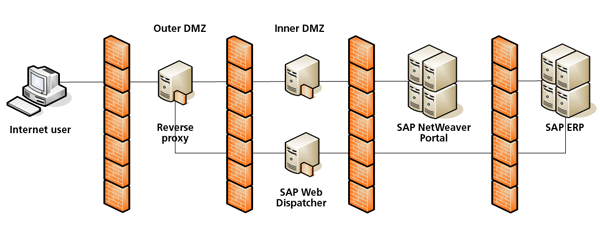
Figure 1
An example of proposed system security architecture
Security System Testing
After you design and build a system using the components that I discussed above (and possibly other components), it is important to ensure that the system is secure before opening it up to the Internet and publicizing its existence. Aside from the typical rounds of regression testing that would need to take place for any major change, testing should focus on the security of the system. You test the security of the system by checking for known vulnerabilities and scanning for potentially unknown security issues.
I recommend that you conduct penetration testing. In penetration testing, a tester, typically a specialist outside party, attempts to break into a system or gain unauthorized access. Using specialized programs and tools, security system testers scan for known weaknesses and other holes in the security and attempt to exploit them. At the same time, the new security features are being tested to see if the hacking attempts are identified and stopped. In addition to testing the security of the system, a penetration test also assesses the ability of the security system to detect the security breach attempt and to alert the system administrators of any attacks.
In addition to testing security your organization should also audit security. Unnecessarily broad access can be a greater liability when operating on the Internet as it increases the potential for an unauthorized user to access the system using a legitimate user’s credentials. Check the roles assigned to users to ensure that any extra unneeded access is not granted and that the commonly used authorizations for controlling access are locked down. A common mistake is for security teams to assign * access for S_RFC (access to remote function calls), S_SERVICE (authorization object for Java WebDynpro and other services), and S_ICF (authorization for WebDynpro ABAP and other services). These access points could be exploited, so allowing users with excessive access (i.e., those with unrestricted access or too open access to multiple points in the system) to connect to the system via the Internet is an unnecessary risk that should be avoided.
Implementation Impact
Implementing an Internet-facing solution involves more than just making technical changes and testing. Moving from the controlled environment of the corporate intranet to the Internet effects additional support challenges and increases the need to diligently maintain the system and its security. When systems are running only in a corporate environment, IT teams have tighter control over the computers, operating systems, browsers, and software installed on the machines connecting to the SAP NetWeaver Portal. The IT team often leverages this control to provide targeted support for a controlled environment.
When an IT team provides access over the Internet, this control is diminished and support staff needs to be prepared for new issues that may result from the new access. As part of the change management effort in support of the launch of an Internet-facing solution, it is important to very clearly spell out the system requirements and what is supported. The help desk needs to be prepared to address these requirements and to identify the cause of any issues. For example, the help desk needs to determine whether unsupported software or hardware is causing the issues, or if an employee’s personal home computer is the source of the problems. These kinds of problems become more frequent as more users attempt to access the SAP NetWeaver Portal with a wider variety of configurations.
An additional support consideration is how to educate employees about protecting their own security when accessing the SAP NetWeaver Portal from a public computer or in a shared environment. This issue is similar to the consideration users would have when accessing email or their banks from a public computer in an Internet café or library. Although the office and kiosks may provide a safe environment and have safety features to prevent employees from leaving their information out and available to others, home and public computers often do not. It is important to ensure employees are educated and aware of the importance of logging off after finishing their work and closing the browser window.
Another safety option to mitigate this risk is to add an automatic logout based on an idle timer if it is not already in place. If this timeout is based on a script, it is possible to use an alias on the URL of the portal to identify if the connection is coming from inside or outside the network and then to further reduce the timeout to increase security for users coming in over the Internet without disrupting frequent users in the office. Lastly, security teams need to revisit the password policy to ensure that secure passwords are used and that they are changed regularly.
Support impacts associated with opening the SAP NetWeaver Portal to the Internet are not limited to end-user support. Basis and security teams must also be prepared to apply security patches regularly and to step up their system monitoring activities. Systems on the Internet must be kept up-to-date with the latest security patches. This updating applies not only to SAP products but also to the database and any other systems in the landscape that are accessed from the Internet.
Security can sometimes receive less priority in a closed network; however, an Internet-facing portal is always vulnerable to new attacks and must be kept up-to-date. Patch Tuesday is typically the second Tuesday of the month and is the date that SAP and Microsoft, among other vendors, release monthly security patches. Security teams should apply these patches to ensure that the system is protected against the latest known threats. Security and IT teams always should be vigilant about monitoring the network and systems to look for signs that security has been breached or that the system is being probed for vulnerabilities. By staying up-to-date and monitoring for unusual behavior, security teams can significantly mitigate the risk of a breach.
Finally, it is important to consider any potential legal implications of allowing access over the Internet. Numerous laws place restrictions on the types of information that can be provided over the Internet and the level of security that must be maintained. These laws vary from state to state and country to county and are being created and constantly revised, so I recommend that you check with the legal department when considering allowing access from the Internet.
In addition to more commonly known laws, such as the Health Insurance Portability and Accountability Act (HIPAA), Payment Card Industry Data Security Standards (PCI DSS), Federal Information Security Management Act (FISMA), and the European Union Data Privacy Directives (EUDPD), states are starting to enact their own legislation focusing on requirements for securing information and reporting known breaches.
Although using a best-practice approach to security and using HTTPS may be considered sufficient, some additional due diligence should be performed to ensure that the solution is in compliance with the law and corporate policy. Because names, birthdates, and social security numbers are often used within SAP self-services (Employee Self-Service [ESS] and Manager Self-Service [MSS]), ESS and MSS can fall under the umbrella of some of these regulations and require additional planning or prevent some features from being deployed on the Internet.
Allowing Internet access to the SAP NetWeaver Portal involves challenges and risks to mitigate, but if the proper steps are taken in the beginning of the process, the potential benefits are substantial. Remember, the key to success in this instance is to ensure that you do your due diligence in designing your system and use best-practice security guidelines, and anticipate any new support and maintenance challenges.
Sidebar: Typical Tasks for Remote Access
Many processes would benefit from open access via the SAP NetWeaver Portal or other mobile solutions. Time recording, maintaining personal information, reviewing company information, and enrolling in benefits are activities that can be done from home or away from the office instead of only at work. Managers benefit, for example, from being able to approve requests and access reporting information, even when they’re away from the office. Remote workers in the field can access applications from wherever they are stationed as long as there is a connection to the Internet. Any service available in the SAP NetWeaver Portal could potentially be included, thus improving ease of use and boosting employee productivity.
Providing access to former employees is another SAP ERP HCM process that benefits from users being able to access the SAP NetWeaver Portal via the Internet. After termination employees often need to access their pay statements. HR teams need to be able to mail the employee’s W-2 forms in January. Providing former employees remote online access to their paystubs and access to the system to update their address information reduces the amount of time HR teams have to spend manually providing old statements or tracking down the correct address for mailing a W-2.
In a typical intranet-only scenario these updates by users outside of the network are not possible, but by allowing access from outside of the office network to former employees, the former employees can do these tasks themselves. This access creates a more efficient and streamlined process — both for the former employee and for the HR department. Making the SAP NetWeaver Portal more accessible opens up the possibility for many other win–win scenarios for employees and their companies.
Jacob Crane
Jacob Crane is a graduate of the Georgia Institute of Technology and has more than seven years of experience in SAP Employee and Manager Self-Services and related SAP technologies. He currently serves as a solution architect on a wide range of SAP projects with a primary focus on ESS, MSS, and Workflow.
If you have comments about this article or publication, or would like to submit an article idea, please contact the editor.

 Premium