One of the most critical success criteria for any shared services implementation is the acceptance of a software tool to take over an established business process. See how the service configurator functionality in the SAP Shared Service Framework for Finance can address an end-to-end business process, including the steps outside of the shared service organization. It makes all steps in a business process more transparent to the user, increasing user satisfaction and ultimately adoption of shared services.
Key Concept
The SAP Shared Services Framework for Finance, available since 2011, is software that facilitates finance business processes for a shared services department. It can be deployed on top of one or more SAP ERP systems or non-SAP systems and provides a user interface for a shared services agent that combines ticketing functionality and workflow, knowledge repositories, and one-click access to relevant transactions in multiple ERP systems. This year it has been enhanced with functionality called the service configurator. This functionality provides users more structure and transparency for processes involving multiple people, thereby enabling the adoption of shared services. Most business processes can be described as a structured series of steps. Workflow and process management ensure that the processes are executed efficiently and effectively, regardless of the number of people involved or organizational boundaries.
The shared service model promises to use economies of scale and process efficiencies to deliver business processes with high quality at low cost. However, the biggest problem project managers involved in implementing shared services face is getting people to change the way they have done certain tasks over the years. If people cannot be convinced to use the shared services, then a company’s investment in the new model is futile.
The initial functional scope of the SAP Shared Services Framework was designed to help a shared services agent process mostly one-step service requests, whether requests come in from a person or are automatically system-generated based on error rules. For example, a customer may call into a shared service center wanting to know the clarification status of a particular invoice dispute. In this case, the software automatically generates a service ticket based on data it discerns from the incoming telephone number, and the agent opens a transaction in an ERP system, finds the information requested, communicates the information verbally, or sends some correspondence to the customer, and then marks the ticket as completed.
However, many end-to-end business processes that are supported in part by a shared service center may actually extend far beyond the service agents. These additional steps that are part of more complex processes may take place before the agent becomes involved, they may be after the agent’s involvement, or they could even be sandwiched between steps in which service agents play a role. In this case, the initial functional scope of the SAP Shared Services Framework required customers to create workarounds. The service agent might mark his involvement in the process as completed, closing a ticket, but the business transaction that the request represents was not really finished; it simply continued without having the benefits of auditability and tracking that the SAP Shared Services Framework provides.
One complaint by end users in complex multistep processes is that they are not sure what happens once they make a particular service request. Standard functionality of the SAP Shared Services Framework provides the requester with status information related to a particular service request or transaction, but not within the specific context of a potentially complex process.
New enhancements describe end-to-end processes in detail and make the process flow and status information easier to understand for all participants in the process — from requesters to reviewers, service agents to local finance staff. The service configurator in the Shared Services Framework enables a business team to define a process, step, and routing rule with valid business fields and direct back-end integration. Using this enhancement, companies can document end-to-end complex business processes involving multiple users, steps, and transactions.
Figure 1 illustrates SAP’s three-layer design principle. The first layer is the screen that is visible for the end user, technically called the Input/Output Layer, which allows end users to enter a business field value for a specific shared service process and see the processing result in the form of a ticket. The second layer is the Process Layer, which is used during the business configuration phase in which business users can define different processes, steps, validations, and actions. The third layer is the Mapping Layer, which is used primarily by the IT team to map front-end field validation, search help, and actions to the ERP back-end systems.
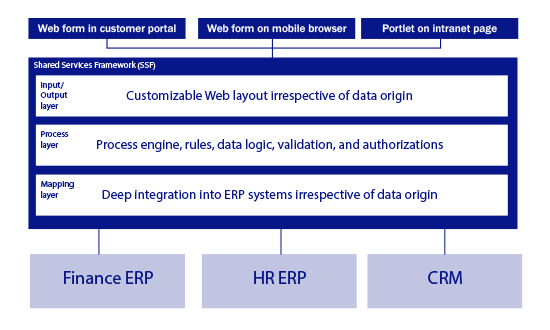
Figure 1
Technical design of the service configurator functionality in the SAP Shared Service Framework
I describe this new capability using a standard process that involves a shared services organization. Usually, before the period end, the local finance manager in a particular legal entity reviews the balance sheet and profit and loss (P&L) and considers any accruals, provisions, or prepayments to be made. The accruals and deferred postings at period end are necessary for the accurate reporting of the period. These accruals and deferred postings need to be reversed in the next period so that they do not accumulate over time. This first part of the process usually remains as the local branch’s responsibility and is outside of the scope of the shared service center. However, the technical postings and reversals are often done by accountants in a shared service.
Rather than discuss the whole scope of this story, I focus on only one possible path that is indicated in the blue line in Figure 2.
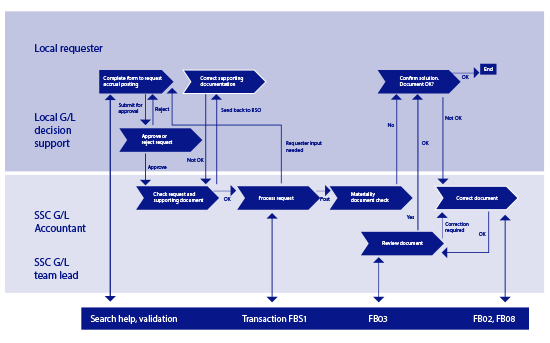
Figure 2
Accrual posting of estimated utility expense using service configurator
The order of the steps shown in Figure 2 are as follows:
- Complete form to request accrual posting
- Approve or reject request
- Check request and supporting document
- Correct supporting documentation
- Process request
- Materiality document check
- Review document
- Confirm solution. Document OK?
- Correct document
The scenario begins with step 1 in the local legal entity or branch in which an accountant raises a request for an accrual posting — in this case for an estimated utility expense. Using a link in his portal, he can fill in a short form requesting information. After he indicates that the category of request is an accrual posting, process-specific information is requested of him. He has to provide the information that is necessary for only this particular type of posting.
There can be significant search help provided by the tool, as well as an immediate data validation that the information entered in the tool is correct. This ensures that the data quality is high — right from the start of the process. Supporting documentation can be attached, even required by the system. For example, for an estimated utility expense, the requestor might attach a Microsoft Excel file with an indication of how the accrual was calculated. As opposed to an email-based process, these documents are immediately part of the system of record — there is no risk of them being lost in an email chain. Once the validation checks have been passed successfully, the local requestor can submit the service request.
In the next step, step 2, a local general ledger (G/L) accountant receives the service request. After reviewing the information, he can approve or reject the request. A rejection sends a notification back to the original requestor. An approval triggers an automatic routing of the service request to the next predefined participant in the process.
Once this service request is locally approved, the request is routed to the Shared Services Center. Here, the back-office team member responsible for G/L accounting sees the service request or ticket in his inbox (step 3). The supporting documents are, of course, automatically included as a part of the ticket. The G/L accounting agent reviews the ticket information as well as the supporting documentation. If there are issues and the accrual cannot be posted as proposed, the ticket is sent back to the local accountant to correct and resubmit the supporting documentation (step 4). Once all the details of the accrual posting have been appropriately checked, in step 5 the G/L accounting agent processes the request directly in the relevant ERP system using the posting transaction FBS1. In a complex system landscape in which multiple back-end ERP systems are connected into the Shared Services Center, the context provided by the ticket and mapping stored in the service configurator architecture preselects the system that is relevant.
In fact, the service configurator can be set up so that the transaction can be automatically processed without the transaction being accessed by a service agent and without any data having to be additionally input by the service agent. For example, in the initial business configuration of the process, the process could be designed to automatically do a posting based on clearly defined business rules. After the G/L accountant confirms that he has checked all documents, which would change the status of the ticket, the system could automatically do the posting based on all the data already provided.
Because these automated postings are frequently scheduled to occur at night, the capability is referred to as lights out. This lights-out capability is the key advantage of the service configurator compared with the existing workaround solutions. First, these automated transactions decrease the volume of actual transaction processing that has to be manually carried out by agents. Second, automated postings eliminate the possibility for manual rekeying errors. Finally, the automation rules can be scheduled to take place during off-peak times to decrease impact on system performance.
Figure 3 shows a screenprint of one step in this process. In my example process, I am now on the step in which the G/L accountant processes the request. The statuses of the preceding steps have been marked as completed. I can see who was responsible and whether any additional comments have been added. In addition, each step has an instruction area in which information about how to perform a particular task can be detailed and company policies can be documented, reducing training effort.
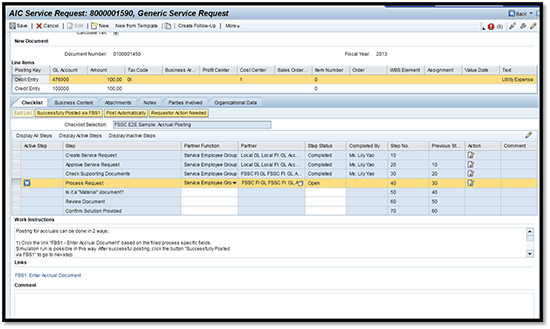
Figure 3
Processing the request via the service configurator
In my estimated utilities expense accrual posting example, the company has an internal control policy of requiring management to review high-value transactions (step 6). In this specific example, the amount is indeed above the materiality threshold. For example, all postings of more than €30,000 are subject to an additional level of approvals. Therefore, the posting is routed to the G/L accounting team lead in the shared service center.
In step 7, the G/L accounting team lead receives the ticket and all related documentation in his inbox. This manager can then review the entire history of the accrual posting request, including time and date stamps and status changes. The team lead views the posted document and finally confirms the posting has been done in accordance with company policies. In this way, the service configurator provides a strong automated, preventive process control to support the company’s governance, risk, and compliance (GRC) initiatives.
Finally, in step 8, the initiator of the process, the requestor from the local unit, receives a task to review the accrual posting and to confirm that the process has been completed. This completes and closes the service request, or ticket.
Getting a More Complete Management View of Finance Operations
Beyond improvements in usability of the system and transparency of where each individual transaction is in the process, the service configurator is also able to generate operational reports about metrics such as numbers of transactions processed or processing time. This data can help financial operations teams improve their effectiveness. Before the service configurator functionality made it possible to address end-to-end processes with multiple steps and business users involved, the reporting of how long a transaction took to process could not correctly reflect the resources that are tied in complex processes. New transparency can help management identify bottlenecks and process inefficiencies that will make them more effective business partners.
Katharina Reichert
Katharina Reichert is part of the Finance Solutions team at SAP SE, located in Walldorf, Germany. As the solution owner for receivables management, she focuses on applications for customer credit management, customer billing, dispute resolution, and collections management.
You may contact the author at katharina.reichert@sap.com.
If you have comments about this article or publication, or would like to submit an article idea, please contact the editor.