Learn how you can use this not-well-understood function to allow a single goods movement of a single material to trigger multiple and simultaneous postings to the G/L.
This article offers a simple explanation of a confusing functionality called "Parallel Valuation," whose purpose is to allow a single goods movement of a single material to trigger multiple and simultaneous postings to the G/L (each using a unique approach to inventory accounting), all in a single FI document. Clarity on this term becomes especially important if you also wish to understand how to work with a related functionality known as "Transfer Pricing" in the Profit Center Accounting (PCA) module. Transfer Pricing allows you to create internal profit-and-loss visibility for transactions (such as Goods Issue of Raw Material to Mfg Order) that might represent two things at once: (1) an accounting-relevant consumption of inventory for your company as a whole, and (2) an intracompany sale from one of your product lines to another.
What you will see is that one of the multiple valuations of any inventory movements you can store in your R/3 General Ledger is called the "Profit Center" valuation view. Since you also have a module in R/3 called Profit Center Accounting, as well as a module that will store multiple unit values for each material (called the Material Ledger), this starts to become confusing. Which is which? And what are the relationships? I will answer these questions.
The sequence of discussion will be an example of what is meant by Parallel Valuation, followed by a closer look at the settings in the MM module (Material Ledger, Material Master) and PCA module (internal sales prices masters) needed to make Transfer Pricing work. Finally, you will see via screenprints the various debits and credits posted in the FI document in response to a single goods movement when three different Valuations and Transfer Pricing are active, as well as see which of those are copied into the Profit Center Accounting document.
By understanding the G/L’s Profit Center valuation view’s relationship to the Profit Center ledger, you will also achieve the primary goal of this article: an insight to the general meaning and mechanics of the R/3 Parallel Valuation function. This insight becomes important not only for understanding how to work with PCA Transfer Pricing, but also for understanding your options to store more than one "amount" in other modules in FI/CO such as the G/L and the Material Ledger.
An Example of Parallel Valuation in the General Ledger
To begin, consider the following business transaction: the plant-to-plant movement of one unit of material #T-350 from plant 6000 to plant 6100. The material’s standard price in plant 6000 is 2.00 pesos (MXP), but in plant 6100 the standard price is 95.00 pesos (purposely exaggerated to make the example’s lesson easier to see). You would expect the journal entry that R/3 automatically creates in response to this inventory movement to look something like what is shown in Figure 1. This represents the company code (i.e., legal) valuation of that business transaction.
If your G/L also records the monetary amounts of each posted debit and credit in a second currency, such as USD, then you would expect to be able to change the display currency when viewing your FI document from pesos to dollars, and see something like what is shown in Figure 2.
Hmmm. Do you notice anything odd about Figure 2’s debits and credits when compared to Figure 1’s debits and credits? Look closely. The credit entry to account #310000 appears to have a conversion rate from pesos to dollars of 2.00 pesos = 0.80 dollars (2.5:1). Meanwhile, the debit entry to account #310000 is using 95.00 pesos = 11.40 dollars (8.3:1). What the heck...is R/3 broken?
You’ve just been introduced to SAP’s Parallel Valuation function.
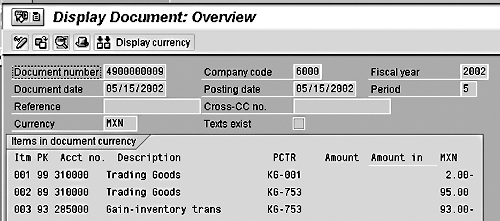
Figure 1
The Journal Entry from a Plant-to-Plant Goods Movement
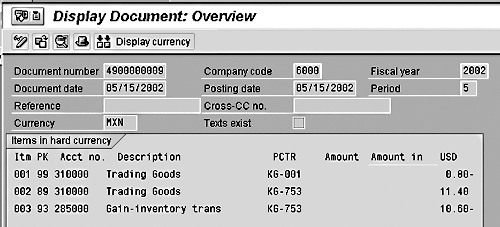
Figure 2
The Journal Entry’s Hard Currency (USD) View
Background Awareness: Material Master Rates Fields
To store more than one valuation for any given set of debits and credits posted to a ledger, R/3 must have some way to locate more than one rate. And, in fact, Parallel Valuation has nothing to do with currency conversions, such as pesos-to-dollars or dollars-to-euros. The goal is to allow R/3 to locate more than one rate for inventory-related transactions. Where will the second and third rates be waiting? In your Material Masters. You will be able to assign more than one kind of balance sheet "per unit" rate to each of your Material Masters, and each of these will be referred to during automatic postings to the General Ledger for inventory transactions.1 By coincidence, those different rates can also involve separate currencies (e.g., peso vs. USD), but ignore that for a moment.
This Parallel Valuation functionality in your Material Masters only becomes possible once you activate the Material Ledger.2 After that, you will see a profound change to the appearance of the Accounting-1 view of your Material Masters. Figures 3a and 3b show an example of this — one material from a plant without the Material Ledger active and one from a plant with it active.
Take special note of the three Valuation columns in the "active" example (Figure 3b). What’s important is that each "per unit" field can be set up with a rate that is independent of the others without any regard for currency-to-currency conversion factors. In other words, each one can represent a unique approach to Balance Sheet valuation/rates — legal vs. internal valuation #1 vs. internal valuation #2 — rather than one approach (e.g., legal) valued via three different currencies.

Figure 3a
Material Master Without Material Ledger Active

Figure 3b
Material Master With Material Ledger Active
Parallel Valuation: Profit Center Transfer Prices
If the concept of parallel balance-sheet valuations for inventory movements is clear, I can now introduce the concept of a Profit Center transfer price during Parallel Valuation in the G/L. This is not something different from Parallel Valuation, and it is not something new outside of Parallel Valuations. It is an addition and is only possible with the Profit Center view within Parallel Valuations. Although some master data settings need to be established in the PCA module, keep your mind focused on the G/L. Any debits or credits that ultimately are posted to PCA will first be posted to the G/L.
The goal here is to not only allow for a unique rate on the balance sheet side of the G/L, but also create extra debits and credits to reflect a "sale" from one of your controlling area’s Profit Centers to another even if, from a legal viewpoint, you have merely moved inventory from one plant to another. Figure 4 shows the Profit Center valuation view for the exact same FI document you saw in Figure 1 (company code view) and Figure 2 (hard currency view). It is important to note that this is an FI (i.e., G/L) document! I have not yet shown you any postings at all to the FI/CO PCA module.
Notice how extra debit and credit lines are shown in the Profit Center valuation view of this G/L posting to account for an internal sale and an internal cost of sale. But where did the different rates comes from? Surely R/3 did not just invent a sales price.
The internal sales price (i.e., transfer price) of 5.00 euros came from a special kind of master data I had to set up in PCA, as shown in Figure 5. The 1.00-euro cost of sales price (i.e., Inventory Change) is a parallel valuation for Profit Centers that comes from the Material Master (review the Euro column in Figure 3). The 10.50-euro debit to account #310000 is merely the same parallel valuation rate source for your material #T-350, but this time in the receiving (i.e., buying) plant (see Figure 6). Finally, the euro amount posted to the variance account #285000 is merely whatever is required to make debits equal credits.
For those of you who like the SE16 view of FI/CO, Figure 7 shows the raw data stored in G/L table BSEG for the example FI document. Notice how all five debit and credit lines are stored. However, only in the case of the parallel valuation for Profit Centers (in my test system, this is stored in the LC3 Amount column) will all five have non-zero amounts. Therefore, when displaying the FI document using its legal (Amount in LC) or hard currency (LC2 Amount) parallel valuation views, you see just three lines. The other two lines are, in fact, there, but they are suppressed in the display on your screen due to their 0.00 amounts.
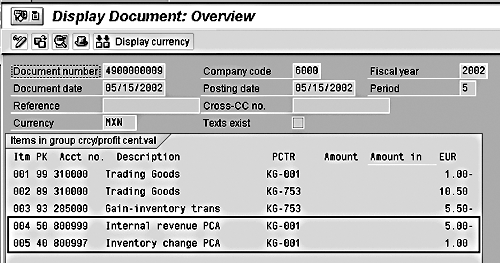
Figure 4
An Example Profit Center Valuation View of an FI Document
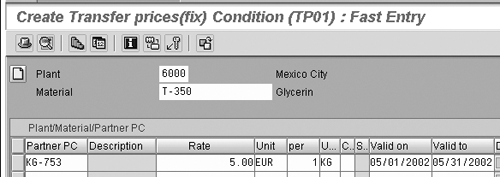
Figure 5
An Example of a Profit Center to Profit Center Sales Price Master Condition
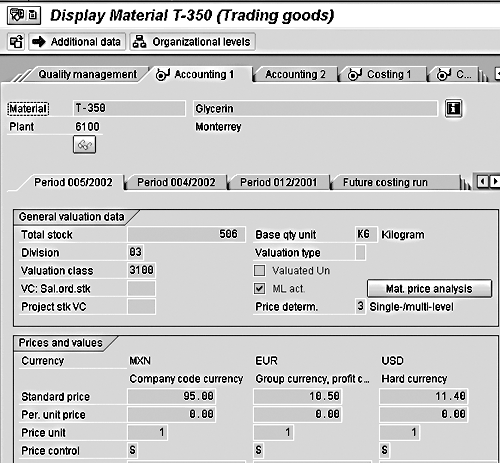
Figure 6
The Material Master in the Receiving (Buying) Plant
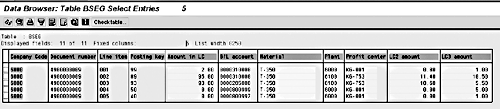
Figure 7
The Source Data for FI Document #4900000009 in Table BSEG
Relationship to the PCA Module
In general, the relationship between postings in the G/L (i.e., the FI module) and postings in the PCA ledger (i.e, the PCA module) is one-for-one in regard to G/L profit-and-loss accounts.3 For example, when a sale is recorded in the SD module, the automatic update to the G/L might consist of one debit to the customer account (B/S) and one credit to a sales account (P+L). In that case, only the credit to the sales account is copied (redundantly posted) into your PCA ledger.
This relationship does not change when Parallel Valuations and Transfer Pricing are active. Figure 8 shows the PCA document that was generated in response to the FI document in the earlier screenprints. Take note of two things in this screenprint compared to Figures 1, 2, and 4. First, the monetary values that R/3 copied belong to your G/L’s Profit Center valuation view only. Second, the debit and credit lines that were copied are made to G/L P+L accounts only. The G/L postings to the Balance Sheet accounts are not copied.
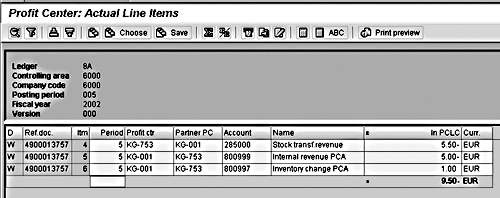
Figure 8
The PCA Document Caused by FI Document #4900000009
Summary
To understand how to work with certain kinds of FI/CO options such as the PCA module’s Transfer Prices, you must first gain some clarity on the more general FI/CO module functionality called Parallel Valuation. This functionality only becomes possible after you activate the Material Ledger. Once the Material Ledger is activated for a plant, the Accounting-1 view of your Material Masters changes dramatically and now can include multiple fields for holding Balance Sheet "per unit" rates.
One of the possible Parallel Valuations that you may activate is called the Profit Center valuation. If this is active in your Material Ledger, then in addition to an extra field in your Material Masters for storing a Profit Center-specific balance sheet "per unit" rate, you also have the option to set up special master data to represent your internal sales prices (transfer pricing) for any inventory-related movements that involve two or more of your Profit Centers. The impact of this is the automatic generation of extra debit and credit lines in your G/L document for all of your Parallel Valuations. However, only the Profit Center valuation will have non-zero values for these extra debit and credit lines. And from this Profit Center valuation view, only the debits and credits to G/L P+L accounts are copied into your PCA ledger.
1
Kurt Goldsmith
Kurt Goldsmith is a senior business consultant for Enowa Consulting, specializing in the diagnosis and resolution of productivity-related integration issues between a company’s division of labor (end users, managers, executives) and SAP software (R/3, BW, APO, CRM). He also has a lifetime performance record of one win and two third-place finishes from five career starts as a thoroughbred racehorse trainer.
You may contact the author at kurt.goldsmith@enowa-consulting.com.
If you have comments about this article or publication, or would like to submit an article idea, please contact the editor.




 Premium