Requisition-to-pay (R2P) is a key operational process that auditors for Sarbanes-Oxley Act compliance will expect to see controls. Fortunately, R/3 Materials Management (MM) has a number of configuration controls that you can use for this purpose. The author explains two, recording purchase requisitions and releasing purchase requisitions, and shows how you might use them in your compliance efforts.
The Sarbanes-Oxley Act of 2002 requires that companies have controls
in place for important business processes. A key process on the
operational side is the requisition-to-pay (R2P) business cycle.
You can use SAP-enabled controls at several points in the R2P process.
I'll describe how you might implement two: recording a purchase
requisition and releasing a purchase requisition. Both are R/3 MM
configuration controls applicable to all releases of R/3. First,
let me provide a quick overview of the R2P business cycle.
The R2P business cycle shown in Figure 1 involves
several departments, SAP R/3 modules, and events. The diagram also
illustrates common cycle events that trigger financially relevant
transactions. The typical R2P transaction flow begins when a user
or an external activity (e.g., MRP or SD) requires the company to
purchase goods or services. The R/3 requisition is entered via
ME51
(Create Purchase Requisition). The R/3 requisition is typically
held for formal release (i.e., authorization) via ME54
(Release Purchase Requisition), which is dependent upon your configuration
in the IMG
Note
If your company uses
the new ENJOY transaction codes, substitute them for the transaction
codes identified.

Figure 1
R2P business cycle
After the R/3 requisition has been formally released, the purchasing
department converts and sources the R/3 requisition into a formal
R/3 purchase order (PO) using ME21. The R/3 PO
should also require release via ME28 or ME29
prior to forwarding it to a vendor. The PO release procedures are
also dependent on your IMG configuration. If R/3 is configured to
automatically release POs, then independent monitoring controls
should be implemented to help ensure POs that do not reference a
previous SAP-approved R/3 requisition are authorized.
The vendor fills the PO and ships the supplies or provides services
specified on the PO. Company-authorized personnel process a goods
receipt via MIGO (Goods Movement) or service receipt
via ML81 (Maintain Service Entry Sheet), which
should reference back to the R/3 PO. R/3 typically generates accounting
entries based on PO line-item information (debit entry) and automatic
posting procedures (credit entry — goods receipt/invoice receipt
[GR/IR]) configured in IMG.
The vendor invoice is routed to accounts payable, where company-authorized
personnel enter the vendor invoice through MIRO
(Enter Invoice). If configured, several R/3 verification routines
help ensure the vendor invoice matches the authorized PO and actual
goods/service receipt (e.g., three-way match). Accounting entries
are generated from the automatic posting procedures (debit entry
— GR/IR) configured in IMG and the reconciliation account
stored in the vendor master record (credit entry).
Transaction F110 (Automatic Payment Proposal)
identifies vendor invoices for payment based on the payment terms
recorded on the vendor invoice. The vendor invoice payment terms
are usually transferred directly from the vendor master record.
However, these payment terms can be changed during vendor invoice
entry if the configuration permits this modification. Payment run
accounting entries are generated based on the reconciliation account
stored in the vendor master record (debit entry) and automatic posting
procedures (credit entry — GR/IR) configured in the IMG.
Example 1: Recording Purchase Requisitions
This control example relates to purchase requisitions, but the
same configuration capabilities are enabled through different configuration
transactions for other purchasing documents (purchase order, request
for quotation, outline agreements), master data (vendor and material),
and events (receiving, vendor invoice processing).
The SEC's Section 404 regulation states that businesses
must provide reasonable assurance that transactions are recorded.
This requires reliable and consistent data-input controls.
Within the IMG, companies can configure multiple purchase requisition
document types via transaction OMEB, allowing them
to group and specify more precisely completed requisitions (Figure
2). Understanding the purpose of each configured purchase-requisition
document type helps you document the R2P business cycle, and it
can also help you determine the required controls for further R2P
processing. For example, you may have a purchasing document type
for each of the following purchase requisition types: entered directly,
initiated from MRP, resulting from Project Systems (PS) activity,
or originating in non-SAP systems or external groups.

Figure 2
Purchase-requisition document types and field selection keys
Each purchase-requisition document type usually has a field-selection
key identified that specifies the data-entry requirements for completing
a purchase requisition. Field-selection keys, if properly configured,
are excellent controls over initiating and recording transactions
that ultimately find their way to the financial statements. Also,
ensuring that data is completely and accurately captured at the
beginning of the R2P cycle increases the likelihood that resulting
financial transactions are properly authorized and recorded.
Field-selection keys are assigned to purchase-requisition document
types via transaction OMEB and can apply to one
or more purchase-requisition document type. For example, purchase-requisition
document type NB is configured to specify the data
entry rules through screen layout rule NBB that
determine which fields are optional, required, or displayed. If
a purchase-requisition document type does not have a field-selection
key assigned to it, then a default field-selection key assigned
to the transaction (e.g., ME51) may apply.
Purchase-requisition field-selection keys are configured in
OMF2.
When you first enter the transaction, you are presented with a list
of configured keys as shown in Figure 3 on the
next page. Locate the field-selection key (i.e., NBB)
identified in OMEB by scrolling down the list.

Figure 3
Configured field-selection keys
Double-clicking on the NBB field-selection rule
displays seven field-selection groups, or sections, associated with
a purchase requisition. Double-clicking on each field-selection
group displays the rules associated with each data field on the
purchase requisition. The configured rules should be reviewed and
matched to company policy to help ensure proper data-capture rules
are in place. Figure 4 on the next page depicts
the GR/IR control data-entry requirements, accessed via transaction
OMF2, for purchase-requisition document type
NB.

Figure 4
GR/IR control data-entry requirements for purchase-requisition document type NB
The screen layout capabilities available in R/3 can also assist
a company in achieving other Sarbanes-Oxley, operational, and compliance
objectives by helping to ensure complete and accurate data-entry
processing. These data-entry requirements are optional in R/3 and
require you to configure the data-entry rules to match corporate
objectives.
Example 2: Releasing Purchase Requisitions
A second objective found in the SEC's Section 404 regulation
states that controls should “reasonably assure” that
receipts and expenditures are properly authorized. Rightly or wrongly,
receiving and A/P personnel tend to presume that their vendor invoices
are authorized if an open purchase order exists in the system.1
This presumption is dependent on up-front purchasing controls
to help ensure proper authorization of purchasing documents prior
to receiving or A/P events. R/3 implements purchasing document (purchase
requisition, purchase orders, and so on) authorization through configured
release procedures that are then linked to security to effect proper
authorization. R/3 provides two methods of releasing a purchase
requisition: without classification and with classification.
In my experience, most organizations implement release procedures
with classification, since it provides more flexibility in establishing
the purchase requisition approval business rules and allows them
to replace manual authorization procedures with electronic sign-off.
As Figure 5 shows, you can establish multiple release
strategies based on multiple criteria via transaction OMGQ.
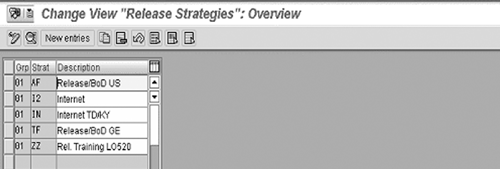
Figure 5
Release procedures with classification
These release strategies should be mapped to company policies
that describe the level of authorities assigned to various employees
and then evaluated to ensure compliance. To evaluate, double-click
on each release strategy and click on the Release statuses
and Classification buttons.
The Release statuses button indicates what release
codes have to be applied to the purchase requisition before it is
released to purchasing for processing. In this example (Figure
6 on the next page), authorized personnel assign the release
code Z2 (through R/3 security) to requisition via
ME54 (or other release transactions) before purchasing
can reference the purchase requisition in a purchase order.
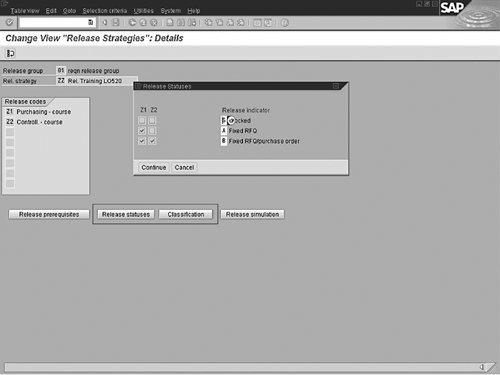
Figure 6
To evaluate a release strategy, click on Release statuses and then Classification
The classification schemas can vary and are typically configured
to match your company's purchase approval policies. R/3 uses
these classification schemas to determine which, if any, release
strategy applies to a purchase requisition. In this example (Figure
7), a purchase requisition must meet several requirements
for the release strategy to apply. When assessing release strategies,
consider whether they help achieve company purchase authorization
policies. I have found several instances where the configured release
strategies permitted several purchase requisitions to go through
without required release procedures (i.e., automatic release).
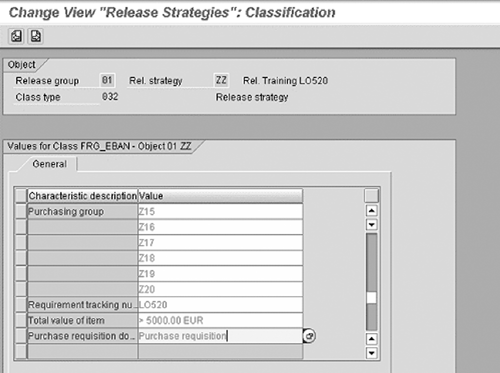
Figure 7
Release strategy classification
You have more aspects to consider when evaluating release procedures
than I can cover here, but working with IT personnel to document
and test release procedure configuration controls can help provide
reasonable assurance regarding prevention of unauthorized acquisition
of goods/services. Additionally, you need to review SAP security
to determine who is authorized to release purchase requisitions
with the above release strategy.
Several required authorization objects with mandatory field values
affect the release of a purchase requisition via ME54
(Release Requisition). Two authorization objects are critical. If
you can identify individuals with two authorization objects and
the mandatory field values, then the probability that they can release
a purchase requisition to purchasing is high. Use transaction
SUIM
and enter the following authorization object and mandatory field
values to help identify individuals who can release a purchase requisition
to purchasing using the release strategy depicted in Figure 6:
| M_BANF_EKO (purchasing organization in purchase
requisition) |
| |
Activity |
02 |
| |
Purchasing organization |
blank |
| M_BANF_FRG (release code in purchase requisition) |
| |
Purchase requisition release code |
Z2 |
| M_EINK_FRG |
| |
Release group |
01 |
| |
Release code |
Z2 |
1 I do not cover the processing of
vendor invoices that do not reference a purchase order. Other security,
configuration, and monitoring controls address these transactions.
Bryan Wilson
Bryan Wilson is president of Acumen Control ERP, which specializes in SAP risk, advisory, and forensic audit services. With more than 20 years of experience in IT risk management, he has managed SAP R/3-enabled controls design and assessment teams for both KPMG LLP and Deloitte & Touche LLP. Bryan has advised audit committees, executive teams, and audit partners at several multi-national companies of the residual risks in their SAP R/3-supported business cycles. He also helped several multi-national clients re-engineer their SAP R/3 security architecture and re-architect business processes after internal control failures or fraud were identified. He currently helps clients assess their SAP control environments using his forensic audit queries, which clients can use to enhance their own off-the-shelf audit query tools. Bryan has a B.S. degree in computer science and is a Certified Public Accountant (CPA), Certified Information System Auditor (CISA), and an active member of the Association of Certified Fraud Examiners.
You may contact the author at bwilson@acutrolerp.com.
If you have comments about this article or publication, or would like to submit an article idea, please contact the editor.