The Profitability Analysis module can track your organization's profitability so that you can focus your limited resources on the most profitable customers.
Key Concept
The SAP Sales and Distribution (SD) module offers strong selling and order- fulfillment functionality. Part of SD, the Sales Information System (SIS), offers many customer analytical tools, but reporting and analytical features are limited. The Profitability Analysis (CO-PA) module, which is part of Controlling (CO), gives a more detailed analytical picture of customer profitability.
I'm going to provide an overview of the Profitability Analysis (CO-PA) module, especially from sales point
of view. I will elaborate on how closely SD and CO-PA are integrated. The primary focus of CO-PA is market-oriented,
particularly from a sales management point of view. Many of the SD configuration settings influence significantly how and
what data flows to CO-PA. Understanding the close integration is critical, especially to SD analysts, as many of these
processes influence how profitability can be managed. This functionality is very basic, thus the information I'll give you
is applicable to all versions of SAP.
Note
The objective of this article is to introduce the basics of CO-PA without going into its complexities. Articles published by the author in the SAP Financials Expert newsletter offer a more detailed and technical evaluation of what CO-PA can do.
Customer Profitability
As the name suggests, the primary objective of CO-PA is profitability analysis. CO-PA lets you understand
where your profits originate. It provides information you need to make strategic business decisions and to answer
questions, such as:
• What are my most profitable customers?
• What are my most profitable product lines?
• What are the profit margins of my
business segments?
The goal of the CO-PA ledger is to track and analyze profitability, especially for business segments.
Usual examples of business segments can be customers, product lines, organizational units, regions, or a combination of
these.
The primary goal is to search the relationship between profits and the potential source of those profits.
The profits can be from product revenue, service revenues, or other revenue streams. Product costs and other overhead
costs are also involved. The CO-PA ledger has individual columns for each of these amount fields, known as value fields.
By comparison, the origins of these profit values are called "characteristics." Examples of characteristics are
customer, product line, and sales area.
As shown in Figure 1, the CO-PA ledger contains characteristics and value fields.
• Characteristics are fields that describe who, what, where, or when.
• Value fields are actual numeric values that quantify revenue or cost.
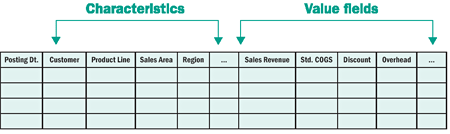
Figure 1
CO-PA ledger structure with characteristics and value fields
What makes the CO-PA ledger more flexible and robust than other ledgers (e.g., General Ledger [G/L] or
Special Purpose Ledger) is that you can design the structure of CO-PA as you wish. The structure of other financial
ledgers is predefined, whereas you can design the CO-PA structure depending on your own requirements. Say that in your
organization, you put more emphasis on customer-related characteristics (for example, sales office, customer group, or
sales group). You can include these characteristics in your CO-PA ledger, whereas someone else might add product-related
characteristics for their analysis.
Note
Although costs are posted to the G/L at the time of delivery, costs are transferred to CO-PA along with the revenues. In the world of financials, this is termed the "matching principle." Costs are matched to revenues so that the profit margins can be calculated correctly.
Note
Incoming sales orders are not actual revenues. They are considered bookings and, therefore, are not posted to any financial ledgers. The CO-PA ledger is the only place within Financials to record sales bookings. CO-PA is used for internal management reporting. Transferring of sales bookings offers an option to compare your actual revenues with the bookings.
Data Flow to CO-PA
SD and CO-PA are closely connected. The revenues/costs and other profit information from SD are
transferred to CO-PA. The billing document or invoice acts as the most basic integration point. The CO-PA ledger is
updated with relevant information upon invoicing in SD. At the time of billing, revenues, discounts, and cost of goods
sold (COGS) are transferred to the CO-PA ledger, as shown in Figure 2.

Figure 2
Invoice/billing documents are posted to CO-PA
In addition to billing documents, you can also configure the system to transfer sales orders to CO-PA, as
shown in Figure 3. Transferring sales orders to
CO-PA can provide an early estimate of the anticipated revenues before the sales order is completed.
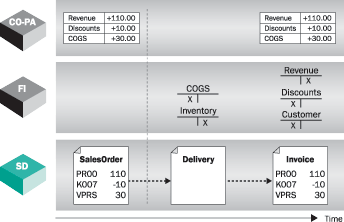
Figure 3
Incoming sales orders can be transferred to CO-PA
When the sales orders or invoices are posted, the system transfers the profitability related information
to CO-PA. The characteristics from the source documents are transferred. Additional information from the customer master
(for example, customer group, sales office, or sales group) and product master (for example, product hierarchy or material
group) can also be transferred based on the source transaction and transferred to CO-PA.
CO-PA lets you derive additional information — for example, the definition of strategic business
units (SBUs).
Various amounts, such as gross revenues, discounts, costs, and estimated sales
commissions, are transferred to CO-PA value fields. The profitability data
(characteristics and value fields) are
represented as multi-dimensional cubes, as shown in Figure 4. The profitability segments
represent specific combinations of characteristic values — for example, "Retail customer from high-tech unit from
the Southern region."
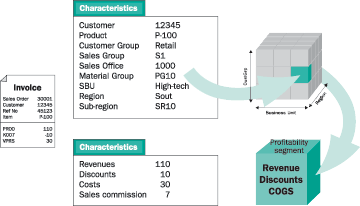
Figure 4
Profitability data flow from SD to CO-PA
SD and CO-PA Integration
Now that I have shown the basics of how data flows to CO-PA, let's cover some of the details. I'll start
with how data from the source document (for example, invoices) flows to CO-PA. In SD, the information from a sales invoice
is stored in condition types — prices, discounts, and surcharges. In CO-PA, the information is arranged as columns,
known as "value fields."
The condition types from SD are mapped to value fields in CO-PA, as shown in Figure 5. In
a standard system, the usual notations for condition types are PR00 for prices, K007 for
discounts, and VPRS for costs. Condition types are the bridge between SD and CO-PA.

Figure 5
SD condition types are mapped to CO-PA value fields
Note that many SD condition types can be mapped to the same CO-PA value fields. For example, if you have
multiple conditions for customer discounts, you can still manage customer discounts as one value field in CO-PA.
With this type of mapping of SD conditions to CO-PA value fields, SD can have a large number of condition
types, making analysis of them unwieldy. Mapping
multiple SD conditions to a smaller, manageable number of CO-PA value fields makes data easier to analyze, as
shown in Figure 6. Note that it does not make sense to have one SD condition type mapped to multiple CO-
PA value fields.
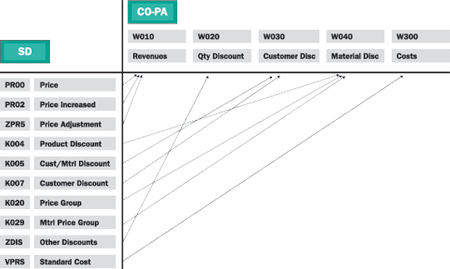
Figure 6
Mapping of multiple SD conditions to CO-PA value fields
From a customization point of view, the configuration of mapping SD condition types to CO-PA value fields
is done in CO-PA customizing via menu path Flow of actual values>Transfer of Billing Documents>Assign Value
Fields> Maintain assignment of SD conditions> CO-PA value fields or transaction KE4I, as
shown in Figure 7.

Figure 7
Mapping of SD condition types to CO-PA value fields
Note
Mapping of condition types to CO-PA value fields is at the operating concern level (a much higher organizational unit than a sales organization). Therefore, you need to make sure that the business meaning of specific condition types remains the same across all organizational units. If you have a condition type PR00 in one region (say, sales organization North America) to represent product revenue and the same condition type has a meaning of service revenue in another region (say, sales organization Europe), then both of these condition types are mapped to the same value field as CO-PA and you will not be able to differentiate between labor and material revenues. In such cases, if required, you can create two separate condition types — one for product revenue and the other for service revenue — and map these to two different value fields in CO-PA.
Which SD Conditions Are Transferred to CO-PA?
Not all conditions from an invoice are transferred to the CO-PA ledger. For example, tax conditions are
not transferred. The reason is that taxes are regulatory requirements. Since you don't have control over taxes, you cannot
change them to influence customer profitability. The following rules are applied to transferring SD conditions to CO-
PA.
• SD conditions that are for revenues and discounts are transferred. (From an accounting point of
view, revenue and discounts accounts are created in CO with cost element categories 11 – revenue elements and 12
– sales deduction).
• Tax conditions are not posted to CO-PA. It may appear that taxes would be transferred to CO-PA;
however, tax
conditions are in fact not transferred to CO-PA. The reason is that, as an organization, you cannot control
profitability based on tax structures.
• Only active conditions are moved to CO-PA; inactive conditions are not.
• Conditions defined as "statistical conditions" are transferred to CO-PA. Statistical conditions are
marked accordingly in the pricing procedures.
Planning in CO-PA
Sales and profit planning is part of overall business planning. CO-PA offers robust features to perform
planning. In addition to the data flow of actual values, you can also enter the plan data into CO-PA manually, or you
could import plan data from Sales and Operations Planning (SOP) to CO-PA.
Using the planning features in CO-PA, you can do plan-vs.-actual comparisons for business segments. For
example, you can plan revenues, discounts, and costs, at the customer-group level. When actual values are posted, you can
compare them to determine if you really met your margin targets.
CO-PA also offers tools and methodologies for automatic planning — for copying actual data to plan,
copying plan data from one version to another,
top-down distribution, and revaluation. Instead of always entering the plan data from scratch, you may
want to start your planning process by comparing plan and actual.
By copying actual data as plan data, you can create the base for further planning. Planning versions offer
you different scenarios — for example, one plan version can be the best-case scenario, whereas another planning
version can be worst-case scenario. By copying plan data among different plan versions, you can manage the planning
process easily. With top-down distribution, you plan the profitability at the product-group level, for example, and the
system calculates the planned profitability at the product level.
Using revaluation, the planned profitability can be revalued — i.e., recalculated. For example, say
you want to increase the price by 10 percent. Instead of changing the prices manually, revaluation of
the profitability calculations is done
automatically.
Profitability Reporting
The core competency of CO-PA is determining the profitability at the market-
segment level. The integrated business model of CO-PA offers different value flows, which allocate revenues
and costs to profitability segments. In addition to accurately determining the profitability information, CO-PA also
provides flexible reporting options. The drill-down reporting engine in CO-PA offers various online analytical processing
(OLAP) features, such as drill-down, sorts, slice-and-dice, overview-detailed list, exceptions reporting, period
breakdown, and information on the origin of data.
As shown in Figure 8, you can analyze how retail customers in Southern regions performed
within high-tech business units. For example, the slice-and-dice and drill-downs are valuable reporting features for
exceptions processing.

Figure 8
Drill-down reporting for characteristics

Mitresh Kundalia
Mitresh Kundalia heads the SAP practice at Quality Systems & Software (www.QSandS.com), a consulting firm specializing in SAP S/4HANA, SAP General Ledger, and complex System Landscape Optimization (SLO)-type reorganizations. Mitresh is widely acknowledged as a leading SAP expert, with multiple publications and an SAP-PRESS book to his credit. He has published more than 50 peer-reviewed articles and white papers, and he has given presentations at various SAP conferences and events. Mitresh is the chief solutions architect of General Ledger Migration Optimizer (GLMO), a leading product to accelerate and jump-start the SAP S/4HANA and SAP General Ledger initiatives; SAP Data Reorganization Optimizer (SDRO), an SLO-type product for managing complex system landscape reorganizations; and Group Currency Activation and Conversion (GCAC), a product suite to manage introduction of parallel currencies and conversion of data in a live SAP system.
You may contact the author at Mitresh@QSandS.com.
If you have comments about this article or publication, or would like to submit an article idea, please contact the editor.