SAP FICO
SAP FICO: An Overview and Key Considerations
What Is SAP FICO?
SAP FICO is SAP’s core functional module consisting of the tightly integrated Financial Accounting (FI) and Cost Controlling (CO) modules, designed to enable the recording of financial transactions across parent and subsidiary entities, the production of financial statements, and support both internal and external reporting, at the end of every period.
The SAP Financial Accounting (FI) module supports accurate financial accounting and financial reporting, while the SAP Cost Controlling (CO) module facilitates cost planning and cost monitoring.
Key sub-modules for SAP FICO:
- Financial Accounting (FI)
- Asset Accounting
- Accounts Payables
- Accounts Receivable
- Bank Accounting
- Fund Management
- General Ledger Accounting
- Travel Management
- Cost Controlling (CO)
- Activity-based Costing
- Cost Center Accounting
- Cost Element Accounting
- Internal Orders
- Product Costing
- Profit Center Accounting
- Profitability Analysis.
The primary objectives of SAP FICO are to provide financial transparency, improve data consistency, and enable business process integration within the organization. Organizations can leverage the inter-connected sub-modules and real-time data streaming to produce trial balances that accurately reflect most business processes from various industries. SAP FICO is an end-to-end solution that combines industry best practices with application expertise, deep-process knowledge, and technical innovation.
Key Considerations for SAPinsiders
SAP FICO: An Overview and Key Considerations
What Is SAP FICO?
SAP FICO is SAP’s core functional module consisting of the tightly integrated Financial Accounting (FI) and Cost Controlling (CO) modules, designed to enable the recording of financial transactions across parent and subsidiary entities, the production of financial statements, and support both internal and external reporting, at the end of every period.
The SAP Financial Accounting (FI) module supports accurate financial accounting and financial reporting, while the SAP Cost Controlling (CO) module facilitates cost planning and cost monitoring.
Key sub-modules for SAP FICO:
- Financial Accounting (FI)
- Asset Accounting
- Accounts Payables
- Accounts Receivable
- Bank Accounting
- Fund Management
- General Ledger Accounting
- Travel Management
- Cost Controlling (CO)
- Activity-based Costing
- Cost Center Accounting
- Cost Element Accounting
- Internal Orders
- Product Costing
- Profit Center Accounting
- Profitability Analysis.
The primary objectives of SAP FICO are to provide financial transparency, improve data consistency, and enable business process integration within the organization. Organizations can leverage the inter-connected sub-modules and real-time data streaming to produce trial balances that accurately reflect most business processes from various industries. SAP FICO is an end-to-end solution that combines industry best practices with application expertise, deep-process knowledge, and technical innovation.
Key Considerations for SAPinsiders
Leverage SAP FICO to generate timely insights within current processes. Organizations typically modernize ERP financial landscapes in phases and not all at once. As a result, finance and accounting managers must incorporate processes across multiple technologies, including legacy or manual solutions, to deliver business benefits. The flexibility of SAP FICO supports this option, as Mark Pockl, insightsoftware’s Solution Engineer, specializing in SAP and Orace EBS reporting solutions, provides best practices for leveraging SAP FICO inside Excel.
SAP FICO automation can enable the standardization of financial processes. With SAP FICO, finance teams are equipped with standard solutions capable of supporting automation across many manual processes related to financial transactions and reporting. This helps finance teams, including the finance departments at Kellogg Company and Newell Brands, effectively manage financial data within SAP ERP systems, including generating reports that different departments require for decision-making.
Economic disruptions increase the need for financial visibility across organizations. SAP FICO is designed to support multiple views of your organization in real time, providing visibility for finance managers at the most critical junctures. In addition, by accurately and quickly managing cost planning and cost monitoring requirements consistently across the business units, organizations can generate ad-hoc reporting from costing and profitability insights.
528 results
-

Members Who Inspire | Akash Kumar
Name: Akash Kumar Job Position: Solution Architect Company: HCL LinkedIn: https://www.linkedin.com/in/akashkumar1987/ Twitter: https://twitter.com/akashkumar1987 How did you first hear about SAPinsider? I first came across SAPinsider at the SAPinsider booth in the 2018 SAP SAPPHIRENOW Conference, which was my first ever SAPPHIRE event and have been a member since. If you had four more hours in your day,…
-

 Premium
SAPinsider 2022 Vegas : Data & Analytics Session Themes
SAPinsider events have been the most widely attended, independent networking and knowledge-sharing events in the SAP technology ecosystem for decades. After taking a hiatus from in-person events for a couple of years, due to the pandemic, SAPinsider was back with a bang this year. SAPinsider 2022 saw 3000+ members in attendance in Vegas in July…
-
- Premium
The Increasing Importance of SAPinsider DART Methodology
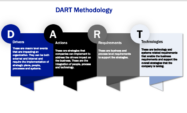
SAPinsider will be publishing Inventory Management and Optimization research reports in November 2022. If you are familiar with our research, you know that we use a proprietary framework called DART, which stands for Drivers, Action, Requirements, and Technology, to conduct our research. While we explain the methodology extensively in our reports and webinars, we believe…
-

Leverage ease of compliance, scalability to make the case for finance transformation
Around 25 percent of SAP customers globally have moved to SAP S/4HANA Finance and around 24 percent are currently implementing the solution, according to research from SAPinsider (note: Mastering SAP and SAPinsider are part of the Wellesley group of companies). SAPinsider’s Benchmark report, SAP S/4HANA Finance State of the Market 2024, surveyed 124 SAP customers…
-

Finding the Right Solution for Asset-heavy Industries
Enterprise asset management (EAM) lives and thrives on foolproof planning and scheduling. That’s a given – but today, we live in a world where there aren’t many givens regarding outside forces affecting supply chains and operations. This is especially true for asset-heavy industries such as energy and infrastructure. Underinvesting in planning and scheduling can lead…
-

Maintaining High-Quality Standards in SAP S/4HANA Implementations
Implementing SAP S/4HANA successfully requires meticulous planning, risk-based testing, automation, comprehensive validation, performance optimisation, data integrity assurance, security checks, continuous feedback, thorough documentation, and active stakeholder involvement, as advised by Tritusa’s expert consulting team.
-

SAP SuccessFactors Talent Intelligence Hub: Capabilities & Benefits
Rizing announces its new Jump Start to Talent Intelligence Hub service this spring, designed to assist SAP SuccessFactors clients in implementing the Talent Intelligence Hub to optimize skills and attributes across various HR modules.
-

- Premium
Simplifying Execution of Maintenance and Inspections with SAP Dynamic Forms
Following last year’s fully subscribed and top-rated session introducing SAP Dynamic Forms, hear directly from SAP’s Global Product Manager how SAP Dynamic Forms can support both simple and complex use cases, while simultaneously eliminating paper and non-interactive attachments. Whether they are for inspections, job safety, or to capture important operational data – forms are an...…
-

DyFlex and Bluetree Join Forces to Deliver Unmatched SAP Capability
Bluetree has joined forces with DyFlex Solutions, bringing together two award winning SAP partners to create the largest independent SAP provider in Australia. This union combines our strengths, enhances our collective expertise and unlocks new opportunities for customers across the region. Like Bluetree, DyFlex is highly awarded, locally led and known for delivering enterprise grade outcomes with…
-

Case Study: Implementing a multi-site connected fieldworker solution for SAP
What does it take to implement a multi-site connected fieldworker solution successfully and ensure seamless integration with SAP? In our latest article, we share insights from BlueScope Steel on how they implemented a connected fieldworker solution with Obzervr and as part of their global Asset Intelligence Program. __ BlueScope is one of the world’s leading…
Your request has been successfully sent