Use this expert advice to successfully implement Enterprise Compensation Management (ECM) in your organization. Discover useful features in ECM to avoid pitfalls and roadblocks. If you have already implemented ECM, use these tips to help you correct or enhance your current ECM environment.
Key Concept
Enterprise Compensation Management is SAP’s latest compensation management solution within the SAP ERP HCM platform. Using the tools available within this module, SAP users can implement compensation solutions for compensation planning, bonus processing, and job pricing. Most functionality is available to end users via SAP NetWeaver Portal. ECM allows managers, compensation, and HR professionals to take ownership of employee compensation data.
In my experience with many Enterprise Compensation Management (ECM) implementations, I’ve collected 10 best practices for you to apply to your own implementation. Whether your organization is small or large, domestic or international, these tips help you avoid mistakes and run a smoother, more efficient implementation.
Not all these tips may be relevant to your company, depending on your organization’s requirements. Since each one captures a distinct aspect of the solution, you can read them individually. Together, these tips represent an aggregate of practical information for implementing compensation solutions in SAP ERP HCM. Although I focus mainly on compensation planning and administration, I also included one tip concerning the job pricing component within ECM.
Tip 1. Learn the Configuration Basics
Configuration within ECM is distinguished between annual versus one time, or static. Annual configuration includes elements such as compensation reviews, compensation review items, and budget periods. However, other elements such as compensation areas, compensation plans, and budget types should remain relatively fixed from year to year. Table 1 gives you a quick look at some of the basic configuration elements.
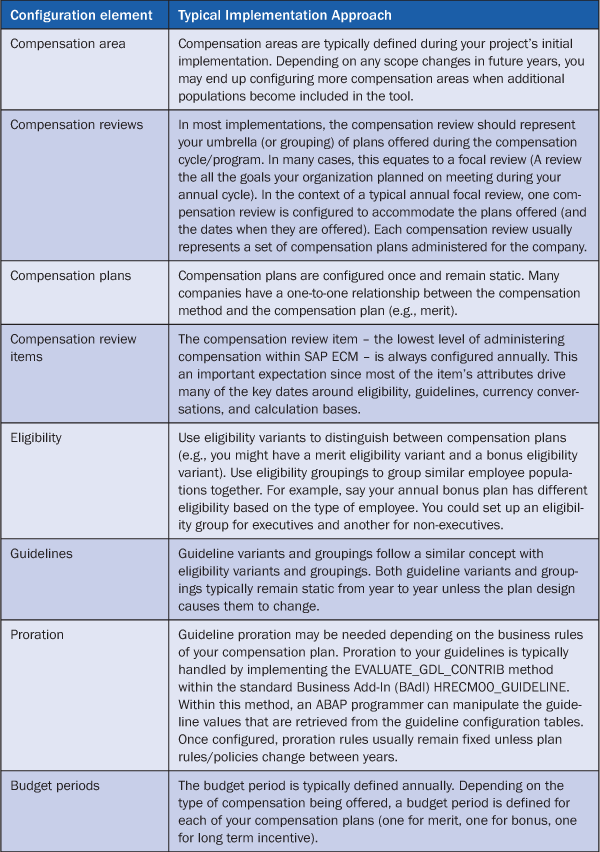
Table 1
Configuration elements
You perform this configuration within the IMG under Personnel Management > Compensation Administration (Figure 1).
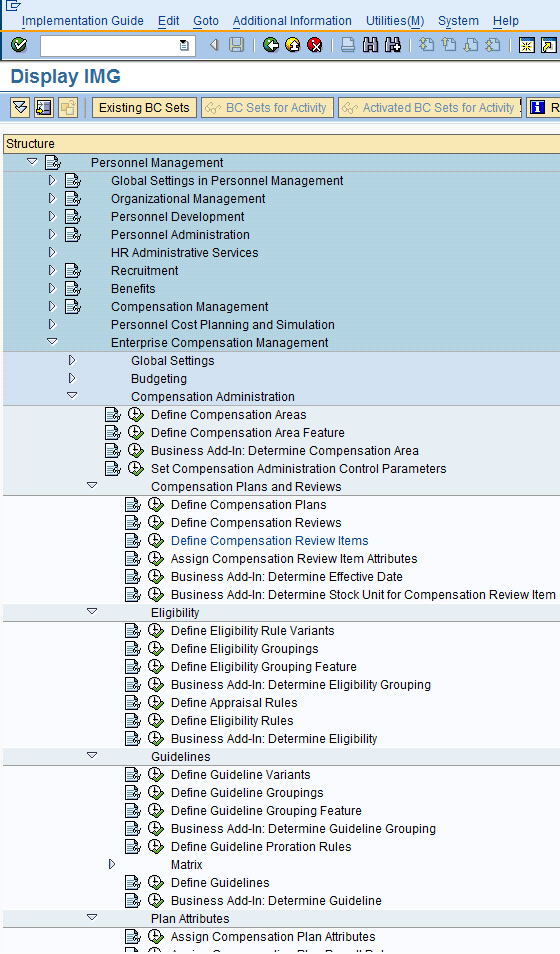
Figure 1
Configuration activities under the Enterprise Compensation Management node
Tip 2. Follow Consistent Naming Conventions
Naming standards attempt to systematize terms so they unambiguously convey similar information in a similar manner to different people. The naming standards you introduce during your ECM implementation are important to the standardization and scalability of your compensation solution. The following three naming standards (for compensation area, compensation plan, and compensation review item) represent some commonly-used conventions within the industry. You may want to infuse some of the following standards in your own implementation where (and if) it makes sense to do so:
- Compensation areas: The most typical naming of the compensation area is to denote it as the two-digit ISO code based on the employee’s country. Compensation areas drive important eligibility and guideline criteria and are frequently used to isolate scope by country. The compensation area is an important part of your compensation definition because many pieces of functionality use it as a key. In other words, you can set up one guideline matrix and drive the variations of country by using the compensation area (e.g., so France can have one set of guidelines while Spain has another, yet share the same global compensation review item). Using the two-digit ISO code for the compensation area within your implementation gives you a consistent identifier for country-specific logic within any of your business rules including guidelines, eligibility, and activation.
- Compensation plans: This typically describes the compensation vehicle used (e.g., merit, bonus, and stock). How you name your compensation plan influences the tab order on your compensation planning worksheet. You may want to consider naming your compensation plans 1MRT, 2BNS, and 3STK (or something similar) so the tab order on your worksheet is merit, bonus, and stock, respectively. This is typically the order in which most companies prefer to sort tabs. Also, the title of the tabs is taken from the description for these compensation plans, so be careful what you name them in the configuration. The functional analyst configuring the system needs to know that the tab name originates from the text of the compensation plan configuration.
- Compensation review items: These typically include the compensation vehicle and the year. Typically, the first two characters of the review item indicate the plan type (MR for Merit, BO for Bonus, or LT for Long-Term Incentive [LTI]). The second two digits of the review item signify the year. For example, MR11 would represent the 2011 merit plan annual review while BO11 would represent the bonus plan 2011 annual review. In addition to providing a clear distinction of the plan and year, naming the compensation review item in this manner also allows you to easily lock down security access by plan type using the standard authorization object P_ORGIN (or P_ORGINCON if using context-sensitive structural authorizations). You can restrict a user from seeing LTI plans, but allow the user to fully support the merit and bonus plans. Achieve this by including infotype 0759 in the P_ORGIN (or P_ORGINCON) authorizations with MR* and BO* for subtype, but excluding LT*.
Figure 2 shows an example of naming conventions with table view V_T71ADM09 (Define Compensation Review Items) populated for a merit, bonus, and stock plan.
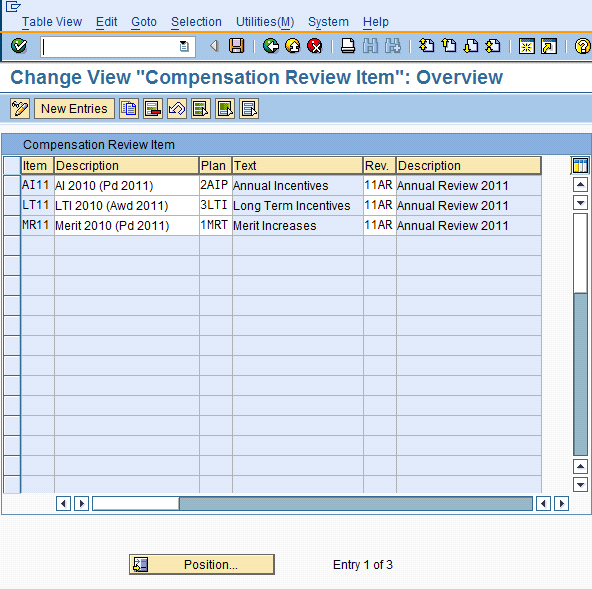
Figure 2
Compensation naming conventions, illustrated in table view V_T71ADM09
Tip 3. Know the Limits of ECM and When to Use HCM Processes and Forms
Off-cycle adjustments such as promotions, lateral moves, and demotions are not typically managed through ECM. Instead, SAP recommends using the HCM Processes and Forms functionality (via SAP Interactive Forms by Adobe) for compensation adjustments before and after annual focal planning. It is important to know the capabilities and limitations of both ECM and the HCM Processes and Forms in context with both focal and off-cycle compensation. Some users struggle to know where ECM leaves off and where HCM Processes and Forms takes over. In short: ECM was built to cover annual focal planning whereas HCM Processes and Forms was designed to cover off-cycle planning. ECM is usually done at a group (team) level permeated throughout the organization, whereas HCM Processes and Forms is usually done at an individual level and routed to the necessary stakeholders of the process.
The SAP Interactive Forms functionality is tightly coupled with the back-end SAP ERP Central Component system. This allows you to easily maintain the data integrity since business validation is deeply integrated into the framework. HCM Processes and Forms allows users to use SAP’s underlying business checks and expose them in the presentation layer (i.e., Adobe) in an intuitive manner. Additionally, the forms heavily use SAP Workflow, which is robust in terms of approvals and notifications. Data is collected from the front end (typically via SAP NetWeaver Portal) and moved through the process via workflow/approval processing. After the data is approved, the SAP system is updated in real time without human intervention. This approach is frequently called auto-post or auto-update within the industry and represents one of the strongest business cases for using HCM Processes and Forms. From a usability perspective, some users have more luck than others when implementing HCM Processes and Forms. Many users wrestle with the on-screen presentation. Some choose to pop up the Web Dynpro window that houses the Adobe form in its own window because the vertical and horizontal scroll bars prove to be a significant usability challenge.
Knowing when to use HCM Processes and Forms versus ECM becomes apparent once you familiarize yourself with what each solution offers. That said, one of the trickiest riddles to solve is how to handle off-cycle adjustments during the annual compensation planning time. For example, a salary change due to a promotion during the annual cycle becomes challenging for planning managers trying to stay within their budget. Business rules need to be established to ensure that an off-cycle adjustment updates the same base pay as the original base pay. For example, say the employee’s base pay was 50,000 EUR when the manager initiated the 2% increase. This same 2% increase should be applied within the system against the 50,000 EUR base pay once the adjustment is implemented. If the annual cycle has been processed and the employee is now making 51,000 EUR, an error should show on the off-cycle form and route to a human for analysis and follow up.
Tip 4. Implement Business Add-In HRECM00_EFFDATE for Effective Dates
Each compensation review item has an associated date on which the compensation element is effective (i.e., the date on which the payroll-relevant infotype records such as infotype 0008 [basic pay] and infotype 0015 [additional payments] update). The effective date of infotype 0759 (compensation process) is defined at the compensation review item level (see tip 2). Figure 3 highlights the section within the compensation review item that contains the default effective date configuration.
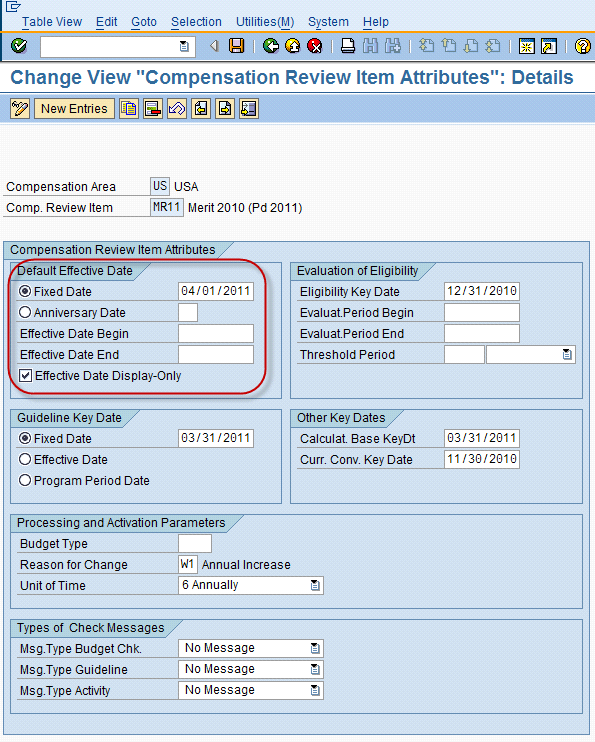
Figure 3
Default effective date configuration within the compensation review item
You can also implement Business Add-In (BAdI) HRECM00_EFFDATE when standard configuration does not totally meet business requirements. For example, you might have a salaried and hourly workforce that roll up to the same budget. Your salaried employees could be on a monthly payroll and your hourly employees could be on a weekly payroll. In this case, you use this BAdI to override the effective date of hourly employees based on some specific effective date (or driven from a custom table or directly embedded in the BAdI implementation). This BAdI potentially helps reduce the complexity of the configuration since you only create one set of compensation review items instead of one for salaried and one for hourly, for example.
Note that even though the effective date of infotype 0759 can be made editable for the manager on the planning worksheet, most companies do not allow this. The effective date of a compensation recommendation is almost always predefined by the compensation department during the beginning of the compensation cycle. Exceptions to this rule include companies that offer service anniversary-based compensation for their increases and those that offer manager’s discretion on when it will be effective. The effective date can be made display-only via simple configuration at the compensation review item.
Tip 5. Selectively Use BAdIs
Several BAdIs within ECM can replace the complete logic of a corresponding component. However, you may want to use the standard logic and just add changes on top of the functionality. Using the SKIP_BADI flag within the call to the BAdI, a user can more effectively use standard functionality in addition to custom logic. Each SKIP_BADI flag is available within the ECM functions that call one of the following BAdIs:
- HRECM00_CALCBASE
- HRECM00_ACTIVATION
- HRECM00_EFFDATE
- HRECM00_ELIGIBILITY
- HRECM00_GUIDELINE.
For more information, see SAP Note 878336 (ECM Function modules: parameter to ease BAdI implementations). Figure 4 gives an example of how this logic is called within the code.
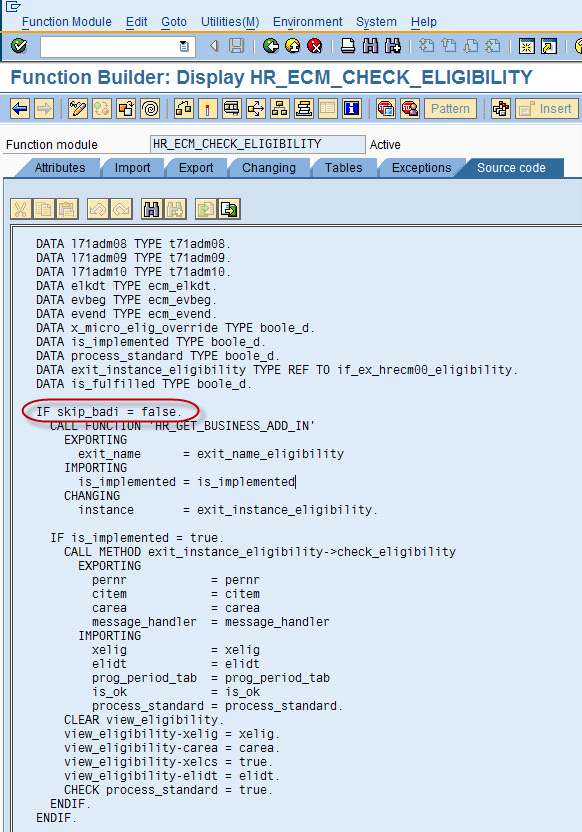
Figure 4
SKIP_BADI flag within function module HR_ECM_CHECK_ELIGIBILITY
Using both configuration and BAdIs as needed is an important part of your implementation. You can satisfy some requirements with standard configuration while others need the additional logic embedded in BAdIs. Being selective in your application of BAdI logic enables your configuration to be more uniform while meeting local or legal requirements through the implementation of the standard user exits available within ECM.
Tip 6. Prepare for ECM Activation
You most likely will implement BAdI HRECM00_ACTIVATION for activation. Activation is the process of creating the payroll-relevant infotype records from the approved planning records — infotype 0008 (basic pay) for merit, infotype 0015 (additional payments) for annual incentive, and infotype 0761 (LTI granting). The logic within this user exit is triggered when changing an employee’s infotype 0759 record status from approved to active using program PECM_CHANGE_STATUS. This BAdI has two methods: ACTIVATE_PROCESS and CALC_SAL_ADJUSTMENT. The ACTIVATE_PROCESS method allows you to revise or create a secondary infotype during activation (for example, by creating or updating a user-specific infotype). With the CALC_SAL_ADJUSTMENT method, you can define an alternative algorithm for evaluating an employee’s new infotype 0008 record. Both methods are commonly implemented. Table 2 shows a simple example of how each method of this BAdI might be used.
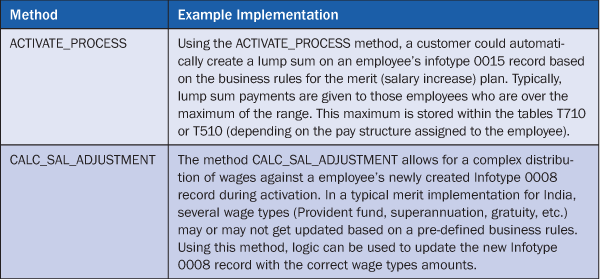
Table 2
Example uses of methods within the activation BAdI
Be sure to leave plenty of time to test your activation process. Activation is one of the most critical aspects of ECM, so it’s important to establish the rigor needed to build, test, and execute. Countries including India, Colombia, and Morocco typically have complex calculations on their merit and activation.
Pay particular attention to activation if you’ve implemented lump sum logic or created a secondary infotype. For example, if you have employees who choose to defer all or some of their bonus, you need to make sure the activation program deducts these deferrals before creating the infotype 0015 record. In these cases, execute both positive and negative test cases to ensure the logic handles all variations.
Before activation, it’s also important to test your downstream payroll processes. Whether you run SAP Payroll or use a third-party payroll provider, do not underestimate the importance of testing payroll or payroll interfaces during an ECM implementation. Because you might configure new wage types (as well as new timelines and processes in place), thorough testing of your payroll processes is a critical component to your success. The last thing you want is for your successful ECM implementation to be ruined by a payroll mess. Be sure to partner with your payroll team throughout your implementation.
Tip 7. Maintain the Exchange Rates Table
Standard table TCURR (exchange rates) holds the currency exchange rates within the SAP system. Exchange rate type M is used throughout the standard ECM functions (e.g., within function module HR_ECM_CONVERT_CURRENCY). Many users maintain this table in financial accounting (FI). You can push the exchange rates in this table from FI to SAP ERP HCM (assuming the two are decoupled) via Application Link Enabling (ALE). It is important you discuss the maintenance of this table with your finance team. Because SAP has hard-coded the exchange rate M in the ECM function modules, it is not possible to use a different exchange type. Figure 5 shows the standard TCURR table, starting with the first entries with exchange rate as M.
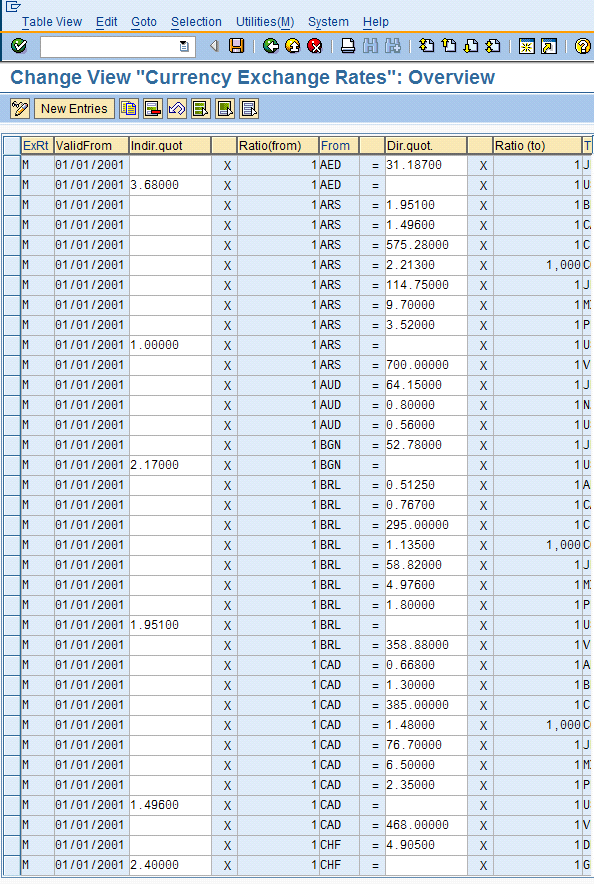
Figure 5
Exchange rate table TCURR is often maintained in FI
The frequency of push is really dependent on your business requirements. For example, say your bonus plan is based on a segmented history from the plan year (e.g., 2010 plan, 2011 payout). In this case, you may want the exchange rate to be fixed at December 31 of the plan year (in my example, December 31, 2010). December 31 might be the date used for the rate of exchange because it is the end of the plan year.
It is important to realize the effect of updating the values in this table since many areas of HR — including payroll — use the exchange rates. Even HR areas outside of payroll including SAP Enterprise Learning and benefits management may use the exchange rate in one form or fashion.
Tip 8. Make a Statement
Compensation statements come in two distinct categories within ECM: compensation review statement (CRS) and total compensation statement (TCS). The CRS is the document for employees after their focal review process. The TCS is typically a year-round document showing the employee’s net worth with the company. Both statements are produced in Adobe and are frequently made available on SAP NetWeaver Portal for employees, managers, and the HR team (often including the compensation team).
The CRS typically links pay to performance. This is the document that managers use for their annual pay discussions with employees. The statement is usually personalized and many times contains relevant information for employees to describe their payments (e.g., merit components, bonus segment calculations, or LTI breakdowns). In the SAP system, the form is rendered using SmartForm technology. The standard SmartForm name is HR_ECM_CRS. You should copy this form into your user namespace and enhance it accordingly. Standard transaction PECM_PRINT_CRS provides the ability to print compensation review statements on the back end (Figure 6). Be sure to create an entry in TVARV and use a program variant to call the custom name of your SmartForm. By doing this, the program knows which enhanced SmartForm template to render in lieu of the standard.
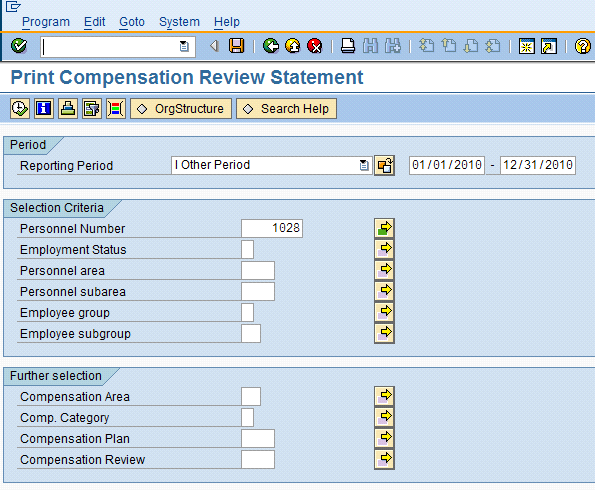
Figure 6
Standard transaction PECM_PRINT_CRS for printing compensation review statements
The TCS is meant to provide a holistic view of an employee’s total compensation value with the company. Frequently, users include all types of pay and benefits information such as base pay, short-term incentives, LTIs, health and welfare programs, and even non-monetary perquisites such as access to an onsite day care and fitness club. In the SAP system, this form is rendered using SmartForm technology, as well. The standard SmartForm name is HR_CMP_TCS. As with the CRS, copy this form into your customer namespace and enhance it as needed.
Many users confuse CRS and TCS. The TCS is typically an anytime document whereas the CRS is given immediately before focal review payout. Several companies have moved away from presenting an employee’s total compensation on an Adobe document and instead present it as an interactive Web site with graphs and what-if analysis. SAP does not yet have this type of interactive total compensation view. The CRS, however, is typically being administered in an Adobe document. This allows the manager and the employee to view and print their pay-for-performance on one page.
Global organizations should consider providing documents with multi-language capability, regardless of whether the statement is initially English only. Be sure that the verbiage and look-and-feel of the document are locked in before sending it for translation. Do not underestimate the amount of time needed for compensation stakeholders, legal, or communications to approve the document.
Tip 9. Implement ECM-Specific Authorizations
Within ECM, additional authorization levels are needed to allow end users to create or change records in infotype 0759. Authorization levels P (for planning and submitting compensation process records) and A (for approving and rejecting compensation process records) have been added to authorization object P_ORGIN (Figure 7). The standard authorization levels for read (R) and write (W) are required for line- and higher-level managers involved in the online planning process. The authorization levels P and A are checked in SAP NetWeaver Portal on the compensation planning iViews and in program RHECM_CREATE_COMP_PROCESS (Create Compensation Process Records). However, these authorization levels are not checked within standard transactions PA30 and PA20 (Maintain and Display HR Master Data).
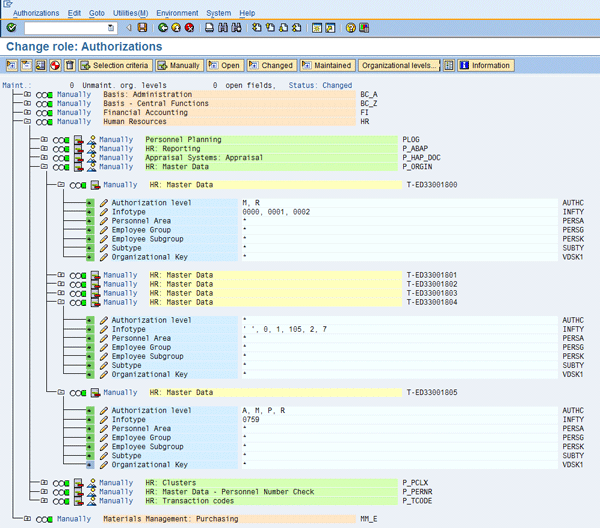
Figure 7
Authorization containing infotype 0759 with authorization levels A and P
In most implementations in which a manager portal in an SAP ERP role is already established, these authorizations are added to this existing role. In addition to gaining levels R and W access to infotype 0759, managers also typically need R access to infotype 0758 (compensation program) and infotype 0760 (compensation eligibility override). If LTIs are part of your project scope, you may need additional access for infotypes 0761 (LTI granting) and infotype 0762 (LTI exercising).
If your organization has context-sensitive structural authorizations switched on, you need to add the necessary authorization levels to the P_ORGINCON authorizations (and not P_ORGIN) found in your existing roles. This concept should be clear to your security administrator.
Due to the sensitivity of the data within compensation, it is crucial to have solid security and access authorizations. Not having proper security protocols and segregation of duties raises red flags to your auditors and leads to a tough project delivery. Make sure you reach out to your security and audit friends early in the project so they understand the high-level design and overall approach.
Tip 10. Analyze Pay Categories
SAP’s Job Pricing submodule of ECM allows users to streamline the way they participate in salary surveys and analyze market data results from providers. An important piece of this functionality centers on pay categories.
Pay categories within Job Pricing enable you to define and analyze compensation from different perspectives. Typically configured pay categories include base salary, total cash, total bonus, LTI, and total direct compensation. For each pay category, you can import market data such as the 10th, 25th, 50th, 75th, and 90th percentiles for comparison and analytical purposes. These percentiles — matched with the relevant pay category — are mapped to the provider’s file layout during import of the market data. This allows you to upload the data, compare, and make hybrid job composites within and between vendor surveys.
Whenever a new file is imported into the system, a compensation professional needs to map the SAP internal data fields to the fields of the salary survey (Figure 8). Once these fields are mapped, future imports do not need to be re-mapped unless a data field changes position or is dropped from the market data, or if the file format or layout changes in some other fashion.
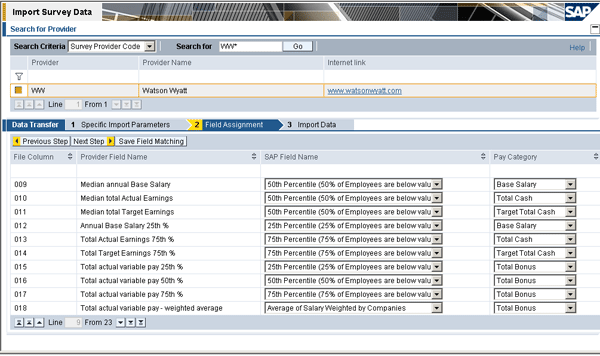
Figure 8
Mapping of SAP fields to provider fields
Jeremy Masters
Jeremy Masters is an author, speaker, and SAP ERP HCM subject matter expert with more than 12 years of experience. Jeremy is also the co-founder and managing partner of Worklogix, which provides SAP ERP HCM professional services and software solutions to Fortune 1000 companies. Jeremy has been involved in more than 20 projects, many of them global in scope. In addition to ECM, Jeremy has worked with the talent management functionality, including performance management, succession planning, and e-recruiting as well as the employee and manager portals in SAP ERP. For more information on Enterprise Compensation Management, you can reference his book Enterprise Compensation Management with SAP ERP HCM.
You may contact the author at jmasters@worklogix.com.
If you have comments about this article or publication, or would like to submit an article idea, please contact the editor.