Discover how the new succession management component from SAP ERP 6.0’s enhancement package 4 for Talent Management can help you in your talent management efforts. This component features new functions for talent management specialists that enable them to identify potential successors for vacant positions, evaluate their training and development needs, and meet corporate goals and objectives.
Key Concept
The talent management specialist is a new role in SAP ERP 6.0 enhancement package 4 that replaces the talent development specialist from earlier SAP ERP HCM Talent Management releases. Talent management specialists work with managers and focus on identifying key positions in their organizations and maintaining talent profiles to build bench strength for the key positions should they become vacant. They are also responsible for identifying qualified candidates and recognizing potential candidates for the successor pool, conducting talent review meetings, and talent calibration.
Many organizations have key positions in their organizational structure that are essential for efficient day-to-day business. Vacant key positions have the potential to negatively affect the business. Succession management is a useful tool talent management specialists can use to help their organizations avoid vacant positions by building benches for key positions and maintaining profiles of potential successors.
Note
A bench consists of a pool of candidates qualified for the key position.
Succession management in SAP ERP 6.0 enhancement package 4 features four new functions for talent management specialists, which include the ability to:
- Conduct talent review meetings
- Conduct talent calibration
- Maintain talent profiles and assessments for the employees
- Maintain and cascade organizational goals
Note
Prior to SAP ERP 6.0 enhancement package 4, succession management was part of SAP E-Recruiting and shared the infotypes and nodes in the IMG. The new succession management component requires new infotypes. If you are an existing SAP E-Recruiting user and plan to implement succession management in SAP ERP 6.0 enhancement package 4, refer to
SAP Note 1241014 (Information for existing customers about EHP4) for more details.
Talent management specialists and managers work together to build the bench by identifying qualified individuals. They use succession management to match position requirements to the individual’s qualifications. This helps determine the individual’s strengths and weaknesses and whether or not he or she would require additional training, further job experience, or mentoring.
Some candidates may require more than three to five years of additional training or mentoring to become qualified. Succession management provides the opportunity for the organization to mentor and train that candidate. If a position becomes available and the candidate is still not qualified, the organization will hire someone externally or look for another qualified internal candidate.
Note
I suggest talent management specialists identify at least one or two employees who are qualified and ready to occupy a vacant key position immediately.
Talent management specialists and managers work with their organization and succession management to define a process for succession planning and developing the employee’s career path.
Figure 1 shows the succession management data model. The data model shows the relationships between objects, the evaluation paths, and the infotypes in the succession management component.

Figure 1
Succession management data model
Note
For your succession planning requirements, SAP recommends that you implement and use the SAP Talent Visualization application by Nakisa for data visualization and other succession management needs. Refer to
SAP Notes 1223936 (Succession and talent development with EHP4) and
1223938 (SAP Talent Visualization by Nakisa – Languages) for more details. You can also read more about Nakisa in my article, "
3 Ways to View Your Personnel with SAP Talent Visualization by Nakisa."
Prerequisites for Implementing Succession Management
Before you attempt to implement succession management, ensure you have performed the following functions:
- Implement the following business packages:
- Business Package for Talent Management Specialist 1.40
- Business Package for Manager Self-Service 1.41
- Business Package for Employee Self-Service 1.41
- Activate the business function ERP_ENTERPRISESEARCH
- Install TREX 7.10 (Refer to SAP Note 1273780)
The Talent Management Specialist Interface
Figure 2 shows the user interface within the succession management component that talent management specialists use to perform their tasks. In addition to the new functions I mentioned above, talent management specialists must:
- Create and maintain talent groups
- Maintain job architecture
- Work with managers to identify key talents, key positions, and development needs for potential employees
- Review and maintain employee talent information

Figure 2
Talent management specialist user interface
To set up an employee’s talent information, click Talent Information under the Detailed Navigation section in the interface. Enter the employee’s name or personnel number. Select the employee and click the Talent Profile button.
Figure 3 shows a selected employee’s talent profile. Talent management specialists enter information in the following tabs: Resume, Talent Assessment, Mobility, Career Goal, and Development Plan.

Figure 3
Talent management specialists use talent profiles to perform succession planning functions
Talent management specialists can use the sliders in the profile to rate the employee’s performance, potential, core competencies, derailers, mobility, languages, internal work experience, and future development.
Talent management specialists are not the only ones maintaining these talent profiles. Depending on the organization’s business requirements, some allow employees to maintain their own talent profiles, and some allow the managers to maintain them. My preference is to have the employees manage their own profiles and to have their managers assess them.
Table 1 shows the details of the iView for a talent profile maintained by the talent management specialist on behalf of the employee.

Table 1
Talent profile iView for profile maintained by the talent management specialist
Table 2 shows the details of the iView for a talent profile maintained by the employee.

Table 2
Talent profile iView for profile maintained by the employee
You can customize talent profiles by following IMG menu path Talent Management and Talent Development > Talent Profile.
Note
If you implemented SAP E-Recruiting, make sure the entries and settings you make for a talent profile are identical to the customizing settings you made in SAP E-Recruiting.
Talent Assessment
The talent profile in succession management features a Talent Assessment tab, where managers and talent management specialists can analyze employees’ strengths and skills (Figure 4).

Figure 4
Managers and talent management specialists use the talent assessment functionality to enter a comprehensive assessment of the employee
Talent assessment is an important component in the talent management process. It gives the organization a clear picture of the employee’s potential and allows it to compare candidates. This component also enables candidates in personal development and helps organizations build bench strength for key positions.
You can customize the data for talent assessment via IMG menu path Talent Management And Talent Development > Talent Assessment.
Table 3 shows the details of the talent assessment iView.

Table 3
Talent assessment iView
Using the talent assessment functionality, managers and talent management specialists can nominate the talent to a talent group and assign a reason for the nomination.
You can access the talent assessment functionality from the manager portal for SAP ERP HCM. Click Assessment under the Services section (Figure 5).

Figure 5
Services for talent management
Table 4 shows the details of the MSS iView.

Table 4
MSS iView
Once the manager or the talent management specialist finalizes the assessment and updates the status to Completed, no further edits or changes are possible in talent assessment for the validity period. If you need to correct the assessment, you must use a Business Add-In (BAdI).
Note
Unlike talent profiles, talent groups used in succession planning are very different from talent groups maintained in SAP E-Recruiting. If you have SAP E-Recruiting in your landscape, the talent groups in SAP E-Recruiting and succession management do not need to be the same. For more details about talent groups, refer to my article, "Talent Groups in SAP e-Recruitment Target the Right Candidate."
Job Architecture
In SAP ERP 6.0 enhancement package 4, job architecture is the basis for succession management (Figure 6). The job architecture consists of:
- Functional areas (Object type FN)
- Job families (Object type JF)
- Jobs (Object type C)
- Positions (Object type S)

Figure 6
The data model of the job architecture
You can maintain the job architecture either through SAP Talent Visualization or succession management. The data you maintain in SAP Talent Visualization still resides in SAP ERP HCM. If you have Nakisa implemented, I suggest using SAP Talent Visualization because of its data visualization capability. Otherwise, it is your choice which to use.
If you decide to maintain the job architecture in SAP ERP HCM, use transaction HRTMC_PPOM (Figure 7).
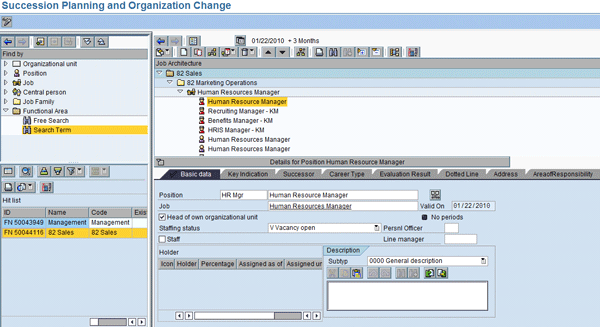
Figure 7
Transaction HRTMC_PPOM allows you to create, edit, or maintain the functional areas
Table 5 shows all the transaction codes you need to create and maintain succession planning in the back end.
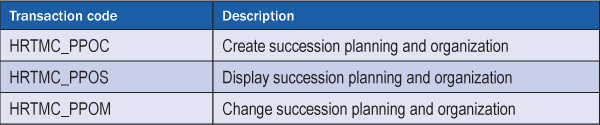
Table 5
Transaction codes for succession planning
Table 6 shows the standard roles for succession management. You can use these as templates.

Table 6
Standard roles in succession management
Note
Refer to the following SAP Notes for more details about succession management and talent development in SAP ERP 6.0 enhancement package 4:
- 1223936 (Succession and talent development with EHP4)
- 1223937 (Talent management and Talent Development – Languages)
- 1223938 (SAP Talent Visualization by Nakisa – Languages)
- 1276732 (Duplicate records in area Last tasks performed)
Refer to SAP Note 1273780 (Talent Management and Talent Development – TREX 7.10) for more details about embedded search, which is the new search capability in SAP ERP 6.0 enhancement package 4. Using this functionality, you can perform contextual and non-contextual search. You need to have implemented TREX 7.10 to use this feature.
Infotypes in Succession Management
Table 7 summarizes the new infotypes you use in succession management.
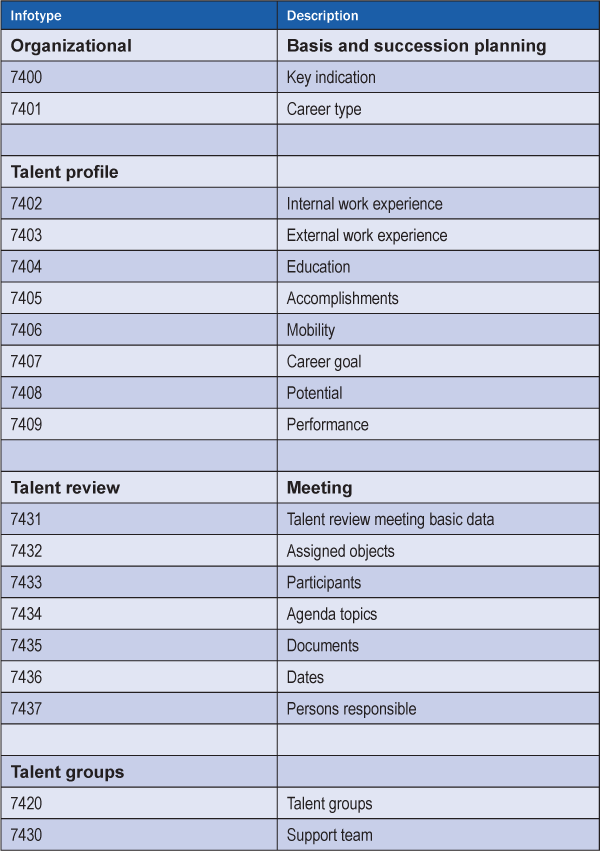
Table 7
New infotypes for succession management

Venki Krishnamoorthy
Venki Krishnamoorthy is an author, speaker, and SAP ERP HCM talent management solutions subject-matter expert. He is currently an independent SAP ERP HCM functional consultant. Venki has over 10 years of experience as a functional lead, project manager, and program manager in the HCM space. Besides implementing SAP HCM solutions, he has implemented and acted as a trusted advisor on SAP ERP HCM talent management implementations, including E-Recruiting, HCM Performance Management, Succession Planning, SAP Talent Visualization by Nakisa, Learning Solutions, and Employee Self-Service and Manager Self-Services. He is the coauthor of three books: E-Recruiting with SAP ERP HCM, SAP ERP HCM Infotypes: Your Quick Reference to HR Infotypes,
and SAP Transaction Codes: Your Quick Reference to T-Codes in SAP ERP.
You may contact the author at krish.venki1@gmail.com.
If you have comments about this article or publication, or would like to submit an article idea, please contact the editor.


 Premium