The WM-PP interface integrates the SAP R/3 Warehouse Management (WM) with the R/3 Production Planning-Process Industry (PP-PI) module to allow for correct quantities of production materials at the right time. The author shares his advice on how to avoid potential complications with the interface, including problems with production supply areas (PSAs) and failed goods movement transaction (COGI) entries.
The SAP R/3 Warehouse Management (WM) is well integrated with the R/3 Production Planning-Process Industry (PP-PI)
module via a WM-PP interface. This interface ensures that production materials needed for production or process orders are
available in the right quantities at the right time.
Despite the high level of integration, you face a number of potential trouble spots when setting up the
interface. Companies face many problems big and small that often undermine the purpose of the WM-PP interface. These
problems include:
- The right materials are not in the production supply areas (PSAs).
- Material quantities in the PSAs are insufficient or excessive.
- The wrong materials or material batches are consumed out of the PSAs.
- The materials are not supplied in time for production to start or continue.
- Negative stocks are in the PSAs.
- You have numerous failed goods movement transaction (COGI) entries.
- You experience time-consuming analysis to fix problems on a daily basis.
- The physical inventory processes in the PSAs are unreliable.
The WM-PP interface can work smoothly by using the correct configuration. The interface is also sensitive
to master data. An incorrect or missing control cycle record will prevent the creation of material requirements. This
causes delays or cancelations in production processes even when the materials are present in warehouses. Furthermore, the
bill of materials (BOM) and routings information must match the control cycle records. Otherwise, incorrect or no
materials will be consumed from the PSAs. This has important implications for the backflushing process, as you must do a
lot of research to analyze wrong transactions to correct material consumptions.
To see how these problems affect the WM-PP interface, it is important to understand how the interface
works. After I describe the inner workings of the interface, I will offer tips on design, configuration, master data, and
operational procedures for avoiding the
problems listed previously.
How the WM-PP Interface Works
The WM-PP interface works to enable staging of all production materials by using the material staging process.
The materials are staged to PSAs using different staging methods. The PSA/bins, where the materials are staged, are
dependent on the master data — i.e., control cycle records. What follows is a description of how the interface and
its associated processes work.
Material staging process: Figure 1 shows a simplified diagram of the material staging
process. The production order/process order has components as per the BOM or recipe copied when the order is created. The
component materials and quantities on order are required in production areas before the scheduled start or continuation of
a production/process order. These materials are warehouse-managed — i.e., they are available in the warehouse and
need to be staged. The requirements are created in the form of transfer requirements (TRs). These TRs need to be converted
into transfer orders (TOs), which tell the warehouse what materials need to be physically staged.
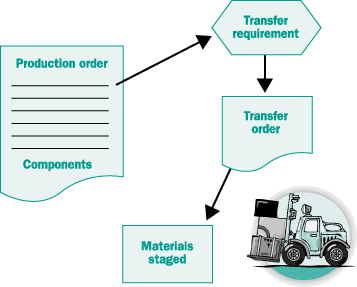
Figure 1
The material staging process: (1) The required components in the production order are placed in a transfer requirement. (2) The transfer requirement is converted into a transfer order, (3) which tells the warehouse what materials to stage.
PSAs: The PSA is the physical location in production where the materials are staged for
use by production personnel. There can be any number of PSAs, depending on the organization, layout, and responsibility
considerations for efficient management of materials within the production areas. The PSAs are linked to work centers and
resource and plant storage locations (Figure 2). One storage location can have any number of PSAs.
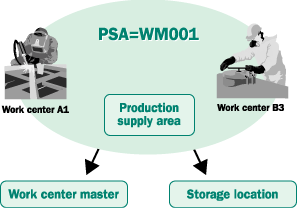
Figure 2
The production supply area (PSA). Note that each PSA has to be linked with storage location and, in turn, to a warehouse according to a plant-storage location assignment. Think of a PSA as a group of work centers for which the components are to be supplied. The components are staged to PSAs.
The PSA is a virtual extension of the warehouse. Consider it a part of the warehouse. It has a specific
storage type and bins. A PSA may have one or more bins. Material is staged in these bins and can only be consumed out of
these bins, and not the bins in the warehouse.
Material staging methods: The staging methods work with different business requiremnts of
production/ process orders. The demands within R/3 are created automatically at creation or release of production/process
orders. SAP R/3 provides the following material staging methods (Figure 3):
- Pick parts are provided in the exact quantities as specified in the process order component list. For
this type of material staging, TRs can be created manually or automatically when the production order is released.
Examples of pick parts are crank shafts, coloring agents, plastic sheets, or batteries.
- Crate parts are commonly used materials and not staged for individual production/process orders. They
are used over many production/process orders. Crate parts are demanded using a manual trigger — e.g., when a crate
is almost empty. The materials are staged if and when production sees that it needs additional materials. Examples of
crate parts are cleaning agents, welding rods, nuts and bolts, nitrogen gas, or benzene drums.
- For release order parts, the transfer quantity is calculated based on the quantities of components in
released process orders. The material quantities in the PSA and the replenishment storage types are reduced from the
requirement. A big advantage of this method is that the total quantity is cumulated and the staging is done for the total
quantity of various materials needed in the PSAs. If required quantities are already
present in the PSA, no TR is created. This method is widely used in process industries. Examples of
release order parts are plastic
granules, prestage mix, and bulk
precipitate.
- Manual staging of components is applicable in situations where the components may be used to stage
materials, rather than in the BOM or recipe. It may also be used to stage additionally required materials.
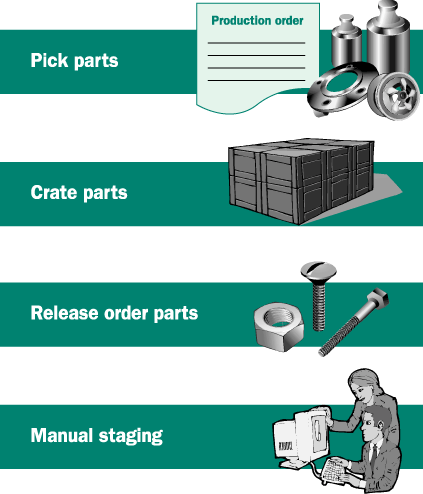
Figure 3
Four possible methods for material staging
Tip!
A production/process order may have
different mixes of pick, crate, and release order parts, depending on the individual requirements. Different staging
methods may be used to stage these materials.
Master data, control cycle records: The control cycle record establishes how and where a
material is to be
supplied within a PSA. The control cycle record is master data for production supply and consists of the
plant, production supply area, and material, and determines the production storage bin and the material staging method
(staging indicator). It decides the specific PSA in the production facilities (bin in terms of warehouse storage type)
where the different materials on the production/process order are staged (Figure 4). The PSA is linked to
the work center/resource in the PP system.
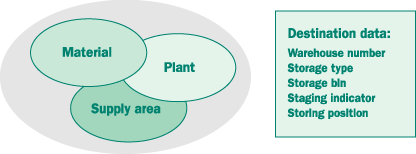
Figure 4
A control cycle record. Notice the combination of plant, supply area, and material. The staging method — say, pick parts — is decided by the staging indicator, and bin information (storage type, bin) is contained within the control cycle record.
Tip!
When creating control cycle records, use
transaction LPK4, as it saves time in creation of master data. Thereafter, little effort will be needed
to update records for newly introduced materials.
Tip!
Create control cycle records in WM units
rather than in base units or unit of issue. This simplifies and improves the staging process.
Figure 5 shows the main steps needed to configure and activate the WM-PP interface.
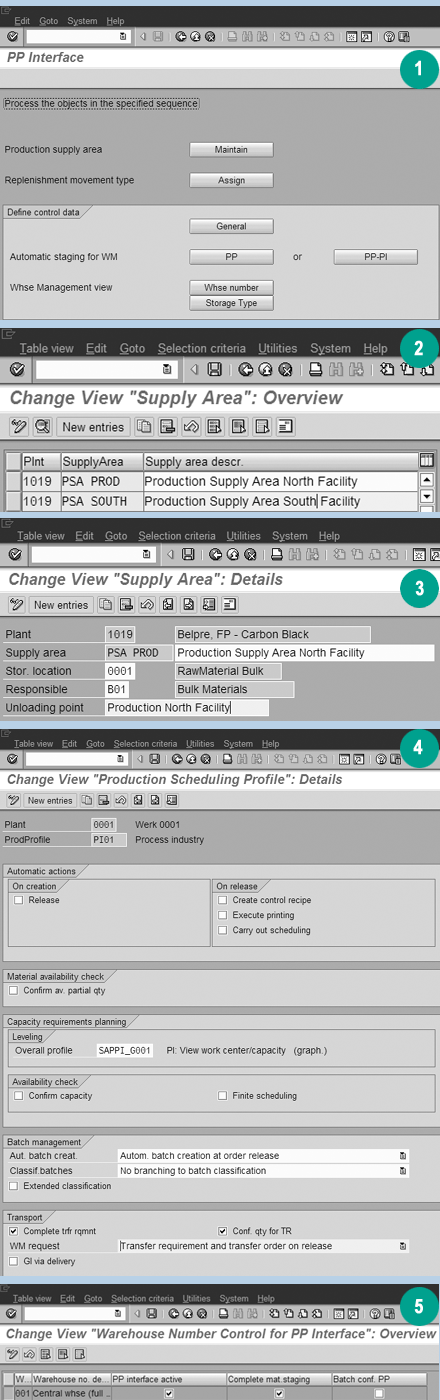
Figure 5
WM-PP interface configuration. (1, 2, 3) Maintain PSAs. (4) Activate the creation of TRs at release or at creation (WM request). (5) Activate the PP interface for the warehouse.
Consumption of materials from PSAs: Once the materials have been staged according to the
requirements generated by production/process orders, the further processing of materials consumption is automatic. The
materials are consumed as a result of a goods issue process for the components of the production/process orders
(transaction MB1A, movement type 261). This transaction works at the level of Inventory
Management (IM). Also, if the materials (material and batch, if batch-managed) are present in the PSA, the materials are
consumed without any intervention by the user.
The goods issue process may be manual (as part of the production/ process order confirmation transaction)
or automated through the process of backflushing of materials. For the most efficient and effective operations,
backflushing is the preferred option. The backflushing takes place at the IM level by consumption at the plant-storage
location level. The materials are also backflushed from the PSAs at the WM level. However, this process is not always
smoothly performed, as I explain later.
Tip!
Backflushing in PP processes enables full
automation of the consumption process at both the WM and IM levels.
Figure 6 shows the typical material staging and consumption processes for
the process industry.
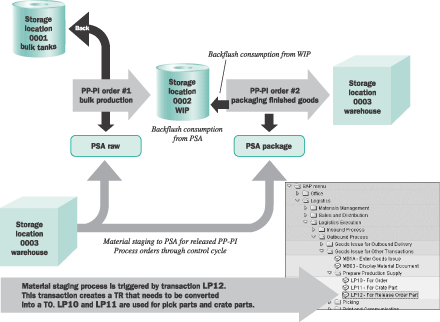
Figure 6
Material staging and consumption processes in process industry. Process order 1 for manufacturing bulk material uses raw materials from bulk tanks (IM-managed) and the WM- managed warehouse. Process order 2 for finished goods uses IM-managed work-in-process (WIP) and packaging components from the warehouse. Materials are staged to PSAs using transaction LP12 (also LP10 and LP11 for pick/crate parts) and consumed by backflushing processes from IM-managed storage locations and WM-managed PSAs.
Material Consumption
Considerations
Now that I've explained how the
WM-PP interface works, let's look at some the important considerations for material consumption out of PSAs:
- Control cycles must exist for all materials in the BOM when the process orders are released.
- Materials must be staged by the
warehouse according to material
staging requirements (transactions LP10, LP11, and LP12). The transactions
should be run at designated time periods.
- Material consumption in goods
movements should be equal to or less than the quantities on production/process order.
- For BOM items, if a material is not present at the IM level, the
transaction fails and the failed goods movement goes to the failed goods movement transaction, COGI.
Tip!
Rely on clearing transaction COGI for
materials not staged to PSAs rather than allow negative stocks. COGI serves as a watchdog for incorrect transactions. It
is a friend you can trust.
If materials are not present in a
PSA bin, the failed goods movement creates negative stock in the PSA
(if negative stocks are allowed). Otherwise, the goods movement transaction fails and the system
goes to transaction COGI. These failed goods movements need to be corrected after
ensuring that correct materials are staged to PSAs.
Tip!
Negative stocks in PSAs: friend or foe? It
is recommended that you not allow negative stocks in PSAs. This way, the failed goods movements will go to COGI. You will
not be blind to consumption by way of backflushing. Negative stocks also interfere with physical inventory processes for
PSAs.
- Any additional materials or unplanned goods issue of components not on the BOM issued at the stage of
confirmation of production/process orders are:
- Consumed out of the PSA if a control cycle exists and materials are available in PSA.
- Issued from inventory and a TR for movement type 261 is created if a control cycle
does not exist and the material is present at the IM level but not in the PSA. This TR needs to be converted into a TO,
allowing consumption of the material from the PSA.
- A TR for movement type 261 is created for cancellations of process/
production order confirmations. This TR needs to be converted into a TO, placing material back in
warehouse.
Common WM-PP Interface Problems
In addition to the above concerns,
you might experience the following problems, for which I've offered
solutions:
Materials consumed are not in inventory stock (COGI error). Production personnel should
check stock prior to a goods movement transaction in the case of manual goods postings (MMBE stock).
Materials/batches consumed are not moved to PSAs, creating negative stocks in PSAs. The
warehouse must use transaction LP10, LP11, or LP12 for material staging at specified
time intervals and for stage materials.
Material batches consumed are different from those actually used on process orders. Check
that the PSA stock has the correct batch number. If not, resolve the problem with production to ensure that the correct
batches are consumed for the process order.
Material demands — i.e., TRs — not created due to missing control cycle. You
need to ensure that master data (control cycle records) is updated in a timely manner.
Material demands are not created for the correct PSAs — i.e., the materials needed in
specific PSAs either are not demanded at all, are demanded in incorrect quantities, or demanded for the wrong
PSA. Review the BOMs or recipes and routing with reference to the control cycle records. The reasons for it may
be one or more of the following: You have the wrong PSAs on the control cycle records! The control cycle records and BOMs
do not match. You probably have the wrong routing leading to the work center/resource.
The warehouse is not using transaction LP10, LP11, or LP12 to stage all materials needed in the
PSAs, or the staging materials are short. Instead, you resort to ad hoc staging by bin-to-bin movements using transaction
LT01. Use transaction LP10, LP11, or LP12 for material staging.
Vijay Garg
Vijay Garg, PMP, has more than 14 years of SAP project management and implementation experience with Fortune 500 companies in the high-tech, chemicals, CPG, and engineering industries using various SAP Business Suite applications as well as SAP APO. Prior to working in SAP, he had vast experience in the engineering industry, including software development and applications.
You may contact the author at vgarg@crestron.com.
If you have comments about this article or publication, or would like to submit an article idea, please contact the editor.