Management
Learn about the new SAP E-Recruiting rapid-deployment solution. See how it is delivered and implemented, its technical prerequisites, and the project management approach to take for it.
Key Concept
A rapid-deployment package includes pre-configured software, content in the form of SAP best practices, predefined templates and tools, educational material, and implementation services.
Many IT implementation projects tend to increase in scope, time, and cost during project implementation. SAP E-Recruiting rapid-deployment solution was designed as one answer to these kinds of problems. The SAP E-Recruiting rapid-deployment solution concept offers a predefined scope, a set timeline for the project management (including all required tasks), and a fixed price. For example, SAP E-Recruiting rapid-deployment solution can be implemented onsite in a company in as little as nine weeks — regardless of the size of the company. This is possible because unlike other, individual projects, less time is spent discussing the scope and content of the implementation project.
In SAP E-Recruiting rapid-deployment solution project implementations, the scope and content is already set, and the user’s requirements are then evaluated in the context of this scope. Any gaps that are found can be filled by adding more functionality to the SAP E-Recruiting rapid-deployment solution project via a change request. Therefore, the project scope, timeline, effort, and required project time stay the same regardless of the size of the company undertaking the implementation of the rapid-deployment solution itself. Additional time and effort is only required if additional functionality is added to the project scope via a change request.
How Does SAP E-Recruiting Rapid-Deployment Solution Work?
SAP E-Recruiting rapid-deployment solution delivers a project concept that enables project teams to perform a bigger part of the SAP E-Recruiting implementation themselves than would be possible in a traditional implementation project. This delivery method shortens the length of the project and reduces project cost. In every project phase — concept creation, realization, and testing — everything is already prepared and ready to be delivered.
In the concept phase a significant amount of time and effort can be saved compared to a traditional project, as the project scope is already defined, the business processes are documented, and the scope document has already been written and only requires completion with the company’s specific details (e.g., specific customizing table values). In the realization phase most of the configuration has already been prepared to be deployed into the business’s development system. The required manual configuration is documented in a step-by-step guide and therefore can be performed quickly and efficiently. In the final testing phase, since the test cases have already been documented, the time can be better used for the testing itself.
Who Is SAP E-Recruiting Rapid-Deployment Solution For?
Before starting to use rapid deployment for a project you must verify that SAP E-Recruiting rapid-deployment solution is the right approach. Since the scope is predefined, companies should evaluate it to see if the delivered process and functionality meet their requirements. This can be true for companies with an already streamlined recruiting process or for those that want to get it.
If a company’s requirements vary too much from the SAP E-Recruiting rapid-deployment solution scope, a more individual, traditional project approach might be a better fit. A compromise could be possible in cases in which the company’s requirements are close to the scope of the predefined service but exceed them at some points. Additional requirements can be included to the project scope as an additional fixed-price service or on a time-and-material basis via a change request. An example of that is that a company wants to use the SAP-enhanced user interface shown in Figure 1 instead of the traditional job search.
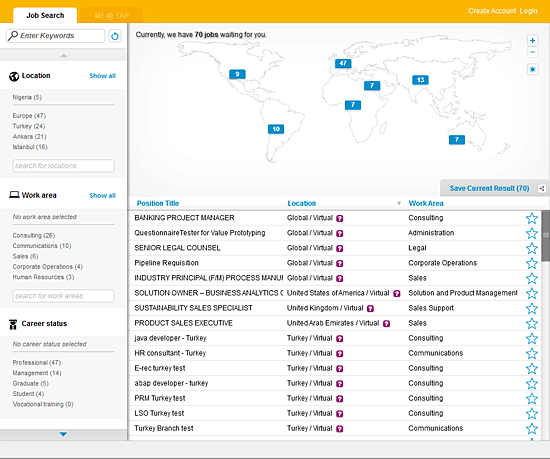
Figure 1
SAP enhanced user interface
The purpose of SAP E-Recruiting rapid-deployment solution is to enable project teams to perform a large number of tasks themselves. Therefore a project team with SAP implementation project experience is at an advantage. Specific SAP certification, however, is not required.
Functionality
SAP E-Recruiting rapid-deployment solution delivers the functionality required to perform the core recruiting end-to-end process. As part of the process, the solution scope includes:
- Requisition creation and publication
- Searching and applying for jobs (internal and external)
- Talent pool sourcing and screening
- Candidate rating and ranking
- Hiring manager integration
- Requisition closing and data transfer
Functionality that is not defined as in scope of the predefined SAP E-Recruitment rapid-deployment solution process is not included unless requested by customers via a change request. This includes some recruiting functionality that is available in the SAP E-Recruiting standard software, which is, however, not part of the defined scope of SAP E-Recruiting rapid-deployment solution. It is important to note that no functionality that is usually available in SAP E-Recruiting standard is deactivated during the implementation of the rapid-deployment solution. The entire SAP E-Recruiting standard software is implemented, however, only the rapid-deployment solution process functionality is configured by the rapid-deployment solution project team. The standard functionalities can therefore still be configured and used after the rapid-deployment solution implementation or can be added to the project scope via a change request.
Business Process
SAP E-Recruiting rapid-deployment solution delivers an end-to-end recruiting process that begins with communicating the recruiting demand to the recruiter and ends with the transfer of the candidate’s data to the SAP ERP HCM system to complete the hiring process (Figure 2).

Figure 2
SAP E-Recruiting rapid-deployment solution end-to-end hiring process
Step 1. Initiate a requisition request (Figure 3):
- Manager: Create the requisition request
- Recruiter: Process the requisition

Figure 3
Manager requisition request
Step 2. Perform talent pooling:
- Recruiter: Searches talent pool and assigns suitable candidates to requisition
Step 3. Publish job posting:
- Recruiter: Creates posting and publicizes it
Step 4. Candidate response to job posting:
- Applicants: Search for a position
- Applicants: Register in career portal and maintain candidate profile
- Applicants: Receive registration confirmation
- Applicants: Start application for job posted
- Applicants: Receive correspondence to confirm email address
- Applicants: Confirm email address and complete application
- Applicants: Receive confirmation of application
Step 5. Evaluation and pre-selection:
- Recruiter: Reviews and assesses incoming applications (Figure 4)
- Recruiter: Requests missing information from applicant (if required)
- Recruiter: Executes pre-selection
- Recruiter: Forwards interesting applicants to hiring manager using a questionnaire to ask for feedback

Figure 4
Review candidate profile
Step 6. Perform the selection process:
- Manager: Assesses candidate for requisition
- Manager: Communicates decision to recruiter about whether to interview candidate
- Recruiter: Schedules interview and sends invitation
- Recruiter: Requests manager feedback after interview using a questionnaire
Step 7. Conduct decision-making and hiring:
- Manager: Communicates decision to recruiter about whether to hire candidate
- Recruiter: Sends out job offer correspondence
- Recruiter: Sends rejection correspondence to unsuccessful candidates
- Applicant: Accepts or rejects offer
- Recruiter: Initiates hiring process
- Recruiter: Withdraws postings and closes requisition
- HR administrator: Receives the hiring work tasks in their Universal Worklist (UWL) in SAP NetWeaver Portal and completes the hiring process by processing the transferred data in the SAP HCM Processes and Forms component.
Project Management Approach
SAP E-Recruiting rapid-deployment solution delivers a prepared project management plan and a work breakdown structure (WBS) that takes into consideration the required process phases and steps as well as the corresponding tasks, including the responsible participants (including SAP consultants and customers). This prepared management plan can save time and effort when managing the project (Figure 5). The standardized project management approach also ensures an optimized project process and the best allocation of resources for the project phase. Therefore, the business is aware of which resources they are required to provide for each phase of the project and can plan accordingly ahead of time, resulting in cost savings throughout this phase of the project.

Figure 5
Step-by-step management plan
Technical Prerequisites
Before the actual implementation project starts the company is required to fulfill the technical prerequisites, as well as providing the system landscape (i.e., installing the required software components), to enable the project team to implement and configure the scope of SAP E-Recruiting rapid-deployment solution.
The following components are required:
- ? SAP Solution Manager 7.0, EHP1
- ? SAP ERP 6.0, EHP 5
- ? SAP E-Recruiting 605
- ? XI CONTENT EA-HR 605
- ? XI CONTENT ERECRUIT 605
- ? SAP NetWeaver 7.02 – Enterprise Portal
- ? SAP NetWeaver Application Server 7.02, Java (ADS)
- ? SAP NetWeaver Enterprise Search 7.10
More detailed information about the technical prerequisites is given below.
SAP E-Recruiting rapid-deployment solution requires SAP E-Recruiting enhancement package 5. Detailed information about the technical prerequisites for SAP E-Recruiting enhancement package 5 can also be found in the SAP Product Availability Matrix (PAM) on the SAP Web site (after you log in, search for product instance e-recuiting), here: SAP Service Marketplace.
Prior to installing and activating SAP E-Recruiting rapid-deployment solution the target SAP application server must be installed with the specified Support Package Stack and the required SAP Notes, as discussed in the following section.
Required SAP Software Components
The following are the lists of required software needed to use SAP E-Recruiting rapid-deployment solution.
SAP ERP HCM Core Components 6.0
The software components in Table 1 are needed at their respective Support Package levels for SAP E-Recruiting rapid-deployment solution.

Table 1
Required software for implementing SAP E-Recruiting rapid-deployment solution
The following SAP NetWeaver Portal components listed in Table 2 are needed at their respective Support Package levels to be implemented in SAP NetWeaver Portal before the implementation of SAP E-Recruiting rapid-deployment solution.

Table 2
Required SAP NetWeaver Portal components
SAP E-Recruiting rapid-deployment solution is based on the SAP NetWeaver Process Integration platform, formerly known as Exchange Infrastructure (XI) to support the ‘transfer new hire’ process. The following software components for XI are needed at their respective Support Package levels for implementing SAP E-Recruiting rapid-deployment solution (Table 3).

Table 3
Required SAP NetWeaver PI software
The following SAP Enterprise Extension Sets and Enterprise Business Functions are required to be activated before the implementation of the rapid-deployment solution (Table 4).

Table 4
Activate these Extension Sets and Enterprise Business Functions before implementing SAP E-Recruiting rapid-deployment solution
SAP Solution Manager
SAP Solution Manager is also required for the implementation of SAP ERP rapid-deployment edition. Solution Manager in general is needed for installation of and managing maintenance certificates, enhancement packages, and upgrades. In the context of SAP E-Recruiting rapid-deployment solution, the implementation content is delivered via Solution Manager templates.
SAP Notes and Messages
All SAP Notes have to be applied to the system via SAP Note Assistant. The following SAP Note contains information about the implementation procedure of SAP E-Recruiting rapid-deployment solution (Table 5).
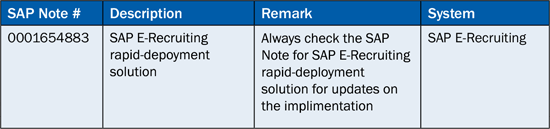
Table 5
SAP Note for implementing SAP E-Recruiting rapid-deployment solution
The following SAP Notes must be implemented before the implementation of SAP E-Recruiting rapid-deployment solution to have the required functional or technical foundation for the rapid-deployment solution configuration that is imported by the rapid-deployment solution (Table 6).

Table 6
Technical prerequisites for the implementation of SAP E-Recruiting rapid-deployment solution
Implementation
SAP E-Recruiting rapid-deployment solution configuration is deployed in the company’s development and quality assurance system via Business Configuration Sets (BC Sets) and extended Computer Aided Test Tools (eCATTs). Additional configuration that cannot be automated is performed partly by SAP consultants and partly by the company’s project team.
SAP delivers the following documentation for the implementation:
- Scoping questionnaire and options list
- Test plans and scripts
- Kick-off presentation
- Qualification questionnaire
- Scoping document (i.e., Business Blueprint)
- Delivery acceptance criteria and sign-off
- Statement of work
- Service WBS, schedule, and effort estimation
- Pre-delivery requirements and checklist
The SAP-delivered WBS specifies which tasks needs to be performed at what time and with which resources on the SAP system’s side and the company’s side. This streamlines and optimizes the implementation timeline.
Carla Seehausen
Carla Seehausen is a SAP E-Recruiting expert working as business processes consultant for SAP Germany. Her extensive knowledge of SAP E-Recruiting was built by her experience in end-to-end implementation projects including concept development and process optimization, implementation and configuration, as well as technical go-live and third-level support. Carla was involved in the development of SAP E-Recruiting RDS and is an expert for SAP E-Recruiting services.
If you have comments about this article or publication, or would like to submit an article idea, please contact the editor.