Use tips from these seven areas, including change control, authorizations, and evaluation, in planning your SAP ERP HCM training program.
Key Concept
A training client refresh strategy is a well-planned approach to refreshing the master data within the training clients. This is key for maximizing the value of the training program.
A training program is made up of a number of elements, which I outlined in part 1 of this series. Now I delve more deeply into the following seven topics:
- Training system clients
- Portal training
- User IDs and authorizations
- Change control processes
- Training data
- Training administration
- Course evaluation
Note
Learning management systems is the name given to software applications that are sometimes used by large organizations to manage training materials. They provide a central repository of training content, and are usually accessed by trainees, trainers, and training administrators for different tasks. The functionality of the systems varies, but most allow you to structure course materials and self-study materials (e.g., SAP Tutor modules) in a way that is easy for the users to navigate. You can build assessments and course evaluations into paths that trainees follow to ensure that they can demonstrate competence at a particular stage before progressing to the next. You can use the recommendations within this article whether you choose to use an LMS or not. If you do not wish to use an LMS, you can replicate the key functionality by establishing training databases on shared network drives, or on a part of the corporate intranet.
Training System Clients
The objective of a training program is to provide an opportunity for demonstrations of SAP ERP HCM functionality and follow-up exercises in an environment that is close to the production system, but that does not pose any risk to production data or breach data protection regulations.
Usually companies use the quality assurance environment for training and testing and have a series of different clients available for specific purposes — each with its own dataset and user IDs. It is worthwhile to specify a requirement for a number of training clients, which can facilitate repeatable delivery of training courses with minimal effort.
Client A (client 310 in the diagram in Figure 1) is the training master and is populated with the data required for demonstration and exercises, but no trainees access it. It should also have user IDs and passwords for all trainees. This client is the basis for copying training data and configuration into the delivery clients.
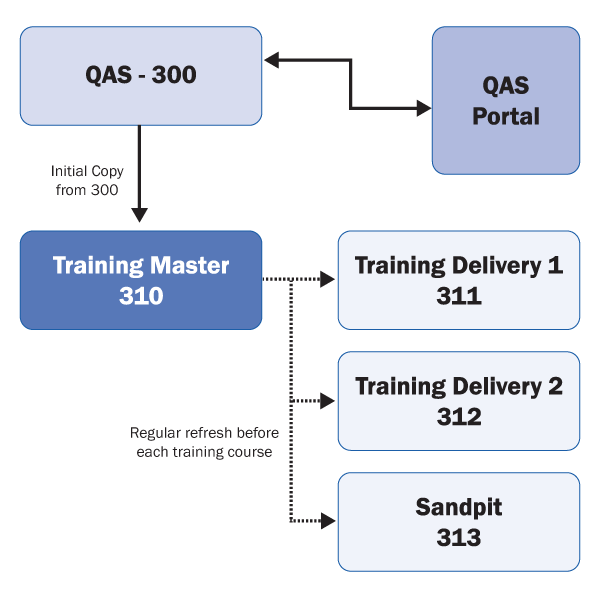
Figure 1
Example of use of different clients within the quality assurance system environment as the basis for training delivery
Client B (training delivery 1) is used for demonstrations and exercises during the delivery of the training course. It will be updated by a periodic client copy from the training master to ensure a clean slate prior to the repeat delivery of each course.
Client C (training delivery 2) is used if you have a large training program in place. If you are delivering several courses simultaneously, you may wish to have a second delivery client. It will be used and updated in the same way as training delivery 1. This is particularly useful if you are delivering personnel administration courses at the same time as payroll courses, as it overcomes the difficulty of managing the restrictions imposed by working with the payroll control record.
You may wish to use a second (or even third) training delivery client to mitigate against problems occurring in training delivery 1. If problems occur during a training course, the trainer and trainees can switch from using training delivery 1 to training delivery 2 and continue with the course using the same demonstrations and exercises.
Client D (sandpit) is used by trainees after they attend the classroom-based training. You should perform periodic client copies from the training master to the sandpit to keep the sandpit in a useful state, with practice data ready for trainees.
Portal Training
The client strategy I’ve outlined focuses mainly on the delivery of courses within SAP ERP Central Component (SAP ECC) — for example, Payroll, Organizational Management, and Training and Events. You take a different approach with courses related to SAP NetWeaver Portal functionality (such as e-Recruitment or employee and manager self services).
The current SAP architecture allows for only one portal to each of the different environments (i.e., one development portal, one quality assurance portal, and one production portal). This may mean that portal training courses have to take place in a client that is also being used for testing, and cannot be delivered using data in the training delivery 1 client. With this in mind, you should consider the following issues when developing portal training courses:
- Ring-fence data: Ensure that the data you plan to use will not be affected by any testing that is carried out in the same client, and equally that any data that is created for training does not affect test results. Ring fence means to isolate the data so that it is not used for any purpose other than training (e.g., is not be used during data migration testing).
- Ring-fence user IDs: Specify user IDs that are exclusively for training delivery.
-
Create and use data within a course: Avoid exercises that require data to be created prior to delivery. If necessary, the first exercise can be to create some data that will subsequently be used during the course. This minimizes the requirement for the trainer to prepare data for each delivery, and enables greater flexibility with training delivery in the longer term.
User IDs and Authorizations
Trainees need a user ID with appropriate authorization for the course in which they are participating. There are two approaches. The simpler is to create a series of generic trainee user IDs to use for every course. These should have fairly broad authorizations to enable the user to perform the functionality from any of the courses. The second option is to create user IDs and associated authorizations that specifically match the contents of each course, so there would be one set of user IDs for the Personnel Administration course and a second set for the Time Management course, for example. I recommend the first option, as I believe that the risk associated with fairly broad authorizations in the training environment is not sufficiently high to justify the added complexity and workload of creating multiple additional user IDs and authorizations.
For portal courses, you need a portal user ID with an associated role as well as an SAP ECC user ID with an associated role. Finally, for employee and manager self-service courses, you need to link the user ID to an employee by listing it on infotype 0105 (communication) subtype 0001 (system username). That employee in turn needs to be in a position that is linked to other employees or a manager via the appropriate relationships in the organizational structure.
Change Control
If the training program is part of a major upgrade or implementation of SAP ERP HCM, it is likely that testing results in configuration changes that occur in parallel with the training program.
To minimize the impact of these changes on the training program, include the training manager on the change control process to ensure that configuration changes are communicated to trainers and released into the training clients in a controlled manner. This approach avoids adverse effects on demonstrations or exercises that were prepared in advance.
Training Data
To maximize the effectiveness of the training course, participants must have the opportunity to work through exercises that represent realistic scenarios. To achieve this, it is necessary to pre-populate the training environment with realistic data.
I recommend the following approach to create training data:
- Assign one employee record to each training attendee per course. Attendees can then follow through a series of exercises against the same employee record in a logical sequence and view the impact of their actions.
- Create a new set of employee records for each course. Don’t rely on using the results of one course for exercises in another. This enables you to have greater flexibility in the sequencing of courses and in running catch-up sessions.
To create the training data you have two options:
- Create a copy of live data and identify suitable employee records for the scenarios you require for the exercises
- Create new dummy data from scratch
I recommend the second option. It ensures you do not compromise any data protection requirements and enables you to set up data exactly as you require for the exercises. For example, if you assign all the employee records the same start date and the same basic pay value, it reduces the amount of work involved in defining the correct answers to exercises.
Training Administration
Running an SAP ERP HCM training program for a large number of attendees involves considerable administration. You should identify an administrator who can carry out the following tasks:
- Issue course availability information
- Book attendees onto courses and confirm bookings
- Produce hard-copy documentation for each course
- Coordinate training resources
- Analyze the results of course evaluations
These tasks are vital to the smooth running of the training program and play a large part in whether the program is viewed as having been a success. If an administrator is assigned to these tasks, it enables the trainers and training manager to focus on the content of the courses and achieving the objectives of the training program.
Course Evaluation
To assess the success of the training program it is useful to gather feedback from attendees. The most effective way to do this is to prepare a template course evaluation form that trainees complete after attending each module. The evaluation form should enable trainees to define whether each of the course objectives was met, and whether they believe they require any additional training.
You can then analyze the results from the template and use them to identify specific instances in which individuals require additional support. You can also use them in generating statistics that may be useful in communication materials to build confidence within the organization.
Rob Lancaster
Rob Lancaster is an SAP ERP HCM consultant specializing in Payroll and Time Management. Based in the UK, Rob has undertaken roles on Europe-wide and global projects, including work in India, Germany, France, Netherlands, and Italy, working in both commercial and public sector organizations. He is particularly interested in process design, change management, and training.
You may contact the author at editor@hrexpertonline.com.
If you have comments about this article or publication, or would like to submit an article idea, please contact the editor.