Manager
Companies deploying SAP Support Package Stacks or SAP enhancement packages to their SAP solutions need to perform regression tests for their business processes. In general a lot of effort goes into setting up and performing the necessary regression tests. See how you can facilitate this testing process using the Business Process Change Analyzer (BPCA) of SAP Solution Manager 7.1’s new Test Scope Optimization functionality.
Key Concept
Test Scope Optimization (TSO) is a new functionality with SAP Solution Manager 7.1. A piece of Business Process Change Analyzer (BPCA), TSO allows you to simplify your test scope and effort, reducing resources used and saving time on testing.
Business Process Change Analyzer (BPCA) provides functionality to analyze the impact of ABAP software changes on your business processes. BPCA change impact analysis can automatically determine the regression test scope through a selection of tests assigned to the affected business processes. With the BPCA functionality of Test Scope Optimization (TSO), a new feature included with SAP Solution Manager 7.1, you can optimize and reduce the required test scope and effort. This is achieved through a program-based optimization of the number of changed objects by business process and the test effort of associated test cases.
The resulting optimized test scope is presented graphically with a suggested sequence of process steps to be included in the test scope. The user can apply multiple levers to adjust and optimize the test scope further and save them as alternative optimization approaches. Optimized test plans can be generated automatically for SAP Solution Manager, HP Quality Center, or IBM Rational.
I show you how you can reduce your test effort with TSO. First I take you through some preparation steps for BPCA before I discuss change impact analysis and some quantitative and qualitative examples of how to improve your testing.
Preparation Steps for BPCA
The preparation steps in BPCA are broken down into two subsections:
- Business Blueprint
- Technical Bill of Material (TBOM)
Business Blueprint
BPCA requires a Business Blueprint in SAP Solution Manager, including process steps and assigned executables (e.g., transaction codes and reports) that could be custom or standard. BPCA requires a simple list of transaction codes and reports for which you want to perform an impact analysis. There are various approaches to set up and maintain the Business Blueprint in SAP Solution Manager:
- Activate business content (Business Process Repository [BPR] provided by SAP Business Suite
- Upload existing business process structures
- Integrate with ARIS from Software AG
- SAP service Reverse Business Process Documentation (RBPD)
- SAP Solution Manager — Solution Documentation Assistant
- SAP Solution Manager — EHP Scope and Effort Analyzer (planned for Support Package 11): Functionality to create an SAP module-based Blueprint based on customer usage information.
TBOM
To enable BPCA, process traces are required for all business processes that are in scope for the change impact analysis. The process trace is called TBOM and includes all ABAP objects (both standard and custom) used during execution. It is assigned to the respective process steps of your Business Blueprint in Solution Manager. You can create TBOMs with the alternative approaches shown in Table 1. Note that for approaches 1–4 the trace recording is turned on before the business process is executed.
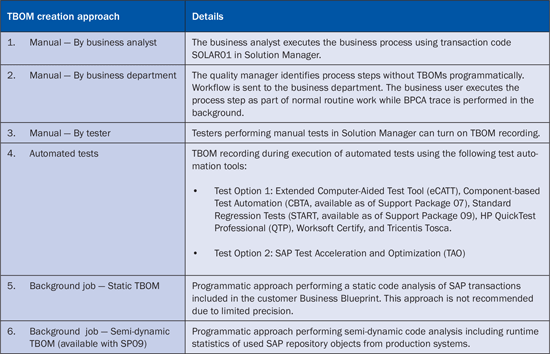
Table 1
BPCA TBOM creation approaches
The standard BPCA change-impact analysis is suitable for change events with a small to medium-sized number of changed objects. For large change events that include several tens of thousands of objects, SAP recommends that a BPCA test scope optimization be performed subsequent to the standard change impact analysis.
Standard Change Impact Analysis Without Test Scope Optimization
For a selected change event such as a transport request or an SAP Support Package, BPCA first compiles a list of all changed SAP objects of the change event. BPCA subsequently identifies all affected business processes and process steps of the Business Blueprint via assessment of process traces (e.g., TBOMs) assigned to executables of the business process or step. Figure 1 shows a BPCA change impact analysis with identified business processes and process steps. This approach is called a standard change impact analysis, or bottom-up approach, because every process step is checked for potential impact from the change event.
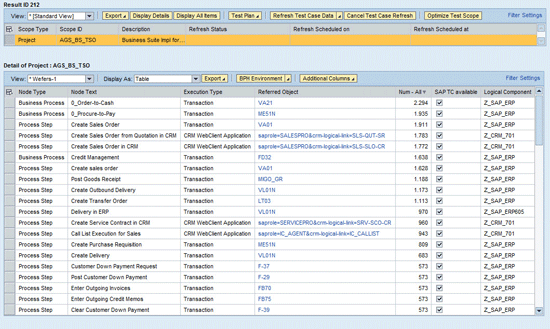
Figure 1
BPCA result — the list of affected process steps
An alternative view shows the Business Blueprint hierarchy with affected process steps. Figure 2 shows the change impact of an enhancement package deployment for business process FI A/R, in which 12 out of 14 process steps are affected.
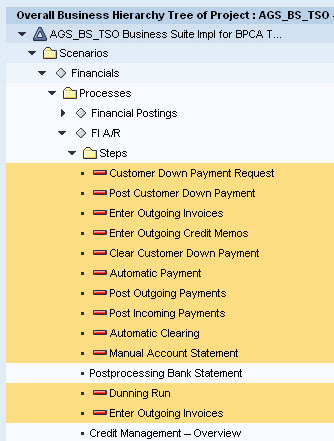
Figure 2
BPCA result — Business Blueprint with affected process steps
BPCA provides additional graphical and tabular views for change managers who want to investigate the root cause of the effects in more detail. The graphical overview is shown in Figure 3 with affected SAP repository objects classified by type (e.g., programs or code objects), Data Dictionary (DDIC) objects, user interfaces (UI), and table content as well as a breakdown by SAP software component.
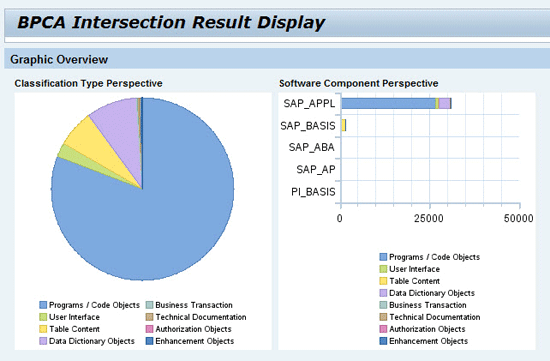
Figure 3
BPCA result — graphical view
The tabular view shown in Figure 4 provides a high degree of detail along the following dimensions with absolute numbers as well as percentages:
- Table rows: Changed objects by SAP system (e.g., SAP ERP), software component, and software package.
- Table columns: Program, code objects, UIs, DDIC objects, and transactions.
- Table cells: Each cell includes the absolute number of affected objects by system or software component and object type. Relative numbers of changed objects are included via percentages (for example, you calculate 5,000 objects as 25 percent of the total number of changed objects, which might be 20,000, so 25 percent is the relative number). Each table cell includes a link to a detail section that lists all objects with more technical information.
This feature is helpful when your team is becoming familiar with BPCA to better understand the affected software objects — whether they are SAP standard or custom code objects.

Figure 4
BPCA result — tabular view
Impact Analysis Types
You can perform change impact analysis using BPCA for the types of change events in Table 2.
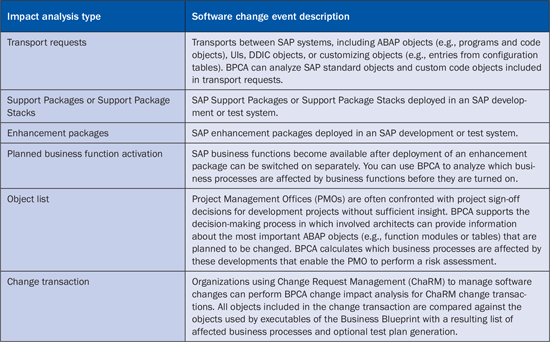
Table 2
SAP software change events supported by BPCA
Note that Support Package and enhancement package deployments include many changed objects, which in general leads to major parts of the Business Blueprint being affected. SAP recommends using TSO to further reduce the test scope using a risk-based approach.
Test Plan Generation
Upon request, BPCA automatically generates a regression-test plan for the affected business process. Table 3 shows test management applications integrated with BPCA.
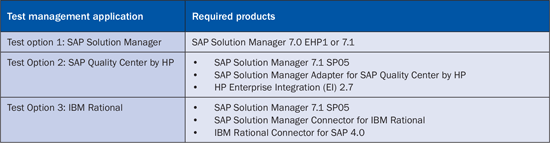
Table 3
Test management applications integrated with BPCA
TSO for Large SAP Change Events
When you perform a BPCA change impact analysis for only a few thousand change objects, such as configuration changes or custom code developments, the standard BPCA bottom-up analysis provides a precise change impact analysis and a resulting test scope with manageable efforts. This is different when analyzing change impacts of large SAP change events, such as Support Packages and enhancement packages, because these change events can include more than 100,000 changed objects. In these cases BPCA provides exact results, but because so many changed objects are deployed, almost all your business processes are likely to be affected. Thus, a high regression-test effort requires almost all available test cases to be executed. In other words, the result is precise, but the resulting regression-test scope is not acceptable from a time and cost perspective.
BPCA addresses this problem via the new TSO functionality. This risk-based test scope identification allows you to balance the spectrum between determining an acceptable test effort and increasing risk when reducing the test scope (Figure 5).
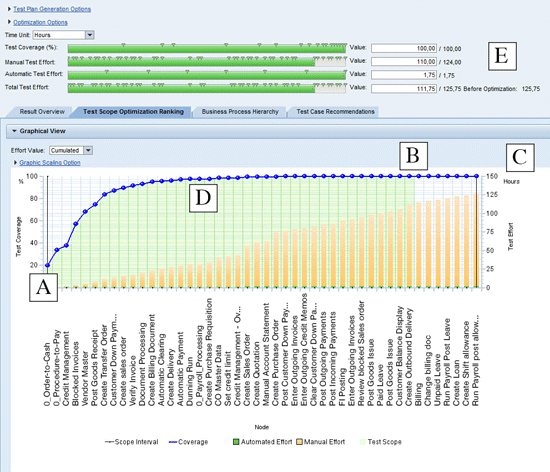
Figure 5
A graphical view of TSO
The general approach of TSO works on the assumption that you should test a changed technical object at least once (but not necessarily multiple times) through all process steps that use this changed object in the underlying SAP software.
Instead of collecting all affected business processes and associated test cases (a bottom-up approach), the TSO determines those business processes and process steps that are affected by many changed ABAP objects of the change event and at the same time do not create an increase in test effort compared with other affected process steps.
Based on this boundary condition, BPCA performs the optimization along two dimensions in parallel:
- The number of changed ABAP objects per process step. BPCA TSO calculates business processes and steps affected with the highest number of changed objects.
- Test effort per process step. BPCA TSO calculates business processes and steps with assigned test cases that lead to the lowest possible test execution effort.
The TSO result is a ranking of affected business processes and steps (Figure 5):
- The blue curve shows the progression of the TSO ranking (i.e., TSO result for process step [x-axis], test coverage [left y-axis], and test effort [right y-axis])
- Point A: The far left section of the x-axis shows business processes or process steps that have the best ratio of changed objects (high) and test effort (low). The test efficiency of the first process on the left side equals 30 percent. In other words, assigned test cases to the first process can already test 30 percent of all changed objects that affect the Business Blueprint. This is a very good percentage for one business process.
- The ranking of process steps from left to right shows in a cumulative fashion the decreasing test efficiency of each process step. In other words, the processes on the left side can test more changed objects than the ones on the right side.
- Point B: The left y-axis shows the test coverage from zero to 100 percent. When the blue curve reaches 100 percent, all changed objects of the change event that affect your business processes have been covered at least once through test cases in the test plan (see the green shaded area of Figure 5).
- Point C: The far right side of the ranking includes all affected process steps. If you include all processes up to this point, you test changed objects several times. This is a full-scope regression test for all affected process steps (i.e., the result of the standard BPCA bottom-up analysis).
- Point D: When reducing the test scope below 100 percent, such as 99 percent (or 95 percent), you leave one percent (or five percent) of changed objects untested, but you can notice that the test effort significantly drops. This effect is called long tail: The blue ranking curve already reaches the saturation area (i.e., the test efficiency of the process steps listed on the right side is much lower). For each additional process step added to the test scope, only a small number of changed objects are tested in addition to what is already included in the test scope.
- The vertical bars in Figure 5 show the cumulative test effort. The bars show test effort for automated tests in green (almost not visible because the effort is small) and for manual tests in orange. You can assign expected test execution times for each test case or use average values with default settings in the Test Management work center.
TSO comes with a set of levers (see point E) that you can use to influence the TSO result. Table 4 shows these levers.

Table 4
Levers for TSO
With Solution Manager 7.1 SP05 you can save the TSO settings as an optimization approach locally (for your user) or globally so that all users can use these settings. Additional levers have been introduced with SP05 to allow further test effort reduction based on smart lever settings (Figure 6).
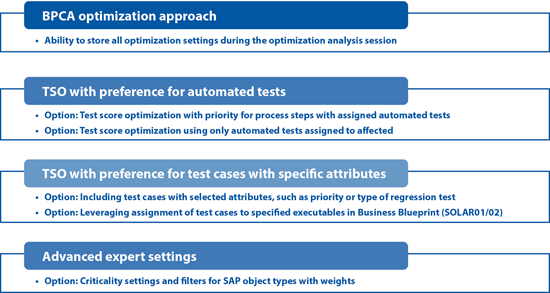
Figure 6
Additional TSO levers and settings with SAP Solution Manager 7.1 SP05
When reducing the test coverage from 100 percent (all changed objects tested at least once) to a lower value such as 99 percent (see point D in Figure 7), you face a higher risk that the untested changes might cause problems in your production systems. SAP recommends mitigating this risk via automatic determination of mission-critical business processes and steps that are forced into the test scope. You can achieve this easily by assigning a custom attribute such as process priority with the value 1 to all mission-critical business processes and steps in your Business Blueprint. The assignment of the custom attribute priority is a manual task that the business process user does for selected processes or steps, such as 50–100. However, the entire Business Blueprint can easily contain more than 1,000 steps. In this case, BPCA can do an automated determination of priority one processes or process steps, and can derive the assigned test cases from those priority one processes. These test cases and their effort are shown in point F in Figure 7. The first step is manual assignment, and then the BPCA logic can derive the test cases automatically.
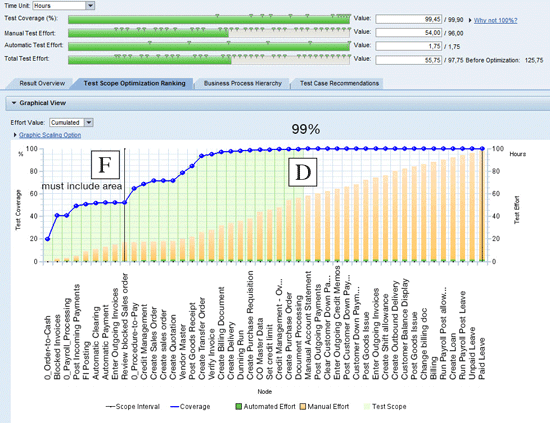
Figure 7
TSO with test coverage of 99 percent plus risk mitigation
A special setting in the TSO optimization approach then forces all mission-critical business processes and steps that are affected into the test scope. These processes are shown in the TSO graphic in the far left area (see point F in Figure 7) up to the vertical line. From SAP internal testing as well as customer feedback, the combination of deselecting process steps with a low test efficiency using 99 percent test coverage in combination with risk mitigation by forcing affected mission-critical processes into the test scope has led to acceptable test efforts and risk levels.
The following quantitative example illustrates the test effort reduction that you can achieve with TSO. The number of included business processes and assigned test cases is rather small just for illustration purposes. When you apply a factor of 10 to 20, the resulting numbers match what is found in typical situations.
Business Blueprint
The Business Blueprint includes:
- Four business scenarios for financials, procurement, sales, and human resources
- Eight end-to-end business processes
- 46 process steps in total with multiple transaction codes assigned per process step
Test Cases
In total, 72 test cases — manual and automated — are assigned at the process step and business process levels (Table 5). Automated end-to-end tests have been assigned to business processes in which single transactions can’t be tested individually. Precursor transactions are needed, creating business documents processed by successor transactions of the end-to-end business process. This is the case for business processes such as order-to-cash and procure-to-pay included in this example.
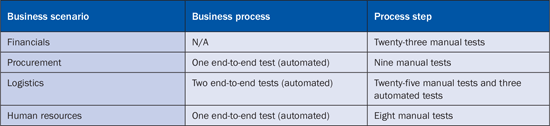
Table 5
Manual and automated tests assigned to process steps and business processes
The test execution effort of all assigned test cases totals 132 hours. Instead of assigning specific test execution efforts to each test case, Solution Manager allows the definition of average efforts by test case type. In the example, the following average test efforts have been defined under the assumption that only human interaction time is considered:
- Manual tests: Two hours — Access and read manual test script, launch and execute process step, document result, status setting, and potential incident creation
- Automated tests: 15 minutes — Just for status analysis by test coordinator after automated test execution.
Change Event
Enhancement package 4 for SAP ERP 6.0 was deployed in the SAP test system, including approximately 180,000 changed objects for software component SAP APPL.
Standard Change Impact Analysis
When performing a standard bottom-up change impact analysis for the enhancement package deployment, BPCA identifies almost all process steps and business processes as affected. As a result, only a six percent test effort reduction can be achieved when comparing the entire test effort of all included test cases.
TSO Approaches
When performing a default TSO without any further user interaction, BPCA calculates a ranking of business processes and process steps resulting in a test scope with 58 tests and test effort reduced to 104 hours, which is a gain of 21 percent. Table 6 shows this gain along with some other options.
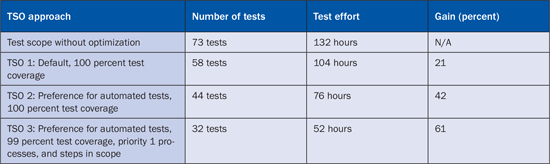
Table 6
Results from TSO
With this starting point, you can achieve further reductions by applying TSO settings as described in Figure 6.
- Setting 1: Test scope optimization with priority for process steps with assigned automated tests
- Setting 2: Test scope optimization using only automated tests assigned to affected process steps when manual and automated tests are assigned
The first TSO setting influences on which rank a process step is listed. Process steps with automated tests assigned are shown in the TSO graphic on the left side, indicating better test efficiency. The second TSO setting applies when companies add test cases to a process step, but rarely remove manual tests when automated tests are added. With this setting only automated tests are used from a process step when manual and automated tests are assigned.
TSO with preference for automated tests and 100 percent test coverage for the given example reduces the test scope further to 44 tests, and test effort reduces to 76 hours, which provides a 42 percent gain compared with the entire test scope (TSO 2 in Table 6).
The third optimization described in the quantitative example deals with the long-tail effect, where the test efficiency is strongly decreasing (see the area between points B and D in Figure 5). To carve out processes with low test efficiency, the test coverage is set to 99 percent (i.e., one percent of all changed objects with an impact on existing business processes are not tested).
This optimization leads to a significant test effort reduction with a slightly increased risk. For risk mitigation, SAP recommends you define a custom attribute Business Process Priority for the Business Blueprint and assign priority value one to all mission-critical processes. In the settings of the TSO optimization approach you can specify that all mission-critical processes are forced into the test scope, and no optimization shall be applied to those priority one processes. With this countermeasure, you can mitigate the risk of excluding a small percentage of changed objects untested.
The combination of the settings for TSO leads to a good compromise regarding significantly reduced test effort and risk level. The resulting TSO ranking list is shown in Figure 7. The optimized test scope includes 32 test cases with a test execution effort of 52 hours, which is a 61 percent gain compared with the entire test scope without optimization (TSO 3 in Table 6).
Two use cases from organizations using SAP functionality show how TSO has already been used.
Landmark Australia
Founded 150 years ago, Landmark Australia is the country’s largest distributor of farm-related merchandise and services. The company provides fertilizer, wool, livestock, financing, insurance, real estate, and many other farm-related products and services. Its national network covers 400 locations that collectively serve 100,000 clients. The company uses SAP software to manage its branch network from internal administration to the point-of-sales transactions with customers. Recently, Landmark decided to upgrade to the current releases of its SAP software. It was a complex undertaking, encompassing SAP ERP, SAP NetWeaver Business Warehouse, and many other SAP applications. To make the challenge even tougher, IT staff members were given the charter of finishing within five months.
Landmark followed SAP’s best practices approach for regression testing (which you can read more about in my best practices document on SCN) and deployed various applications provided by Solution Manager 7.1, including BPCA for automated TSO. In conjunction with Solution Manager-supported solution documentation, custom code, and test automation, Landmark has been able to achieve its goal to upgrade its SAP landscape on time and within budget in less than five months. Quantitative benefits include:
- Greater than 50 percent testing costs saved
- Greater than 60 percent testing time saved
- Fifty percent core engine labor costs reduced
Global Apparel Footwear Company, USA
One of the largest footwear manufacturers in the US with global operations across 150 countries uses SAP ERP Human Capital Management (HCM) to run multiple country versions. The company deploys SAP legal change packages for SAP ERP HCM on a quarterly basis, resulting in a significant test effort. The company performs around 2,400 regression tests using manual as well as automated tests using HP Quality Center and SAP Test Acceleration and Optimization (TAO) integrated with Solution Manager 7.1. The company used an early version of BPCA-SAP Quality Center by HP integration, which was made publically available in October 2013.
Note
SAP legal change packages are similar to SAP support packages. SAP produces these legal change packages regularly to address required changes that arise from changed laws and government rules and procedures. They are mainly used in SAP ERP HCM HR and FI/CO.
To use BPCA, the company performed the following preparation steps:
- Create the Business Blueprint in Solution Manager by downloading the existing Business Blueprint in SAP Quality Center by HP, followed by an upload from SAP Quality Center by HP test set.
- Automatically generated BPCA TBOMs using SAP TAO for all SAP ERP HCM-related process steps.
The BPCA change impact analysis executed for SAP ERP HCM legal change packages included approximately 50,000 changed objects. BPCA identified the majority of SAP ERP HCM process steps as affected with a test scope reduction from originally 2,400 test scripts down to:
- 1,825 test scripts using 100 percent test coverage
- 76 test scripts using 99 percent test coverage in combination with mission-critical process steps forced into the test scope for risk mitigation
By using BPCA for change impact analysis and TSO, the company realized a number of advantages:
- Significant test scope reduction with much shorter test execution time
- Significantly reduced test preparation effort
- Greater visibility into the impact of SAP legal change packages on business processes and required regression tests.
Future Direction
SAP plans to release a number of new features and applications to support advanced change impact analysis of SAP software change events (Table 7).
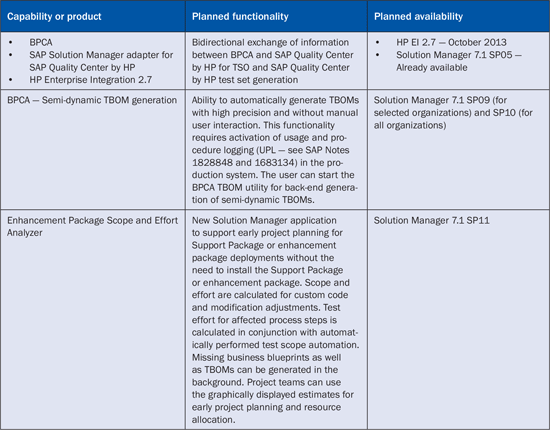
Table 7
BPCA new features and applications
Marcus Wefers
Marcus Wefers, senior director of Solution Management, is responsible for SAP's Test Management strategy, including positioning and future development of products and capabilities to support test and quality management, such as SAP Solution Manager, SAP TAO, and SAP Quality Center by HP. Focus areas of his 26 years at SAP include software development, project management, quality management, and solution management for SAP applications in the areas of Financial Consolidation, Profit Center Accounting, SEM, Analytics, Performance and Strategy Management, Business Planning, Corporate Governance, and Application Lifecycle Management. He worked on international SAP customer projects in Europe, the Americas, and APJ. In addition, he is a regular speaker at ASUG conferences, SAPPHIRE, and SAP TechEd.
You may contact the author at marcus.wefers@sap.com.
If you have comments about this article or publication, or would like to submit an article idea, please contact the editor.