Manager
Companies updating their SAP solutions with custom developments, performing configuration changes, or deploying SAP Support and Enhancement Packages can gain significant efficiency gains when using automated tests. See how to create automated regression tests of your end-to-end business processes with SAP TAO and SAP Solution Manager.
Key Concept
SAP TAO provides functionality to build automated test scripts based on components. A user, such as a business analyst, executes a business transaction while SAP TAO selects or creates all necessary test components on the fly and composes a fully functional test script. The system automatically parameterizes all fields that require data entry and assigns them to a test data file that the user can extend. Users can reap significant cost savings during subsequent maintenance activities by the fast exchange of damaged test components.
Automated testing can benefit all types of companies as they ensure the effectiveness of their SAP systems through the course of developments and changes. SAP has multiple solutions and functionalities that address testing. SAP Test Automation and Optimization (SAP TAO) is embedded into a broader set of test management tools provided by SAP and HP called Test Option 2. We provide a broad overview of Test Option 2 and delve into various functionalities of SAP TAO.
You can use Process Flow Analysis functionality in SAP TAO to create an automated test for a single business transaction. The test created using this functionality is made of components, and the first iteration of test execution is automatically captured. We explain how to create a test script using this functionality including validations, iteration handling, and consolidation. You also can create a Technical Bill of Material (TBOM) in SAP Solution Manager when you execute the test script using SAP TAO.
We also explain in detail how to create an end-to-end test script by combining different scripts created using Process Flow Analysis functionality of SAP TAO. We use a sample order-to-cash (O2C) process as an example and provide step-by-step information to help you create and execute the end-to-end test script. We start by explaining the components of Test Option 2 before explaining the functionality.
Test Option 2
SAP provides various test tool options for test management. Because many companies use SAP Quality Center by HP to manage their test activities, SAP provides a set of integrated products from SAP and HP that allows companies to manage the entire quality process. This set of integrated products and capabilities is positioned as Test Option 2, an offering of SAP and HP apps sold by SAP that includes:
- SAP Solution Manager – Business blueprint for setup of business process structures, documentation, and functional and test requirements
- SAP Solution Manager – Business Process Change Analyzer (BPCA) for change impact analysis of software changes and risk-based test scope identification
- SAP Solution Manager – Incident Management (ITSM) for handling of incidents integrated with Defect Management of SAP Quality Center
- SAP Solution Manager Adapter for SAP Quality Center by HP (SAP Solution Manager Adapter) – this SAP product enables data exchange between SAP Solution Manager and SAP Quality Center
- SAP Test Data Migration Server (SAP TDMS) – this SAP product enables companies to set up lean test systems from source systems (e.g., SAP production systems)
- SAP Quality Center by HP (SAP QC) – product to manage the entire test process from test requirements to test execution
- SAP Test Acceleration and Optimization (SAP TAO) – SAP product to build automated functional tests for SAP solutions
- SAP Loadrunner by HP (SAP Loadrunner) – product to manage load and performance tests
These applications together help manage the entire test management process, which is more than just test automation. For example, test management includes defining business processes in a business blueprint and defining the test scope and a test plan. An illustration of this option is shown in Figure 1.
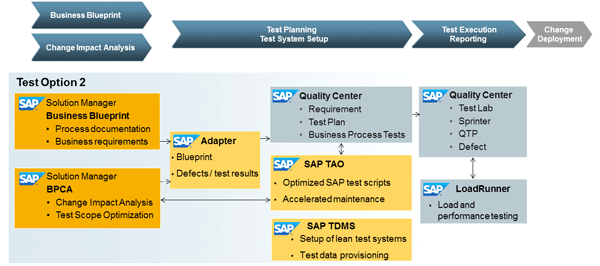
Figure 1
Test management products and capabilities from SAP and HP (Test Option 2)
Most companies need to significantly reduce the number of defects found in production landscapes after software change events. At the same time, companies need to reduce costs for regression tests and have to comply with shrinking time intervals for test activities. Consequently, companies look at test automation to provide these advantages. SAP Quality Center, including the module Business Process Tests (BPT) and the integrated test automation tool QuickTest Professional (QTP), provides most of the capabilities required to create automated tests for SAP and non-SAP applications. In addition to these tools, SAP has developed SAP TAO, which is explicitly targeted to speed up the creation and maintenance of automated tests for SAP solutions. SAP TAO is delivered on its own or in a bundle with SAP Quality Center.
The SAP TAO approach is based on three concepts (Figure 2):
- Test case: Automated test cases are composed of test components, not single command lines, with a flow that corresponds to the business process step
- Test components: Logical parts of the SAP business transactions are encapsulated into test components with full parameterization of entry fields
- Test data: Data for required entry fields of the business transaction can be captured automatically during recording or added later to allow test execution with multiple iterations
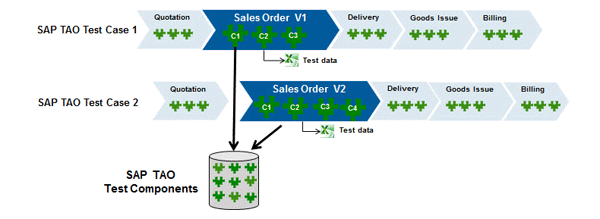
Figure 2
Component-based automated test cases using SAP TAO
The SAP TAO approach allows users to create automated tests for variants of business processes through the reuse of test components. SAP TAO provides access to a central storage of reusable test components. When the user works with SAP TAO for test case creation or maintenance, the application automatically retrieves the required centrally stored tests components.
SAP TAO: Process Flow Analyzer
Many quality teams face the issue that they have expertise on the applications used to manage the quality process, but are lacking know-how about the critical business processes that need to be tested after software change events. SAP TAO includes a Process Flow Analyzer (PFA) that enables business analysts to execute SAP business processes easily and create all necessary test assets in the background. Alternatively, test engineers can follow the steps of an existing manual test script and use PFA to create automated tests (Figure 3).
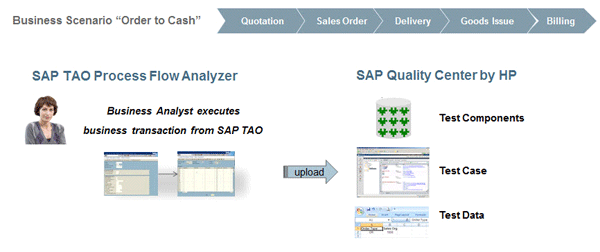
Figure 3
Create an automated test case using SAP TAO PFA
At the end of the PFA session, SAP TAO uploads the generated test components and test case to SAP QC. The test data is retrieved during the PFA session and stored in a Microsoft Excel file that is typically stored on a central server.
Table 1 lists activities that should be considered to include a new SAP TAO test case in a regression test cycle. For more details, go to https://service.sap.com/testing and follow the path Additional Information > Test Management.
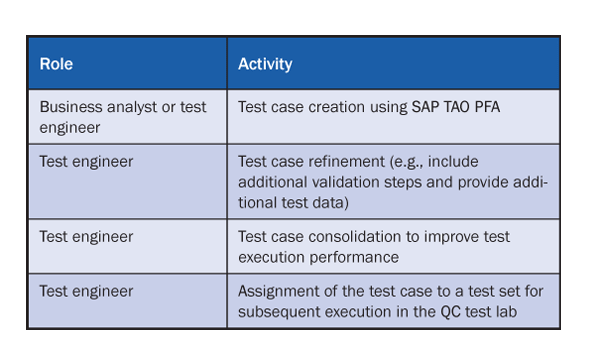
Table 1
Roles involved with SAP TAO test script creation
To perform these activities, SAP TAO 2.0 requires the following HP products and capabilities:
- SAP QC – Business Process Test (BPT): SAP TAO stores all test components in the BPT module
- SAP QC – Test Plan: SAP TAO stores all test scripts in this module. The user can maintain the test scripts as well.
- SAP QC – Test Lab: Test scripts are assigned to test sets in this module. Test sets are used to execute 1-n test scripts
- SAP QC – Quick Test Professional (QTP): Runtime environment for test execution
In addition, SAP TAO requires the following SAP systems:
- SAP Solution Manager 7.0 enhancement package 1 or 7.1 including SAP TAO add-on ST-TAO
- SAP Test System (e.g., SAP ERP including SAP Solution Manager add-on ST-PI)
When the user starts SAP TAO 2.0, the application connects to SAP Solution Manager to perform a license check. Subsequently, SAP TAO automatically connects to the default system under test (e.g., an SAP ERP test system).
To create an automated test script for a single SAP business transaction, the user selects the Design module of SAP TAO. First, the user adds the transaction code to the list of executables by clicking the New button (Figure 4).
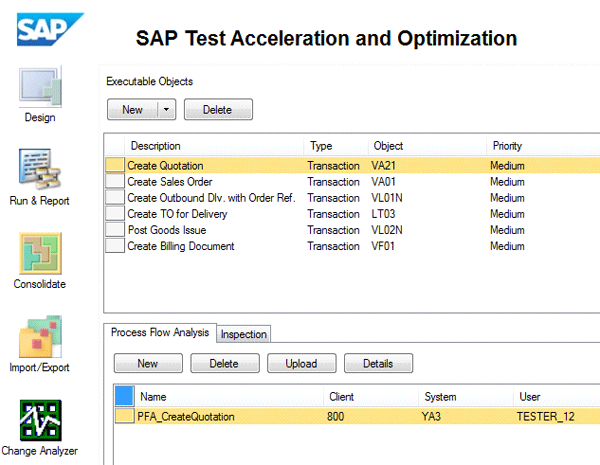
Figure 4
The SAP TAO Design module
Now the business analyst or test engineer starts the creation of a new process flow analysis for the selected transaction and provides a suitable name for it. SAP TAO starts the execution of the transaction in the connected SAP system under test. The user enters data for all required fields and navigates through the various screens of the transaction (Figure 5).

Figure 5
SAP TAO – process flow analysis for transaction VA21 (Create Quotation)
In addition, the user can add checkpoints for screen fields to ensure that predefined conditions are met during test execution. Figure 5 shows a check point for the name of the screen field Quotation Type to ensure that test script execution only passes when creating quotations of type QT.
At the end of the execution of the business transaction, the user stops the PFA recording. SAP TAO has captured in the background all screen details processed by the user, as well as the navigation between screens and UI elements of the transaction. The result of the PFA recording can be viewed in a PFA detail report, which includes processed screens, values of input fields, buttons used, and check points added (Figure 6). The PFA detail report helps the test engineer understand the structure of the test script. After reviewing the PFA detail report, the user can decide to upload the SAP TAO test assets to SAP QC.
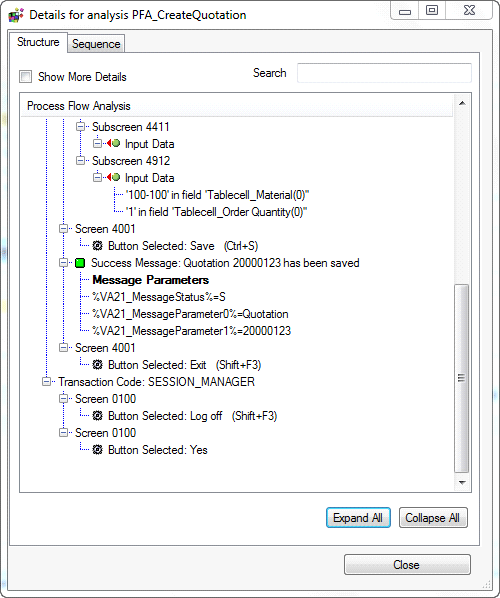
Figure 6
SAP TAO – PFA detail report
Generate SAP TAO Screen Components, Test Script, and Test Data File
When the user triggers the upload of the SAP TAO test assets into SAP QC, SAP TAO performs the following activities in the background:
- Generation of SAP TAO screen components through back-end inspection on the system under test (Figure 7). SAP TAO automatically creates parameters for all input fields of the screen. The screen components are stored in SAP QC BPT.

Figure 7
SAP TAO screen components stored in the SAP QC BPT module
- Composition of a test script using SAP TAO screen components and default components (delivered as content). The sequence of the used test components is based on the process flow analysis that the user performs. The generated test script is stored in the SAP QC Test Plan module (Figure 8).
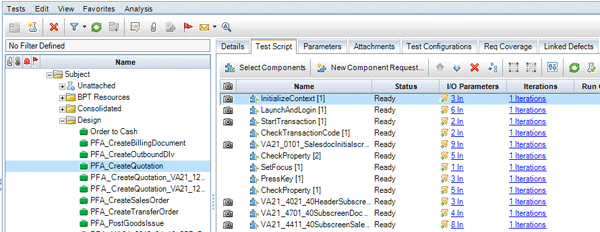
Figure 8
SAP TAO generated test script stored in SAP QC Test Plan module
- SAP TAO automatically captures data entered in the business transaction during PFA recording. The data is stored in an SAP TAO-generated Excel file with columns linked to the parameters of the test components (Figure 9). In addition, the data file includes login information (e.g., SAP system, client, user, and encrypted password) for the system under test.
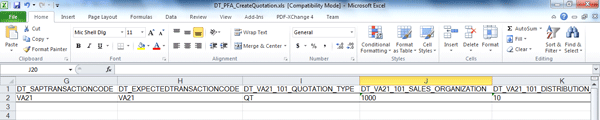
Figure 9
Excel file with test data generated by SAP TAO
Refine an SAP TAO Test Script
The test script generated by SAP TAO can be refined further by test engineers in various ways. They may decide to add extra iterations to the test script execution or add validation steps.
Enable Test Script for Multiple Executions via Test Data
The SAP TAO-generated test script can be extended to allow multiple iterations. The test engineer can add more data rows in the test data file (Figure 10). The data file associated with a SAP TAO test script can be accessed via the SAP TAO Run and Report module.

Figure 10
Excel file with data for multiple test script iterations
In a final step, SAP QC settings need to be adjusted to enable multiple iterations. To complete this step, click the Update Iterations button in the SAP TAO Consolidation module (Figure 11).
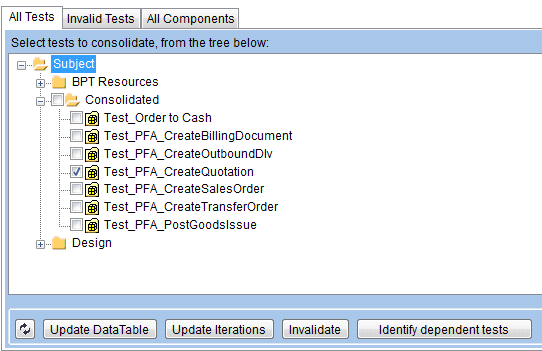
Figure 11
Function Update Iterations in SAP TAO Consolidation module
SAP TAO Validations
You can inject validation steps in a test script using SAP TAO Check Picker functionality. When creating a test script the user can include a check that only specific transaction VA01 order types are used. The navigation through the transaction might be very different when using a different order type, and thus, the test script fails. When including a validation step that checks during test execution that a particular order type is used, you can prevent this source of error. This concept works for any type of check as well.
While recording a script, you can insert new validation steps from the PFA Control window (Figure 12). Subsequently, the user can select the screen UI field of the business transaction. SAP TAO implicitly captures all the required information (e.g., all field properties, current value).
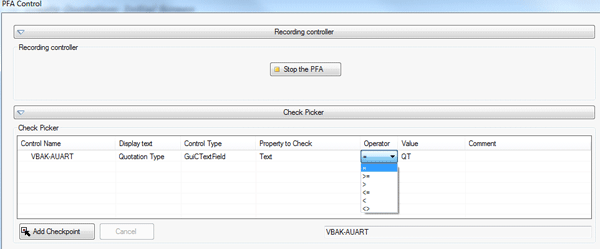
Figure 12
Validations using SAP TAO
Later the user can choose a property, operator, and value to be compared for the selected UI field. In the example in Figure 12, the text of the Quotation Type field is compared with value QT during test script execution.
SAP TAO Consolidation
To improve the performance of the test script execution, you should consolidate SAP TAO test scripts by accessing the Consolidation module of SAP TAO (Figure 13). As the result of the consolidation, all components used in a test script are merged into a new consolidated test component and stored in SAP QC BPT.
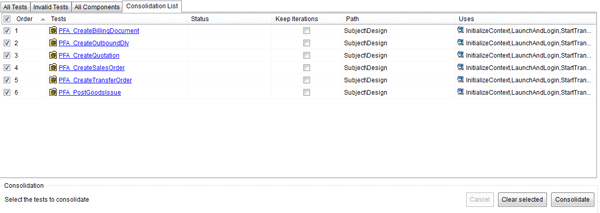
Figure 13
Mass consolidation using SAP TAO
Run the SAP TAO Test Script
The test script can be executed from SAP QC (Figure 14). In the Test Lab module of SAP Quality Center, a Test Set can be created, and test scripts can be added for execution.
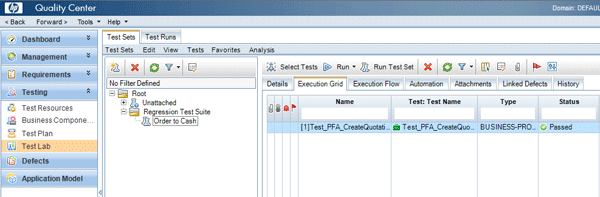
Figure 14
Test execution using SAP QC
The test script execution generates HP QTP logs that you can view from SAP QC (Figure 15). This screen shows the test log that automatically appears after the execution of the automated test script.
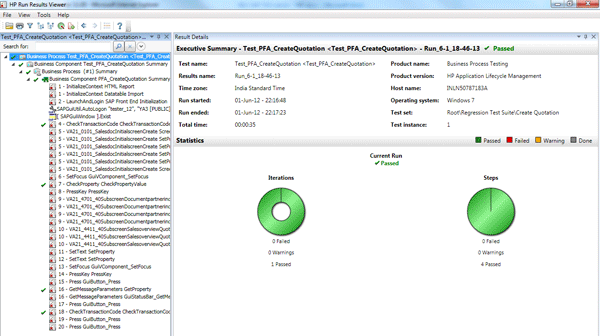
Figure 15
HP QTP logs generated after a test script execution
In addition, SAP TAO generates a test execution log that you can access from the Run and Report module of SAP TAO. The user can select a test script and view all the logs generated up to that point by opening SAP TAO after test execution and viewing the detailed reports (Figure 16).
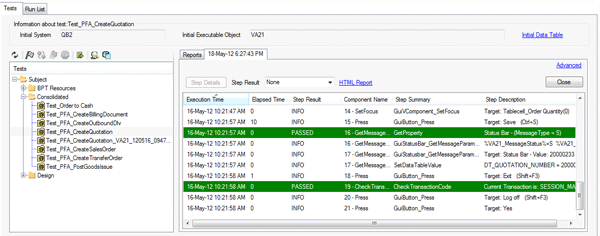
Figure 16
SAP TAO: Test execution logs
Run the SAP TAO Test Script to Generate BPCA TBOM
The Business Process Change Analyzer (BPCA) application of SAP Solution Manager helps identify a significantly smaller test scope. BPCA requires the availability of process traces (BPCA TBOM), which you can create manually or through automated tests that SAP TAO provides. After assignment of the test script to the relevant process step, you can execute the test script from Run and Report module of SAP TAO. After test execution, the BPCA TBOM is automatically generated and assigned to the process step in SAP Solution Manager (Figure 17).
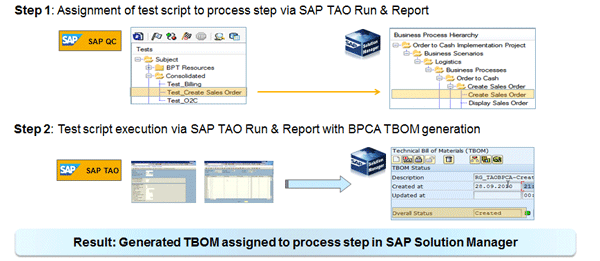
Figure 17
Approach for BPCA TBOM generation using SAP TAO
QM departments preparing automated tests for regression test cycles are confronted with the fact that many transactions can’t be executed independently, but require execution in a well-defined sequence. This is especially true for business transactions in the area of logistics. For example, in the O2C business process, it is possible to execute an automated test for a quotation or sales order transaction independently, but you can’t execute such an automated test for a delivery, goods issue, or billing transaction. This leads to the requirement to create automated tests that can cover end-to-end (E2E) business processes.
When creating automated tests for E2E business processes, the test engineer needs to consider additional aspects:
- Identification of the most important business processes variants to be automated
- Composition of single automated tests into an E2E test
- Handover of execution results such as document numbers from one test script to the following test script
- Test data provisioning to allow multiple executions of the entire process chain
To support these tasks, business process experts and test engineers need to collaborate closely. To illustrate the creation of an automated E2E business process test, the O2C business process is used. This process includes the process steps shown in Table 2.
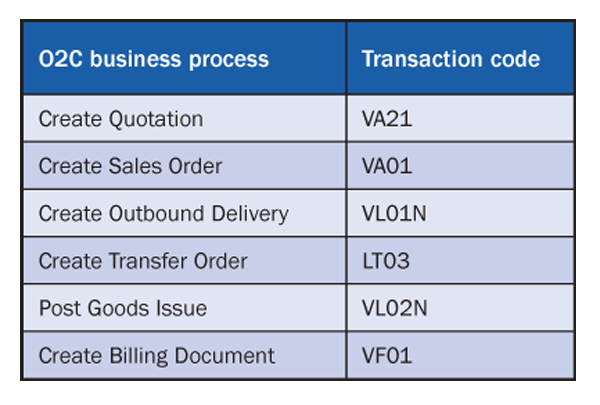
Table 2
List of business process steps in a sample O2C business process
Step 1. Create SAP TAO Test Scripts for Single Transactions
The test engineer needs to create automated test scripts for all the process steps of the E2E business process. After the test engineer creates the process flow analysis with SAP TAO and uploads all test assets to SAP QC, all required single test scripts are available in the Test Plan module of SAP QC (Figure 18).

Figure 18
Test scripts created in SAP Quality Center for O2C business process steps
Step 2. Adjust Test Scripts for Test Automation of an E2E Business Process
The test scripts created via SAP TAO need to be adjusted when used in an E2E business process test. You should copy the script in some other folder (e.g., the Design folder of the Test Plan module) before modification.
You need to make the following modifications to each individual script:
- Remove the InitializeContext component from the test scripts: This component needs to be removed in all individual test scripts. This component is needed to read the test data from the Excel file. Because this action has to be performed only once, this component can be taken out from each individual script and is added later to the new parent script.
- Remove LaunchAndLogin: You need to remove the LaunchAndLogin component from all the test scripts created for the business process steps.
- Rename three-parameter values and data file column names: Because all test scripts can’t use the same parameter values for components StartTransaction and CheckTransactionCode, they should be renamed so that they can be uniquely identified:
- Component StartTransaction: The parameter SapTransactionCode has parameter value DT_SAPTRANSACTIONCODE, which needs to be modified. For example, for the CreateQuotation (VA21) test script, the new parameter value could be DT_VA21_SAPTRANSACTIONCODE for this parameter. The data file that was created along with the test script needs to be modified. The corresponding column name needs to be updated with a new parameter value name.
- Component CheckTransactionCode: In the first occurrence of the component CheckTransactionCode, the parameter value of ExpectedTransactionCode should be modified. For example, for CreateQuotation (VA21) test script, the new parameter value could be DT_VA21_EXPECTEDTRANSACTIONCODE for this parameter. Its data file also needs to be updated with this new parameter value name.
- Component CheckTransactionCode (second occurrence): In this parameter, the value DT_EXPECTEDTRANSACTIONCODE needs to be changed. For example, for CreateQuotation (VA21) test script, the new parameter value could be DT_VA21_EXPECTEDTRANSACTIONCODE_OCC2. Its data file also needs to be updated with this new parameter value name.
Figure 19 shows the test script in SAP QC after doing the above mentioned modifications.

Figure 19
Create Quotation test script after modification
Next, you need to merge the test data files. To design the E2E test, you need to differentiate between the following input data:
- Data retrieved from the test data file
- Data retrieved from the previous test, such as the document number posted by the previous transaction
In the O2C example, the Quotation Number created in the first transaction, Create Quotation, needs to be used in the second transaction, Create Sales Order. Our quick tip "Capture Test Results in an Excel Data File" provides more detailed information of input types for the O2C business process.
The data files from the single test scripts need to be merged into one data file. The following columns shall be included only once:
- DT_SAPSYSTEM
- DT_SAPCLIENT
- DT_SAPUSER
- DT_SAPPASSWORD
- DT_SAPLANGUAGE
- DT_SAPOPTIONS
In the O2C example, the quotation number created by test 1 is handed over to test 2, which creates the sales order. The same is true for the subsequent process steps. The document numbers created during each test execution are stored in the SAP TAO execution context. It can be accessed by a special syntax (e.g., %VA21_MessageParameter1%). This value needs to be entered in the required column of the data file. The context parameter is named in the following manner: %<Transaction Code>_MessageParameter<Number>%. The PFA detail report provides the information about the context parameter name that holds the required document number (Figure 20).
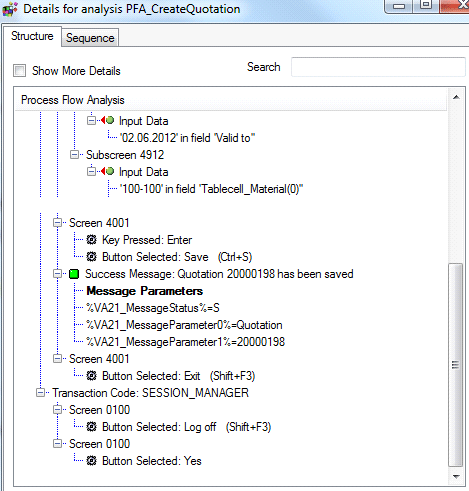
Figure 20
PFA detail report showing message parameters
To pass the quotation number from test 1 to test 2, Create Sales Order, the column DT_VA01_0301_QUOT requires the value %VA21_MessageParameter1% (Figure 21).

Figure 21
Excel file with message parameters
Step 3. Test Composition for an E2E Business Process Test
In the Test Plan module of SAP QC, you need to create a new empty automated test of type Business-Process (Figure 22).
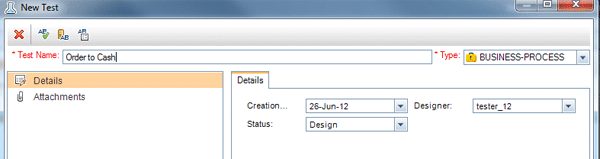
Figure 22
Create a new automated test of type BUSINESS-PROCESS
You add three components to this test script. The first one is InitializeContext, which you add for input for three parameters (Figure 23): DataTablePath (the path to the merged Excel file), DataTableRow (value of 1), and TestOptions (value of /n).

Figure 23
Parameters of InitializeContext component
Next is the LaunchAndLogin component. This component performs the launch of the SAP GUI and the login to the system under test. It requires six parameters with values shown in Figure 24.
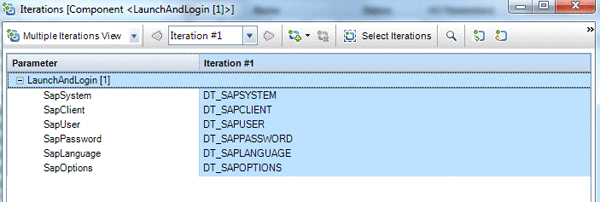
Figure 24
Parameters of the LaunchAndLogin component
Now you need to set up consolidated components of the single transactions of the business process. Add the consolidated components of each individual transaction in the right sequence. For the O2C business process, add the consolidated components of the transaction need in the following order:
- Create Quotation
- Create Sales Order
- Create Outbound Delivery
- Create Transfer Order
- Post Goods Issue
- Create Billing Document
Last is the log-off component to end the business process test (Figure 25).

Figure 25
O2C test with all the components
Step 4. Finalize E2E Test and Check Execution Readiness
As for the single test scripts, the E2E test script is consolidated by default to increase the performance during test execution. You need to set the SAP TAO configuration for the E2E test script to Create Tests with Consolidated Components, which creates a new test script that includes the consolidated components (Figure 26).

Figure 26
SAP TAO configuration
The test engineer needs to run the E2E test script from Test Lab module of SAP QC to verify correct test execution (Figure 27).
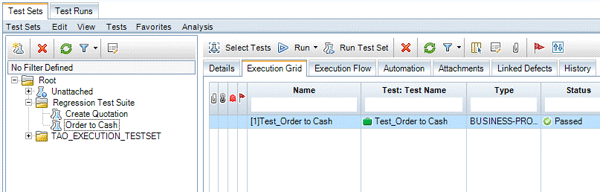
Figure 27
Test execution from SAP TAO
After successful validation of the E2E test script, the status is changed to Released and assigned to the appropriate SAP QC Test Set.
Step 5. Test Data Provisioning for Multiple Test Executions
You can run any SAP TAO test script multiple times on different data sets. The test engineer can add as many data rows in the data file and subsequently update SAP QC with the iterations using SAP TAO.
Note
For more, see the SAP TAO test script structure
here. You can also see the test data used for the E2E business process O2C
here.
Marcus Wefers
Marcus Wefers, senior director of Solution Management, is responsible for SAP's Test Management strategy, including positioning and future development of products and capabilities to support test and quality management, such as SAP Solution Manager, SAP TAO, and SAP Quality Center by HP. Focus areas of his 26 years at SAP include software development, project management, quality management, and solution management for SAP applications in the areas of Financial Consolidation, Profit Center Accounting, SEM, Analytics, Performance and Strategy Management, Business Planning, Corporate Governance, and Application Lifecycle Management. He worked on international SAP customer projects in Europe, the Americas, and APJ. In addition, he is a regular speaker at ASUG conferences, SAPPHIRE, and SAP TechEd.
You may contact the author at marcus.wefers@sap.com.
If you have comments about this article or publication, or would like to submit an article idea, please contact the editor.

Sonal Kumar
Sonal Kumar works as a senior product manager in the ALM Solution Management team, and he responsible for product management of SAP Test Acceleration and Optimization (SAP TAO), SAP Solution Manager Adapter for SAP Quality Center by HP (Adapter), and Component Based Test Automation (CBTA) in SAP Solution Manager. He is a computer engineer and has master's degree in business administration.
If you have comments about this article or publication, or would like to submit an article idea, please contact the editor.





 Premium