Learn how to benefit from SAP NetWeaver Process Orchestration even for integration processes requiring different messages for process instantiation. Although SAP NetWeaver Business Process Management, which is ultimately responsible for the process implementation, doesn’t allow the definition of several start events, you can circumvent this restriction by defining a super interface comprising all the interfaces on which the process start depends. Reusing this idea allows you to model similar scenarios that also require multiple interfaces to be initiated.
Key Concept
With SAP NetWeaver Process Orchestration you can model executable business process model and notation (BPMN)-based processes that can contain start and intermediate message events depending on exactly the same interface. The process engine responsible for executing the process model decides dynamically during runtime whether to start a new process instance for an incoming message or to forward the message to an already-running instance. This behavior is called Conditional Start in SAP nomenclature and is a prerequisite for implementing enterprise integration patterns (EIP) such as the aggregator pattern.
For building stateful integration-centric processes handling the reliable message transfer between systems and applications, developers can use SAP NetWeaver Business Process Management (SAP NetWeaver BPM) in combination with SAP NetWeaver Process Integration (SAP NetWeaver PI). They are both part of SAP NetWeaver Process Orchestration (SAP NetWeaver PO), SAP’s new middleware package.
SAP NetWeaver BPM takes over the role of a state machine on the pure Java stack for those cases. Formerly, on the SAP NetWeaver PI double stack (e.g., running on both Java and ABAP), this role was covered by cross-component Business Process Management (ccBPM). As SAP is moving strategically to the Java stack for its middleware solution, organizations are now starting to migrate their existing stateful integration scenarios to SAP NetWeaver PO. Obviously, the question is raised whether all scenarios modeled using ccBPM can be migrated to SAP NetWeaver PO.
In my previous articles (“Bringing ccBPM-based Integration Processes to SAP NetWeaver PO: Why Automation Doesn't Work,” “Properly Convert Existing ccBPM-based Integration Processes to SAP NetWeaver Process Orchestration,” and “Remodeling ccBPM Processes Using SAP NetWeaver PO: How to Distribute Work between BPM and PI”) I explained how a migration of existing ccBPM-based integration processes looks. In this installment I’ll address another typical use case that often occurs in integration scenarios: the collection and aggregation of data belonging to different interfaces (representing different messages) when it is not known beforehand which message comes in first. Hence, the process must be able to start as soon as one of the respective messages arrives. Let’s see how this challenge can be solved using SAP NetWeaver PO.
Note
Stateless integration processes differ from stateful integration processes in that they cover only normal message handling procedures such as receiver determination, interface determination, and mappings. They describe the message handling within the enterprise service bus (ESB). Once the message has left the ESB, the process is finished. The tool of choice for stateless processes is the PI Designer. Stateful processes on the other hand store or persist data while they are executed. The perfect example is the Aggregator pattern, which collects several messages and stores them within the process until the end condition is reached. The stored messages represent the state. Once the end condition is fulfilled, the stateful process sends out the collected message in a bundle to the receiver. The tool of choice for modeling stateful messages is SAP NetWeaver BPM. Typically you correlate several messages in a stateful process in contrast to stateless processes, which only carry exactly one message.
The Problem
In real-life integration scenarios, integration architects often face the problem that a large message is split in several pieces and must be aggregated again into one large message before it can be forwarded to the final destination. The aggregation is typically solved by using stateful integration-centric processes. As long as all message fragments belong to the same interface, this is not a problem. In my article “Combine SAP NetWeaver BPM and AEX to Implement Powerful Integration Scenarios” I explained how to configure such a scenario using SAP NetWeaver BPM. Figure 1 shows the solution from that article.
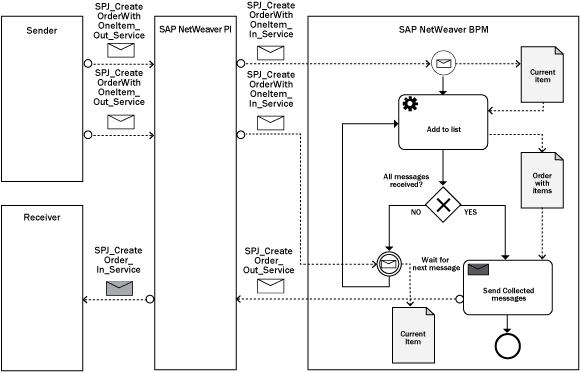
Figure 1
Aggregator pattern implemented using BPMN
Obviously, the message start event ( ) as well as the intermediate message event (
 ) are both associated with the same interface, SPJ_CreateOrderWithOneItem_In_Service. During runtime, the BPMN engine decides whether to either start a new process instance in case no process is already running on arrival of the first message or assign the incoming message to an already-running process instance. This is handled automatically for integration developers and relieves them from tedious, error-prone conflict resolution problems. The behavior of SAP’s BPMN engine for the described scenario (which is called Conditional Start in SAP’s nomenclature) has been discussed in several articles in the meantime, including this one on the inner workings of Conditional Start on SAP Community Network. However, the described behavior works only if the interface of both events is identical.
Note
As I mentioned in the key concept, Conditional Start is a prerequisite for using enterprise integration patterns (EIPs). For more on EIPs, see the book Enterprise Integration Patterns: Designing, Building, and Deploying Messaging Solutions by Gregor Hohpe and Bobby Woolf.
Now assume a different use case: a large Intermediate Document (IDoc) consisting of an order header and order items is split into its different segments. The header contains different data compared with the information contained in the line items. Hence, the associated data structures (or the interfaces) belonging to the header and the items must also be different. In addition, assume that the receiver system cannot aggregate the message itself. Therefore, an integration process needs to aggregate the segments again so the receiver gets only one complete packaged order. The problem is that the integration process does not know which segment comes in first: the header or one of the items. Therefore, it must be prepared for both cases. In pure BPMN this isn’t a problem either: A process can have two (or more) start events representing different interfaces. However, SAP NetWeaver BPM doesn’t support this use case. It allows only one start event. How can you solve the problem if you take this restriction into consideration?
Define a Super Interface and the Respective Mappings
The problem would be solved if you could map the new scenario to the one with the identical interface so you could benefit from the well-known Conditional Start behavior of the engine. In other words, how can you avoid that the integration process has to struggle with different interfaces? The solution to this problem is to create a super interface that consists of both the header and the item interface. Although this sounds simple, there are still some pitfalls to avoid, and I’ll walk you through them in the next few sections. Now I’ll get started with the definition of the interfaces in the Enterprise Services Repository (ESR). Figure 2 depicts all the data structures you need for this example.
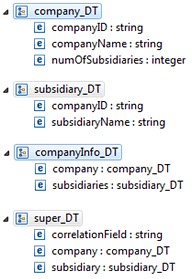
Figure 2
Data structures representing the messages
Instead of working with orders and order items, the scenario works with a company and its subsidiaries. At the top of Figure 2 you can identify the company’s header information contained in the company_DT structure. It consists of the company’s unique identifier (companyID), the company’s name (companyName), and the number of its subsidiaries (numOfSubsidiaries). Beneath the header segment in Figure 2 you can find the segment for each subsidiary (subsidiary_DT). It is linked to the header segment via the unique identifier (companyID) and also contains a field that holds the subsidiary’s name (subsidiaryName). These are the basic segments. In the third place you can find the structure that the receiving system expects (companyInfo_DT): one data structure comprising both the header segment and all the subsidiary segments that belong to the company. There must be as many subsidiary segments as indicated by the numOfSubsidiaries field of the header segment. However, note that the cardinality of the subsidiaries field in the companyInfo_DT structure in Figure 2 is zero to unbounded.
At the bottom of Figure 2 the structure of the super interface is finally depicted (super_DT). It contains the header segment and exactly one subsidiary segment. It holds an additional field named correlationField that you can later use to identify the right process instance for the incoming messages because you have to ensure that the incoming subsidiaries are assigned to the right company and vice versa. super_DT is the interface that is later assigned to both the message start event and the intermediate message event in the BPMN model. With this trick, you can use the standard Conditional Start behavior of SAP’s BPM engine described above.
Note
In SAP NetWeaver PI’s ESR each data type must be wrapped within a message type that is finally used within a service interface. That’s why you find the appendix _DT (for data type) and _MT (for message type) throughout this article. In essence, the message type is just a wrapper around the identically named data type.
However, before you can assign an incoming message (e.g., the company_DT or subsidiary_DT segment) to the BPM engine, you need to map it to the super interface as the BPM engine only reacts on super_DT messages. The respective mappings are depicted in Figures 3 and 4.
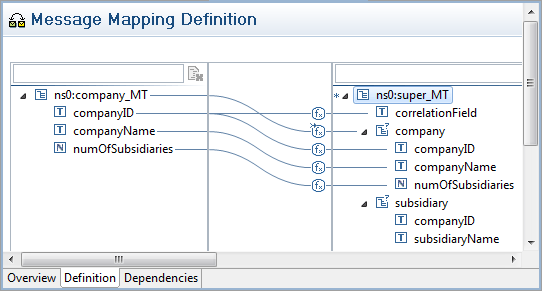
Figure 3
Message mapping for the company message

Figure 4
Message mapping for the subsidiary message
The respective segments are mapped to their counterparts in the super interface. In both cases, you assign the companyID field to the correlationField in the super_MT segment.
Define the Integration Flows
Now that the interfaces and mappings are in place, you can continue with the configuration of the message behavior in SAP NetWeaver PI using integration flows. You need to define three integration flows:
- For the incoming company_DT message to the BPM process
- For the incoming subsidiary_DT message to the BPM process
- For the collected companyInfo_DT message from the BPM process to the target destination
The respective integration flows are depicted in Figures 5, 6, and 7, respectively.

Figure 5
Integration flow for the company message to the BPM process

Figure 6
Integration flow for the subsidiary message to the BPM process

Figure 7
Integration flow for the aggregated message from the BPM process to the receiver
Both messages (for the company as well as for the subsidiary) are mapped to the super interface using the previously described mappings. The resulting message is just forwarded without further adjustments to the target system.
Model the BPM Process
Now you need to develop the integration process itself. Figure 8 shows the final result.

Figure 8
Process for aggregating different interfaces
The process looks nearly identical to the one depicted in Figure 1. It consists of the message start event and the intermediate message event that both point to the same super interface. You can also identify the loop leaving the intermediate message event and that is responsible for aggregating the different segments. Now I’ll explain the process step by step.
After the first message has arrived, the process is being instantiated at the message start event. Here three data objects — incomingMsg, numExpectedSubs, numReceivedSubs — are allocated and initialized. Also, recognize the associations from the start event to the respective data objects in Figure 8. The output mapping of the start event that tells the process engine in the end how to actually fill the data objects with values is depicted in Figure 9.

Figure 9
Output mapping of the Start event
The incoming message is mapped one by one to the incomingMsg data object, which is also of type super_MT. Keep in mind that only one of the substructures in the super_MT message is set — either the company or the subsidiary. In addition, the two fields numExpectedSubs (representing the number of expected subsidiary messages) and numReceivedSubs (standing for the number of already-received subsidiary messages) are initialized with the values -1 and 0, respectively. A fourth data object named resultMsg is responsible for holding all the received messages and is the one that is forwarded to the final receiver. However, as you don’t yet know whether the incoming message contains a filled company or subsidiary segment, you can’t assign it any value, but you can later.
Next, the process proceeds downstream to the Is Company set? gateway. For defining the condition for the Yes gate, you use a standard function that is shipped with SAP NetWeaver BPM. It is the isSet function that tests whether a field is filled with a value. Remember that exactly one of the two substructures is actually filled by the incoming message — either the company or the subsidiary part. Hence, you can test the companyID field of the company section in the incoming message for valid contents using the isSet function. If the field is filled accordingly, the process follows the respective sequence flow leaving the gateway on the Yes gate. Otherwise, the subsidiary part of the structure is set, and the process continues following the No gate. The correct configuration of the gateway is shown in Figure 10.

Figure 10
Configure the gateway
Depending on the result of the evaluation at the Is Company Set? gateway, the process continues with either the Set Company Msg or the Append Subsidiary Msg mapping step. First, look at the Set Company Msg step. The associated mapping is depicted in Figure 11.
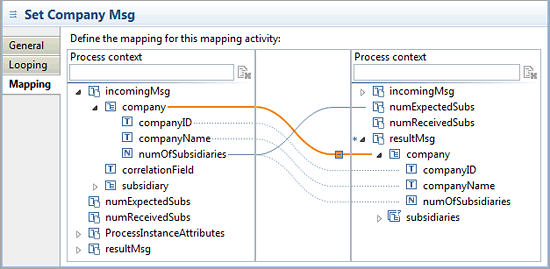
Figure 11
Assign the company part of the incoming message to the result message
After you reach this step, you know that the company part of the incoming message is filled. Hence, you can now assign the respective parts of the incoming message and the result message to each other. In addition, you can update the numExpectedSubs data object to the correct value as the header segment contains exactly this information in its numOfSubsidiaries field.
If the subsidiary part of the incoming message is filled, you reach the Append Subsidiary Msg step in the process model. The mapping looks slightly different and is depicted in Figure 12.

Figure 12
Append a subsidiary from the incoming message to the result message
The subsidiary is appended to the result message’s subsidiaries array as a company can have several subsidiaries. SAP NetWeaver BPM foresees an Append function for this particular use case. You can select it by right-clicking the respective mapping and choosing the function from the context menu as shown in Figure 12. In addition the data object numReceivedSubs is incremented by one as a new subsidiary has been received. To increment a field, use the numeric-add()function, which is also part of the standard shipment of SAP NetWeaver BPM: numeric-add(numReceivedSubs,1).
After either filling the company part or adding the subsidiary to the result message, you reach the All msgs. received? gateway. It verifies whether all messages have been received in the meantime. This is obviously the case if the number of expected subsidiary messages (represented by the numExpectedSubs data object) is equal to the number of received subsidiary messages (represented by the numReceivedSubs data object). Hence, the expression for the Yes gate looks like the one shown in Figure 13.
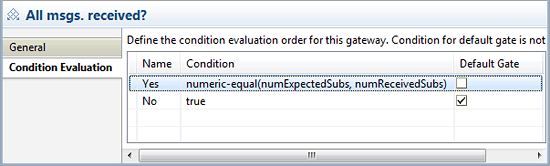
Figure 13
Define the condition for the Yes gate of the All msgs. received? gate
Next, look at the configuration of the intermediate message event. As stated above, it is assigned to exactly the same interface as the message start event. There are no surprises regarding the output mapping of the intermediate message event. It also assigns the received message to the data object incomingMsg of the process context. This is identical to what is depicted in Figure 9. However, the numExpectedSubs and numReceivedSubs data objects need no adjustment as they were already initialized during the output mapping of the message start event. The configuration of the correlation condition of the intermediate message event is interesting (Figure 14).
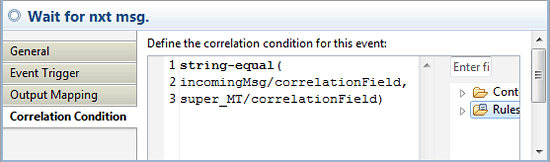
Figure 14
Correlate the condition for the intermediate message event
Because you have extracted the companyID field from both the company as well as the subsidiary message parts into a dedicated correlation field of the super interface (compare Figure 2 as well as the mappings in Figures 3 and 4), you only have to define the correlation condition against this single field. This simplifies the correlation handling significantly and ensures that incoming subsidiary and company messages are associated with the right process instance.
Finally, look at the Send aggregated msg service task. Once all messages have arrived, you forward the collected package to SAP NetWeaver PI by invoking the respective outbound interface CompanyInfo_Out (Figure 7). The input mapping for the step is shown in Figure 15.

Figure 15
Input mapping for the Send aggregated msg. step
Note that the data that has been collected in the resultMsg data object within the process context is assigned as an input parameter to the outbound interface CompanyInfo_Out.
You have now set up the integration scenario. You can now build and deploy the process. For more information on how to finally configure the overall solution, assign the associated service group for the service task, and connect SAP NetWeaver BPM with SAP NetWeaver PI, read my article “Benefit from the Tight Integration Between SAP NetWeaver BPM and AEX Without Configuration” which discusses all settings in detail.

Dr. Volker Stiehl
Prof. Dr. Volker Stiehl studied computer science at the Friedrich-Alexander-University of Erlangen-Nuremberg. After 12 years as a developer and senior system architect at Siemens, he joined SAP in 2004. As chief product expert, Volker was responsible for the success of the products SAP Process Orchestration, SAP Process Integration, and SAP HANA Cloud Integration (now SAP HANA Cloud Platform, integration service). He left SAP in 2016 and accepted a position as professor at the Ingolstadt Technical University of Applied Sciences where he is currently teaching business information systems. In September 2011, Volker received his Ph.D. degree from the University of Technology Darmstadt. His thesis was on the systematic design and implementation of applications using BPMN. Volker is also the author of Process-Driven Applications with BPMN as well as the co-author of SAP HANA Cloud Integration and a regular speaker at various national and international conferences.
You may contact the author at editor@SAPpro.com.
If you have comments about this article or publication, or would like to submit an article idea, please contact the editor.



