The presence of a start routine changes the selected data structure and granularity. It has a negative impact on the source data retrieval process, even if you have not implemented it. In some scenarios, a start routine can change execution time from minutes to hours and even produce a different result. In most cases, you can implement an alternative solution to obtain the best loading performance.
Key Concept
A transformation is a stage of the extraction, transformation, and loading process that allows you to consolidate, cleanse, and integrate data from heterogeneous sources. When you load data from one BI object into another BI object, the data is passed through a transformation, which then converts the source fields into the target format.
In large-scale SAP NetWeaver BW implementations, a support team has to handle two antagonistic trends:
- The permanent growth of data scope that should be processed in the same restricted window of time
- Strongly defined scheduling for the actual release of data to end users
In many cases, you can improve the data processing time by taking a look at the transformation’s start routine. However, in other scenarios including the following, the use of a start routine is required:
- Analyzing a group of semantically associated records (all documents items)
- Normalizing a data structure (inserting records)
- Optimizing the data process by performing a single selection for a group of fields
Because a start routine causes redundant source data retrieval and has a negative effect on your loading process performance, you should avoid using it in all other scenarios.
I’ll explain how start routines work within transformations and then I’ll show you two views of transformations, one with a start routine and one without. I’ll then explain how a transformation’s start routine could affect performance. To help you avoid unnecessary start routines, I offer three alternatives — a transformation end routine, data transfer process (DTP) filtering, or a transformation update rules routine — and explain which situation is best suited for each alternative.
Transformations and Start Routines
A transformation converts data from a source to a target structure. Only the source data fields that are required for transformation have to be retrieved. During transformation execution initiated by the DTP, the source data is reduced and aggregated to meet the transformation’s needs. The required set of source data fields is determined from the fields’ rule mapping (Figure 1).

Figure 1
Source fields selection for a transformation without a start routine
With a start routine implementation, it is impossible to determine in advance which source data fields should be delivered to transformation because of the following reasons:
- Any available source field could be required in the start routine
- There is no way to determine the fields actually used in the routine code
- No mapping mechanism exists for the start routine for mandatory definition of the source fields actually used
As a result, all source data fields are selected and passed to the transformation independent of their real use (Figure 2). This is the cause of redundant source data retrieval.

Figure 2
Source fields selection for a transformation with a start routine
How Start Routines Affect Performance
A start routine causes two negative effects:
- Retrieving and transferring all data fields — redundant structure (columns)
- Canceling aggregation — redundant granularity (rows)
The presence of a start routine leads to the retrieval and transfer of all source data fields. If a source is a flat structure data (Persistent Staging Area [PSA], master data, or DataStore object [DSO]) the effect of a start routine is not substantial. It is comparable to performing a SELECT statement for several fields (SELECT f1,f2,…fn) or for all (SELECT *). The performance may decrease if you have very large data sets with many fields.
The situation differs if an InfoCube is a transformation source. In contrast to the flat structure SELECT * case, you retrieve part- or full-star schema data, which contains some or all the tables (and their fields) that make up the InfoCube (Figure 3).

Figure 3
InfoCube object composed of related tables (rectangles on the schema)
In addition, when the InfoCube is a transformation source, the InfoCube’s source data is delivered already aggregated to satisfy the transformation needs. That reduces the amount of data that should be processed. If a suitable pre-calculated aggregate exists, it can be used to speed up the DTP performance (Figure 4).

Figure 4
InfoCube source data retrieval for when the InfoCube is the transformation source
However, if you are using an InfoCube as a transformation source, you are better off not using a start routine because you lose the aggregation benefits of it. As shown in Figure 5, the more fields (characteristics) the source InfoCube has and the more data it contains, the more the start routine affects performance.

Figure 5
InfoCube source data retrieval for a transformation with a start routine
Example of Performance Effect from Using Start Routines
To illustrate a performance difference caused by a start routine I included an example of DTP executing for the transformation between two InfoCubes. The source InfoCube contains about 20 million records, which covers 15 months.
The DTP selects a one-month portion of the records, which is about 1.5 million records. The original transformation did not have a start routine. I implemented the empty start routine in this transformation just to show its adverse effect. The routine itself does not perform any process so its contribution to execution time is minimal. The execution time growth is caused by the existence of the start routine, not by its implementation.
Figure 6 shows the DTP monitor fragment for a scenario without a start routine. The source data retrieval time is logged in the Extraction from InfoCube line. Figure 7 illustrates the same monitor fragment for a start routine scenario.

Figure 6
DTP execution monitor for a transformation without a start routine

Figure 7
DTP execution monitor for the same transformation with an empty start routine
As you can see, the source data retrieval time grew from 1.5 minutes (Figure 6) to 48 minutes (Figure 7). Moreover, it required more system resources. The first running of the start routine scenario failed in 18 minutes after using all the available system resources (temporary table space). I had to allocate additional resources so the start routine could finish successfully.
To illustrate a target content difference caused by a start routine, I chose the scenario in which IC_TR is the InfoCube and DSO_TR is the DSO. The DSO has fewer characteristics than the InfoCube and the system overwrites the DSO key figure during loading. Figure 8 shows the structure for IC_TR. Figure 9 displays the structure for DSO_TR. As you can see, The DSO has the same structure as the source InfoCube, except for the 0EMPLOYEE object.
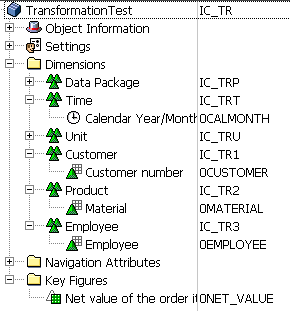
Figure 8
Source InfoCube, IC_TR

Figure 9
Target DSO, DSO_TR
I populated the IC_TR with the sample data in Figure 10. I then executed the scenario twice — once before using the start routine and once after creating the start routine.

Figure 10
Source InfoCube IC_TR conten
Figure 11 shows the monitor view in the scenario without a start routine and Figure 12 shows the monitor view with the start routine. Notice that at this point, the version without the start routine has four data records whereas the version with a start routine has six data records. In the version without a start routine, the six original source records were aggregated to four to meet mapping requirements. In the version with the start routine, all source records (six) were passed.
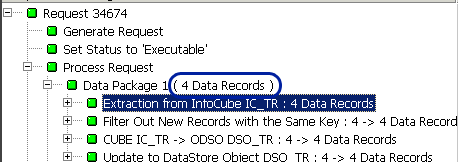
Figure 11
DTP monitor without a start routine
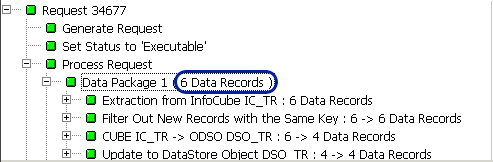
Figure 12
DTP monitor with a start routine
The difference in retrieval behavior explains the difference in the received results. In the scenario without the start routine, the results include the cumulative key figure values (Figure 13). This reflects the source InfoCube content for the DSO key fields.
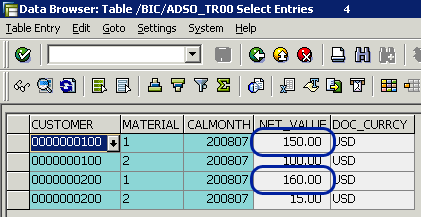
Figure 13
Target data (DSO_TR) content (no start routine)
In contrast, when using a start routine, you receive the last value aggregation (Figure 14). This can lead to an unexpected result because you cannot ensure the InfoCube’s source data sort order, as you can see by the different values in the NET_VALUE columns.
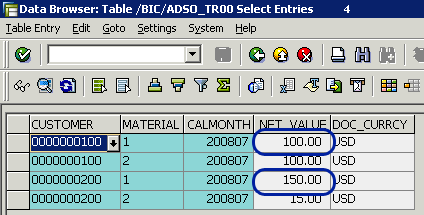
Figure 14
Target data (DSO_TR) content (start routine scenario)
Alternatives to Using a Start Routine
Three alternatives are available that you can use as a substitute for a start routine. They either fully or partially substitute its capabilities:
Transformation End Routine
A transformation end routine is similar to a start routine in that it covers the same functionality as a start routine:
- Analyzes a group of semantically associated records (all documents items)
- Filters (deletes) unnecessary records
- Normalizes the data structure (inserting records)
- Optimizes the data process by performing single selection for a group of fields
The end routine is a better option than a start routine because it is associated with the target structure, whereas the start routine is associated with the source fields. As such, the transformation performs an end routine after the fields’ update rules (Figure 15).
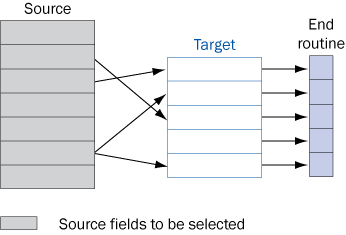
Figure 15
Source fields selection for transformation with end routine
The end routine does not affect the performance issue, so it could be viewed as a high-priority alternative. The major distinction restricting the end routine use is that it processes the transformation’s target structure data. If a source data field required for manipulation is not passed to the target data, then you need to use a different alternative.
DTP Filtering
Deleting unnecessary source data records can be performed by a DTP filtering mechanism. This is an even more effective approach than a start routine from a performance point of view. DTP filtering is translated to the WHERE condition of the SQL statement, retrieving the source data. It requires a smaller data transfer, as opposed to a start routine, which retrieves all the data and filters it after the transfer. The DTP allows you to define specific filtering values for one or more separated fields.
Transformation Update Rules Routine
Transformation update rules routines are implemented for each field separately and called for every transferred record. If you need to retrieve data from the same external source for a number of fields, you are forced to perform the redundant data access. Process optimization involves storing the retrieved data in the program memory (global variables) and referencing the memory instead of the external data.
To implement this in a scenario without a start routine, you should add the same code fragment at the beginning of each update routine, referring to the memory stored data. The additional code structure should check to see if a global variable (such as a rule on an internal table) is populated. If not, the code should populate the variable by performing a routine that retrieves the data and stores it in the program memory. You should encapsulate the memory-populating code in a separate program module (form or function module).
Michael Shtulaizen
Michael Shtulaizen is the SAP NetWeaver technical manager of Strauss Group Ltd., Israel. He has been working with SAP BW since 2002. He has rich development experience in SAP environments (more than 10 years) that allows him to propose original solutions in SAP NetWeaver BW systems.
You may contact the author at Michael.Shtulaizen@Strauss-Group.com.
If you have comments about this article or publication, or would like to submit an article idea, please contact the editor.



 Premium