You can use the Production Planning and Detailed Scheduling (PP/DS) optimizer in SAP Advanced Planning & Optimization for finite scheduling of production resources to avoid capacity overload and at the same time optimize the production sequence. Finite scheduling means there is no capacity overload and optimized sequence means there is minimal difficulty to changeover with respect to the due date. You can design the setup matrix — the prerequisite master data for PP/DS optimization — with a step-by-step approach by analyzing the product mix with a hierarchy. With that analysis, it is easier to translate scheduling rules into parameters the system understands with minimum ongoing master data maintenance.
Key Concept
Shop floor scheduling with sequence-dependent changeover rules is based on the design of a setup matrix. Based on the changeover difficulty from one product to another in the production sequence, you formulate a setup matrix with this changeover difficulty quantified as a penalty using a numerical value. By using an exception-based setup matrix with help from the Production Planning and Detailed Scheduling optimizer in SAP Advanced Planning & Optimization, you can simplify the design of the matrix when you deal with a complex product mix and also substantially reduce the number of entries in the matrix (e.g., from 1 million to a few hundred entries).
Automating and optimizing a shop floor sequence with scheduling rules is not an easy task. These rules are developed from field experience and are broadly based on availability of resources, sequence-dependent difficulty, and on-time delivery to customers. With those rules in mind, automating the schedule in terms of system parameters becomes a challenge for any implementation of Production Planning and Detailed Scheduling (PP/DS) in SAP Advanced Planning & Optimization (SAP APO). This is especially true for optimizing the sequence based on variable dependent rules.
A key to efficient shop optimization is the design of a changeover matrix, or in SAP terminology, a setup matrix. Such a matrix features a complex set of data with setup transitions from one product to another in the production sequence. Transition, a common term on the production floor, refers to scheduling production of another product from an existing one on a production line. Although setup matrix design is a one-time formulation of the setup transitional values, you should conceptualize it in a simplified way so that business users do not have difficulty with its ongoing maintenance.
I achieved success for a client by implementing an exception-based setup matrix to simplify the complex products mix with a step-by-step approach. I created a set of instructions to coordinate the production machines to go from one product to another, and that set of instructions is reusable for the next time the switch is made.
Note
It is helpful to understand the concepts of sequence optimization before reading this article, as it does not cover these concepts in detail.
Soft Versus Hard Constraints
My client used multiple testers to test semiconductor chips. An objective of this project was to optimally sequence different sizes of semiconductors for the testers. Major variables included customer and forecast requirement dates, availability of tools on the floor, and changeover difficulty from one product to another product depending on new setup or tools requirements (also known as a sequence-dependent changeover penalty). Apart from those variables there was also downtime, resource capacity of testers, labor, and shift timing.
In the initial phase of requirements gathering, I analyzed the complex variable scheduling rules in multiple iterations. I came up with two different categories of rules that are described as scheduling constraints in SAP APO terminology:
- Hard constraints are rules that you generally cannot violate and that require major shop floor changes to override
- Soft constraints are rules that the scheduler tries to adhere to while minimizing setup time and penalty, but at the same time maximizing resource use and customer service
You handle hard constraints mostly with master data setup, such as resource capacity (e.g., labor or machines), shift timing, or tools availability (i.e., secondary resource). On the other hand, soft constraints act as a trade-off between sequence-dependent setup and customer due date. This sequence optimization is based on a setup matrix, which is a tabular form of changeover data transitions from one product or product group to another.
The overall high-level design flow is shown in Figure 1. First you run material requirements planning (i.e., short-term planning) to come up with the unconstraint plans, which means that the plan is the ideal replenishment plan without considering the constraints on the floor. Now the system maintains hard constraints as master data either in the form of resource master data (e.g., primary or secondary resource) or calendar/shift /downtime. On the other hand, the system maintains soft constraints as a setup matrix. The system feeds the master data and setup matrix to the PP/DS optimizer in SAP APO for sequence optimization. The optimizer conducts the tradeoff between setup transition versus customer due date while sequencing the production schedule. At the same time, the optimizer constrains the sequence, respecting the hard constraints.
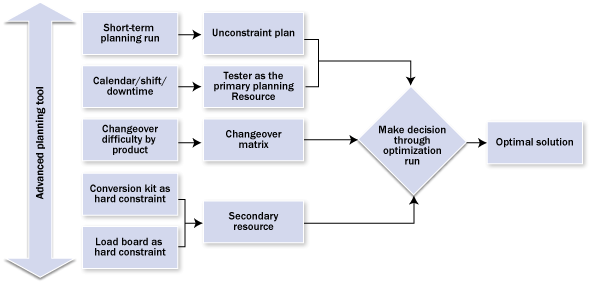
Figure 1
High-level design flow
The major challenge is to formulate the setup matrix, in which you incorporate all the scheduling soft constraints in terms of setup time and penalty, quantified as a numerical value.
Formulate an Exception-Based Setup Matrix
The setup matrix constitutes two aspects of changeover from one product to another:
- Setup time, which refers to the time to transition one product to another — you can easily figure out that time from regular shop floor information
- Setup cost, which is a numerical value, not a dollar value, that represents the difficulty to transition from one product to another (the higher the number, the higher the difficulty)
You can group products with similar setup conditions under a setup key and, further, as a setup group. I’ll explain that after I describe how I came up with the setup matrix.
As an initial step, my business counterpart and I analyzed a sample set of products, which acted as a good representation of the client’s business. The objective was to understand the difficulty of transition between the products and explain how to come up with a setup matrix. Once we had the sample setup data, we assigned a value to each transition (Figure 2). If there is no difficulty at all, the value is 0, and as the difficulty increases, the value increases. There is a range of seven numbers (0 to 6), with 6 being the highest difficulty.

Figure 2
Changeover difficulty by products
The next step was to identify products with similar setup transitions under a setup group to simplify the product mix. Products within the same setup group have a very low level of difficulty to transition from one to another. A subgrouping within a setup group is called a setup key, which can represent one product or group of products for which transition value is zero (Figure 3).
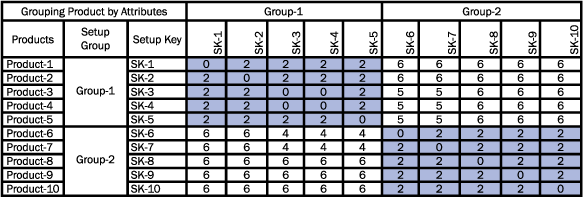
Figure 3
Grouping by changeover difficulty
Here’s an explanation of the hierarchy I use:
- Categorize products by similar setup conditions as setup groups (low penalty)
- Categorize products within a setup group as a setup key with the same attribute for sorting (zero penalty)
- Assign a low penalty for setup group changeover
- Assign zero penalty for setup key changeover
Once you complete the logical grouping as described above, the user maintains the setup matrix by setup group, with the setup key as an exception value of zero. In this case, zero is good because it indicates there is no penalty from a given setup key to the same setup key. Therefore the system looks for this combination first before looking for entries for the setup group, which is a higher grouping.
Numerical values as penalties are maintained for transition from one setup group to another with all possible combinations. The SAP system considers lower penalty transitions as lower numerical values and vice versa.
That means if there are five different setup groups, then for each setup group there would be five rows of values with all combinations of setup groups, which is imperative in the matrix. By using the matrix groups, the system can find out what the combination value is if you switch from one product to another.
In the case of setup keys, there is only one entry for each setup key to the same setup key, with zero as the exception (Figure 4). This exception-based setup matrix (note the E for exception in the setup keys in Figure 4) helps you reduce the number of setup keys you need, as opposed to maintaining all possible combinations of setup keys in a standard matrix.
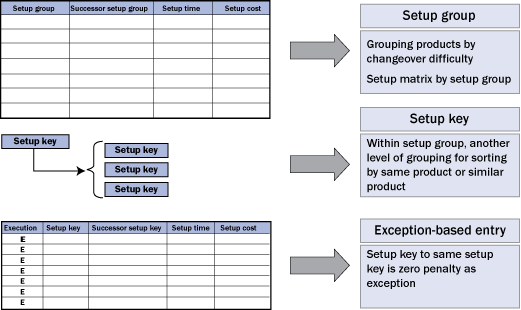
Figure 4
Design of setup matrix with exception
For example, there are five setup groups (let’s call them SG1, SG2, SG3, SG4, and SG5) and each setup group has two setup keys. The setup matrix should be as follows:
- SG1 to SG2 = penalty value
- SG1 to SG3 = penalty value
- SG1 to SG4 = penalty value
- SG1 to SG5 = penalty value
Now let’s assume you have three setup keys (SK1, SK2, and SK3). For setup keys, there is one entry for each setup key to the same setup key, with zero as the exception. Again, zero means there is no penalty, so the transition is the first preference for the system.
- SK1 to SK1 = zero
- SK2 to SK2 = zero
- SK3 to SK3 = zero
You sort setup keys within a setup group, and you maintain penalty values in the exception-based matrix (Figure 5).
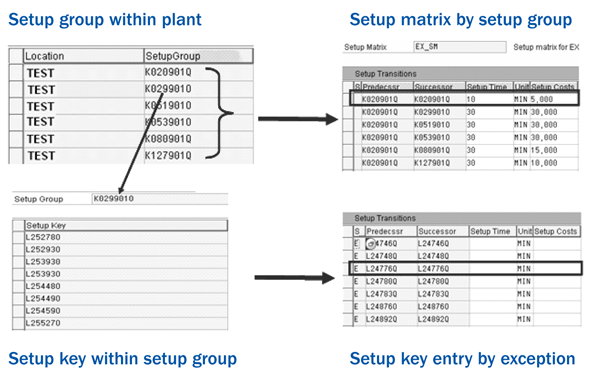
Figure 5
Exception-based setup matrix
What would be the overall logic? For any changeover of one product to another product in the production schedule, the PP/DS optimizer checks the exception entry in the setup matrix. If there is any exception entry for that combination of setup keys (i.e., the transition is between two different products with the same setup key in one product group), there is zero penalty. If there is no exception entry for the setup key, the PP/DS optimizer looks for a higher grouping for the penalty values. This is the logic the PP/DS optimizer follows to sequence the products for the production schedule (Figure 6).

Figure 6
Changeover logic in PP/DS optimizer
Benefits and Validation Process
Once I completed the design of the setup matrix with the sample set of data, the client analyzed the total product mix to come up with the same structure of simplified grouping across 1,000 products, each with 1,000 records.
There were 100 groups as setup keys, with 10 products in each setup key and 20 products as setup groups. If the client maintains the changeover transition only by products, there are 1 million records (i.e., the matrix combination of 1,000 products * 1,000 products).
If you maintain the matrix only by setup key, which is the lowest level of grouping, the number of records would be 10,000 (i.e., 100 setup keys * 100 setup keys). Finally, in the case of an exception-based setup matrix, the number of records is substantially reduced to 500 (20 setup groups * 20 setup groups = 400, + 100 setup key exception-based entries).
With the exception-based setup matrix approach, you not only reduce the entries in the setup matrix, but also simplify the ongoing maintenance of the setup matrix with new product introduction. For example, new product introduction usually belongs to one setup key and group, so you do not need to maintain any values in the setup matrix because there is already an entry for the same group and key. In the case of a new setup key, you need to maintain only one entry as an exception. Based on my experience, it is rare to need another new setup group unless a company experiences a major change in business strategy.
After the design work of the setup matrix for the PP/DS optimizer, the next major challenge is to validate the solution. In the client implementation, no benchmarking existed apart from the scheduler’s experience. How do you know if the system provides a better solution than what the scheduler previously did manually? Many unanswered questions exist regarding benchmarking and the system solution when you implement such a complex design.
To answer those questions, the first step is to provide sample orders to the scheduler for manual sequencing. Then you feed the same orders into PP/DS at the same time for automatic sequencing through optimization. I performed this process with multiple iterations to fine-tune the penalty value in the setup matrix, and then I compared the optimization result with the manual sequence and the number of major changeovers in the production sequence. The number of major changeovers was the measure to validate the optimization result.
My objective was to achieve an equal or lower number of changeovers in the production schedule with the automatic process of the PP/DS optimizer compared to the traditional manual scheduling. This validation process was the key to the successful implementation of the PP/DS optimizer.
Parijat Chakraborty
Parijat Chakraborty is a director of SAP SCM Solutions at Falcon Prime, Inc. He has 14 years of experience in SAP technology. He focuses on implementing various components of SCM, such as Demand Planning, Supply Network Planning, PP/DS, and Global ATP. He specializes in supply chain manufacturing systems and optimization techniques.
You may contact the author at parijat.chakraborty@falconprime.com.
If you have comments about this article or publication, or would like to submit an article idea, please contact the editor.




 Premium