Ensure that your employees’ critical accounts are credited first when setting up multiple bank transfers for payroll.
Key Concept
An SAP system stores bank detail information on infotype 0009. Every employee must have a subtype 0 (main bank) account. A bank transfer allows the employer to transfer funds automatically to the employee’s bank. A check means that employees receive a physical check that the employer’s payroll department prints and physically distributes to them. Most employees elect a bank transfer (also called a direct deposit) and in some countries this is a mandatory requirement. However, other countries, such as the United States, allow employees to have the option of a bank transfer or a physical check.
Employees often ask how their various bank accounts are credited when they want to transfer funds to multiple bank accounts. Mostly this comes into play when they have a check with a small amount of money in it and find out that noncritical accounts are funded and the accounts in which they need the money are not.
This process isn’t identified in any existing SAP course. We’re going to show you how bank account transfer functionality works, including how validity dates determine the order in which your SAP system processes bank transfers. We’ll use two examples, one of an employee who elects to transfer flat amounts into several accounts and the other of an employee who wants to transfer percentages of his pay into the accounts.
Bank Transfer Functionality
Many employers allow employees to have more than one bank transfer. If your company does, then you allow employees to elect additional bank details via infotype 0009 subtype 1 (other bank) records.
Employees can enter bank details into your SAP system in several ways. Many companies use SAP’s Employee Self-Service (ESS) functionality. Other companies may have their own Web-based interface tool that updates the SAP R/3 bank details. Companies may make employees complete their bank details election information on a form and have a payroll specialist key in this information. Regardless of the interface that updates an employee’s bank details, the way that the bank details functionality works remains the same.
The employee can elect a percentage or a flat dollar amount to transfer to a checking or savings account via a bank transfer each pay period. Employees can elect to have a check cut instead of a bank transfer; however, this requires that they manually take the check to a bank to deposit it.
Standard Payroll functionality processes the bank details information according to validity dates. The oldest bank details subtype 1 (other bank) record processes first. If you have multiple bank details subtype 1 (other bank) records that are valid on the same date, then payroll looks at the sequence number.
Whenever you create an infotype 0009 record, the database automatically assigns it a sequence number. The infotype 0009 screen does not display this directly. However, you can view it through SAP’s Data Browser (transaction SE16) when you view the transparent table PA0009. The sequence number is part of the key for the infotype record and helps distinguish this record from other infotype 0009 records that have the same validity dates for the same personnel number and same subtype. Two infotype 0009 records cannot have the same key information stored on the database.
Note
Most users do not have access to SE16 in a production client. The overview screen in PA30 does not show the records in sequence number order so the user knows which comes first. This is not an option in table T588M. The only way to see this information other than SE16 is to go to Data Dictionary to view the transparent table PA0009 or build an SAP query to display this information. In the production environment at our company, we allow payroll specialists to access SE16. This transaction is display only and it is far easier for them to view this information in this transaction rather than in Data Dictionary. The information isn’t something that employees would understand if they saw it directly; therefore, SAP does not even provide this option on the standard ESS bank details interface screen or on infotype 0009 via SAPGUI for Windows in the transactions PA20/PA30.
Flat Amount Transfer
In our first example, an employee wants to transfer $50 electronically into his son’s college fund account and $500 into a joint checking account that he has with his spouse. The remaining money from the paycheck should be a physical check that the employee deposits into his own personal checking account. In our example, the company does not have a Web-based interface that allows the employee to do this. Therefore, the employee completes a form with the bank details information and sends it to a payroll specialist who keys the information into the system using SAPGUI for Windows functionality. The payroll specialist needs to set up the following records:
Step 1. Create a bank details (infotype 0009) subtype 0 (main bank). This subtype defaults remaining payroll funds into a physical check that the employee can deposit into his or her own personal checking account (Figure 1).
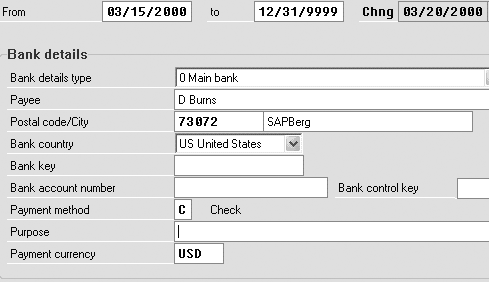
Figure 1
Bank details for the main bank
Step 2. Create a bank details (infotype 0009) subtype 1 (other bank). This subtype stores the American Banker’s Association (ABA) routing number, account number, and the $50 election for the son’s college fund (Figure 2).
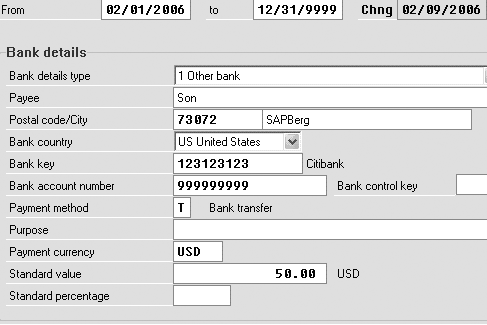
Figure 2
Bank details for son’s college fund
Step 3. Create a bank details (infotype 0009) subtype 1 (other bank). This subtype stores the ABA routing number, account number, and the $500 election for the joint checking account with the spouse (Figure 3).

Figure 3
Bank details for the joint account
The infotype 0009 records processes in ascending order according to the infotype’s key values. Any funds remaining after all the bank details subtype 1 (other bank) records are completed are distributed to the main bank, which is the bank details subtype 0 (main bank) record. This means that if my example employee received a net check for $1,000 this pay period, $50 would go into the son’s account first because it has the earliest validity date on the bank details subtype 1 (other bank) record. The $500 would go to the employee’s bank details subtype 1 (other bank) joint checking account record. This means that the employee would receive a physical check of $450 because on the bank details subtype 0 (main bank) record, the employee elected a check instead of a bank transfer.
What if the bank doesn’t have enough money to cover all the other bank records? Payroll processes all of the subtype records that it can until there’s no money left. Say an employee elects a flat amount transfer and receives $300 net in this pay period. Payroll processes $50 to the son’s account and then sends $250 to the joint account. The employee would not receive a physical check in this pay period because no funds are left over for the main bank account.
Percentage Transfer
If you have employees whose pay alters frequently, it might be easier to use percentage elections instead of fixed elections for the subtype 1 (other bank) records. The validity dates still determine the order in which the system processes the subtype 1 (other bank) records.
The way that you calculate the amount of money distributed to the subtype 1 (other bank) accounts differs. Say for our second example that the employee still keeps his main bank record as a physical check. The subtype 1 (other bank) are now percentage based. The employee wants 10% of the paycheck to go into the son’s college account (Figure 4) and wants 40% of his pay to go into the joint account with his spouse (Figure 5).
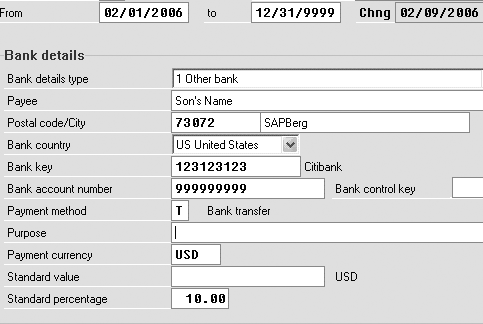
Figure 4
Other banks: son’s account with percent
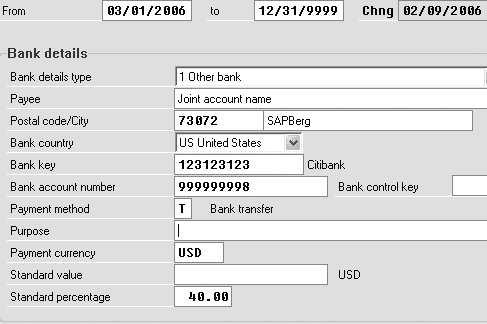
Figure 5
Other banks: joint account with percent
Tip!
If you want the joint checking account to receive funds before the son's college account, then an HR specialist needs to delimit the current bank details subtype 1 (other bank) record for the son's college account. Next, the specialist creates another bank details record for the son’s college account with a validity date greater than the date used for the joint checking account (say, 3/1/2006). Payroll then funds the joint checking account first, then the son's college account. Any remaining money still goes into the subtype 0 (main bank) record.
Let’s go back to our example payroll run in which the employee had a net income of $1,000. You now want to base the percentage on earnings. You see the following breakdown. Since the subtype 1 (other bank) account with the oldest validity date is still the son’s college fund, 10% of the net pay would go to this account, or $100 (as $1000 / 10% = 100). The next subtype 1 (other bank) record is the joint checking account. This says that 40% of net pay, or $400 (as you start with $1,000 and divide this by 40%, giving you $400), would go into this account. Since that is all of the subtype 1 (other bank) records, payroll creates a physical check for $500 (which is $1000 - $100 - $400), which is then distributed to the employee.
Dawn Burns
Dawn Burns is an SAP-certified human resources senior consultant and Quality Assurance Manager and HR Consultant with Howrey LLP. She is a former SAP Human Resources instructor for SAP America and has more than 12 years of experience in human resources and information technology.
If you have comments about this article or publication, or would like to submit an article idea, please contact the editor.
Brad Walters
Brad Walters is a certified SAP HR consultant for Electronic Data Systems with more than nine years of SAP HR experience. His SAP work experience includes configuration and production support of PA/OM, Recruitment, Payroll, and ABAP development.
You may contact the author at walters_brad@hotmail.com.
If you have comments about this article or publication, or would like to submit an article idea, please contact the editor.






 Premium