With the acquisition of SAP BusinessObjects a few years back, SAP extended its offerings in the Business Intelligence (BI) area and is now in a position to offer companies a broad range of BI products. With this larger set of BI clients also comes more complexity when choosing the right BI tool based on your own specific requirements. Learn about the available options and how to choose the best BI tool to meet your company’s needs.
Key Concept
SAP offers companies an SAP BusinessObjects BI portfolio that provides a set of BI tools, each with its own strengths and weaknesses. Each of these BI clients is designed with specific use cases and personas in mind—none cover all types of requirements. As a result, companies must be mindful when selecting the best product to use for their specific needs.
With the addition of SAP BusinessObjects BI to the overall SAP portfolio and with the combined roadmap of SAP BI products and SAP BusinessObjects BI products (e.g., SAP BusinessObjects Analysis, edition for Microsoft Office and SAP BusinessObjects Design Studio), companies have more choices to make when it comes to determining their BI strategies.
Before going into too much detail, let me first explain some of the criteria you can use to narrow down the list of potential BI clients for your audience. I’ll also take a look at the overall SAP BusinessObjects BI portfolio and the different kind of categories that are available as part of the portfolio.
SAP BusinessObjects BI Portfolio – An Overview
The SAP BusinessObjects BI portfolio is grouped into three main categories:
- Agile visualization
- Dashboards and applications
- Reporting
In the following sections I discuss each of these categories in detail.
Agile Visualization
In the agile visualization category you find SAP Lumira, SAP BusinessObjects Explorer, SAP BusinessObjects Analysis, edition for Microsoft Office, SAP BusinessObjects Analysis, edition for OLAP, and SAP Predictive Analysis (Figure 1). Notice that all of these products have one important thing in common: they’re all designed for a business-analyst or power-user type of user and do not require IT to be part of the overall process. It is important to remember, however, that these products do have different strengths and weaknesses and that none of them covers all of your requirements on their own.
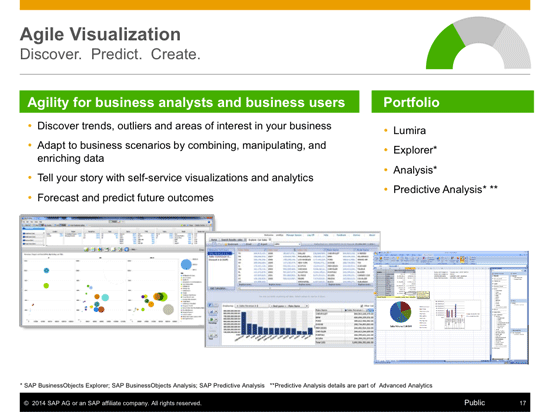
Figure 1
Agile visualization
In the agile visualization category, you often find requirements such as being able to:
- Change the view of the data in the report.
- Create and edit the report by the user.
- Enrich the data and merge different data sets.
- Create new calculations as part of the report.
- Search in the data set.
- Ask questions.
These are all requirements that your stakeholders might request when they describe their needs. More than likely, you can then identify an agile visualization category product that is able to provide the necessary functionality to fulfill these requirements. As stated previously, the most important aspect in this category is the fact that these functionalities can be leveraged by the business user without the need to involve IT.
Dashboards and Applications
There are two main products in the dashboards and apps category: SAP BusinessObjects Dashboards (formerly Xcelsius) and SAP BusinessObjects Design Studio (Figure 2). Both of these products offer the capabilities to build dashboard-style content based on your corporate data and both are designed for an IT-based audience. These products are designed for the IT department to create the content, which then can be consumed by your business users, but these products are not designed for the business user to create the dashboards.
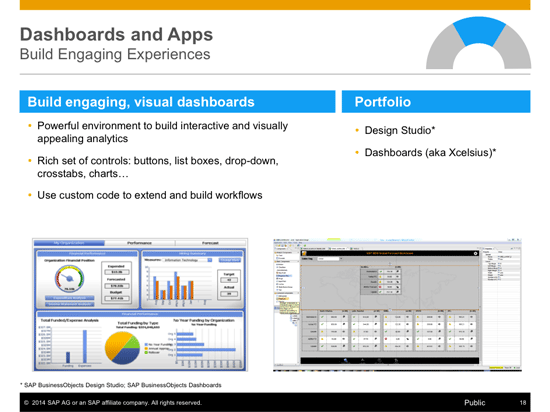
Figure 2
Dashboards and apps
In this category, you often find requirements such as the need to:
- Display highly visualized information.
- Track corporate key performance indicators (KPIs).
- Display highly aggregated information with the option to drill down when needed.
- Display the information on mobile devices.
- Interact with the dashboard in the form of filtering and navigating.
These are just some typical examples of requirements that would fall under the dashboards and apps category. Later on in this article I delve further into the details about how you can differentiate between these products and select the right BI tool for your requirements.
Reporting
There are two products in the reporting category: Crystal Reports and Web Intelligence (Figure 3). Both of these products are typical reporting tools with one major difference: Crystal Reports is designed for the IT department to create the reports, and Web Intelligence is designed as a self-service reporting tool for the business user to create and edit the reports.
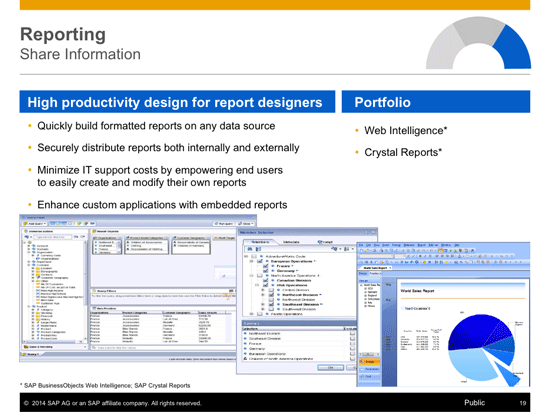
Figure 3
Reporting
In the reporting category, you often find requirements such as being able to:
- Create a well-defined repeatable layout.
- Automatically distribute reports to a large audience.
- Create a set of pre-defined reports.
- Format and print documents.
If your project requires a BI client that is able to fulfill these requirements, you should look at the products in the reporting category and start with the functionality of those products.
So far, we’ve reviewed the different categories of SAP BusinessObjects BI Portfolio, but none of these BI clients is a silver bullet in and of itself. When looking to fulfill all your BI strategy requirements, you have to look beyond just a single BI client, as you need more than just one BI tool to fulfill all your needs. Will you require all of them? Probably not, but you probably will need more than one of these BI tools.
SAP BusinessObjects BI Portfolio – Personas
In addition to understanding the different products in the overall SAP BusinessObjects BI portfolio and the different categories in the overall portfolio, it is also very important to understand the different personas (roles) in your company and how these different personas are matched up with the different BI tools.
Note
In this context, the words persona and role are used interchangeably.
Normally you find these five roles in your company (Figure 4):
- Decision maker
- Analyst
- Consumer
- Designer
- IT

Figure 4
BusinessObjects BI roles—the decision-maker role
These roles might have different names in your company—for example, an analyst might be called a power user or business analyst, and a decision maker might be referred to as senior management or a line of business manager. However, you will find these five basic types of personas in your company (even if labeled differently), all with different skills and different needs. It could also be that some of these roles are filled by a single person. For example, in your organization a designer and an analyst might actually be the same person. My point is that there are different kinds of roles in your company, each having different requirements, and each of these roles might not match up exactly to one person—instead a single person in your company might fulfill the responsibilities of more than one role.
Decision-Maker Persona
So let’s start with the decision-maker role (highlighted in Figure 4). The decision maker’s persona requires that information be highly visualized. In addition, this information needs to be available online, offline, and on mobile devices. The decision maker needs to be able to consume this information quickly and, if required, needs to be able to analyze the information on its own without having to rely on the IT department to create or change a report. Typically, the decision maker is a role found in senior management, line of business management, and on an executive leadership team. Therefore, it is very important that the information is available visually and is easily consumable.
Analyst Persona
The analyst persona (Figure 5) is often your go-to person in a company when senior management requires a quick answer to a question. Very often the analyst is also called a power user, which perhaps describes this role slightly better. The analyst has a very good understanding of corporate data and elements such as the underlying data models and the dependencies between the different sets of data. Analysts require products that provide a large set of functionalities and do not present limitations or boundaries when it comes to analyzing information and creating reports and data visualizations for management. Very similar to the decision-maker role, the analyst also needs products that allow working with data without having to rely on the IT department.

Figure 5
The analyst role
Consumer Persona
The consumer (Figure 6), as the name of this role indicates, is mainly focused on the consumption of the information and less focused on creating reports or dashboards. The consumer persona is typically the person who requires information to perform daily tasks – for example, an accountant who requires a list of open invoices or the shop floor worker who requires a material list for the next order to be fulfilled. With this persona, the focus is more on the actual consumption of information than on the creation and editing of reports. Therefore simplicity is a very important aspect of this role.
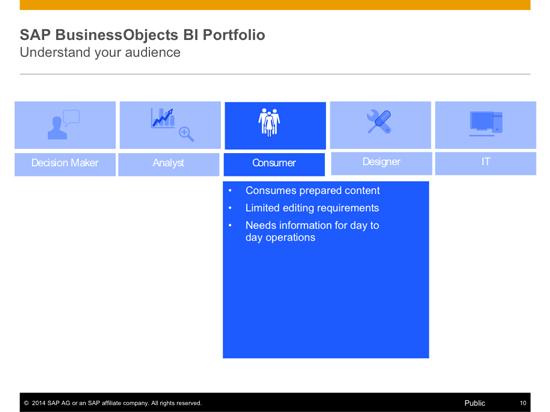
Figure 6
The consumer role
Designer Persona
The designer role is the persona that creates BI-related content (Figure 7). In this case, BI-related content could mean metadata, such as Universes in the SAP BusinessObjects BI system, or BEx queries in the SAP NetWeaver BW System or SAP HANA models. In addition BI-related content also includes pre-defined reports, dashboards, or workbooks created by the designer persona and consumed by other stakeholders. Very often the designer is part of the IT department, but more and more you also see the designer role as part of the BI team and even in specific line of business departments where a single person takes on the responsibilities of both an analyst and a designer.
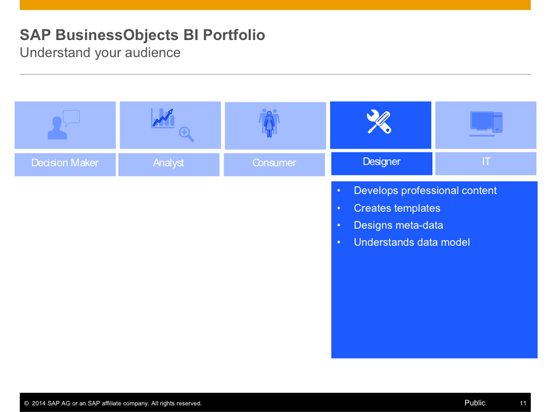
Figure 7
The designer role
IT Persona
Last but not least is the IT role (Figure 8). The IT persona is less relevant for the actual requirements discussion and the selection of the right BI tool, as the IT role in this case is really more about completing the administrative tasks for your SAP BusinessObjects BI system, such as system management and system monitoring. As mentioned previously, very often the designer and IT roles are combined and fall under the aegis of the IT department.
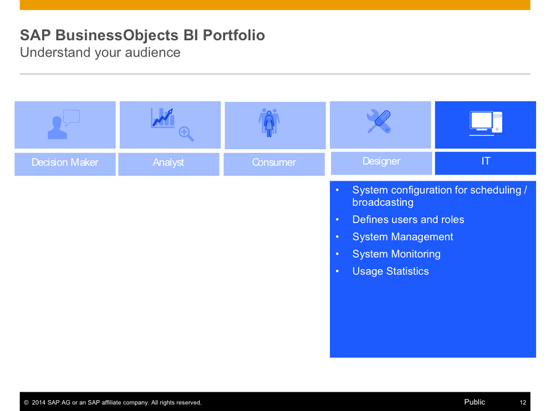
Figure 8
The role of IT
Matching Personas with BI Clients
So far I have discussed the overall SAP BusinessObjects BI portfolio and the products within it, and the different personas that exist and that might come with requirements to use as part of a BI project. In the next section, I show how to combine these different roles with the available products, so that you can understand which products to leverage for which type of audience.
The easiest way to differentiate the available BI products is to show which products should be used by which role when it comes to consuming and creating BI content (Figure 9). Starting with the consumption of BI data, following is the reasoning behind each of your choices.
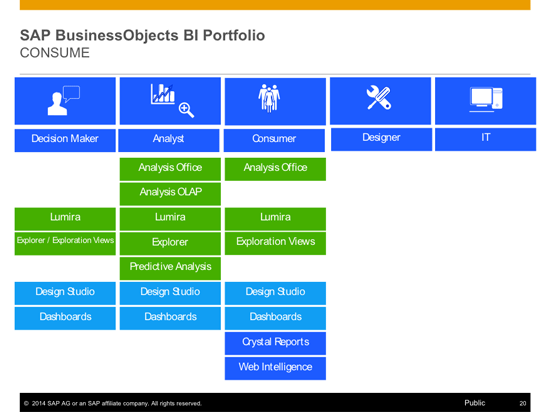
Figure 9
Consuming BI content
Decision-makers’ requirements:
- A decision maker requires highly visualized information presented in a simple and easy to consume fashion. For this you can use SAP BusinessObjects Design Studio and SAP BusinessObjects Dashboards for pre-defined dashboards, and SAP Lumira and SAP BusinessObjects Explorer for situations where it’s important to provide self-services.
- Decision makers don’t really need Crystal Reports and Web Intelligence as their visualization capabilities are not as strong as required and the user interface (UI) of Crystal Reports and Web Intelligence would provide too many functionalities for this audience.
- SAP BusinessObjects Analysis, edition for Microsoft Office and SAP BusinessObjects Analysis, edition for OLAP provide a multi-dimensional type of capabilities, which rarely is required for this audience.
Analysts’ requirements:
- As mentioned previously, analysts need to be able to really analyze the information, enrich the data, and manipulate the data when required; therefore, the analyst has to have access to all the different BI clients.
- Analysts have less need to access Crystal Reports and Web Intelligence, as here real multi-dimensional capabilities are important and Crystal Reports and Web Intelligence are reporting clients which are usually not required by the analyst persona.
Consumers’ requirements:
- Crystal Reports and Web Intelligence are needed by consumers in order to consume pre-defined content and to allow for some self-service capabilities.
- In cases where the consumer role does need data visualization capabilities combined with some self-service aspects, the user would leverage SAP Lumira or SAP BusinessObjects Explorer.
- For analytical capabilities, the consumer role can leverage SAP BusinessObjects Analysis, edition for Microsoft Office over SAP BusinessObjects Analysis, edition for OLAP simply because the consumer role would be very comfortable using Microsoft Office.
- To meet dashboarding requirements, the consumer role leverages pre-defined content that is created with SAP BusinessObjects Design Studio or SAP BusinessObjects Dashboards.
In the graphic in Figure 10, the designer and IT roles are empty for the consumption part as they are seen as supporting roles here in creating the actual BI content.

Figure 10
Creating BI content
Looking at the second aspect, the creation of BI content, I show the logic for the product choices for each of these roles below.
Decision makers:
- In cases where decision makers need to create content without the services of the IT department, the product choices would be SAP BusinessObjects Analysis, edition for Microsoft Office for more analytical type of requirements and SAP Lumira and SAP BusinessObjects Explorer for scenarios with stronger data-visualization requirements.
- For the decision-maker persona, Crystal Reports and Web Intelligence do not fit this audience and do not offer a user experience that suits this role.
- SAP BusinessObjects Dashboards and SAP BusinessObjects Design Studio are not designed to allow business users (e.g., decision makers) to create dashboards, so this would not be an option.
Analysts:
- Similar to the consumption side, the analyst persona leverages the BI client that suits the requirements best and the analyst has access to the different BI client tools.
- Analysts would not use the SAP BusinessObjects Dashboards and SAP BusinessObjects Design Studio products, as these BI tools are specifically designed for the designer or IT persona.
- In situations where analysts need to share reports with consumer personas, Web Intelligence is a good product choice, as it is more likely that consumers are already familiar with this product.
Consumers:
- In situations where consumers need to create content without the involvement of the IT department, the product choice is SAP BusinessObjects Analysis, edition for Microsoft Office for more analytical types of requirements, based on their familiarity with Microsoft Office. SAP Lumira would be a good choice for situations with stronger data visualization requirements.
- In situations where consumers just require a reporting environment, but one that also allows consumer personas to create or change reports, Web Intelligence is the preferred choice.
In addition, to provide the other personas with the needed pre-defined reports, the designer and IT roles can leverage those BI clients that don’t provide a self-service reporting environment, such as SAP BusinessObjects Design Studio or Crystal Reports.
Product Roadmap Disclaimer
The descriptions in this article of future functionality are the author’s interpretation of the publicly available product integration roadmap. These items are subject to change at any time without any notice, and the author is not providing any warranty on these statements.

Ingo Hilgefort
Ingo Hilgefort started his career in 1999 with Seagate Software/Crystal Decisions as a trainer and consultant. He moved to Walldorf for Crystal Decisions at the end of 2000, and worked with the SAP NetWeaver BW development team integrating Crystal Reports with SAP NetWeaver BW. He then relocated to Vancouver in 2004, and worked as a product manager/program manager (in engineering) on the integration of BusinessObjects products with SAP products. Ingo's focus is now on the integration of the SAP BusinessObjects BI suite with SAP landscapes, such as SAP BW and SAP BW on SAP HANA, focusing on end-to-end integration scenarios. In addition to his experience as a product manager and in his engineering roles, Ingo has been involved in architecting and delivering deployments of SAP BusinessObjects software in combination with SAP software for a number of global customers, and has been recognized by the SAP Community as an SAP Mentor for SAP BusinessObjects- and SAP integration-related topics. Currently, Ingo is the Vice President of Product Management and Product Strategy at Visual BI Solutions, working on extensions to SAP’s product offering such as SAP BusinessObjects Design Studio and SAP Lumira. You may follow him on Twitter at @ihilgefort.
You may contact the author at Ingo@visualbi.com.
If you have comments about this article or publication, or would like to submit an article idea, please contact the editor.



 Premium