It's important to select the appropriate time evaluation starter schema because this decision impacts how you plan your R/3 time management environment. Learn more about how to select a time evaluation starter schema, how time schemas differentiate between positive and negative time evaluation, and how the TIMTP and TYPES functions work.
Key Concept
A time pair is a self-contained unit of time data. The term is derived from the concept of pairing up a start time with an end time to produce a single time pair. A time pair has many attributes. Prominent among them are the start and end time and the length of time between the start and end time. A time pair does not necessarily need to have the start and end times filled, but it always has a specific duration.
The starter schemas are intended as a starting point for customers implementing R/3 time evaluation. They provide an outline for a well-configured time schema. These schemas also include preconfigured rules for certain pay practices, e.g., for the calculation of overtime. Four time starter schemas are included with standard SAP R/3. They are TM00, TM01, TM02, and TM04.
Whenever a time evaluation schema is implemented in R/3, a key decision is which time evaluation starter schema to use. In other words, which of the delivered example schemas — such as TM00 and TM04 — should you use as the basis for the time evaluation implementation?
This is not a trivial question since the time schema is inextricably linked to the broader R/3 time management environment. The selection of a starter schema has to take into consideration how this environment is planned. For example, if you want to implement an exception-only time recording environment, then the time schema needs to reflect that by including the appropriate schema code.
The selection of the most relevant starter schema depends to a significant extent on whether that schema includes function TIMTP or function TYPES. These two functions are pivotal in any SAP time schema; they are the transition points between raw time data and the wage types and other results that are derived from this data. Understanding these two functions is important for selecting the most appropriate starter schema.
This is the first article in a series that explores how to select a time evaluation starter schema. In the course of this series, I’ll discuss several aspects of SAP time evaluation. Among them are how time schemas differentiate between positive and negative time evaluation, the time pair concept, and how the TIMTP and TYPES functions work.
The Starter Schemas
Starter schemas are also referred to as example schemas or schema templates. All currently available versions of SAP R/3 come with four time starter schemas: TM00, TM01, TM02, and TM04. I will not include schema TM02 in this article because it shares characteristics with the other schemas and is similar to TM01. Another starter schema — TM0C — is delivered for a Concurrent Employment (CE) environment as part of the HR Extension Sets for SAP Enterprise Release 4.7. TM0C is closely related to TM04. A discussion of time evaluation CE falls outside the scope of this article; therefore, I am not including TM0C.
The starter schemas are intended as a starting point for customers implementing R/3 time evaluation. They provide an outline for a well-configured schema. These schemas also include preconfigured rules for certain pay practices — e.g., for the calculation of overtime and guaranteed hours.
Once you select a starter schema, you copy it to a different name in the customer namespace — for example, TM00 to ZM00. You can then configure the copy according to your requirements. Subsequently, the customer schema is specified on the selection screen of the time evaluation program before this program is executed.
Time vs. Payroll Schemas
Users who are familiar with payroll schemas should note a few fundamental differences between time and payroll schemas. Functionally, they have entirely different purposes. The time evaluation program uses a time evaluation schema to produce wage types based on time data. The payroll driver uses a payroll schema to import these time evaluation wage types, as well as other types of payroll data, to process an employee’s payroll.
For example, the time evaluation program may produce overtime wage types based on the work time data entered in the relevant time infotypes. Subsequently, payroll imports the overtime wage types from the time results as well as rate information from the basic pay infotype when the payroll program is run. It uses all this data to calculate the dollar value of the overtime wage type.
The programs using the schemas also differ. A different version of the payroll program exists for each country. Payroll starter schemas are provided for each of these payroll programs. For example, the payroll driver for the United States is RPCALCU0 with starter schema u000, while the payroll driver for South Africa is RPCALCW0 with starter schema w000. In contrast, the time evaluation program has only one version, an inter-national version — RPTIME00. This program can execute any of the standard starter schemas for time evaluation.
Positive and Negative Time Evaluation
Time evaluation (also called time reporting) is typically categorized as either positive or negative time evaluation. Ne-gative time evaluation is often referred to as exception reporting. Whether positive or negative time evaluation is required influences the selection of a starter schema.
Positive time evaluation refers to a situation in which all time data for an employee is recorded and time wage types are produced primarily on what has been recorded. For example, a work entry on a particular day may result in regular work, overtime, and shift premium wage types, depending on the relevant schema configuration. If no time data has been recorded for a working day, however, then no wage types are generated. Instead, you can configure the schema to issue an appropriate warning message.
Negative time reporting refers to an environment in which only exceptions to an employee’s normal work schedule are recorded. The assumption is that employees work according to their defined schedules unless otherwise indicated. Time wage types are produced both on the basis of the planned work schedule and the exceptions. If an employee is scheduled to work 40 hours per week and no time data is recorded, the employee is still paid for those 40 hours. If an unpaid absence is recorded for eight hours, on the other hand, the employee is paid for only 32 hours.
Now I’ll explain how these differentiating factors are represented in the schemas by looking at the CHECK statements and the functions for importing data.
CHECK Statements
The easiest way to distinguish between a positive and a negative time schema is by looking at the CHECK statements at the beginning of the schema. One of the uses of the CHECK function is to look up an employee’s time management status in the planned work schedule infotype (infotype 0007). Time evaluation only proceeds for an employee if the time management status corresponds to what the CHECK statement requires. For example, a schema containing CHECK NEG (Figures 1 and 2) only processes those employees flagged for negative time evaluation (i.e., according to planned working time).
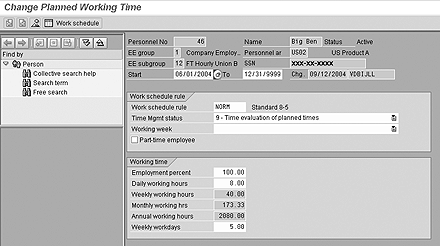
Figure 1
The employee (infotype 0007) is flagged for negative time evaluation
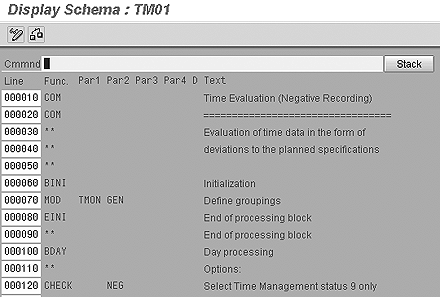
Figure 2
CHECK NEG status indicates that for schema TM01 only employees flagged for negative time evaluation will be processed
Time-Data Import Functions
The time schema functions that import data from the time infotypes are also clear indicators of whether a schema is intended for positive or negative evaluation. Time infotype data is imported with functions that start with the letter P. For example, P2011 imports time event (punch in and punch out) data from infotype 2011. A schema using P2011 in all likelihood signifies a positive time evaluation schema, since clock terminals collecting punches are usually deployed in positive time environments.
At the same time, the function for importing absence data, P2001, is not an indicator of the time evaluation environment because absences are recorded in both positive and negative time evaluation environments.
Positive and Negative Time Evaluation Starter Schemas
With this information about CHECK and the P functions, you can distinguish between positive and or negative time evaluation starter schemas, as shown in Table 1.
| TM00 |
Positive time |
No CHECK statement related to time status — hence does not differentiate between positive and negative time evaluation |
Imports infotype 2011 as well as infotypes 2001 and 2002 |
| TM01 |
Negative time |
CHECK NEG — only performs negative time evaluation |
Does not import infotype 2011, but only infotypes 2001 and 2002 |
| TM04 |
Positive/negative time |
CHECK PON — processes both positive and negative time evaluation |
Imports 2011 if positive time evaluation and 2001 and 2002 regardless |
|
| Table 1 |
Positive and negative time evaluation starter schemas |
This table shows that positive and negative time evaluation considerations, while useful, do not make possible a clear-cut decision about selecting a starter schema. To get to that point, you need to look at functions TIMTP and TYPES.
Schemas Using TIMTP and TYPES
TIMTP and TYPES are the lynchpins of a time schema. Only one of the two functions should be used in a given schema. They both have exactly the same purpose — to set two specific attributes of a time pair in a certain way. These two attributes — the processing type and the time type — are used to carry out these key time evaluation schema functions:
- Generate wage types for payroll purposes
- Form time balances for use in reporting
- Form time balances for use in absence quota management
Where the two functions differ is in how they go about setting these attributes. This difference is reflected in the rest of the time schema as well as in the time-management environment as a whole.
I’ll explain how TIMTP and TYPES work in a subsequent article. At this point, note that the starter schemas can be divided into two groups from a TIMTP-TYPES perspective. Some of the starter schemas use TIMTP and some use TYPES, as shown in Table 2.
| TM00 |
|
Positive time |
Time evaluation with personnel time events |
| TM01 |
|
Negative time |
Time evaluation for work schedule deviations |
| |
TM04 |
Positive/ negative time |
Time evaluation without clock times |
|
| Table 2 |
Starter schemas from a TIMTP-TYPES perspective |
This table shows that functions TIMTP and TYPES do not clearly indicate whether a schema is for positive or negative time evaluation. However, in combination with the positive/negative evaluation factor, they do make it possible to select an appropriate starter schema. To understand how, you need to take a closer look at how TIMTP and TYPES work.
Clock Times and the TIMTP Restriction
Before going into the details of the TIMTP and TYPES functions, I want to point out a useful rule of thumb for eliminating particular starter schemas. This rule depends on whether time data contains start and end times.
Note that the descriptions of some of the starter schemas in SAP contain the phrases “with clock times” or “without clock times.” These phrases are also found on the first line of the schemas themselves.
“Clock times” refer to the start and end times of a time record. A time record that does not have a stated start and end time is “without clock times.” You can configure R/3 so that it is only necessary to record the duration (elapsed time) of an absence or a work entry. You make this configuration setting in feature HRSIF. By setting the feature variable to 0, the user is forced to specify begin and end times for entries shorter than the planned shift. A value of 1 allows the user to leave out begin and end times. Feature HRSIF is documented in SAP R/3 itself and you can find more information via transaction PE03.
If HRSIF is set to 1, for example, one may record that an absence was four hours long without specifying when that absence started or ended. In this case, the time record is “without clock times.” Conversely, if your system is set up so that a user is forced to specify a begin and end time, then the time record is “with clock times.” A good rule of thumb is that if start and end times are not recorded — i.e., the time pair is “without clock times” — then you cannot use TIMTP. It follows that in situations like this you cannot use starter schemas TM00 and TM01. This is a technical restriction of TIMTP.
Time evaluation ends processing for a time record without a start or end time if TIMTP is used. Start and end times must be added to the time record to resolve the error.
TYPES, on the other hand, is not so restrictive. You can use TYPES whether begin and end times are specified or not.
In summary, the starter schema selection considerations are:
- If start and end times are not recorded, then TM04 may be the most appropriate starter schema.
- If start and end times are recorded and the time environment is exclusively negative, then TM01 is probably a good starter schema.
However, consider that function TIMTP is more dependent on an employee’s work schedule than is TYPES. Knowing this, TM01 may still not be the best starter schema to use if the intention is to implement a flexible work schedule environment. Furthermore, knowing the “clock times” rule of thumb does not make it any easier to decide which template to pick if the time environment is positive and start and end times are recorded. In this case, both TM00 and TM04 can be used.
Next in this series, I will describe time pairs and show how TIMTP and TYPES work.
Leendert van der Bijl
Leendert van der Bijl has been consulting in SAP HR and Payroll for more than eight years. He started out as an SAP time management consultant and over the years has assisted customers in a variety of industry sectors with their SAP implementations. Most recently, he conducted the first implementation of Concurrent Employment time management.
You may contact the author at lvdbijl@us.epiuse.com.
If you have comments about this article or publication, or would like to submit an article idea, please contact the editor.