How nimble is your supply chain? The answer depends more on one factor than any other — data. Learn how to best apprehend the mobile data you need at its sources to make the best use of it in your operations.
Key Concept
Radio frequency (RF) devices allow you to capture or create data quickly and accurately from any location and transmit it directly into your SAP system. Usually small and handheld, they are integrated with SAP’s Warehouse Management (WM) system and Task and Resource Management (TRM). The SAPConsole method of connectivity uses a standard SAPGUI-based screen environment, which is reduced in size and uses buttons and plain text stripped of formatting embellishments. WebSAPConsole and SAP NetWeaver Mobile offer more elaborate, graphical, character-based interfaces that feature touch screens. In warehouse environments, RF devices are typically useful for goods receipt, goods issue, putaway, picking/replenishment, interleaving, packing and unpacking, inventory counting, loading and unloading, serial number capture, inquiries, movement by storage unit, and posting changes.
However, data that enables a responsive
supply chain expires quickly. Analyzing
it within a few days is not nearly as
useful as acting on it within a few hours.
Therefore SAP has provided a variety
of mobile technologies to capture data
real-time, where it happens, allowing
companies to make faster and better decisions.
It is first important to consider the
types of processes that may be beneficial
for your company. Some common candidates
for mobile data capture technologies
include:
• Order capture/direct store delivery
scenarios
• Warehouse/shipping operations
• Production processes/confirmations
• Quality management/usage decisions
• Mobile asset maintenance
Once you identify the scenarios for
which mobile data capture can benefit
your enterprise, the next step is to
establish what SAP technology is right
for the situation. The most pressing
question is whether the person capturing
the data will have a connection to
SAP available or if the data needs
to be queued and sent to your SAP system
later.
Note
Syncing data to SAP is still a valuable process and does not violate the principles of mobile data capture. Using a PDA to capture an order that is synchronized to SAP a few hours later is still more accurate and useful than transcribing handwritten sheets or dealing with subsequent data-entry errors.
When a real-time connection is available
to SAP, you can use SAPConsole, WebSAPConsole,
or SAP NetWeaver Mobile (formerly known
as SAP Mobile Infrastructure). When
you need an offline solution that synchronizes
with SAP, the best choice is SAP NetWeaver
Mobile. These solutions are summarized
in Table 1, and I
will discuss each in detail.
| Technology |
Online/offline |
Common uses |
Notes |
| SAPConsole |
Online |
Warehouse processes |
SAP provides warehouse
transactions; customers often
develop additional ones in
ABAP |
| WebSAPConsole |
Online |
Warehouse processes |
Very similar to SAPConsole,
except it uses a different
emulation |
| SAP NetWeaver Mobile |
Online or offline |
Order capture, mobile asset
maintenance |
Includes a database on
the handheld device, allowing
synchronization when offline |
|
| Table
1 |
Overview
of mobile infrastructure options |
Note
Third-party companies have developed solutions similar to the ones I’m describing, but my discussion focuses on SAP-provided technologies.
SAPConsole
SAPConsole was originally released
to complement the SAP Warehouse Management
(WM) module. It provides real-time,
online connectivity for text-based
radio frequency (RF) devices. Additionally
SAP provides a set of RF transactions
for common warehouse activities.
Technology Overview
SAPConsole is essentially a screen-scraping
technology. This means that transactions
that run in the normal SAPGUI are stripped
of color and graphics and emulated
in text. The solution runs on a Windows
server and requires a Telnet engine
to transmit information to the RF devices
(Figure 1).
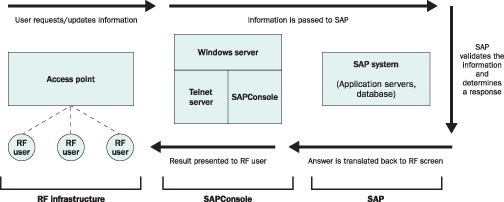
Figure 1
SAPConsole technical overview
Target Devices
Companies generally use handheld
RF devices capable of running the Telnet
protocol with SAPConsole. The SAP-provided
transactions are sized to fit the two
most common screen sizes for handheld
devices, 16-by-20 and 8-by-40 characters.
Limitations
The main limitation of SAPConsole
is that it can only work online. If
the business scenario requires the
operator to perform transactions when
a wireless network is not available,
meaning he or she cannot connect to
SAP, SAPConsole is not a good choice.
SAPConsole has no mechanism by which
to execute a transaction if a real-time
connection to SAP is not available.
SAPConsole
also does not support some of the
more advanced SAP screen functions,
such as drop-down lists. Transactions
executed on the RF device can use buttons,
function keys, and empty fields where
the user can type (or scan) information.
Lastly, it is worth noting that SAP
releases transactions only for WM.
This limitation can be overcome, as
I’ll discuss next.
Customization Opportunities
As SAPConsole is strictly a screen-scraping
solution, no business logic resides
outside of R/3 and the skill needed
to develop custom transactions is simply
ABAP dialog programming. Note that
developers who are used to writing
user exits or reports will require
additional time to understand how many
different combinations of buttons a
user can click on and how many different
error messages they can generate, but
fundamentally ABAP programmers can
develop mobile transactions via SAPConsole.
A good way to start is to examine the
existing SAP transactions with special
attention to how they manage the menus
and function keys. SAP-delivered SAPConsole
transactions are prefaced by LM and
are followed by a two-digit number.
For example, LM00 is the main menu
for RF transactions, LM04 is to process
a transfer order, and so on.
Processes Supported
SAP provides a large variety of SAP
WM transactions natively with SAPConsole.
Additionally, customers often use it
to write production issues and confirmations,
goods receipts and issues, and quality
hold and release processes.
WebSAPConsole
WebSAPConsole is a different flavor
of SAPConsole intended to take advantage
of the more powerful Pocket PC-type
of RF devices mobile users are starting
to adopt. It runs in a Web browser,
allowing on-screen buttons as opposed
to the text-only, function-key intensive
interface of SAPConsole. This product
is intended to support the emerging
trend of multimodal picking (a single
device that can simultaneously handle
voice and text picking) as well as
to be a part of SAP’s RFID solution. Figures
2 and 3 show
screens from a typical user interface.
Note that to trigger the menu options,
the user can either click on the button
on-screen or enter the number corresponding
to the menu option.

Figure 2
Example of the menu for WebSAPConsole
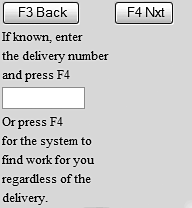
Figure 3
Custom picking transaction emulated on WebSAPConsole
Technology Overview
WebSAPConsole, like SAPConsole, is
a screen-scraping technology. Transactions
that run in the normal SAPGUI are stripped
of color and graphics and emulated
in HTML, which can be viewed in a Web
browser. WebSAPConsole runs on a Windows
server requiring a Web server to transmit
information to the RF devices (Figure
4).
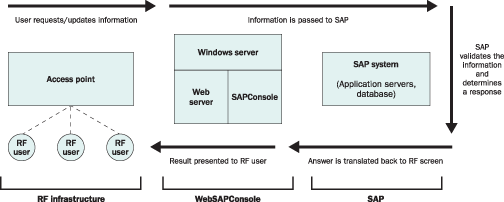
Figure 4
WebSAPConsole technical overview
Note
Historically, voice picking solutions were just that — voice picking solutions — and there was no mechanism to interact visually with the RF device. This led to segregated areas of the warehouse serviced either by traditional RF devices (supporting scanning and on-screen instructions) or voice technologies. Operators would have to keep track of which areas required which technology, instead of being able to choose the best way to execute each pick.
A better solution would merge these two methods allowing, from a single device, a user to decide if he wanted to perform picking using either voice or on-screen instructions. To begin supporting this process Motorola, IBM, and other companies proposed a multimodal markup language, XHTML + Voice (X+V) to the World Wide Web Consortium (W3C). SAP has incorporated this standard into WebSAPConsole, meaning that an RF transaction can interact with a user via voice and on-screen text (multimodal picking).
For more information about the standard, refer to www-306.ibm.com/software/pervasive/multimodal/?Open&ca=daw-prod-mmb.2.
Target Devices
Pocket PC devices are the intended
target devices for the WebSAPConsole.
Major RF vendors are now offering rugged,
drop-test certified devices at prices
similar to traditional, text-based
devices. The emergence of these devices
and software like WebSAPConsole allows
new work processing methods such as
text- and voice-based picking.
Limitations
The main limitation of WebSAPConsole
is the same as SAP Console: It is an
online-only solution.
Customization Opportunities
The customization opportunities for
WebSAPConsole are the same as SAPConsole.
ABAP developers can write custom transactions
that are emulated on the RF device.
Processes Supported
As with SAPConsole, WebSAPConsole
provides a large variety of WM transactions
and also commonly performed production
issues and confirmations, goods receipts
and issues, and quality hold and release
processes.
Note
WebSAPConsole is different than Web Dynpros. It takes familiar transactions you have been working with for years (dynpros) and translates them into HTML for emulation via a browser. Web Dynpros are an outgrowth of SAP NetWeaver and represent the emerging trend in developing user interfaces.
SAP NetWeaver Mobile
SAP NetWeaver Mobile is a more sophisticated
solution than SAPConsole or WebSAPConsole
in that it can support online and offline
transaction processing. SAP NetWeaver
Mobile is part of the SAP NetWeaver
suite and provides a technology layer
used to host various mobile applications
offered by SAP, such as Mobile Asset
Management (MAM) and Mobile Procurement.
In addition, SAP allows customers
to build their own mobile infrastructure
applications using their Mobile Development
Kit (MDK). The MDK comes as a standard
component of SAP NetWeaver Development
Studio. SAP NetWeaver Mobile requires
that software reside on the handheld
device, including local business logic
and a persistence layer for data storage.
This allows replication to the device
and local processing without a connection
to a back-end server. The processed
data is later synchronized to the back-end
SAP system when connectivity is available
via wireless or cradled methods.
Technology Overview
SAP NetWeaver Mobile consists of
a mobile client, the SAP NetWeaver
Mobile Server, which passes data back
and forth to the back-end system (this
is part of the SAP NetWeaver Application
Server), and the back-end SAP system
that hosts the data. The SAP NetWeaver
Mobile client is Java-based and comes
in two types: Abstract Window Toolkit
(AWT)-based or Java Server Pages (JSP)-based.
The SAP NetWeaver Mobile client hosts
the client-side application logic and
the data storage. In addition, the
SAP NetWeaver Mobile client has built-in
functionality for data replication
to the back-end system via the SAP
NetWeaver Mobile Server.
The SAP NetWeaver Mobile Server is
part of the SAP NetWeaver Application
Server and is comprised of the J2EE
and ABAP stack. The SAP NetWeaver Mobile
Server is responsible for synchronizing
data between the SAP NetWeaver Mobile
client and the back-end SAP system.
In addition, it provides centralized
functionality to administer the mobile
device, such as deployment of applications
and patches to the mobile device based
on end-user ID or device ID. In addition,
the SAP NetWeaver Mobile Server provides
key tools to monitor and diagnose data
synchronization.
Target Devices
The SAP NetWeaver Mobile client can
run on both Win32 devices (laptops,
tablets) and Pocket PC or Windows Mobile-based
devices. Since the SAP NetWeaver Mobile
framework is Java-based, you can easily
import custom-built applications to
run on various devices. For example,
an application written for a Windows
Mobile-based handheld can also run
on a Windows-based laptop or tablet.
Limitations
Having its own processing logic and
data storage allows the SAP NetWeaver
Mobile client to run offline, but this
can lead project teams to envision
more sophisticated applications than
might be prudent. Specifically, they
may be tempted to overextend the handheld’s
capability. Despite improvements in
data storage capacity and processor
speed with handheld technology, the
user needs to be careful not to replicate
more data than the device can store
or process. Data relationships on SAP
back-end systems can be extensive and
complex. As a result, it is unwise
to duplicate the same level of transaction
complexity on a handheld to run offline.
It is important to focus on a basic
subset of back-end functionality.
Customization Opportunities
SAP NetWeaver Mobile offers a variety
of off-the-shelf applications so the
skill sets required to implement it
vary. For an SAP-delivered mobile application
such as MAM, people experienced in
plant maintenance or service management
must configure the application and
those with SAP Basis expertise must
install and administer it. If you want
to build a custom mobile application
or enhance an SAP mobile application,
you need Java expertise for client-side
development and ABAP skills to build
the back-end Business Application Programming
Interfaces (BAPIs). SAP does permit
the enhancement of its own delivered
applications. You can create completely
custom-built mobile applications that
meet the needs of the user precisely
using the MDK and SAP NetWeaver Developer
Studio.
Processes Supported
SAP offers various off-the-shelf
applications, such as Mobile Procurement
and MAM. For example, MAM has the functionality
to manage or create work orders and
notifications (Figure 5).
In addition, the latest 3.0 version
includes geographic information system
(GIS) integration, RFID capability,
and signature capture. You can also
enhance these processes using SAP’s
development tools if needed. In addition,
the customer may need to build completely
new functions — SAP supports
this with its MDK. For example, in
a temporary overflow warehouse in which
RF connectivity does not exist, new
functions could be created to perform
goods receipts and goods issues. The
data could then be synchronized to
the back-end system when the user gets
back into range of the wireless network
or to a cradled connection.
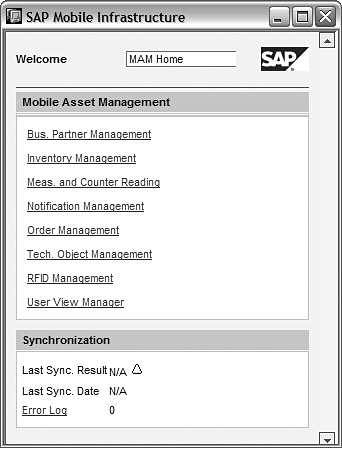
Figure 5
Main menu of MAM as seen on a handheld device
Observations about
Mobile Data Capture
You must consider several issues
besides the SAP technology that enables
your company’s data capture abilities:
form factor, security, and the data
source.
- Form factor:
A common mistake is selecting a device
because it is the newest model available.
However, you need to take your environment
into consideration. For example,
will this device be used in a freezer?
If so, will the device’s operating
temperatures be appropriate? Since
the operator will probably be wearing
gloves, will the keys be big enough?
Or might the device be used in a
dangerous environment? Perhaps it
needs to be intrinsically safe? The
environment can quickly render some
mobile devices impractical, so be
sure to consider that in your selection.
Also, should the process you are evaluating even
be enabled for mobile devices? Can the information
be readily captured on a small screen size with
a stylus or minimal keyboard? Are users going to
be patient enough to follow what in SAP might be
one screen but on the mobile device might be several?
Many mobile projects have been unsuccessful because
the end users found it too difficult to get information
into their mobile devices.
- Security: It is
important to select RF devices compatible
with your corporate security policy.
Some security policies require specific
software that can only be run on
handhelds with a certain operating
system or processing power. Also
it is important to draft a policy
governing how to handle mobile devices
that are lost. How will you keep
unauthorized people from finding
the devices and accessing the data
on the device or your network?
- Data source:
People often deploy RF devices to
capture data more accurately, but
what exactly will be the source of
that data? Most likely it will be
bar codes, but do you have consistent
labels or bar codes across your enterprise?
Is the bar code format something
that all of your mobile devices can
scan? How will you manage revisions
of your bar codes now that all these
mobile functions employ them? RFID
tags are becoming more common and
used in conjunction with bar codes
or as replacements for bar codes.
In addition, handheld vendors now
offer devices that read both bar
codes and RFID tags.
Mobile Data Capture
Cheat Sheet
You have probably noticed there were
few hard rules regarding what to use
in what situations — it almost
always is subject to interpretation.
I recommend the by-scenario area approach
I described at the beginning of the
article, summarized in Table
2.
| Scenario |
Technology
to consider |
Rationale |
Other notes |
| Order capture |
SAP NetWeaver Mobile |
This is likely an off-premises
activity during which SAP
connectivity cannot be guaranteed. |
|
| Warehouse |
SAPConsole or WebSAPConsole |
SAP provides a series of
transactions for warehouse
processes. |
To decide between SAPConsole
and WebSAPConsole, consider
if the more advanced processes
(voice picking) or potential
to use a touch screen are
of interest, in which case
the latter would be preferable. |
| Production processes |
SAPConsole or WebSAPConsole |
This is likely an on-premises
activity and a variety of
third-party companies resell
these transactions. |
SAP NetWeaver Mobile could
also be used, especially
if areas of the plant cannot
have wireless coverage. |
| Quality management |
SAPConsole or WebSAPConsole |
This is likely an on-premises
activity and a variety of
third-party companies resell
these transactions. |
SAP NetWeaver Mobile could
also be used, especially
if areas of the plant cannot
have wireless coverage. |
|
| Table
2 |
Summary
of mobile data capture scenarios
and options |
Chris Moose
Chris Moose is a partner in IBM's Global Business Services organization where he is the sponsor of SAP warehouse management and transportation management offerings. With worldwide responsibility for these offerings, he has helped expand IBM's delivery capabilities globally and has personally delivered projects on four different continents. His specific interests include the use of technology to address the historical fixed cost nature of supply chains enabling flexibility and then quantifying that business value with a benefits realization focus. In addition to his practice management and delivery focus, Chris is a frequent speaker at industry events as well as an author for industry magazines.
You may contact the author at chris.moose@us.ibm.com.
If you have comments about this article or publication, or would like to submit an article idea, please contact the editor.



 Premium