One of the most common — and most costly — issues facing large organizations today is keeping customer master data accurate and clean. Duplicate customer records and other dirty data produce a fragmented view of the customer and can cost organizations millions of dollars annually. Learn how to enable address validation and duplicate checks in the Interaction Center coupled with SAP BusinessObjects Data Quality Management to avoid creating duplicate and inaccurate customer master data.
Key Concept
Address validation helps SAP CRM users create accurate customer address information by providing the correct spelling and formatting of street names, city names, and postal codes. Duplicate check helps prevent the creation of duplicate customer records by notifying the SAP CRM user of a potential overlap between the new customer record and one or more existing customer records with a similar name, address, telephone number, or email address.
Master data management (MDM) continues to be a hot topic in enterprise software, particularly in CRM. According to a 2009 Gartner customer survey, an average organization loses $8.2 million annually because of poor data quality — and 22% of companies lost $20 million. Bad data can enter your SAP CRM system in a number of ways, whether it’s through poorly designed Web self-registration sites, over-stressed contact center agents looking to save time, incomplete or outdated data obtained from external marketing lists, or multiple record systems that result from corporate acquisitions and mergers.
Regardless of where the data originates, inaccurate customer data and duplicate customer records result in higher costs, lower efficiency, and increased customer annoyance. For example, sending duplicate marketing collaterals or multiple billing statements to the same customer results in higher marketing costs and wasted effort. Similarly, turning a late-paying customer over to collections can result in a major faux pas and mea culpa if it turns out that the customer is one of your most profitable customers but you had been mistakenly sending the billing notice to an outdated address.
Therefore, data quality is understandably a top issue for anyone deploying and maintaining an SAP CRM system. While you can use MDM tools to reconcile duplicate entries that exist in the system, it is both cheaper and more desirable to avoid the creation of duplicate customer records in the first place by eliminating the problem at the source.
One of the most common sources for duplicate records making their way into an SAP CRM system is the contact center. For example, overworked and over-stressed contact center agents under pressure to handle each customer interaction as quickly as possible sometimes create a new customer record if they are having trouble finding an existing one. Similarly, contact center agents can leave fields blank or enter inaccurate or abbreviated address information instead of taking the time to look up the correct spelling or formatting (e.g., entering “Hillary” instead of “Hilary” or entering “Hilary Dr.” instead of “Hilary Drive”).
To ensure a high degree of data quality, you must enable contact center applications to prevent human error. The Interaction Center (IC) in SAP CRM has capabilities to help ensure that new and modified address information is validated for accuracy and checked for duplicate records. We’ll begin by describing the address validation and duplicate check capabilities available in the IC. Then, we will take you through the necessary setup and configuration tasks.
Note
To use the address validation and duplicate check capabilities of SAP in the IC, you need to license SAP BusinessObjects Data Quality Management (SAP BusinessObjects DQM), version for SAP Solutions (sold in a minimum block of four CPU). You also need to purchase a subscription to the relevant address directory for each country you want to support.
Overview of Address Validation and Duplicate Check
As of SAP CRM 7.0 with Support Package 05, you can use the IC for address validation and duplicate check. You are provided with the following capabilities during new address and address change processes:
- Address cleansing and enhancement
- Improves productivity through minimum required data entry, proper casing, and data correction
- Suggestion dialog prompts for additional required data
- Address reference data for 230+ countries updated regularly, which ensures accuracy
- Ability to view and accept a validated address
- Duplicate checking
- Prevents duplicates from being created
- Verifies for duplicates on existing records
- Potential duplicates are tracked in cleansing cases for later review and resolution
Address Validation and Duplicate Check in the IC
You can configure the address validation and duplicate check functionalities to be invoked automatically when an agent in the IC creates a new account or contact person or when an agent adds or changes an existing address for an account or contact person. The agent is informed of any invalid address information, as well as whether any similar and potentially duplicate records already exist for the record that he or she is creating (Figure 1).
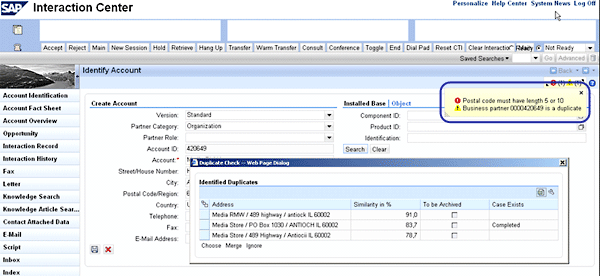
Figure 1
An address validation message about an invalid postal code and a duplicate check message about potential existing duplicate records
In most cases, address validation is initiated during a round trip to the server when an address field is changed. It is initiated first to ensure the proper capture of elements such as the proper postal code, street number range, spelling, or case.
At this point, the agent is presented with a dialog with proposed corrected data and can ignore or accept it (Figure 2). Accepting automatically updates the fields to reflect the data in the dialog. If a street number is incorrect, a valid number range is presented and the agent is allowed to correct the entry. The dialog that the agent views depends on the analysis of the address data by SAP BusinessObjects DQM.
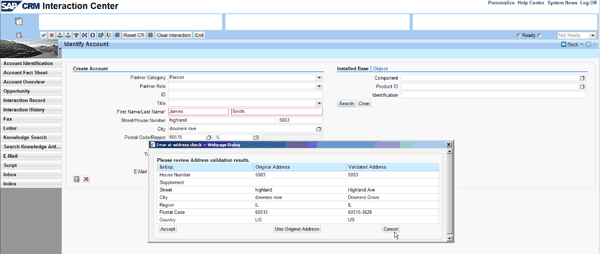
Figure 2
Address validation proposals for valid address formatting
A duplicate check is invoked when the IC agent attempts to save the customer record. Each potential duplicate in the list is displayed in order, from the most similar to least similar (Figure 3).
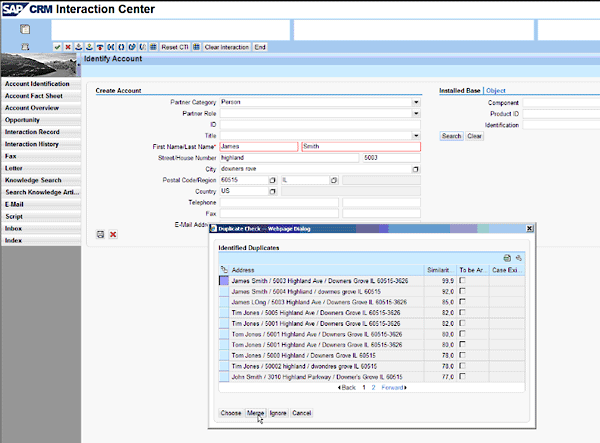
Figure 3
List of potential duplicate records
At this point, the agent has several options (shown as buttons in Figure 3):
- Choose: Allows the agent to replace the information entered with the selected record
- Merge: Creates a cleansing case to merge the existing account with the selected record
- Ignore: Allows the entered data to remain valid. The record is saved as is.
- Cancel: Returns the agent to edit mode without any changes to the data
The user process is intuitive and efficient, ensuring data accuracy.
Set Up and Configure Address Validation and Duplicate Check
SAP BusinessObjects DQM consists of the following components, shown in Figure 4:
- DQM Business Add-Ins: enables address cleanse, duplicate check, and matching within SAP applications. Features ABAP code, views, and tables specifically for data quality activities.
- DQM Remote Function Call (RFC) Server: conduit for data exchange between data services and application
- Pre-built data services jobs: specifically tuned for SAP real-time and batch processing, including additional fields and tables
- DQM Premium: licensed for use only within SAP CRM and SAP ERP
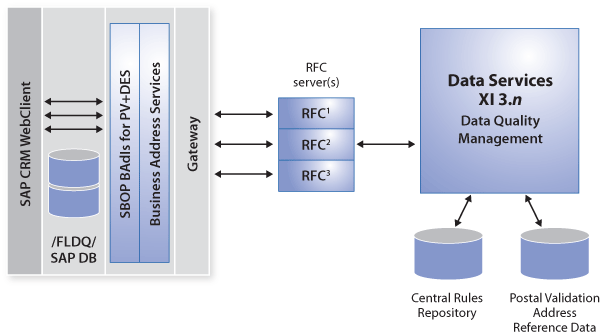
Figure 4
Components of SAP BusinessObjects DQM
Once all the software components are installed and the SAP BusinessObjects DQM configuration is complete, the following configuration steps are needed to enable the capability within the IC:
- Enable the relevant BAdIs: ADDRESS_SEARCH, ADDRESS_CHECK, and ADDRESS_UPDATE.
- Enable duplicate checking in the Account Identification Profile assigned to the relevant business role. To do this, follow IMG menu path Customer Relationship Management > Interaction Center WebClient > Master Data > Define Account Identification Profiles. Then check the Check Account for Duplicates check box (Figure 5).
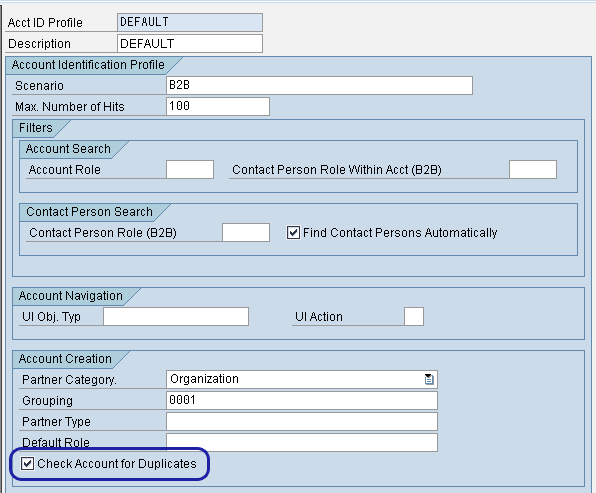
Figure 5
Mark the Check Account for Duplicates check box
Because contact centers are a source of data inaccuracy, it makes sense to deploy a solution that guards the integrity of data throughout your enterprise. This is a clear step that helps organizations maintain a high degree of data quality and secure their investments by providing a high level of business process efficiency.
John Burton
John Burton is a director of product management at SAP and is responsible for the SAP CRM Interaction Center (including ERMS) and social CRM topic areas. John has 13 years of experience at SAP and has been involved with SAP CRM and the Interaction Center since 1999. He is also the author of Maximizing Your SAP CRM Interaction Center, available at the SAPinsider Store. John is an alumnus of the University of Michigan and Central Michigan University. John can be found on LinkedIn at www.linkedin.com/in/sapjohnburton.
You may contact the author at john.burton@sap.com.
If you have comments about this article or publication, or would like to submit an article idea, please contact the editor.
Renee Wilhelm
Renee Wilhelm is a product manager at SAP working on the SAP CRM Interaction Center and social CRM topic areas. Renee has been involved in contact center solutions since 1999, working on topics that range from workforce optimization to SAP CRM. Renee is an alumnus of the University of Illinois at Chicago.
You may contact the author at renee.wilhelm@sap.com.
If you have comments about this article or publication, or would like to submit an article idea, please contact the editor.