Learn about the new BEx Report Designer and BI Integrated Planning included in SAP NetWeaver 2004s and see how they fit into the SAP NetWeaver BI data output landscape.
Key Concept
The BEx Suite consists of reporting and analysis tools to help you create formatted reports (reports with a specific design) to distribute SAP BI data to the decision-makers in your company. You can use these reports both online and offline and even transfer them to PDA
SAP NetWeaver 2004s includes two new front-end tools for the BEx Suite, BEx Report Designer and BI Integrated Planning. BEx Report Designer allows you to create formatted reports (reports containing design and style elements) that you can access via the Web. Examples of formatted reports include income statements for tax forms that contain specific fields in a particular layout.
The other new tool delivered in SAP NetWeaver 2004s, BI Integrated Planning, replaces BW-BPS. This changes the way you perform planning at your company, whether it’s sales planning, profit center planning, or another type of financial planning. You no longer need to have multiple Excel spreadsheets circulating through management levels. This tool leverages SAP BI InfoCubes to store plan data and SAP BI front-end tools to enter and present it.
Figure 1 provides an overview of the new and improved BEx tools SAP NetWeaver 2004s offers. Part 1 of this series contains information about the two new tools. In part 2, I will explain enhancements to existing BEx Suite tools in the SAP NetWeaver 2004s release.

Figure 1
Overview of BEx Suite update in SAP NetWeaver 2004s
BEx Report Designer
An enhanced formatting tool, BEx Report Designer allows you to create reports with blank cells, characteristic value-based shading, and colored cells.
You can also incorporate titles, headers, footers, and other stylized output into your reports. This provides Web-based flexibility to meet the formatting needs of both internal (users within your company) and external (customers, industry groups, government agencies) report recipients.
Formatting options are the key BEx Report Designer features. Compared to other SAP data output software, you have less control over navigation features (although you can reduce the data set through filtering), but more control over the look and feel of a report. BEx Report Designer provides formatting options that are not possible with Web Designer or with Excel (BEx Analyzer). These options include headers, footers, and page breaks, as well as fonts and colors. You may also include text, charts, and pictures in your reports with BEx Report Designer.
Table 1 provides an overview of the various SAP software programs available for creating SAP BI reports. You can use this table as a guide when deciding which software to use for your reports. For example, if you want to create a report in which users can drill down to various items, you might want to use BEx Analyzer. Conversely, if you want to generate a sharp-looking report with high-level data for a manager, you may want to use BEx Report Designer.
| SAP software for SAP BI data output |
GUI |
Analysis navigation capabilities |
Information sources |
Formatting capabilities |
| BEx Analyzer |
No thin client; needs Excel XP |
Extensive addition to Excel features |
SAP BI sources (InfoProvider) and third-party providers directly) |
Somewhat extensive; new features for BEx Analyzer allow for many more formatting features |
| Web Analyzer |
Thin client (Web browser) |
Many navigation options, customization possible, but better left to the Web designer |
SAP BI sources |
Very limited; SAP controls data table format |
| BEx Report Designer |
Thin client (Web browser) |
Limited |
SAP BI sources |
Extensive; add colors, headers, and footer cells |
| Web Designer |
Thin client (Web browser) |
Extensive; new buttons make complex designs much easier |
Mostly SAP BI sources (programming needed for others) |
Very good layout options for Web items; detailed formatting for individual Web items |
| Visual Composer |
Thin client (Web browser) |
Medium; depends on underlying data source. |
Through Java-based connectors access to almost all possible sources of data, including SAP BI |
Good; a custom Web application design tool in which you can implement Web coding for total design control. Non-code-based solutions have limited formatting. |
|
| Table 1 |
SAP BI analysis tool comparison |
BEx Report Designer is not an Excel-based tool, but rather a Web-based tool that uses Java Runtime. In BW 3.5 and below, you needed to know ABAP to change a table’s design. BEx Report Designer provides a non-code-based solution, to improve the look of an analysis. Again, this is for Web-based output, but in the next article, I will cover improvements for Excel-based output as well. Figure 2 contains a sample report created with BEx Report Designer. You can add colors and titles, but the navigation options provided via the Filter link are limited.

Figure 2
Web-based BEx report output on the Web
Note
With Java Runtime, the new SAP NetWeaver 4.0s Web templates no longer support the ABAP table interface tool.
Although I will discuss the enhanced printing (BEx Information Broadcasting) features in part 2, you should know that SAP NetWeaver 2004s permits you to easily link BEx reports to the integrated Adobe PDF printing solution. Also, you may execute reports overnight to distribute early the next day via email and SAP NetWeaver Portal (Figure 3).

Figure 3
BEx Report Designer input and output options
Complete integration exists between BEx reports and BEx Web Application Designer (Web AD). You may insert multiple BEx reports via the new report Web item. This allows for a complex cockpit of information in a BEx Web template with a highly formatted data table in the cockpit.
BI Integrated Planning
SAP NetWeaver 2004s also includes the new BI Integrated Planning, which allows you to forgo Excel-based financial and sales planning and move to cross-functional integrated planning on top of InfoCubes. Although SAP included Business Planning and Simulation (BW-BPS) for planning functions in the prior BW 3.5 release, there were issues of consistency with other SAP BI tools and ease of use. BI Integrated Planning has nearly the same functionality as the old BW-BPS, but consistency with standard BEx tools makes it a much better solution.
Note
BI Integrated Planning was one of the main benefits of moving planning out of Strategic Enterprise Management (SEM) and into SAP NetWeaver Enterprise Services Architecture (ESA). Now one management team can focus on developing both the planning and analysis tasks of SAP NetWeaver BI.
Prior to the introduction of BI Integrated Planning, you needed to learn two different toolsets — one for planning and one for analysis — although many areas within the two toolsets performed similar functions. The new BI Integrated Planning tool provides one tool set for both planning (user/automated data input and manipulation) and analysis. Using one instead of two toolsets speeds up your implementations and requires less work in the long term.
In BI Integrated Planning, the concepts and data storage with transactional InfoCubes (now called real-time InfoProviders) remain the same as in BW-BPS. Also, the goal of both the BI Integrated Planning and BW-BPS tools is a targeted planning input screen for the user.
It is the method of achieving this goal that is new. The design environment (where you develop planning applications) has changed completely (Figure 4). For example, it is now Web-based and tightly integrated with BEx tools. With this new design come new terms (Table 2).
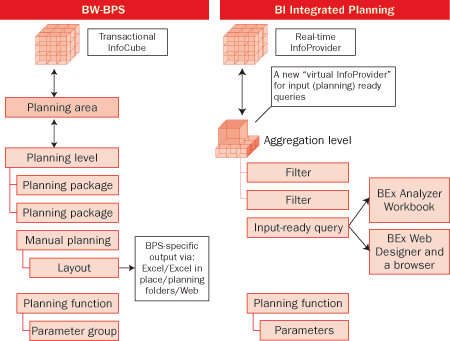
Figure 4
SAP NetWeaver 2004s BI Integrated Planning compared to BW-BPS
| New term |
Old term |
New term’s definition |
| Real-time InfoProvider |
Transactional InfoCube |
InfoCube designed for direct plan data loading |
| Filter |
Planning package |
The data a planner plans in one planning session |
| Input-enabled BEx Queries |
Manual planning layout |
The entry screen for planning |
| Aggregation level |
Planning level |
A high-level slice of an InfoCube’s data to support SAP-delivered planning tools |
|
| Table 2 |
New terms and definitions introduced with BI Integrated Planning in SAP NetWeaver 2004s |
The development environment for planning is now all Web-based. Using a browser-based GUI, a planning modeler sets up the planning environment, but includes only the elements uniquely connected to planning, such as data selections (aggregation levels and filters) and planning functions and sequences. The BEx toolset in SAP NetWeaver 2004s now handles output options and data entry screens previously handled by BPS-specific functionality. These include BEx Query Designer, BEx Analyzer, and Web AD, which I will discuss in more detail in part 2 of this series.
While some terms have changed, most of the functionality and concepts are the same. Concepts of data slices, characteristic relationships, SAP-defined planning functions, user exits, and formula extensions (FOX) have the same meaning and purpose. Although the concept of locking remains the same from a business perspective, the technical implementation has changed with more display options and features. The new design reuses the standard BEx toolset for manual planning input and uses process chains to schedule planning functions and planning sequences.
Note
You can use standard BEx variables in step 1. For example, if you use variables in the planning model design, you can limit the number of objects you need to make (as you do in query design). With a planning input query that automatically changes values based on who is planning, I can eliminate 100 hard-coded versions that are specific to one planner.
The three basic steps for implementing a planning project are the same.
Step 1. Model the planning environment. First, define the aggregation level (previous planning level) to connect to a real-time InfoProvider. Then, define data slices (a subset of an entire dataset) to lock out data from accidental changes. Next, define filters for specific characteristic value combinations for planners to limit the data involved in planning a task. Finally, when necessary, create planning functions to automate planning tasks.
Step 2. Create a user interface. In this step, you enter plan data and execute user-initiated planning functions. Build input-enabled queries off aggregation levels and use filters to limit the planned data. Make sure to use BEx variables where necessary. For example, the filter could depend on an authorization-filled variable. This would dynamically limit the data for each planner differently if necessary. Then build Excel workbooks and Web pages with these input-enabled queries. You can even incorporate buttons to execute planning functions (like macros) and planning sequences (multiple, linked planning functions).
Step 3. Automatically create and execute process chains containing planning functions and sequences. New SAP NetWeaver 2004s process types allow you to switch real-time InfoCubes from planning mode to loading mode. In some planning system designs, the system loads an InfoCube with data from source online transaction processing (OLTP) systems. Then the system switches the InfoCube to allow direct input of the plan data. Previously, you had to schedule the switching function and run it with ABAP tools. These steps are automated with the SAP BI process chain toolset. They also permit you to execute planning functions and sequences, another new feature.
Note
For more information about these new features, as well as hands-on experience, refer to the upcoming SAP NetWeaver 2004s delta classes SAP offers. These courses include DBW70E (“Extraction and Back End Delta”), DBW70P (“SAP BI Planning Delta”), and DBW70R (“Reporting and Front End Tools Delta”).
Ned Falk
Ned Falk is a senior education consultant at SAP. In prior positions, he implemented many ERP solutions, including SAP R/3. While at SAP, he initially focused on logistics. Now he focuses on SAP HANA, SAP BW (formerly SAP NetWeaver BW), SAP CRM, and the integration of SAP BW and SAP BusinessObjects tools. You can meet him in person when he teaches SAP HANA, SAP BW, or SAP CRM classes from the Atlanta SAP office, or in a virtual training class over the web. If you need an SAP education plan for SAP HANA, SAP BW, BusinessObjects, or SAP CRM, you may contact Ned via email.
You may contact the author at ned.falk@sap.com.
If you have comments about this article or publication, or would like to submit an article idea, please contact the editor.