SAP recently announced the starter kit for liquidity planning with SAP BusinessObjects Planning and Consolidation. With the starter kit, you can create multiple liquidity scenarios and select them to fund operations and strategic initiatives across the enterprise.
Key Concept
The starter kit for liquidity planning available for SAP BusinessObjects Planning and Consolidation helps organizatons get up and running faster with a solution that streamlines the liquidity planning process. The starter kit is applicable for both SAP BusinessObjects Planning and Consolidation, version for SAP NetWeaver and for the Microsoft platform.
As an outcome of the recession that began in 2008, companies increasingly plan for sources of funding and other liquidity instruments. Increased hedging against financial risk and a renewed interest by regulators and oversight commissions on the reporting of financial instruments provide even more catalyst for sound liquidity planning. You can use SAP BusinessObjects Planning and Consolidation to include planning and management of liquidity instruments as a part of business planning and forecasting activities by using its starter kit for liquidity planning. The starter kit is available for companies already using SAP BusinessObjects Planning and Consolidation 7.0 at no additional charge.
The starter kit for liquidity planning brings companies using SAP systems best-in-class management capabilities for their liquidity forecasting and observation needs. For more information on how the best-in-class companies stand out, see the sidebar, “Best-in-Class Liquidity Forecasting.” I’ll give you a sneak peek at the starter kit and talk about some of the key features important for cash management and liquidity planning.
Note
The liquidity planning starter kit described in this article is a joint initiative from SAP and Deloitte with both parties bringing it to market based on a tool set and accompanied professional services. This initiative resulted from close cooperation among SAP, Deloitte treasury management and finance consultants, and members of the Deloitte SAP BusinessObjects Performance Management Tools team.
Create Liquidity Planning Scenarios
You can use SAP BusinessObjects Planning and Consolidation as the foundation for a liquidity planning and cash management solution. Some of the starter kit’s features for liquidity planning include the following:
- Gives organizations a jumpstart in the implementation of a solution for liquidity planning
- Addresses the needs of the treasury department and the CFO
- Enables a faster implementation incorporating best practices that reinforce and improve the liquidity planning process
- Can be implemented as a new installation or incorporated into your existing SAP BusinessObjects Planning and Consolidation application
- Is system independent — can be sourced through flat files and integrated with SAP ERP Financials as well as other ERP systems
Figure 1 depicts the landing page for the starter kit. SAP BusinessObjects Planning and Consolidation provides a unified application for planning, budgeting, forecasting, and financial consolidation. The starter kit for liquidity planning offers a unified user experience with context-sensitive action panes and a variety of ways to interface with the application. SAP Crystal Presentation Design (formerly known as Xcelsius), licensed separately, is used to create the dashboard views, including the graphics.
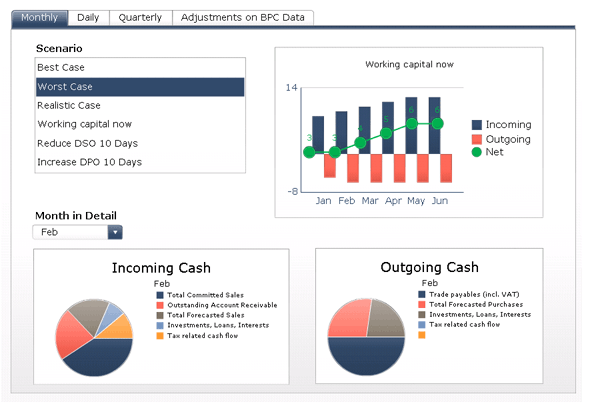
Figure 1
Landing page of the starter kit for liquidity planning (Source: SAP, Deloitte)
The starter kit models a variety of planning and forecasting scenarios based on cash models and financial instruments. It includes the following features:
- Automatically converts SAP BusinessObjects Planning and Consolidation planning data into cash flow data
- Calculates mid- to long-term forecasts (up to two years) by integrating committed transactions with forecasted financial data
- Allows for isolating the effect of intercompany cash flows on a group level
- Enables simulation and sensitivity analysis on the source data and calculation rules level
- Directly integrates with SAP NetWeaver, enabling data quality checks and remediation procedures
The first step to implement the starter kit for liquidity planning is to define the import sources and to structure the required information for use in the planning model. You can import the latest liquidity information from any source system and check the data by drilling through from SAP BusinessObjects Planning and Consolidation to an SAP Business Explorer (SAP BEx) report or to any other source system (e.g., SAP ERP or a Web application). The local planner clears the current version of the plan using the window shown in Figure 2.
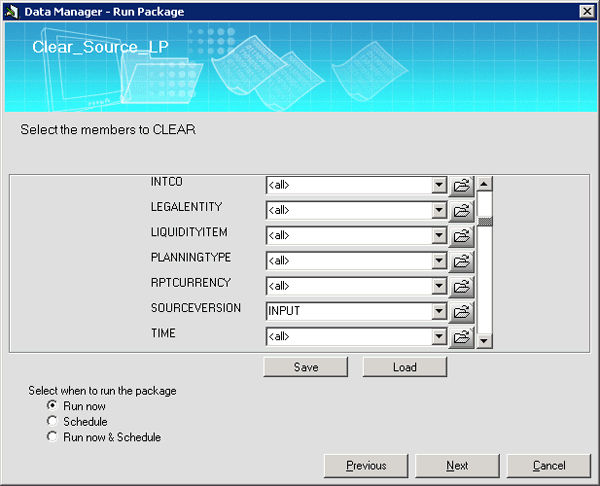
Figure 2
Clear window for the starter kit for liquidity planning
Similarly, Figure 3 illustrates the load window for the starter kit for liquidity planning. The local planner uploads the latest liquidity information into SAP BusinessObjects Planning and Consolidation. The source SAP NetWeaver Business Warehouse (SAP NetWeaver BW) enterprise data warehouse InfoCube is mapped using the load facility. This InfoCube collects all the data from different sources (including ERP systems, third-party sources, or flat files). The InfoCube aggregates the information for use in SAP BusinessObjects Planning and Consolidation at the time of the load to present the cash position at that given moment.
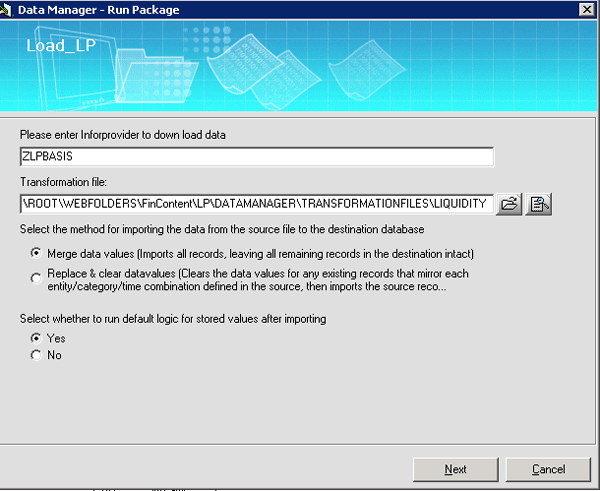
Figure 3
Load facility for the starter kit for liquidity planning
The local planner can check the integrity of the load in SAP BusinessObjects Planning and Consolidation using the ad hoc data analysis facility shown in Figure 4. If the load is incorrect due to mapping errors, incomplete aggregation of source data, or currency levels, you can clear the load and repeat the process step after correcting the error.
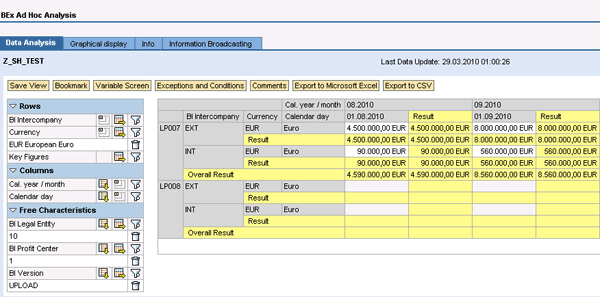
Figure 4
Ad hoc data analysis window allowing local planners to confirm proper data load (Source: SAP, Deloitte)
Once the liquidity and cash flow information is loaded and validated, you can perform a number of analyses. First, you can check the overall cash management levels for each item of the liquidity model against a given target or overall actual level. Cash flow rules and calculations either imported as part of the load or modified post-load provide these conditions. To do this, access Cashflow Calculation from the tab from the main page and then click the Cashflow Calculation button to execute the run table as shown in Figure 5. For example, calculation rule PT07 suggests that 10% of the value from the liquidity information is directly shown as a cash asset, with the remaining 90% of the value reflected as a cash asset in 30 days.
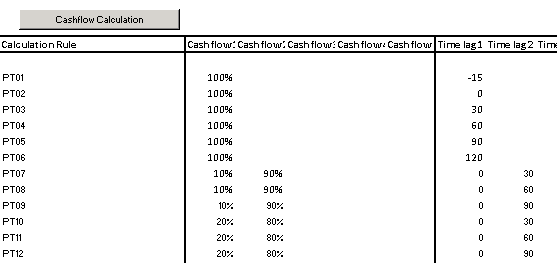
Figure 5
Cashflow calculations illustrating cash flow levels by source according to target (Source: SAP, Deloitte)
As part of a separate currency load and mapping activity, you can handle the exchange rates to provide the absolute liquidity position in a uniform currency. You can use a basic currency exchange table for the import (Figure 6).

Figure 6
Basic currency exchange table used for mapping uniform currency analysis (Source: SAP, Deloitte)
In addition to the main analyzer dashboard, which illustrates cash position by multiple time intervals, you can also use working capital categories predefined as budget items in SAP BusinessObjects Planning and Consolidation (Figure 7). This allows the local planner to conduct additional sensitivity analysis at the budget line item level. This helps harmonize the budget across multiple line items in addition to preserving overall cash and liquidity positions.
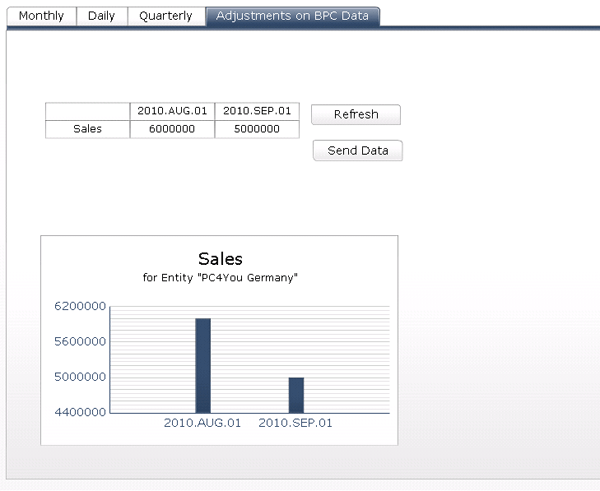
Figure 7
Analysis and adjustments by budget line item level (Source: SAP, Deloitte)
The main analyzer dashboard illustrates cash positions by multiple time intervals and multiple versions or scenarios (for example, to reflect best- and worst-case scenarios) and the detailed liquidity categories for each time period. You can also perform top-down adjustments on specific liquidity items (for example, the CFO agrees to other payment conditions with one important customer).
The manager can enter the new value directly in the PowerPoint or PDF. He sees the results in the graph, and then the data is automatically sent to SAP BusinessObjects Planning and Consolidation.
Best In-Class Liquidity Forecasting
Liquidity forecasting is currently the top concern for treasurers, with higher funding costs and uncertain revenues due to major uncertainties in the economic outlook. According to a 2009 report by Deloitte, improvement in the cash forecasting capabilities of current treasury IT systems is of the highest priority for treasurers (94% of respondents) because current forecasting features are considered “insufficient.”
There are several advantages to organizations looking to adopt a more comprehensive liquidity planning approach. In a recent FSN study, best-in-class organizations share common characteristics in the area of cash management and liquidity planning as shown in Figure A. Best-in-class stand out by being much more likely to use technology to enable and support lower days sales outstanding (DSO), with an average of 21 days versus 53 for peers. They also have 84% accuracy in their cash flow reporting — 35% higher than their peers. Best-in-class companies also consider risk management practices, with a 43% use of GRC tools versus a 29% level in other companies surveyed. In addition, 75% of best-in-class companies have the ability to reforecast as market conditions change versus 53% of others surveyed.
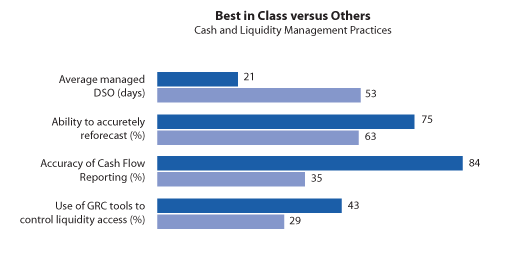
Figure 8
Advantages of best-in-class cash management and liquidity planning versus others (Source: Deloitte)

William Newman
William Newman, MBA, CMC is managing principal of Newport Consulting Group, LLC, an SAP partner focused on EPM and GRC solutions. He has over 25 years of experience in the development and management of strategy, process, and technology solutions spanning Fortune 1000, public-sector, midsized and not-for-profit organizations. He is a Certified Management Consultant (CMC) since 1995, qualified trainer by the American Society of Quality (ASQ) since 2000, and a trained Social Fingerprint consultant in social accountability since 2012. William is a recognized ASUG BusinessObjects influencer and a member of SAP’s Influencer Relations program. He holds a BS degree in aerospace engineering from the Henry Samueli School of Engineering and Applied Science at UCLA and an MBA in management and international business from the Conrad L. Hilton School of Management at Loyola Marymount University. He is a member of the adjunct faculty at both Northwood University and the University of Oregon with a focus on management studies and sustainability, respectively.
If you have comments about this article or BI Expert, or would like to submit an article idea, please contact the editor.
You may contact the author at wnewman@newportconsgroup.com.
If you have comments about this article or publication, or would like to submit an article idea, please contact the editor.



 Premium