Become acquainted with the script logic functionality available in SAP BusinessObjects Planning and Consolidation 7.x, version for SAP NetWeaver. Review use cases for script logic, its architecture, various ways to execute it, and a few basic key words.
Key Concept
Script logic is a set of instructions that executes custom business calculations either online or by batch processing. SAP delivers a set of keywords and functions that accept parameters. Using them, customers can implement business calculations on the data. All planning and consolidation tools provide similar scripting languages. For example, SAP provided FOX for Integrated Planning/Business Planning and Simulation. However, script logic in SAP BusinessObjects Planning and Consolidation 7.x, version for SAP NetWeaver is much different than other scripting languages in its use of keywords (as far as their syntax goes) and overall functions (as far as how those keywords are executed in the scope data)
Script logic functionality in SAP BusinessObjects Planning and Consolidation, version for SAP NetWeaver helps business users execute custom business logic, anything from simple mathematical operations to complex allocations. It helps in executing this logic in the server side either online or in batch mode. Business users are now able to write or execute this logic right from Admin/Microsoft Excel clients making it much more easily accessible. It also provides means for advanced programmers to code complex logic.
I’ll introduce script logic functionality for new users who intend to work in the SAP NetWeaver 7.x version of SAP BusinessObjects Planning and Consolidation. It is based on keywords from SAP BusinessObjects Planning and Consolidation, version for SAP NetWeaver 7.0 Support Package (SP) 08/SAP BusinessObjects Planning and Consolidation, version for SAP NetWeaver 7.5 SP03 release and any following releases of BPC. While I tried to keep this article for beginners, basic knowledge of SAP BusinessObjects Planning and Consolidation and SAP NetWeaver is recommended.
Originally, script logic was a proprietary language of OutlookSoft, which was acquired by SAP. The original OutlookSoft product continues to be shipped by SAP as a separate product (called SAP BusinessObjects Planning and Consolidation, version for Microsoft). Its script logic originated from the Microsoft version of script logic. I do not cover Microsoft’s script logic keywords and functions and do not discuss the differences between two versions. Script logic is coded in the SAP BusinessObjects Planning and Consolidation Admin client. The Admin client provides the ability to validate and save the script to the server (Figure 1).
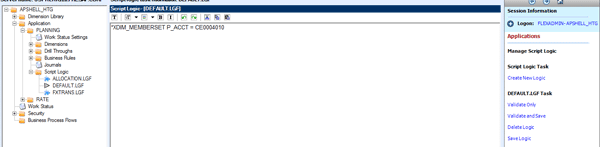
Figure 1
Script logic file maintenance in the Admin client
Script logic files are stored in the SAP NetWeaver File Service. The script logic can be triggered from input schedules through default logic or from Data Manager. Figure 2 explains the logical steps involved in the execution of a script logic file.
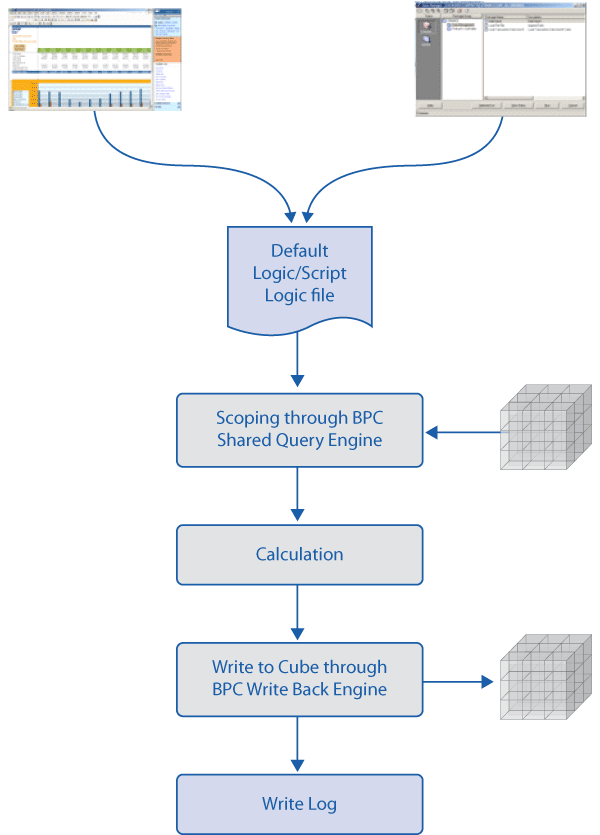
Figure 2
Script logic file execution steps
Scope (or data region) of the default logic is determined by current selections (also known as Current View) of the users. The current selections can happen from the Current View in the Microsoft Excel client, the Selection screen in Data Manager, and also in the script logic file as part of your script (Figure 3). For Data Manager-triggered script logic files, scope is either provided by the Data Manager’s selections or defined inside the script logic file.
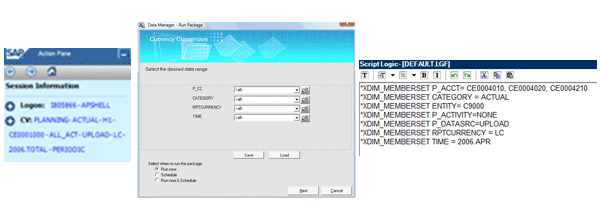
Figure 3
Various ways of scoping – Excel client Current View, Data Manager Selection screen, or scoping commands in script logic
A typical script logic file has three sections: scoping, calculation, and a commit statement. These three sections together are typically called a commit block. In some cases, one script logic file can have multiple commit blocks. Script logic does not allow a calculation result to be used in a subsequent calculation. Consider this example:
{scoping}
NetSales = GrossSales - Returns
Profit = NetSales – COGS
Commit
Here NetSales is the calculated result from the first formula. The script logic engine does not make the value of NetSales available to the second formula. Therefore, the second formula results in wrong values. This is the way you have to write it in script logic:
{scoping}
NetSales = GrossSales – Returns
Commit
{re-scoping}
Profit = NetSales – COGS
Commit
Let’s start going through individual keywords. Note that whenever possible I used example data from the SAP-delivered ApShell AppSet. This should help if you decide to try it out in an SAP BusinessObjects Planning and Consolidation system. The examples provided here for specific keywords are just examples, not necessarily best practice/guidance within script logic.
Script logic has a few keywords to define scoping. *XDIM_MEMBERSET is the most commonly used. (Note that almost all of the script logic statements begin with *.)
Syntax: *XDIM_MEMBERSET {Dimension name} = {Members Set}
You can use multiple members to define the scope with *XDIM_MEMBERSET:
*XDIM_MEMBERSET P_ACCT = CE0004010, CE0004020, CE0004030
Another keyword bas() returns all base members of a parent:
*XDIM_MEMBERSET P_ACCT = bas(CE0004000)
<ALL> can be used to scope all members of the dimension including parents:
*XDIM_MEMBERSET P_ACCT = <ALL>
When you scope on the parent members, children are summarized to parent entry and passed to script logic calculation:
*XDIM_MEMBERSET P_ACCT = CE0004000
You can also exclude some members from scoping and scope on remaining members of the master data:
*XDIM_MEMBERSET P_ACCT <> CE0004010
When you are defining scoping for default logic, it may be helpful to add more members to incoming data selections. For those use cases, you can use *XDIM_ADDMEMBERSET.
Syntax: *XDIM_ADDMEMBERSET {Dimension name} = {Members Set}
All the options mentioned for *XDIM_MEMBERSET are valid for *XDIM_ADDMEMBERSET.
You can also use this keyword to add scope members to any of the previously defined dimension within the same script logic file:
*XDIM_MEMBERSET P_ACCT = bas(CE0004000)
*XDIM_ADDMEMBERSET P_ACCT = CE0004200
In some cases, you may have to scope based on a dimension property. *XDIM_FILTER is the scoping keyword for those scenarios.
Syntax: *XDIM_FILTER {dimension name} = {dim name}.properties(“{property name}”) = ” {property value}”
Example:
*XDIM_FILTER Time = [Time].properties(“MONTHNUM”) = “2”
The above statement will scope only February’s data for the available years within the application. When you are processing millions of data records, you should try splitting the scoping and calculation by using *XDIM_MAXMEMBERS.
Syntax: *XDIM_MAXMEMBERS {dimension name} = {max number of members per package}
Example:
*XDIM_MEMBERSET P_ACCT = bas(CE0004000)
*XDIM_ADDMEMBERSET P_ACCT = CE0004200
*XDIM_MAXMEMBERS P_CC = 5
The above script reads all P_CC from the dimension first and then reads the application data by a package of five cost centers (Figure 4). Each package is processed and accumulated. When all the packages are processed, the combined result data is written back to the application.
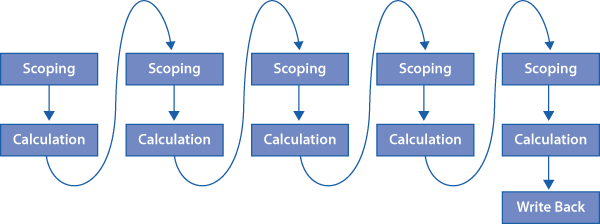
Figure 4
Script logic process when *XDIM_MAXMEMBERS is used
In the majority of scenarios, you would like the scoping to be dynamic and don’t want to hardcode the values within the script logic file. The %dimension_SET% special keyword helps in achieving this.
Example:
*XDIM_MEMBERSET P_ACCT = bas(%P_ACCT_SET%)
*XDIM_MEMBERSET TIME = %TIME_SET%
During run time, %dimension_SET% is replaced with Current View or Data Manager Selection values.
You can also pass values using Data Manager prompts.
Example:
*XDIM_MEMBERSET P_ACCT = bas($INC_STAT_ACCT$)
*XDIM_MEMBERSET TIME = $CURR_YR$
During run time, $INC_STAT_ACCT$ and $CURR_YR$ is replaced with user-entered values. Note that Data Manager package dynamic script needs to be configured to accept these values. (Refer to the how-to guide from SDN for step-by-step solution for this: https://www.sdn.sap.com/irj/scn/go/portal/prtroot/docs/library/uuid/d01ce779-f1b2-2b10-07ba-da3734013245.)
Once data is scoped, for further calculation, the script logic supports two forms of syntax – namely script logic native keywords and MDX keywords. Among script logic native keywords, WHEN/REC/ENDWHEN is the more commonly used. This keyword is used to write back one new record with the desired dimension members when a specific condition is met among the existing transactional data.
Syntax:
*WHEN {dimension/dimension.property}
*IS {member/Property value}
*REC(FACTOR/EXPRESSION = .., {dimension = member},
*ENDWHEN
Note that *REC always needs to be between WHEN/IS and ENDWHEN. Standalone *REC will have no impact.
Example:
*XDIM_MEMBERSET P_ACCT = CE0004010
*WHEN CATEGORY
*IS ACTUAL
*REC(FACTOR = 1.1, CATEGORY= “FORECAST“)
*ENDWHEN
The above script reads all CE0004010 account data from the application. The WHEN block loops through the transactional data one by one. Within the transaction data, when CATEGORY value is ACTUAL, the value is increased by 10% (FACTOR = 1.1) and the CATEGORY value is changed to FORECAST. At the end of transactional data looping, a message is logged and script logic ends. See Figure 5 for the flowchart of this execution.

Figure 5
WHEN/IS/REC/ENDWHEN processing
In the WHEN statement, you can check the value of the property. Within the REC statement dimension assignment, you can also use property values as a source.
Example:
*XDIM_MEMBERSET CATEGORY = ACTUAL
*WHEN TIME.YEAR
*IS "2007"
*REC(FACTOR = 1.1, CATEGORY = CATEGORY.COMPARISON)
*ENDWHEN
You can also use multiple REC statements within one WHEN/ENDWHEN.
Example:
*XDIM_MEMBERSET TIME = 2006.AUG,2006.SEP
*XDIM_MEMBERSET P_ACCT = CE0004010
*XDIM_MEMBERSET CATEGORY = ACTUAL
*WHEN P_ACCT
*IS "CE0004010"
*REC(EXPRESSION = %VALUE%/1.5098, RPTCURRENCY = "EUR")
*REC(EXPRESSION = %VALUE%/1.0666, RPTCURRENCY = "CAD")
*REC(EXPRESSION = %VALUE%/1.9183, RPTCURRENCY = "GBP")
*ENDWHEN
Multiple conditions can be written as well.
Example:
*XDIM_MEMBERSET TIME = 2006.AUG,2006.SEP
*XDIM_MEMBERSET P_ACCT = CE0004010
*XDIM_MEMBERSET CATEGORY = ACTUAL
*WHEN P_CC.CURRENCY
*IS "EUR"
*REC(EXPRESSION = %VALUE%/1.5098, RPTCURRENCY = "EUR")
*IS "CAD"
*REC(EXPRESSION = %VALUE%/1.0666, RPTCURRENCY = "CAD")
*IS "GBP"
*REC(EXPRESSION = %VALUE%/1.9183, RPTCURRENCY = "GBP")
*ELSE
*REC(RPTCURRENCY = "USD")
*ENDWHEN
You can read and use other values within the scoped data for REC’s calculations.
Example:
*XDIM_MEMBERSET P_ACCT = CE0004010,CE0652000
*WHEN P_ACCT
*IS "CE0004010“ *REC(EXPRESSION = ([P_ACCT].[CE0004010],[P_ACTIVITY].[NONE])/([P_ACCT].[CE0652000],[P_ACTIVITY].[LABPRD]), RPTCURRENCY = P_CC.CURRENCY, P_ACCT = CE0661000)
*ENDWHEN
I am deriving CE00661000 by dividing the value of the CE0004010 account and NONE activity with the value of the CE0652000 account and the LABPRD activity. EXPRESSION/FACTOR within REC supports addition (+), subtraction (-), multiplication (*), and division (/). You can’t use property values within the calculation.
EXPRESSION/FACTOR of REC also supports writing IF condition on the measure value.
Example (the bolded code is here and throughout the rest of the article is for emphasis only):
*XDIM_MEMBERSET P_ACCT = CE0004010,CE0652000
*WHEN P_ACCT
*IS "CE0004010" *REC(EXPRESSION = ([P_ACCT].[CE0652000]>0?[P_ACCT].[CE0004010]/[P_ACCT].[CE0652000]:0), RPTCURRENCY = P_CC.CURRENCY, P_ACCT = CE0661000)
*ENDWHEN
Here, the script is checking whether the denominator is greater than zero. If yes, it then does the calculation. Otherwise, it posts 0. In some scenarios, you may want to read the data from another application. The *LOOKUP keyword allows doing this within script logic.
Syntax:
*LOOKUP {App}
*DIM [{LookupID}:]{DimensionName} = "Value" | {CallingDimensionName}[.{Property}]
*DIM MEASURES = ”MeasureName”
*ENDLOOKUP
*WHEN {dimension}
*IS {member}
*REC(FACTOR/EXPRESSION = {..LOOKUP(LookupID)..})
*ENDWHEN
As of SAP BusinessObjects Planning and Consolidation, version for SAP NetWeaver 7.0 SP08/7.5 SP03, the MEASURES definition within LOOKUP block is no longer mandatory. (See SAP note 1454807 - BPC7NWSP08: allow lookup without measure in script logic.) If no MEASURES definition is given, LOOKUP inherits the measure definition from either the *XDIM_MEMBERSET measure definition or the data region passed by Data Manager.
Example:
*XDIM_MEMBERSET TIME = 2006.AUG
*XDIM_MEMBERSET P_ACCT = CE0004010
*XDIM_MEMBERSET CATEGORY = ACTUAL
*LOOKUP RATE
*DIM TIME = "2006.AUG"
*DIM CATEGORY = "ACTUAL"
*DIM R_ACCT = "AVG"
*DIM R_ENTITY = "GLOBAL"
*DIM RATEEUR:INPUTCURRENCY = "EUR"
*DIM MEASURES = "PERIODIC"
*ENDLOOKUP
*WHEN P_ACCT
*IS "CE0004010"
*REC(EXPRESSION = %VALUE%/LOOKUP(RATEEUR), RPTCURRENCY = "EUR")
*ENDWHEN
Here, the rate values for EUR are read from the RATE application and used in EXPRESSION calculation. To make the lookup more dynamic, you can use the property value of the dimension, as shown below:
*XDIM_MEMBERSET TIME = 2007.AUG
*XDIM_MEMBERSET P_ACCT= CE0004010
*XDIM_MEMBERSET CATEGORY = ACTUAL
*XDIM_MEMBERSET P_CC = US
*LOOKUP RATE
*DIM TIME = "2006.AUG"
*DIM CATEGORY = "ACTUAL"
*DIM R_ACCT = "AVG"
*DIM R_ENTITY = "GLOBAL"
*DIM RATE:INPUTCURRENCY = P_CC.CURRENCY
*DIM MEASURES = "PERIODIC"
*ENDLOOKUP
*WHEN P_ACCT
*IS "CE0004010"
*REC(EXPRESSION = %VALUE%/LOOKUP(RATE), RPTCURRENCY = P_CC.CURRENCY)
*ENDWHEN
In many use cases, you need time offset functions to move the data between years or to refer to values from a different period than the current scope. The TMVL keyword supports a strong time offsetting function within the script logic.
Syntax: TMVL(offset, base_period)
The offset can be either positive or negative. Only integers are allowed.
Example:
*XDIM_MEMBERSET P_ACCT = CE0004010, CE0004020, CE0004210
*XDIM_MEMBERSET CATEGORY = ACTUAL
*XDIM_MEMBERSET ENTITY = C9000
*XDIM_MEMBERSET P_ACTIVITY = NONE
*XDIM_MEMBERSET P_DATASRC = UPLOAD
*XDIM_MEMBERSET RPTCURRENCY = LC
*XDIM_MEMBERSET TIME = 2006.APR
*WHEN CATEGORY
*IS ACTUAL
*REC(FACTOR=1.1, TIME = TMVL(12,2006.APR))
*ENDWHEN
Here, the scoped value of 2006.APR will be copied to 2007.APR. TMVL works based on the PARENTH1 hierarchy of the TIME dimension. The base period can be a hardcoded value (as shown in the above example), a time script variable such as %TIME_SET%, or a Data Manager prompt variable such as $CURPER$. When there are multiple values on TMVL, the first value of the time set is taken as the base period for –ve offset and the last value as the base period for +ve offset.
When I introduced WHEN/IS/REC/ENDWHEN, I mentioned that WHEN/IS/REC/ENDWHEN works based on transactional data. However, sometimes you may have to base your calculation on your master data (for example, populating initial values at the beginning of a planning cycle or driver-based calculations). For those use cases, as of BPC SAP NetWeaver 7.0 SP09, the *WHEN_REF_DATA keyword can be used to switch the default behavior of the script logic. (Refer to SAP note 1474115- Enable new keyword: *WHEN_REF_DATA for script logic for further details).
Syntax:
*WHEN_REF_DATA = MASTER_DATA
Or
*WHEN_REF_DATA = TRANS_DATA
Transactional data setting is the default value.
When you switch to master data base mode, this will be effective to all WHEN/IS/REC/ENDWHEN blocks until you override.
Example:
*XDIM_MEMBERSET P_CC = US
*XDIM_MEMBERSET RPTCURRENCY = LC
*XDIM_MEMBERSET P_DATASRC = UPLOAD
*XDIM_MEMBERSET CATEGORY = PLAN
*XDIM_FILTER TIME = [TIME].properties("YEAR") = "2009"
*WHEN_REF_DATA = MASTER_DATA
*WHEN TIME.YEAR
*IS "2009"
*REC(EXPRESSION = 0.01)
*ENDWHEN
Even though there is no data for 2009 in the application, as I used in *WHEN_REF_DATA = MASTER_DATA, the above script will post initial records for all base periods with 0.01 as the value. Note that I did not give any scoping value for P_ACTIVITY. In this case, the script will post for all base members of the P_ACTIVITY dimension.
The *SELECT keyword makes the script logic more dynamic based on property values instead of directly hardcoding the member values in the script.
Syntax: *SELECT ({variable}, {[What]},, {From dimension}, {Where})
Example:
*SELECT(%CURRSET%, "[ID]", RPTCURRENCY, "[REPORTING]='Y'")
*XDIM_MEMBERSET RPTCURRENCY = %CURRSET%
Here, REPORTING property of RPTCURRENCY determines the list of reporting currencies. In the future, if a new currency is added in RPTCURRENCY, the script does not need to be adjusted for this change. During runtime, the required currencies are dynamically read from the RPTCURRENCY dimension.
*FOR/NEXT allows you to loop a set of scripts over a given list of values. You can also pass the variable from the SELECT statement as the list of values.
Syntax:
*FOR {variable1} = {set1} [ AND {variable2 = {set2}]
{text}
{text}
*NEXT
Example:
*XDIM_MEMBERSET TIME = 2008.OCT
*XDIM_MEMBERSET P_ACCT = CE0004010
*XDIM_MEMBERSET CATEGORY = ACTUAL
*SELECT(%CURRSET%, "[ID]", RPTCURRENCY, "[REPORTING]='Y'")
*LOOKUP RATE
*DIM CATEGORY = "ACTUAL"
*DIM R_ACCT = "AVG"
*DIM R_ENTITY = "GLOBAL“
*DIM MEASURES = "PERIODIC"
*FOR %CUR% = %CURRSET%
*DIM C_%CUR%:INPUTCURRENCY = "%CUR%"
*NEXT
*ENDLOOKUP
*WHEN P_ACCT
*IS "CE0004010"
*FOR %CUR% = %CURRSET%
*REC(EXPRESSION = %VALUE%/LOOKUP(C_%CUR%), RPTCURRENCY = %CUR%)
*NEXT
*ENDWHEN
RPTCURRENCY has two members (EUR, USD) with the REPORTING property as “Y”. During runtime, the above script is converted to:
*XDIM_MEMBERSET TIME = 2008.OCT
*XDIM_MEMBERSET P_ACCT = CE0004010
*XDIM_MEMBERSET CATEGORY = ACTUAL
*LOOKUP RATE
*DIM CATEGORY = "ACTUAL"
*DIM R_ACCT = "AVG"
*DIM R_ENTITY = "GLOBAL“
*DIM MEASURES = "PERIODIC"
*DIM C_EUR:INPUTCURRENCY = "EUR"
*DIM C_USD:INPUTCURRENCY = "USD"
*ENDLOOKUP
*WHEN P_ACCT
*IS CE0004010
*REC(EXPRESSION = %VALUE%/LOOKUP(C_EUR), RPTCURRENCY = EUR)
*REC(EXPRESSION = %VALUE%/LOOKUP(C_USD), RPTCURRENCY = USD)
*ENDWHEN
*FOR/NEXT can be used with any other keyword. However, you can’t use the *SELECT statement inside the FOR/NEXT loop. The *SELECT statement is executed first before FOR/NEXT is executed.
When you are planning on a detailed level application, you may want to post back summarized data to a summary level application or vice versa. For those use cases, *DESTINATION_APP allows you to write data to another application.
Syntax: *DESTINATION_APP = {app name}
Your source and target application will almost never be same. So, you need additional keywords to go with DESTINATION_APP to define the differences of the application structure.
SKIP_DIM ignores the dimensions that are not relevant for the target application.
Syntax: *SKIP_DIM = {dimension name}[,{dimension name},…]
Likewise, if you have additional dimensions in the target application, you may need to hardcode specific values for those dimensions. ADD_DIM defines those values.
Syntax: *ADD_DIM {dimension name} = {value}[,{dimension name} = {value},…]
Also, you may just have different dimensions in the target application compared to the source application. RENAME_DIM basically allows you to define those mappings.
Syntax: *RENAME_DIM {source dimension name} = { target dimension name }[,{source dimension name} = { target dimension name },…]
Example:
Let’s say PLANDETAIL is a detailed level application with two additional dimensions, namely PRODUCT, MARKET. It also has P_ACCTDETAIL as the account dimension instead of P_ACCT of PLANNING App. It does not have a P_ACTIVITY dimension. (If you are trying this script in your system, create a new application PLANDETAIL as a copy of PLANNING. Create an additional dimension P_ACCTDETAIL, PRODUCT and MARKET and make sure to maintain the necessary members. Remove P_ACTIVITY and P_ACCT from PLANDETAIL and add P_ACCTDETAIL, PRODUCT and MARKET). The below script is written on a PLANNING application.
*XDIM_MEMBERSET TIME = 2006.AUG
*XDIM_MEMBERSET CATEGORY=ACTUAL
*DESTINATION_APP = PLANDETAIL
*SKIP_DIM = P_ACTIVITY
*ADD_DIM P_DATASRC=INPUT, PRODUCT = NO_PRODUCT, MARKET = NO_MARKET
*RENAME_DIM P_ACCT = P_ACCTDETAIL
*WHEN CATEGORY
*IS "ACTUAL"
*REC(EXPRESSION = %VALUE%)
*ENDWHEN
When the above script is executed, the data available for the defined scoping in the PLANNING application is written in PLANDETAIL with NO_PRODUCT and NO_MARKET. All P_ACCT values are mapped to P_ACCTDETAIL.
No planning solution can work without a top-down distribution function. RUNALLOCATION allows you to distribute a source region to a specified target region based on various conditions. Much information is already available on this function:
The keywords explained so far typically help to implement simple to medium complex logic. For advanced custom logic, you can write ABAP code and call it from script logic using *START_BADI/*END_BADI with custom parameters.
Syntax:
*START_BADI <filter_value_of_your_BADI_implementation>
<key1> = <value1>
<key2> = <value2>
*END_BADI
where filter_value_of_your_BADI_implementation is the name of the filter you provided during the BADI implementation of UJ_CUSTOM_LOGIC BADI.
Again, a detailed step-by-step how to guide is available for this Business Add-In (BAdI) in SDN:
https://www.sdn.sap.com/irj/scn/go/portal/prtroot/docs/library/uuid/20f4252d-98ca-2b10-e689-f85085ae2d12
Within script logic, you can use MDX syntax and SAP NetWeaver supported keywords to do the business calculations.
Example:
*XDIM_MEMBERSET P_ACCT = CE0004010
*XDIM_MEMBERSET TIME = 2006.AUG
*XDIM_MEMBERSET CATEGORY = ACTUAL
[CATEGORY].[#FORECAST] = [CATEGORY].[ACTUAL] * 1.1
The above script increases the scoped ACTUAL values by 10% and writes them in the FORECAST category.
You can find the remaining supported MDX keywords by executing the function module BAPI_MDPROVIDER_GET_FUNCTIONS from transaction SE37 of any SAP NetWeaver system. At the time of this article, SAP NetWeaver supports 123 MDX keywords. You can also find syntaxes for each keyword at:
https://help.sap.com/saphelp_bpc75_nw/helpdata/en/ef/c7e46d50ed4ee395de90ea435c1640/content.htm
Script logic supports *SELECTCASE/ENDSELECT instead of nested IIF conditions.
Syntax:
*SELECTCASE {expression}
*CASE {value1}[,{value2},…]
{formulas}
[*CASE {value1}[,{value2},…]
{formulas}
[*CASEELSE]
{formulas}
*ENDSELECT
During execution, *SELECTCASE/ENDSELECT is converted to an IIF statement of MDX.
Script also supports the specific keyword *ADD/*ENDADD for basic addition. This is useful when you have to read multiple members from a dimension based on a property value and use them in calculation.
Syntax:
*ADD {variable} = {set}
{formula}
*ENDADD
In my experience, using advanced MDX results in serious performance degradation. I do not recommend using any of the MDX keywords other than basic mathematical calculations (+, -, /, *) with tuples (defining a specific cell data using members; for example, ([CATEGORY].[ACTUAL],[TIME].[2006.AUG]).
Script logic delivers few keywords to increase the readability of scripts when you write lot of them.
The // character helps you to write comments on your code. Anything present after // will be considered a comment. You can place // in the middle of a statement or at the beginning. You do have to repeat this character in each line if you are writing multiple-line comments.
Example:
//This is scoping section.
*XDIM_MEMBERSET P_ACCT = CE0004010
*XDIM_MEMBERSET TIME = 2006.AUG
*XDIM_MEMBERSET CATEGORY = ACTUAL
//This is calculation Section
[CATEGORY].[#FORECAST] = [CATEGORY].[ACTUAL] * 1.1 //Increase the Actuals by 10% and store in Fcst
*FUNCTION helps in defining your own calculations based on MDX calculation/keywords.
Syntax:
For single-line functions
*FUNCTION {functionname}({Param1}[,{Param2}…]) = {Function Text}
For multi-line functions
*FUNCTION {functionname}({Param1}[,{Param2}…])
{Function text}
{Function text}
*ENDFUNCTION
Example:
*FUNCTION Price(%COST%,%HOUR%)
%COST%/%HOUR%
*ENDFUNCTION
[#CE0661000] = Price([CE0004000],[CE0652000])
*INCLUDE allows you to combine multiple script logic files into one script logic file.
Example:
*INCLUDE FUNCTION_DEFINITIONS.LGF
[ACCOUNT].[#PER_PRICE] = Price([ACCOUNT].[PERSONAL_COST],[ACCOUNT].[LAB_HOUR])
Content of FUNCTION_DEFINITIONS.LGF
*FUNCTION PERSONAL_COST = CE0004000
*FUNCTION LAB_HOUR = CE0652000
*FUNCTION PER_PRICE = CE0661000
*FUNCTION ACCOUNT = P_ACCT
Price(%COST%,%HOUR%)
%COST%/%HOUR%
*ENDFUNCTION
*SUB/*ENDSUB helps in defining reusable logic sections anywhere in the body of the script logic.
Syntax:
*SUB {SubName}({Param1,[,{Param2}…])
{body text}
{body text}
{body text}
[…]
*ENDSUB
Example:
Let’s say that you created a custom property called MyParent in P_ACCT and filled it with parents of each member for PARENTH1 hierarchy.
*SELECT(%PERCOST%, "[ID]", P_ACCT, "PARENTH1 = 'CE0004000'")
*ADD %ACC% = %PERCOST%
[#CE0661000] = %ACC%/[CE0652000]
*ENDADD
*COMMIT
[#CE0661000] = [CE0661000]/[CE0652000]
During runtime, a list of members under the CE0004000 parent is selected first and then these members are passed to an ADD statement. Before execution, the above script will be translated into:
[P_ACCT].[#CE0661000] = [P_ACCT].[CE0004010]/[P_ACCT].[CE0652000]+[P_ACCT].[CE0004020]/[P_ACCT].[CE0652000]+[P_ACCT].[CE0004030]/[P_ACCT].[CE0652000]
*COMMIT
[P_ACCT].[#CE0661000] = [P_ACCT].[CE0661000]/[P_ACCT].[CE0652000]
When you have to write long script logic statements with multiple members and tuples, script logic expects you to write in one single line. However, this may not be ideal for readability. *BEGIN/END allows you to wrap one script logic statement into multiple lines. During compilation, this will be passed as one single statement.
Example:
*BEGIN
[P_ACCT].[#CE0661000] =
([P_ACCT].[CE0004010] + [P_ACCT].[CE0004020] + [P_ACCT].[CE0004030] ) / [P_ACCT].[CE0652000]
*END
That summarizes SAP BusinessObjects Planning and Consolidation, version for SAP NetWeaver 7.x supported keywords. It is necessary that you understand the syntax and supported functions of native script logic keywords before you think of writing ABAP BAdIs. Almost all simple to medium complex calculations can be achieved with native keywords. Also, keep checking the latest SAP notes (Component EPM-BPC-NW-ADM-LF) and BPC SAP NetWeaver Support Package release notes for additions to script logic.
Velavan Trichy
Velavan Trichy T works in the SAP Business Planning and Consolidation Solution Management group, managing both the SAP NetWeaver and Microsoft BPC products. In his current role, he is responsible for understanding market requirements; defining, assembling and packaging solutions; and enabling the field and ecosystem to successfully bring these solutions to market. Before this, he worked with Fujitsu Consulting as a principal consultant for four years. During this time, he worked in all areas of SAP NetWeaver BI, from ECC extractor configuration/enhancement, all the way through to complex reporting using BEx and WAD. He has also lead multiple projects, covering high volume SAP NetWeaver BI data warehousing design and implementations, as well as global projects. Velavan also has extensive planning experience, has worked on SEM-BPS, BI-IP and BPC projects, and has also implemented the SEM Management Cockpit and BSC. During his time at Fujitsu, he contributed to its SAP BI Center of Excellence, building multiple tools to ease/automate project realization steps, as well as presented papers at SAP BI conferences. Before this, Velavan worked at Intelligroup, where he gained experience in Pharma clients and designed and implemented custom Analytical applications. He has also worked at Tata Consulting Service, where he first started using BW 1.2B.
You may contact the author at velavan.trichy.thirugnanam@sap.com.
If you have comments about this article or publication, or would like to submit an article idea, please contact the editor.