By 2014 the Single Euro Payments Area (SEPA) is likely to become mandatory for all companies doing business in Europe. One of the most significant impacts is expected to be the decommissioning of domestic payment formats. Become familiar with the two new SEPA direct debit (SDD) payment methods being introduced with SEPA. Get detailed insight into the business processes associated with SDD and the necessary settings within SAP ERP Financials to activate the new payment formats. Understand the logical structure of the respective format trees within the Data Medium Exchange Engine (DMEE).
Key Concept
In December 2010, the European Commission proposed a new regulation to establish technical requirements for credit transfers and direct debits within the Single Euro Payments Area (SEPA). The new regulation calls for a mandatory migration date for the current domestic payment methods within the 32 SEPA member states by 2014 at the latest. This regulation forces all companies that are doing business with European partners and that are sending or collecting payments in Euros to comply with the new payment standards.
The Single Euro Payments Area (SEPA) is the result of actions taken by the banking industry in 2002, when the industry created the European Payments Council (EPC) to define the standards, frameworks, and rules for euro payments. SEPA applies to all national and cross-border euro payments within and between the 32 member states of the European Union (EU), the three European Economic Area countries, and Switzerland.
SEPA was originally launched in January 2008 with the introduction of the SEPA credit transfer payment instrument. In November 2009, the second phase started with the introduction of two SEPA direct debit (SDD) payment schemes — one for business-to-consumer (SEPA Core direct debit) and one for business-to-business (SEPA B2B direct debit) transactions. These new payment instruments are supposed to be identical across SEPA and provide significant payment efficiencies for the daily business of corporations. For example, exporters no longer require expensive, difficult-to-manage incoming payment accounts at foreign correspondence banks. Companies can set up payment factories and shared service centers for financial operations, enabling them to centralize their financial accounting, cash, and treasury management functions.
The new SEPA payment instruments initially exist in parallel to the traditional domestic payment formats such as BACS (bankers’ automated clearing services) in the UK. SEPA adoption still remains low. To speed up the migration, the European Commission decided to introduce a regulation establishing a fixed migration date for this parallel phase. The current proposal calls for a 12-month transition period for credit transfers and a 24-month transition period for direct debits after the regulation enters into force. It also foresees an extension of these time frames of up to 24 months. This extension implies that the new SEPA payment forms are expected to become mandatory by 2014 at the latest, provided that the European Parliament and the Council of the European Union pass the regulation.
Both the SEPA credit transfer and the SDD payments are based on International Organization for Standardization (IOS) 20022 payment-processing standards and are defined as XML formats. The SEPA credit transfer does not differ significantly from the existing standard credit transfer within the EU, but it eliminates the current 50,000 euro value limit. The SDD schemes are more complex payment instruments requiring the creditor to receive a mandate from the creditor’s debtors.
The mandate is the authorization and expression of consent that the debtor grants to the creditor allowing the collection of outstanding receivables from a specified debtor account. Creditors must store mandate information in their systems to prove the legitimacy of their collections and to transfer mandate-related data to their financial institutions. Both the SEPA credit transfer and the SDD payment instruments require the use of an international bank account number (IBAN) and a bank identifier code (BIC). Companies have to update their systems to support both IBAN and BIC.
I explain the core business processes behind the SDD payments, the fundamental differences between the Core and B2B variant, the SDD payment format, and the necessary settings in the SAP system. SAP’s SEPA functionality supports SAP R/3 4.7 and higher, including SAP ERP Central Component (ECC) systems. The SEPA functions are delivered with Support Packages that belong to the software components SAP_ABA (generic components) and SAP_APPL (logistics and accounting).
Some Basics about SDD You Need to Know
There are basically five parties involved in processing an SDD payment:
- The payer (debtor)
- The payee (creditor)
- The payer’s bank
- The payee’s bank
- The payment clearinghouse involved in this transaction
The SEPA rulebook introduced a new object (the mandate) governing the relationship between the debtor and creditor. SEPA mandates have a double function. First, they’re a legal agreement between the payer and payee empowering the payee to debit the payer’s bank account (once or repeatedly). Second, they’re an agreement between the payer and its bank where the payers authorize their banks to debit their accounts.
Figure 1 displays the process of SDD payments. The payment transaction starts with a creditor who needs to request a mandate from the debtor (1) and stores the received mandate details in his accounting system (2). Once the receivable becomes due, the creditor submits the SDD together with the mandate to its bank (3). The creditor’s bank checks the formal validity criteria of the direct debit such as the use of IBAN and BIC and forwards the direct debit to the responsible clearinghouse (4). The clearinghouse forwards the transaction to the debtor’s bank (5), which finally debits the account of the payer (6).
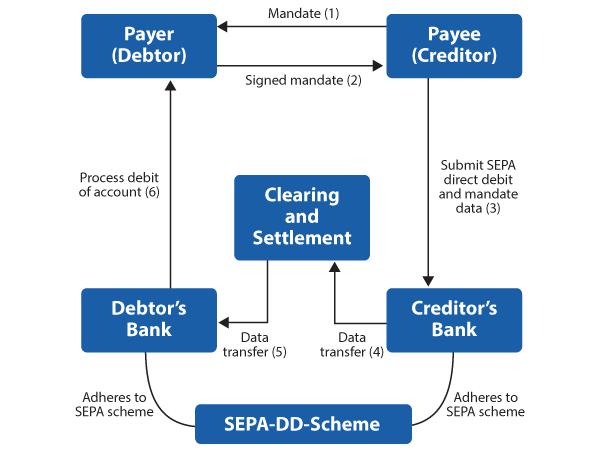
Figure 1
SDD scheme
Both banks need to adhere to the SDD scheme that is described in detail in the rulebooks of the European Payments Council. This rulebook governs, for example, the life cycle of a mandate from creation to cancellation, relevant processing times for clearing and settlement, as well as the detailed structure of the corporate-to-bank and inter-bank XML messages.
Fundamental Differences between SEPA Core and B2B Direct Debit
The SEPA rulebook does foresee two fundamental variants of SDD payments: one B2B version that companies can use only for commercial transactions and one SEPA Core version that is designed for transactions with private persons. It is important to be aware of the differences because they are processed differently by banks, and both of them can be configured in the SAP system to create a slightly different payment format in the DMEE. Table 1 summarizes the major differences between the two SDD variants. Payees cannot mix both SDD variants in a single payment batch, and therefore, the identification code of the payment data has to be either Core or B2B.
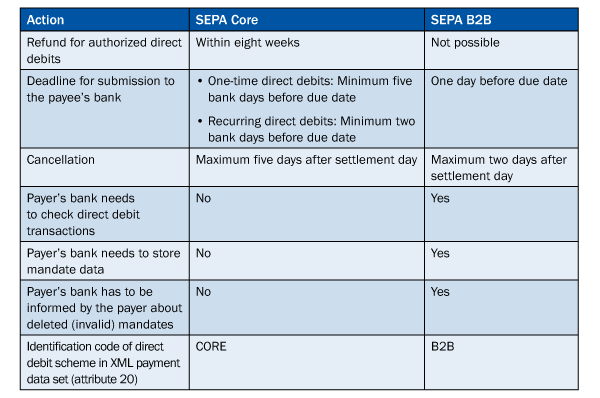
Table 1
Differences between SEPA Core and SEPA B2B formats
Mandate Configuration in the SAP System
SAP provides you with a complete mandate management component that is tightly integrated in the accounts receivable component. You find the configuration settings by following IMG menu path Financial Accounting > Accounts Receivable and Accounts Payable > Business Transactions > Incoming Payments > Management of SEPA Mandates or by using transaction FI_APAR_SEPA_CUST. There are two configuration settings — one for defining the general settings of your mandate management and one for defining the mandate attributes such as address of the payer who can be changed during the life cycle of a mandate.
Now I take a closer look at the general settings. The configuration consists basically of four areas (Figure 2):
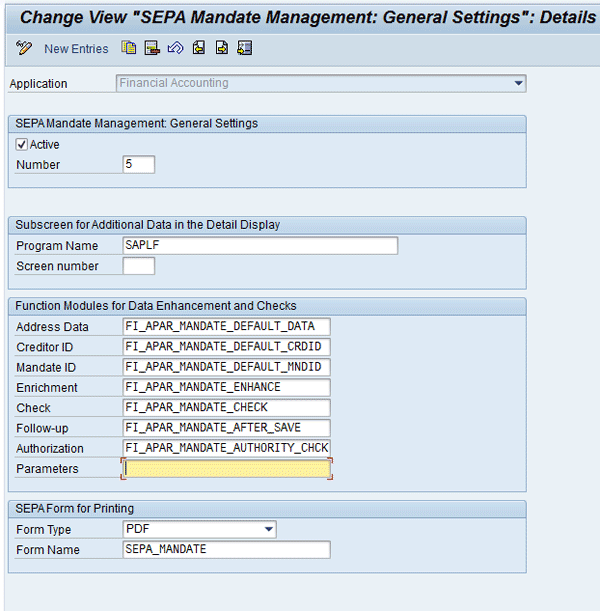
Figure 2
Configuration of SAP mandate management
1. Basic settings. In this configuration view you can select whether the mandate management should be active in your SAP system and which applications should use it. The application describes the SAP component (for example, accounts receivable) in which the mandate is being used. In theory, you may set up the mandate management for multiple applications, but in most cases, entering only one value suffices. The parameter number defines how many times the use of a mandate is logged by the system in a separate table. The system records only your specified number of times. For example, if you enter 10, the system records the last 10 times a mandate was used.
2. Subscreen settings. In this control you can define the additional screen for the display of mandate details in case you have defined such a screen element.
3. Function modules. SAP provides six different function modules in which you can modify the standard modules delivered in the SAP system. If you don’t want to change these modules, you can leave these fields empty. The function modules allow you to define:
- Default address data for debtors and creditors that the system should suggest during mandate creation
- Whether the unique creditor ID should be selected
- Which numbering scheme should be picked for the mandate ID
- How to navigate within the mandate management screens
- Which additional data fields should be populated during mandate creation
- Which validity checks should be performed during the creation or alteration of mandates
4. Forms for printing. At the bottom of the screen you can define which form types (SAP Smart Form or PDF) you want to choose for correspondence (i.e., the printing of the mandates). SAP delivers a sample form for both PDF and SAP Smart Form called SEPA_Mandate that you can also adapt to your needs.
One result of these settings is an additional display/create mandate icon within the Bank Details section of your transactions for changing customer master data (Figure 3). This icon allows you to maintain mandate management data directly from your customer master records. The icon is only visible if you have maintained an IBAN for this bank account because this number is mandatory for using SDD payment instruments.
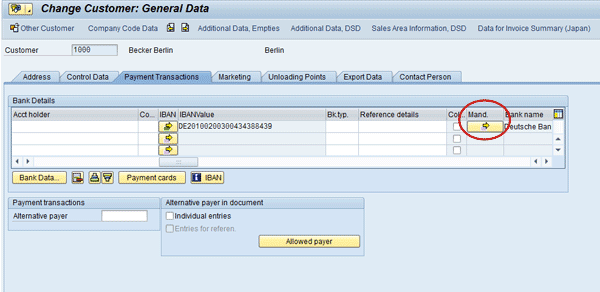
Figure 3
Mandate management integration in the accounts receivable component
You can create mandates in the SAP system in two other ways. You can use a dedicated SEPA mandate transaction FSEPA_M1 that you find in the user menu following the navigation path Accounts Receivable > Master records > SEPA Mandates > Create. Alternatively, you can use transaction FI_APAR_SEPA_CONV, a mass transaction for creating multiple direct debit mandates at once out of existing bank details. Again, the prerequisite for running this program is a valid IBAN for each customer account (Figure 4).

Figure 4
Mass creation of SDD mandates
Note the B2B Mandate check box in the Output control section. This setting determines whether the program creates SEPA Core or SEPA B2B mandates. B2B Mandate also exists in the accounts receivable component when you create single mandates.
SEPA Direct Debit Settings in the Payment Medium Workbench
Now that you have a basic understanding about the mandate management component in the SAP system, I want to explain where the actual direct debit payment formats need to be set up. SAP implemented both SDD variants with the single payment format SEPA_DD in the Payment Medium Workbench (PMW) and the DMEE. This payment format includes a parameter to separate the B2B and Core variants.
In contrast to the classic payment medium programs (RFFO*, where * represents a country suffix), the PMW allows you to maintain, configure, and enhance your payment formats more easily. In addition, the PMW separates generic functions from format-specific mapping and allows you to apply legal changes to payment medium formats faster. The component also reduces the degree of complexity because you need to use only one tool and don’t have to work with many different payment medium programs that are often hard to maintain and extend. The DMEE is integrated in the PMW, which facilitates generating files for the defined payment formats. The DMEE provides a customizing tool in the form of a graphical editor.
You can check whether your SAP system contains the payment medium format SEPA_DD by following IMG menu path Financial Accounting > Accounts Receivable and Accounts Payable > Business Transactions > Outgoing Payments > Automatic Outgoing Payments > Payment Media > Make Settings for Payment Medium Formats from Payment Medium Workbench > Adjust Payment Medium Format (Figure 5).
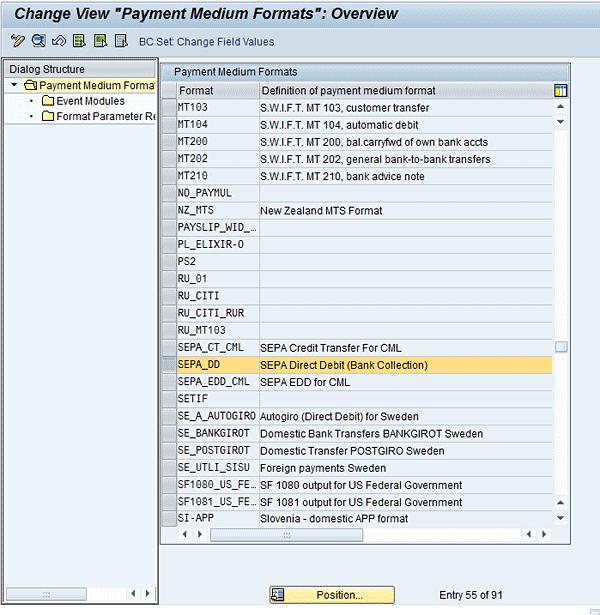
Figure 5
SDD payment medium format in the PMW
Double-click the SDD payment medium format to validate that the following PMW settings are maintained correctly (Figure 6):
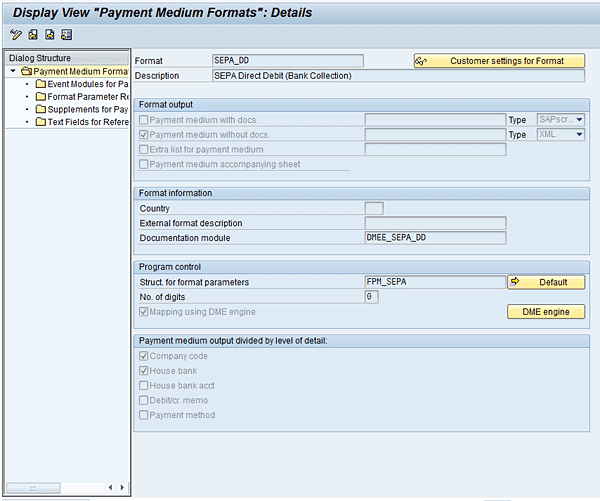
Figure 6
Detailed PMW settings of the SEPA credit transfer payment medium format
- The Payment medium without docs. field should be XML
- Mapping using the DMEE (i.e., the Mapping using DME engine check box needs to be selected)
- The Documentation module field should be DMEE_SEPA_DD (this module contains some general text provided by SAP describing the SEPA format delivery)
- The Payment medium output divided by level of detail section should have Company code and House bank checked (this is called granularity in the SAP context)
The granularity defines how the SAP system combines and groups your outgoing payments in a file. This process happens immediately after the payment run (program F110) by the program RFPAYM_SCHEDULE, which sorts the pool of items to be cleared. In the case of the SEPA direct debit, the PMW creates a separate payment file for each combination of company code and house bank that was used in the payment run. I have explained this in part 1 of my article. The settings for the direct debit payment format are the same as for the credit transfer.
Configuration of the Payment Medium Format
Before you can actually execute SEPA direct debits, you have to assign this payment medium format to the country and country code settings of the SAP payment program. Use transaction FBZP or follow IMG menu path Financial Accounting > Accounts Receivable and Accounts Payable > Business Transactions > Outgoing Payments > Automatic Outgoing Payments > Payment Method/Bank Selection for Payment Program > Set Up Payment Methods per Country for Payment Transactions (Figure 7).
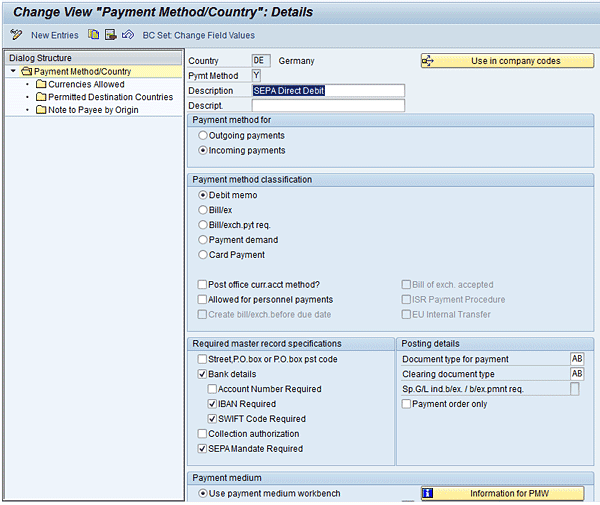
Figure 7
Country settings of the SDD payment method
By double-clicking the payment method, you can maintain the country-specific settings. They are similar to the credit transfer settings I described in part 1, but not the same because direct debit payments are in contrast to credit transfers and incoming payment transactions. There are no different settings for the B2B and Core variants because the separation is triggered with the identification code in the actual payment format. Make sure that you have entered the following configuration details (Figure 7):
- Payment method for: Incoming payments
- Payment method classification: Debit memo
- Required master record specifications: Bank details, IBAN Required, SWIFT Code Required, SEPA Mandate required. The reason for selecting IBAN and SWIFT code is the SEPA format specifications that require this master data.
- Posting details: The document type for payment and Clearing document type are AB in this example (representing an accounting document), but they depend on your configuration settings and may be different in your SAP system.
- Payment medium: Select the Use payment medium workbench radio button and enter SEPA_DD in the Format field. You need to make sure that the DMEE format tree and the PMW payment medium format have the same name.
- Allowed currency is Euro only, which you can set within the Currencies Allowed folder on the left.
- Note to payee should point to the default delivery by SAP, which you can set within the Note to Payee by Origin folder on the left.
Now maintain the company code settings for the payment method. Use transaction FBZP or follow IMG menu path Financial Accounting > Accounts Receivable and Accounts Payable > Business Transactions > Outgoing Payments > Automatic Outgoing Payments > Payment Method/Bank Selection for Payment Program > Set Up Payment Methods per Company Code for Payment Transactions. You need to maintain the following configuration settings in the detail company code settings of the payment method (Figure 8):
- Paying co. code (paying company code)
- Pymt Method (payment method): A code consisting of one character you use for master data maintenance and for the payment run settings
- Amount limits based on your choice
- Select the Foreign business partner allowed check box
- Restrict the note to payee to four rows of text (because this is the setup of the default note to payee delivered by SAP)

Figure 8
Company code settings of the SEPA direct debit
Now that you have completed all necessary configuration in the PMW, I would like to review the format tree in the DMEE. It is not possible to discuss all nodes of the DMEE format tree in this article, but I would like to point you to two of the most interesting ones containing the mandate information and the identification code (SEPA Core or SEPA B2B).
DMEE Format Tree for SDD Payments
The physical structure of the direct debit payment file is exactly the same as the credit transfer, so I recommend that you look at my explanations in part 1 of this article. The configuration of the hierarchy levels as well as the sort and key fields in the DMEE format tree for the SDD correspond to the SEPA credit transfer. SAP Notes 1401975 and 1135499 contain a detailed overview of the various structure nodes and how they are filled by the SAP system for the SDD as they have been defined by the EPC.
I mentioned earlier that the mandate information has to be transmitted together with the payment information. You can find the mandate data under the DMEE format tree node DrctDbtTx (Figure 9). There are four main pieces of information included:
- Current mandate ID (which is filled by structure FPAYHX-MNDID)
- Date of the mandate signature
- Amendment indicator (describing whether a mandate was changed or not)
- Details about the amendment such as the original mandate ID
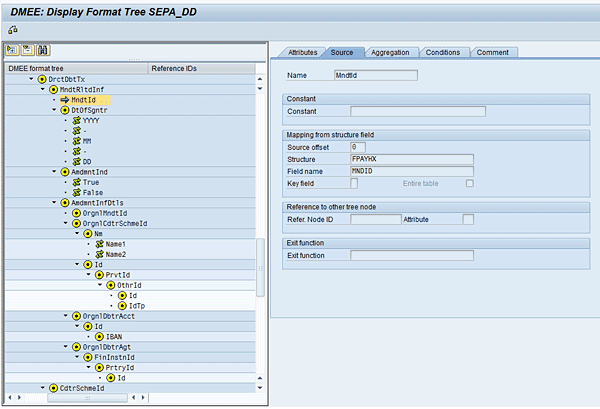
Figure 9
Company code settings of the SEPA direct debit
The information about the payment identification code is included further up in the header node PmtInf. SAP designed a dedicated node with two constant values (B2B and core). Depending on the value of this constant, you either generate a payment file with Core or with B2B direct debit payments. The corresponding data element in the SAP system is SEPA_B2B, which belongs to the table SEPA_MANDATE.
Juergen Weiss
Juergen Weiss works in the functional area of SAP Financial Supply Chain Management. As part of SAP’s product management team, he was globally responsible for the Financial Supply Chain Management applications, including Electronic Bill Presentment and Payment, Dispute Management, Collections Management, Credit Management, Treasury and Risk Management, Bank Relationship Management, and In-House Cash as well as Accounts Payable and Receivable.
You may contact the author at juergen.weiss@sepa-now.de.
If you have comments about this article or publication, or would like to submit an article idea, please contact the editor.




 Premium