Using these simple steps, learn how to prevent unauthorized users from making changes to historical time master data. Once an employee enters time data and an employee’s manager or time administrator approves the submission, it is important that the employee can’t make any additional changes to those hours.
Key Concept
The Report for Time Leveling (RPTAPPU0) is an SAP standard report that creates test procedures for time infotype records. With this report, an authorized person can check the time data of an employee or group of employees and automatically release it if there are no queries.
One of the most obvious gaps in SAP ERP HCM system security is how to lock down historical data. With standard SAP security authorizations, if a user has access to a specific Personnel Administration (PA) infotype, this access applies to all past, present, and future data. The validity date of the record has no impact on the ability to access data.
This security issue becomes increasingly problematic with regard to time management. Time data typically needs to be modified only until it is relevant to payroll processing. Any historical data should only be modifiable to the central HR or time administrators.
By using a little-known piece of functionality — test procedures (infotype 0130) — companies can provide an additional layer of security that offers period-based protection of HR data. This protection only applies to changes of the protected data. User with view access can still see the historical records.
So what exactly is infotype 0130 (test procedures)? Infotype 0130 is a data record that indicates up to a specified date that the data related to the test procedure has been checked. Once you create an infotype 0130 record for a personnel number, the SAP system checks the validity date to see whether it is before or after the date of the test procedure. Without the necessary authorization, if the validity date is before the test procedure date, the system rejects any changes to that record.
What if different infotypes need different test procedures? Perhaps your time infotypes need a different procedure and must run on a different date than your other infotypes. You can configure infotype 0130 so that it is divided into separate subtypes, with each subtype being associated with multiple PA infotypes.
Consider this example. Assume you have configured a test procedure called Z1. Z1 is associated with the Personal Data infotype (0002). Now, you want to make sure that the data in infotype 0002 can’t be modified up to a certain date (e.g., the employee’s hire date).
Either manually or via a program, an infotype 0130 record is created for an employee’s personnel number. To create an infotype 0130 record, go to transaction code PA30 and enter the personnel number for the employee for whom you wish to create a test procedure. Click the create infotype icon and select Test Procedures in the Infotype field in the Direct selection section of the screen (Figure 1). Enter your test procedure subtype in the Test for field (Figure 2). In the Released by field, enter the date that you wish to check up to (e.g., 10.10.2012). In the example in Figure 2, the test procedure record is created manually. You can tell the test procedure is created manually because it says MP013000 (the dialog program name) in the Tested using field.
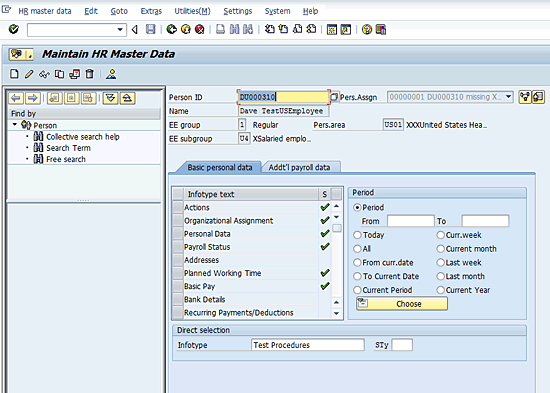
Figure 1
Maintain HR master data (transaction code PA30)
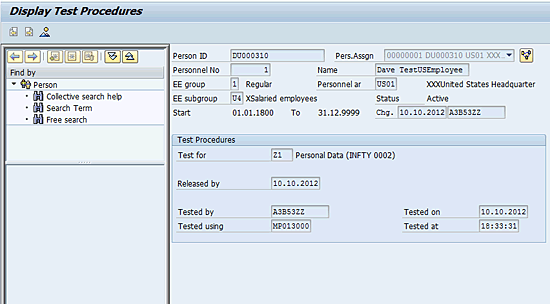
Figure 2
The display screen for test procedures
If this new record is created and a user with standard write access (the W authorization level in the HR master data authorization object) to infotype 0002 tries to change a personal data record, the system rejects the changes if the validity date is before the test procedure date of 10.10.2012. Any changes to this record now require a user with special authorization to make corrections.
Customizing and Configuring Test Procedures
The functionality for test procedures is not active by default. Some configuration must be performed so that it’s enabled. There are three customizing steps that are necessary to set up test procedures:
- Activate the APPRO authorization main switch. Use transaction code OOAC. By default, the APPRO switch is set to 0, meaning that it’s inactive. To activate the authorization check, change the value to 1 (Figure 3).
- To configure the types of test procedures you want to use, follow IMG menu path Personnel Management > Personnel Administration > Tools > Authorization Management > Test Procedures > Create Test Procedures. In the example in Figure 4, I created a subtype called Z2. This subtype is used to control time data for payroll processing.
- Associate the test procedure subtype to a PA infotype or subtype. Follow IMG menu path Personnel Management > Personnel Administration > Tools > Authorization Management > Test Procedures > Assign Infotypes to Test Procedures. In the example in Figure 5, I associated infotype 2002 (attendances) with the Z2 test procedure. You can associate multiple test procedures with the same infotype or subtype. In that situation, both test procedures’ subtypes need to allow access; otherwise, the changes are not made.

Figure 3
HR authorization switches
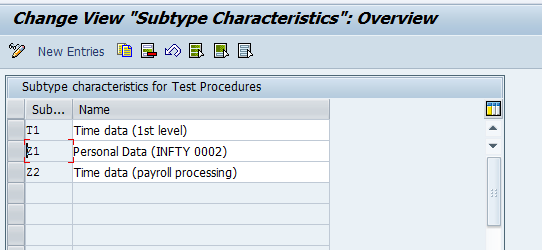
Figure 4
Test procedure subtypes
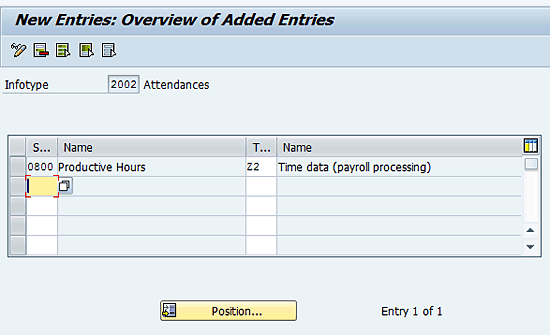
Figure 5
Assign infotypes to test procedures
Grant Access to Historical Data
Now that the configuration is complete, how does an administrator make changes to historical records that are locked by test procedures? To do this via standard HR authorizations you need to have write access to infotypes and subtypes. This write access is granted in your HR master data (P_ORGIN) authorization object. This authorization should be in the security role of the user.
Granting write access to infotype 2002, however, is not the only thing you have to do to get access to change historical records. You also need write access to infotype 0130 in the P_ORGIN authorization object of the role of the user (Figure 6).
With this additional authorization, you can control who can change the historical data associated with your test procedures.

Figure 6
P_ORGIN authorization object with test procedures access
Note
If you use the contextual or the extended check authorization objects (P_ORGINCON or P_ORGXX) in your environment, write access to infotype 0130 still applies.
Automatically Create the Test Procedure Infotype
One question still remains: How do you create the test procedure infotypes? If the Released by date needs to update regularly, creating and updating the test procedures for all personnel numbers in a system would be an impossible task if done manually. Additionally, if the test procedure infotype record doesn’t exist for a personnel number, the check is not performed.
The SAP system provides a sample report called Report for Time Leveling (RPTAPPU0) that is specific to time data (Figure 7). This report enables the SAP system to check time infotypes for an employee or a group of employees and release them automatically. Once the records have been released, the released by date in the test procedure infotype (0130) is automatically set to the end date of the selection period.
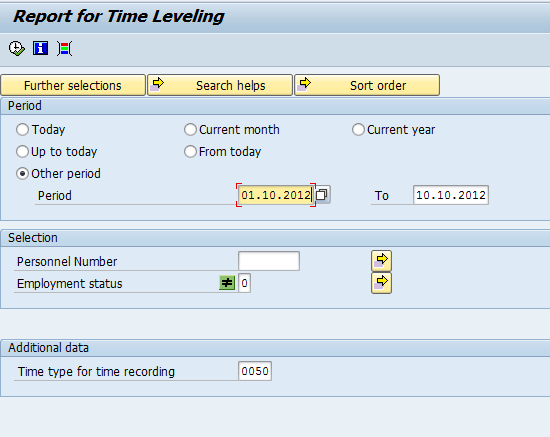
Figure 7
The time leveling report
Unfortunately, this report can be used only in relation to time infotypes, and not with any other PA infotypes. If you wish to set test procedures automatically for other PA infotypes, you need to create your own report that automatically sets infotype 0130 for those PA records.
Malcolm Dillon
Malcolm Dillon is an independent SAP GRC and security consultant. He has over eight years of SAP security and audit experience. He has worked on multiple SAP Access Control 5.3 implementation and upgrade projects. HCM security role design and integration with SAP Access Control via HR triggers is his specialization. When he’s not spending time with his family, he can be found out on a local golf course.
You may contact the author at MDillon@Nine21SAP.com.
If you have comments about this article or publication, or would like to submit an article idea, please contact the editor.






 Premium