See how Transportation Planning/Vehicle Scheduling (TP/VS) enhances and complements the SAP Logistics Execution System solution and takes transportation planning to the next level with full integration into the document flow.
Key Concept
Transportation Planning/Vehicle Scheduling (TP/VS) supports any transportation process in a company. It helps the transportation planner in daily tasks with automatic tools, such as optimizer, which tries to find the ideal transportation solution for a given situation (lowest cost with the highest service level). TP/VS also provides user-friendly transactions for performing manual operations, such as responding to urgent/ unexpected situations by changing the shipments manually or reassigning a new means of transport.
Since the recent release of mySAP SCM 5.0, the two most common questions asked of me about TP/VS are:
• Where does it reside in SAP’s transportation solution?
• How do you plan an optimal solution for scenarios involving more than one transportation option?
First, let me address where TP/VS resides in SAP’s transportation solution. SAP transportation management is
composed of three pillars: planning, execution, and freight costing. TP/VS focuses on planning transportation and
represents the planning pillar of the transportation management solution in SAP. By using TP/VS, you can improve the
transportation planning process while reducing the planning cycle time. In this way, the transportation planner focuses on
the most important tasks.
The two other pillars that R/3 and mySAP ERP Central Component (ECC) cover, execution and freight costing, support
the inbound and outbound processes. You can see how these three pillars of transportation management compare between
R/3/ECC and TP/VS in Table 1.
| Scenarios |
Inbound and outbound |
Inbound, outbound, and stock transfers |
| Inputs |
Deliveries |
Sales orders, purchase orders, deliveries, planned shipments |
| Means of transport selection |
Manual |
Optimization, manual assignment |
| Load consolidation |
Manual or semiautomatic with sorting criteria |
Manual or automatic via optimization |
| Route determination |
Based on route master data (fixed routes) |
Optimization. Based on transportation lanes between nodes
(locations, customers) and/or transportation zones. |
| Carrier selection |
Manual |
Manual. Optimization based on priority, business share, carrier cost (from R/3 or maintained in
APO). |
| Carrier allocation (maximum, minimum number of trips) |
No |
Based on demand planning functionality |
| Tendering |
EDI |
EDI, XML message, Web |
| Shipment execution |
Yes |
Only planning, no execution |
| Freight costing |
Yes, based on rates and pricing conditions |
Only planning, no execution |
| Alert management |
No |
Yes |
|
| Table 1 |
Comparison
of R/3 and TP/VS functionality in
transportation management |
Let’s start with an example to explain the scope of TP/VS. Figure 1 describes a
TP/VS scenario that represents all of the supply chain nodes and agents. In this figure, you find nodes in the supply
chain for outbound, inbound, or internal transportation processes. The vendors and plants are for inbound processes in the
procurement area. The plants, distribution centers, and customers relate to outbound or distribution processes.

Figure 1
Transportation model supply chain elements
Note
If you are familiar with APO, you might wonder about the difference between TP/VS and Transportation Load Builder (TLB) included in Supply Network Planning (SNP). TLB focuses only on internal transportation within a company (i.e., transportation between your manufacturing plants and distribution centers), while TP/VS focuses on optimizing the external transport to customers (outbound processes) or from vendors (inbound processes). The starting points for TLB are deployment orders, planned stock transfer orders between plants, warehouses, or distribution centers. TLB takes these proposals and builds loads by consolidating the loading of trucks, but it does not take care of determining the route and selecting the carrier.
You can define different means of transport to carry on transportation activities in complex processes.
TP/VS handles any means of transport; therefore, it is able to plan scenarios with mixed resources such as a maritime
scenario illustrated in Figure 2. In this scenario, a distribution center located in Barcelona transports
items to Palma de Mallorca using a truck, a ship, and a second truck or van on Mallorca Island. Three legs or steps
compose this scenario, also called multimodal because several modes are involved.

Figure 2
Maritime scenario involving three transportation legs
You can plan many other scenarios or situations with TP/VS: a single warehouse supplying multiple
destinations, routes with multiple pick-up and drop-off stops, cross-docking, vehicle with itinerary (modes of
transportation that have defined departure schedules), such as trains and ships, or mixed scenarios combining previous
ones.
You can model any means of transportation available, such as railways, ships, airplanes, trailers, trucks,
and vans in the transportation processes. You can freely define new Means of Transport by following menu
path IMG>APO>TP/VS>Basic Settings>Maintain Means of transport (Figure 3).

Figure 3
Define means of transport
The transportation lane element of TP/VS in Figure 1 allows you to define connections among logistic nodes
(customers, vendors, plants, warehouses). It contains the required information for defining and planning the trips between
nodes: distance, estimated time, means of transport, and allowed carriers. For instance, in the maritime scenario in
Figure 2, you could transport items to the island by ship or airplane based on criteria including cost of the means of
transport, urgency, order value, or ship/airplane schedules.
Now, how do you plan an optimal solution for those scenarios? TP/VS manages transportation with several
tasks that I group into two phases: vehicle scheduling and TSP relationship management.
Vehicle Scheduling: Optimization
When planning, the first task a planner faces is to answer questions such as “What’s the
appropriate means of transport,” “What’s the best route,” and “Could I consolidate
deliveries?” TP/VS answers these questions starting with the transport demands and proposing optimal and feasible
solutions, while respecting constraints across supply chain. Optimization is the heart of TP/VS.
It is important to understand how the optimizer tool in TP/VS works to translate company processes into
parameters so the optimizer tool can make appropriate decisions. It supports the automatic planning process. You can
execute it from Interactive Vehicle Scheduling or a background transaction. The optimizer tool considers
two things at the same time: optimization formula and constraints.
Tip!
You can connect an external Geographical Information System (GIS) to SCM to determine distances. This increases the model’s accuracy, while also providing a graphical representation of the shipments. A GIS system helps you locate master data at street level by geo-coding and calculating more accurate distances based on roads. It requires data and services from third-party vendors who specialize in GIS software.
The optimization formula tries to obtain the best shipping scenario regarding routing and load
consolidation by minimizing incurred cost. The formula for these costs, which represent the three questions in the
planner’s first task, is as follows:
Optimization costs = Fixed transportation cost + variable transportation cost + service level penalty cost
You encounter fixed transportation costs when the planner determines the means of transport or vehicle for a
particular shipment. A planner often must consider the balance between service and cost. For example, sending material by
airplane may improve the service level, but the fixed cost of air shipping is higher when compared to shipping material by
truck.
Variable costs incurred during the planned shipment refer to the distance (cost per kilometer or mile), duration
(cost per time), cost per unit, stopovers, and quantity cost (per unit and distance).
Finally, customer satisfaction and service level variables factor into the service level penalty costs. The
optimizer tool assesses the costs that result from service level issues, such as early or late arrival, to find the lowest
cost solution.
You maintain all of these costs in the master data or in the cost profile in SAP APO (Figure 4) by
following menu path APO>Master Data>master Data for TP/VS>Maintain Vehicle Scheduling Cost. As
with other optimizers, the figures usually don’t represent real costs, but a method to drive the optimizer tool to
obtain the best solution.

Figure 4
Costs related to service level in the cost profile that show penalties due to early, delayed, or non-delivered shipments
To clarify all of these concepts, let’s take a simple example. You have three deliveries with the
same delivery date and two available trucks to ship the deliveries (Figure 5). Customer 1 has a 20-ton
shipment, customer 2 has a 10- ton shipment, and customer 3 has a 10-ton shipment. Truck 1 can hold 30 tons and truck 2
can hold 10 tons. You have several options to satisfy your customer demands:
A) Take truck 1 (30 tons) and load deliveries 1 and 2. Take truck 2 (10 tons) for delivery 3.
B) Take truck 1 and load delivery 1. Take truck 2 for delivery 2 and return to load delivery 3.
C) Take truck 1, load delivery 1, and return to load delivery 2. Take truck 2 for delivery 3.
D) Take truck 1 and load deliveries 1 and 2. Then return truck 1 to the plant and load delivery 3.

Figure 5
Three customer deliveries with several shipping options
What’s the best option? It depends on two of the factors in the optimization formula I described
earlier: transportation cost (fixed or variable) and the service level agreement with your customers. Option A is the
least expensive, but the long distance for truck 1 to travel means that you cannot deliver the shipment on time. In this
case, option B might make more sense because you can deliver the shipments on time. Options C and D are logical, but from
a cost point of view they are worse.
This is a very simple scenario that only takes a few elements and factors into account. Reality is more
complex with thousands of deliveries. A good plan requires that you analyze all of these variables to find the best
solution from both cost and quality of service points of view. The first step in this process identifies the scope and
scenario you want to optimize. Selecting different sales order documents or purchase orders allows you to identify the
scope and, therefore, the scenario.
Additionally, this optimization process is limited by physical constraints and timing restrictions. The
physical dimensions of your transportation vehicles (truck, van, trailer) determine the maximum load capacity, translated
into maximum number of pallets, volume, length, or weight. The process uses up to eight dimensions as inviolable
constraints during the optimization. Working hours for the truck, customer dock hour availability, vendor pick-up times,
train schedules, or ship departure times add more complexity.
Compatibility and incompatibilities among products, vehicles, and locations is an additional factor to
consider. This is especially important in cases involving forbidden mixes of items in a truck (e.g., frozen and unfrozen
products), or when customers require specific means of transport, as might be the case with a location that is difficult
to reach.
You can define compatibilities between different object types in the screen shown in Figure
6, which you access by following menu path SCM Settings>APO>TP/VS>Optimizer>Define
Compatibility Types. With this setting, I could create an incompatibility type between vehicle and location based
on the codes (field name). After that, I could create the incompatibility between Truck and customer code
34556, corresponding to a customer that only accepts shipments by van.
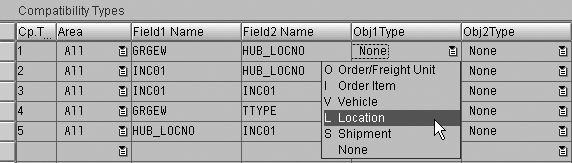
Figure 6
Define compatibility types
The parameters that drive the optimization process are grouped in the optimization profile (Opt.
Profile), which you define in the TP/VS settings or directly from Interactive Vehicle Scheduling via
transaction /SAPAPO/VS01 or by following menu path SCM IMG>APO>TP/VS>Optimizer>Define
optimization Profile (Figure 7).
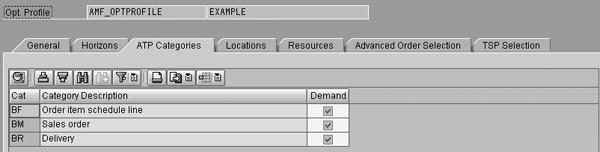
Figure 7
Optimization profile with a scenario selection based on the ATP order category
With this profile, you guide the optimizer to find the best solution. For instance, you can skip planning
of low weight orders, leaving those to parcel companies. In Figure 7, the ATP Categories tab allows you
to define the scope of the scenario. By selecting sales order and deliveries, you are defining an outbound scenario. The
rest of the tabs define the scope of the planning process and allows you to restrict it as needed. For example, you can
restrict the locations to plan (North Zone, East Coast), which truck or means of transport to plan or use, and which
period of time (Horizons) to consider.
A common characteristic of any optimizer tool is the capability to assign weight to variables —
the planner decides which criteria are the most important. As shown in Figure 8, the planner decides how
to balance service level and transportation cost with weight assignment. In this example, delivery earliness is not a
critical factor for this company in the Weighting of Cost Factors, so the planner sets this value to zero.
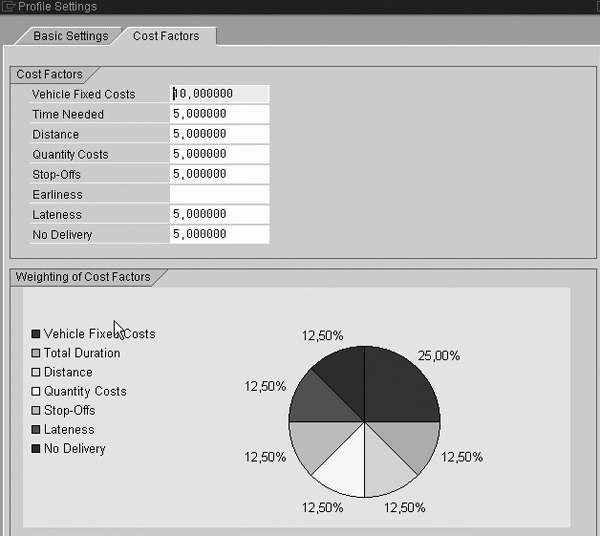
Figure 8
Optimization gauge and multipliers weighting
You perform space optimization through load consolidation, but optimizer cannot handle complex space
assignment. You should model space assignment using dimensions: number of pallets, mass, volume, length. For example, you
could depict a truck with a constrained resource of 30 pallets, 30 tons, and 40 cubic meters. You cannot model, for
instance, space occupied by wheels or other specific restrictions.
Tip!
You can integrate returns into the optimization process so you can use the return leg of a trip to transport empties. You create these returns in Sales and Distribution (SD) in R/3 Release 4.6B and later. This is especially important for companies with high-value containers or a significant volume of empties.
The planner then manipulates planned shipments with consolidated deliveries manually if needed,
especially for portions of demands or urgent deliveries. Figure 9 shows the interactive planning
transaction where planners can interact and adapt the results or build their own shipments. You can access this
functionality via transaction code /SAPAPO/VS01 or by following the menu path
APO>Transportation Planning/Vehicle Scheduling>Planning>Interactive Vehicle Scheduling.
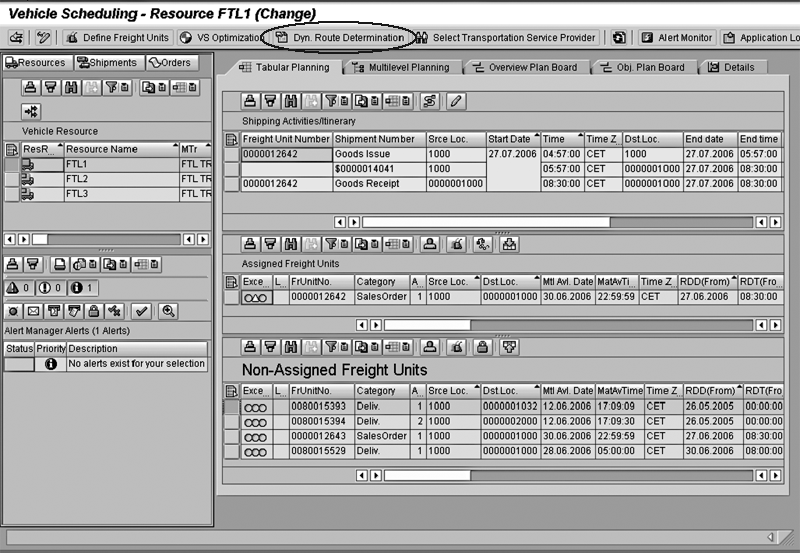
Figure 9
The circled button represents the new dynamic route determination functionality in interactive planning click here to view a larger version of this image
By using drag and drop, I can create new shipments, including non-assigned freight units, such as sales
order items or deliveries. I select a Freight Unit (sales order, purchase orders, stock transfer orders,
or deliveries) and assign it to a transportation resource (truck, van, ship). Then the system tries to find the required
loading, unloading, and transportation activities that compose the route or itinerary.
Relationship with TSPs
Nowadays, third-party logistics (carriers) are key players in the transportation processes. Once you
determine planned shipments, a TSP or your own resource must execute it. This involves three steps:
Step 1. Select a carrier.
Step 2. Communicate new orders to your service providers.
Step 3. Integrate the carrier into your supply chain.
These three steps are essential best practices in transportation processes. You can model all of these
using different approaches in TP/VS.
Step 1. Select a carrier. Outsourcing transportation services makes selecting a carrier
important to maintain your company’s reputation with your vendors or customers, while at the same time saving money.
The goal of carrier optimization is to find the carrier that can execute planned shipments with the lowest cost.
mySAP SCM 5.0 has increased flexibility in this area, offering several selection criteria, including
different options to assign the carrier for a determined shipment automatically. These options include business share
maintained on the transportation lane, and prioritized TSP costs maintained manually in APO master data or based on real
freight costing coming from R/3.
Continuous movement in mySAP SCM 5.0 allows improvements in the carrier selection based on the
identification of continuous routes. This saves transportation costs because the same carrier can execute various
shipments.
When selecting a carrier, you can take into account limitations (allocations) due to carrier capacity,
such as maximum ships per day or week, to check if the proposal is realistic. SAP note 445118 gives you more information
about this topic.
Step 2. Communicate new orders to your service providers. In this step, technology now
plays an important role. Now you have the option of XML communication, which is more flexible than EDI. EDI, XML, and
email offer integration methods with your transportation partners.
In the screen shown in Figure 10, a carrier reviews its assigned shipments and can
either accept or reject them, or change the proposed dates. These actions are integrated into the alert monitor, so the
planner can react to changes or rejected shipments. mySAP SCM 5.0 incorporates decision rules, so the system performs
actions automatically for overdue tenders. These actions include automatic rejection, reassignment, or a trigger for an
alert.
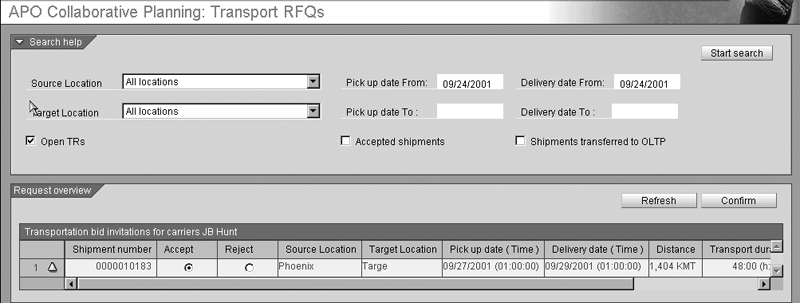
Figure 10
Internet collaboration allows TSPs to accept or reject shipments click here to view a larger version of this image
Step 3. Integrate the carrier into your supply chain. As a best practice, you should
integrate carriers as part of your supply chain to respond quickly and efficiently to orders. This means that the carrier
should be able to access information easily. Internet and collaborative processes fulfill this requirement. For the
allocation used during the carrier TSP selection, you can integrate the TSP in the tactical planning, providing access to
weekly or daily information about its capacity.
Integration with R/3 and ECC
Remember that APO is a planning system, and therefore it is never the system responsible for execution
or costing, which always happens on the R/3 or ECC side. In this case, once the planner accepts the shipment document, you
can publish the delivery and shipment to your ERP system, where the execution process starts. You can integrate mySAP SCM
5.0 with R/3 Release 4.6C and later, but some scenarios (delivery split, working with shipping points, or dynamic route
determination) require later releases. These restrictions are explained in SAP note 832393.
Experience demonstrates that integration is usually the main difficulty when you connect external, non-
SAP systems to R/3. In this sense, the integration between APO and R/3 through Core Interface (CIF) maintains the
transportation solution integrity through one common flow and mapping of documents. As with other APO modules (Production
Planning and Detailed Scheduling, SNP), execution and costing always happens in R/3, but standard integration provided
between TP/VS and Logistics Execution System (LES) in R/3 makes it simple.
Sales orders or purchase orders, deliveries, and shipments flow between both systems depending on the
planned scenario. You perform freight costing in the LES transportation processing system, which contains contractual
freight rates and agreements permits to calculate final cost based on pricing procedures and condition techniques.
An example of integrated document flow for the outbound process is described in Figure
11. First, you send sales orders created in R/3 to APO via CIF, which generates the transportation demands. Once
you have created the planned shipments, tendered them, and assigned them to the carrier in APO, they can generate
deliveries and shipment documents in R/3 for execution and freight costing. The system maps the information from APO, such
as means of transport, deliveries consolidated, legs, and carrier into the shipment document.
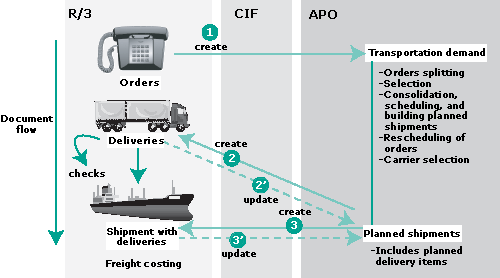
Figure 11
Document flow for an integrated outbound process click here to view a larger version of this image
Regarding the document update process (steps 2’ and 3’ in
Figure 11), you maintain both systems in sync. Changes in R/3 deliveries drive updating in APO and vice versa. mySAP SCM
5.0 has improved this integration by offering dynamic rules to control the actions that you execute when, for instance, an
order is changed.
Usually sales orders are not constrained by transportation restrictions, although sometimes you must
perform a splitting process prior to consolidating the load. You carry out this process before the optimization/planning
process. With this process you reduce deliveries that are too heavy or sales order items that are impossible to
accommodate into any means of transport by following splitting rules. The problem with large sales orders is not new. This
splitting functionality was included with SCM 4.0, but improved with mySAP SCM 5.0.
For example, if your largest vehicle has a maximum capacity of 30 tons, you cannot allocate a sales
order item containing 50 tons. mySAP SCM 5.0 introduces new functionality by using correlated splits to distribute large
orders on multiple trucks or transportation resources.
In addition to transactional flow, this interface facilitates the integration and uniformity of master
data because most of the data comes from R/3. CIF integrates data related to the customer or provider, such as address,
plant, or distribution center addresses as well as carrier data and product data, such as weight or size.
Note
For further details about the document flows between mySAP SCM and R/3, refer to SAP note 362445.
What’s Happening: Alerts
Management by exception is important in the planning/optimization processes. It is critical to know when
abnormal situations are happening in your shipments. For instance, if someone changes an order’s due date when it is
included in a shipment, this can cause an error when generating the shipment or planning the order. This could affect your
agreement with your customer, or it could cause other problems with master data or resource availability. With the dynamic
integration introduced in mySAP SCM 5.0, alerts warn planners when order changes in R/3 affect already planned shipments
or continuous movement.
At this point, let me underline the link to global ATP, particularly backorder processing. In this case,
considering new planned delivery dates because of transportation restrictions allows you to react to the transportation
issues. You could contact the customer to make him or her aware of the issue or seek out alternatives.
Dynamic Route Determination
Supported by new TP/VS functionality included in mySAP SCM 5.0, you can determine dynamic routes during
the sales order entry, providing a direct decision support. That is, during sales order entry, online routing
determination and scheduling occur with consideration to carrier allocation and resource capacity check.
When you create a sales order, the system displays a new screen, offering shipment proposals. After you
select the appropriate shipment, the system triggers the ATP check process and displays the ATP screen with the delivery
proposal. You can trigger dynamic route determination in the SCM system using the Dyn. Route
Determination button in Figure 9 as well.

Adolfo Menéndez Fernández
Adolfo Menéndez Fernández is the application architecture manager at Repsol in Madrid. Previously, he worked at SAP Consulting Spain as the logistics consulting manager. He studied at the University of Oviedo, where he earned an electronic engineering degree. He is a certified SAP consultant in supply and demand planning (SNP and DP), order fulfillment (Global Available-to-Promise), production planning and detailed scheduling (PP/DS), as well as procurement and materials management (MM). Adolfo has more than 10 years of SAP implementation experience in the consumer product goods, pharmaceutical, automotive, furniture, textile, chemical, oil & gas, and steel industries using SAP ERP logistic modules (including PP, MM, and sales and distribution [SD]) as well as SAP SCM (DP, SNP, and PP/DS). He is APICS certified in Production and Inventory Management (CPIM).
You may contact the author at asturiasadolfo@yahoo.com.
If you have comments about this article or publication, or would like to submit an article idea, please contact the editor.