Overcome the challenge of retaining the original master data attribute validity from when transactions occurred.
Key Concept
Developers only tend to use time-dependent master data attributes when a source system provides them as time dependent. However, SAP NetWeaver BI can also record time-independent master data from a source system as time dependent. This can greatly improve the accuracy and robustness of data models.
SAP NetWeaver BI allows developers to produce complex data models with minimal development effort. Nevertheless, data degradation can occur with many of these data models. In particular, degradation can take the form of data inconsistency (when a key figure is recorded against two different characteristic values) and data inaccuracy (when a key figure is recorded against the wrong characteristic value).
I explained in part 1 of this series how to overcome data inconsistency by introducing an intermediate DataStore object into a delta data flow before an InfoCube. However, some business situations demand pinpoint accuracy. In this part of my series, I examine how to improve data accuracy. This article applies to all versions of SAP NetWeaver BI and data from SAP or non-SAP systems.
One challenge with the method I described in part 1 of my series is that data retrieved via a lookup (this could be from any source but my example was for master data attributes) is valid only at the time the data is loaded. However, this does not necessarily correspond to the desired data, because you may need data valid at a different date than when the load occurred. Figure 1 shows the overall data flow of this method. The adjustment I’ll explain does not change the overall flow. Rather, I am fine-tuning this flow to improve accuracy.

Figure 1
Consistent overall data flow from part 1
In this article, I demonstrate how using time-dependent master data attributes, even when the provided data is not time dependent, can not only improve data accuracy but also ensure that you can reprocess and reload the information without causing data degradation. I will also show where inaccuracies can still creep in using this approach and how to mitigate them.
Let’s look at an example. A consumer products company uses product groups to analyze the success of its marketing campaigns. It also receives point-of-sale (POS) data from retailers at the end of the month.
Consider what happens when a product changes product groups halfway through the month. Users expect sales for the product during the first half-month (we assume the retailer provides a daily breakdown) to show up against the old product group and the second half-month sales against the new product group. The SAP NetWeaver BI environment only holds the new product group (because master data attributes are time independent) at the time the system processes the data; therefore, all sales are recorded against the new product group. This could make the difference between an ineffective marketing campaign being terminated and permitted to continue.
Another aspect is reloading information. If there is any reason to reload data, the values retrieved from the lookup are those valid at the load date. For historic data, these could be considerably inaccurate, as an historic load may take place several months after the transactions occurred.
Imagine what happens when a retailer realizes it sent incorrect figures six months ago. This information is resubmitted and reprocessed, but now sales values for six months ago are recorded against today’s master data values.
This happens not just with incorrect data. Frequently, source system data is extended with additional fields. If this information is reloaded to capture the historical values of those new fields, the same problem occurs.
Note
Throughout this article, I use the date format DD.MM.YYYY.
If you would like to learn more about data modeling and data warehousing, SAP Education offers these classes in the US: BW310 — BW Data Warehousing (for BW 3.5) or BW310 BI — Enterprise Data Warehousing (for BI in SAP NetWeaver 2004s) and BW330 — SAP BW Modeling (for BW 3.5) or BW330 — SAP BW Modeling (for BI in SAP NetWeaver 2004s). For more information, go to
www.sap.com/useducation.
Retain Historical Accuracy
For my consumer products example, I want to retain the original master data attribute (in this case, product group) based on the transactional data. Let’s suppose that the product group was X but is now Y. If the company sold 500 units of product in the first half-month and 600 units in the second, I need to show 500 units against product group X and 600 units against product group Y for that month. However, the current model shows all 1,100 units against product group Y.
I will make use of the same example as in part 1. Table 1 shows a summary of the final result. This result is from using an intermediate DataStore object for a data load updating an InfoCube with delta images.
| 001 |
01.01.2007 |
A |
X |
10 |
01.01.2007 |
| 001 |
01.01.2007 |
A
|
X |
-10 |
03.01.2007 |
| 001 |
01.01.2007 |
A |
Y |
12 |
03.01.2007 |
|
| Table 1 |
Data (uncompressed) in SAP NetWeaver BI InfoCube on January 3, 2007 |
This one purchase order serves as an example comparable with my consumer product scenario. The aggregated purchase order value has been recorded against material group Y (valid on the date of data load), even though material group X was valid at the purchase order date. For greater accuracy, I record this purchase order value against material group X.
Solution: Time-Dependent Master Data Attributes
To find the correct material group value, I need a suitable date (or characteristic from which to derive a date, such as fiscal year/period) in the transactional data. This normally is the date when the transaction occurred (in my example, the purchase order date). I also need a record of what master data attributes were valid at different points in time. To address the latter, I use time-dependent master data attributes despite the fact that the data provided (material group, in my example) to the SAP NetWeaver BI system is time independent. See the sidebar, “Time-Dependent Attributes” to learn how to record time-independent master data attributes as time dependent.
In the transformation in which I configured the master data attribute lookup (as in part 1), I now have another option. Because the master data attribute I used is time dependent, a clock/time-characteristic icon appears to the right of the Source InfoObject (Figure 2).
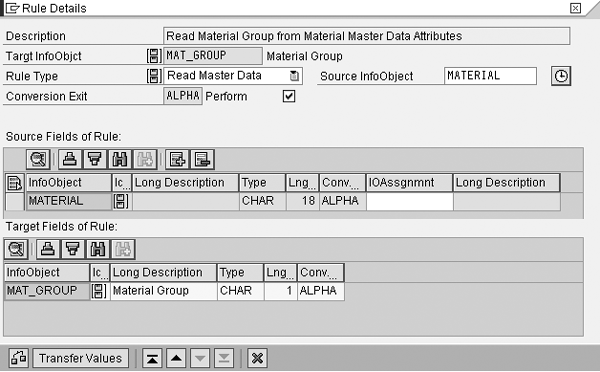
Figure 2
Master data attribute lookup for time-dependent attributes
Click on this icon to see the screen in Figure 3. This allows you to configure how to determine the correct master data attribute. The system compares the date specified here against the Valid From and Valid To ranges in the master data attributes to uniquely determine the correct record.

Figure 3
Time-dependency for reading master data
The three options are Current Date, Constant Date, and use of a characteristic value. In my example, I’m processing information on January 3, 2007 for data valid on January 1, 2007. Using Current Date (the default) would find the master data attributes for January 3, 2007. This is material group Y. I also could use Constant Date, such as 01.01.2007, but this would cause problems with purchase orders dated at other times.
Therefore, I choose the final option. Here, I specify the InfoObject in my source data that holds the date value I want to use. Using the drop-down list, I can select my purchase order date (I added it to the list of source fields in the transformation Rule Details screen beforehand). The Start and End options apply if an exact date does not exist. Here, I can use an InfoObject to represent a date range (for example, fiscal year or period) and specify whether to use the first or last date of that date range.
I could also perform the above lookup using ABAP in a routine. However, I do not normally recommend this. Although performance is slightly better, it requires hard coding, not configuration. This means I must more thoroughly test it, a smaller community maintains it, and it is more subject to breaking due to system changes. Nevertheless, you might not be able to avoid ABAP code in some situations, such as when the source data only has a calendar month, not the specific date, and you must perform the lookup using the fifteenth of that month (i.e., neither Start nor End option works).
Now that the configuration is in place, let’s see what happens when I load data. Figure 4 shows the slightly modified data flow.
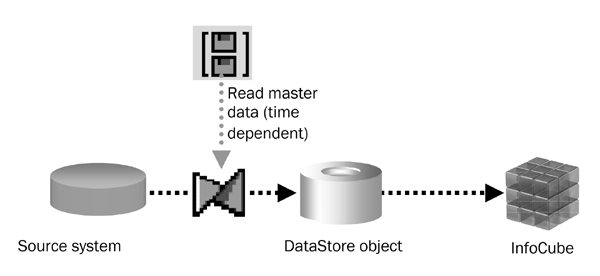
Figure 4
New data flow for improved accuracy
Step 1. Starting position. Material A is part of material group X. This master data is valid and exists in the source system on January 1, 2007. A BW developer loads the master data on January 1, 2007 using an InfoPackage or the data transfer process and stores it in SAP NetWeaver BI against the material InfoObject. The material InfoObject has material group defined as a time- dependent attribute. Figure 5 shows the result.
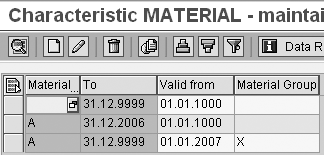
Figure 5
Material master data attributes as at January 1, 2007
Purchase order 001 enters the source system for material A with value 10 on January 1, 2007. When a BW developer loads the record into the DataStore object, the transformation performs a master data attribute lookup to find out the material group valid at the purchase order date. Table 2 shows the data stored in the DataStore object.
|
|
| Table 2 |
Data in SAP NetWeaver BI DataStore object on January 1, 2007 |
Step 2. Master data changes. On January 2, 2007, material A changes in the source system to become part of material group Y. A BW developer loads this change into SAP NetWeaver BI against the material master data attributes. The SAP NetWeaver BI system automatically adjusts the old record to prevent overlapping date ranges (Figure 6).
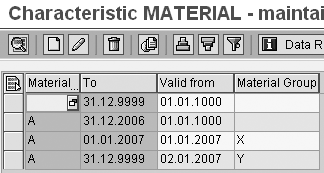
Figure 6
Changed time-dependent master data attributes
Step 3. Transactional data changes. On January 3, 2007, purchase order 001 changes in the source system from a value of 10 to a value of 12. When a BW developer loads the change into SAP NetWeaver BI, the delta process sends two records, one a before image with ROCANCEL of X and a value of - 10 and another an after image with ROCANCEL empty and a value of 12. Both records perform a master data attribute lookup during the transformation to find the material group. However, this lookup uses the purchase order date to determine the material group. Therefore, the DataStore object still holds material group X and not material group Y, as before (Table 3).
|
|
| Table 3 |
Data in SAP NetWeaver BI DataStore object on January 3, 2007 |
I use the DataStore object in my data flow to update the InfoCube. Table 4 shows the records in the InfoCube (generated by SAP NetWeaver BI from the DataStore object change log). This is an improvement on my starting position (back in Table 1) because the material group has retained its old value, but the InfoCube has still been updated with the correct purchase order value.
| 001 |
01.01.2007 |
A |
X |
10 |
| 001 |
01.01.2007 |
A |
X |
-10 |
| 001 |
01.01.2007 |
A |
X |
12 |
|
| Table 4 |
Data in SAP NetWeaver InfoCube as at January 3, 2007 (uncompressed) |
You could load information directly into the InfoCube without using an intermediate DataStore object because the master data attributes cannot change retrospectively (i.e., backdate) as you populate their Valid From value using the system date. However, I still recommend using an intermediate DataStore object. Not only is this good practice, but it also avoids problems in the future should the master data attributes become truly time dependent. I’ll examine this scenario in part 3 of my article series.
Furthermore, an intermediate DataStore object is necessary in two situations. The first situation occurs when using a generated date (such as the system date) to perform the lookup. The original record and the before image use different dates. The original record used the date when the data was processed and will have looked up values based on that date, but the before image uses a different date because it was processed on a different day and so may have looked up different values. The second situation relates to forward-dated transactional data dates, which can have the same effect. I’ll discuss forward-dated data in more detail in the next section.
I used the example of reading master data attributes. However, you also could use this approach for reading data from DataStore objects using ABAP routines. If this is the case, then you need to configure the DataStore object to have some form of date InfoObject in the key fields. The ABAP routine can then use this date to perform the lookup.
Using this solution, you can now reprocess and reload transactional data as long as no one deletes the master data attributes (it is very unusual for this to happen in a productive environment). Therefore, it is much more robust, as well as accurate, than the solution I presented in part 1. This quality also means that you can delete old data from the intermediate DataStore object because you know that you can recreate it on demand. However, before doing this, ensure the next section (future-dated transactional data dates) does not apply.
Forward-Dated Transactional Data Dates
While the previous solution covers most possibilities, it still suffers from problems when you use certain transactional data dates to perform the lookup. This is because the user or the system can set some transactional data dates in the source system. Whether or not this is possible depends entirely on the transaction or system providing the data. Consider the example below, which uses the same configuration as the earlier solution. I assume for the sake of simplicity that my purchase order date can be forward dated.
Step 1. Starting position. The master data attributes are loaded exactly the same as before. For a reminder, refer to Figure 5.
Purchase order 001 enters the source system for material A with value 10 on January 1, 2007. However, the user entering this purchase order sets it to a future date, in my example, 03.01.2007. When a BW developer loads the record into the DataStore object, the transformation performs a master data attribute lookup to find out the material group valid at the purchase order date. This is material group X as it is valid from 01.01.2007 to 31.12.9999. Table 5 shows the data stored in the DataStore object.
|
|
| Table 5 |
Data in SAP NetWeaver BI DataStore object on January 1, 2007 |
Step 2. Master data changes. On January 2, 2007, material A changes in the source system to become part of material group Y. This is processed exactly as before (refer to Figure 6). However, no further changes take place for either master data or transactional data.
In this situation, the data in the DataStore object appears to be inconsistent with that in the master data. Without knowing the history of changes, users who can examine both master data attributes and the transactional data cannot understand why the purchase order appears incorrectly logged against material group X when material group Y is valid. As the master data attributes have changed but the transactional data has not, no delta process is generated to update the information with the correct values.
However, if the transactional data had changed, a delta process would have caused this information to be reprocessed. This is why it is important to continue to use an intermediate DataStore object. Otherwise, the inconsistencies referred to in part 1 will reoccur.
The simple solution to avoid this is to choose a transactional data date that users cannot forward-date (such as system creation date). Another simple option is to gain user acceptance and understanding of the reasons for occurrences of apparently inaccurate information.
However, if neither of these options is possible, then another option is to reprocess the information. SAP does not provide any programs to automatically identify when this has occurred and trigger data reprocessing. You could create a custom program that identifies which master data attributes have changed and then searches for transactional data that should be reprocessed. However, this is highly complex and far beyond the scope of this article.
A simple way of reprocessing the data is to perform a full update of all transactional data where the date (forward dateable) is greater than or equal to the last time the master data attributes were updated. This is normally the previous day (if the system updates data daily). This results in a dual data flow (Figure 7).

Figure 7
Dual data flow for reprocessing forward-dated data
In the BI capabilities of SAP NetWeaver 2004s, SAP introduced the new concept of the data transfer process (DTP). This replaced InfoPackages for moving data within a BI system. The DTP allows developers to configure how data moves from one object to another. More than one DTP can move data between the same source and target object. Each DTP can specify whether to load data using a full or delta process. Also, each DTP can have its own set of filters to restrict which data is sent from the source object to the target. These filters can be set to constants or even use the OLAP variables within the BI environment.
My example is an ideal situation to use the data transfer process to separate the reprocessing load from the regular load. To do this, configure an additional DTP as a copy of the existing one, from the same source into the same target. Set the extraction mode of the new DTP to full update and create a filter for the transactional data date InfoObject using an OLAP variable to determine the date of the previous day. This filter ensures that the DTP processes only the forward-dated data. Previous versions of SAP NetWeaver BI such as SAP BW are far more restrictive and this approach can cause problems with the delta process.
Of course, it is also possible to do a periodic (for example, every weekend) reload of all of the information into the Data- Store object to ensure its accuracy. This still requires the users to accept that forward-dated information may not be entirely accurate for the period of time between reloads.
Which option to use depends on the complexity, performance, and data volumes expected from each approach. Normally, forward-dating would not frequently occur, but this entirely depends on the source system and how users enter the information.
I’ll explain another option to handle forward-dateable dates that avoids reprocessing of data in the next and final part of this article series. The article will cover what happens when the source system does provide time-dependent master data attributes, the additional problems incurred, and how SAP NetWeaver BI provides functionality to ensure precision accuracy.
Time-Dependent Attributes
Master data tables record time-dependent attributes using
Valid From and
Valid To dates. (Note that only
Valid To is part of the key that describes the record uniquely.)
Figure 1, a standard master data maintenance view, shows an example of how SAP NetWeaver BI stores and maintains this data.

Figure 1
Time-dependent master data attributes
The Valid From and Valid To dates determine when the master data is valid. SAP requires that master data attribute records exist spanning every day from 01.01.1000 to 31.12.9999 (as Figure 2 shows). If only part of the date range is covered, SAP NetWeaver BI automatically creates records to fill in the gaps.

Figure 2
Set Valid From to the current date using a formula
Source systems may or may not provide master data attributes with Valid From and Valid To information (i.e., as time dependent or time independent). If your source system provides time independent master data attributes, then you may still store them as time dependent. To do this, record the extraction date as the Valid From and 31.12.9999 as the Valid To.
In my example, assume the source system provides time-independent master data attributes for material. That is, the source system only provides the current material group for a material to SAP NetWeaver BI. If I load information on January 1, 2007, then the source system provides a single record with material A and material group X. In SAP NetWeaver BI, I enter the Rule Details screen for the 0DATEFROM target InfoObject in the transformation. I set the Valid From to the current date using a formula (Figure 2). To create the formula, select Formula as the Rule Type. The system presents a screen to enter a formula. In my case, I need to double-click on the System Date option from the list available in the bottom left of the screen and save.
However, to be more sophisticated, I could set Valid From to be the date when the source system provides (not processes) the information. This may be possible if the source system provides the date of extraction (when using non-SAP interfaces, such as flat files, I have often included this as part of the specification). I could also accomplish this by using a routine to find the date the data request was initiated. In the transformation, I enter the Rule Details screen for the 0DATETO InfoObject. I also set the Valid To field to 31.12.9999 (Figure 3) by setting the Rule Type to Constant.
Figure 3
Time-dependency for reading master data
After loading the records into the master data attributes, the SAP NetWeaver BI system ensures that it’s accounted for the entire date range from 01.01.1000 to 31.12.9999 (during saving and activation). After my first load of information, the master data attributes (in master data maintenance, as before) look like Figure 4. You can see that the SAP NetWeaver BI system has created an additional record for material A, which is valid from 01.01.1000 to 31.12.2006 but has no material group value.
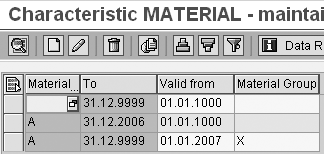
Figure 4
Master data attributes
Let’s assume that the material group in the source system changes to Y. As before, the source system only provides the current information. So, on January 2, 2007, you load a single record for material A, material group Y. The transformation sets Valid From to the current date (02.01.2007) and Valid To to 31.12.9999. Figure 5 shows the new master data attributes.
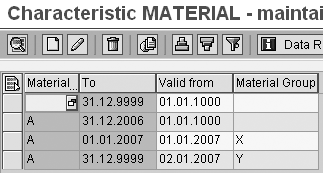
Figure 5
New master data attributes
During master data attribute activation, the SAP NetWeaver BI system automatically sets the preceding record (in this case, the third one in the list in Figure 5) to the day before the Valid From of the new record to avoid overlapping information. The master data activation process uses new records in preference to the currently active ones. However, if any new records overlap (for example, if two loads are inactive because the first was never activated, possibly due to missing a manual action or a failure in a process chain), then the master data attribute activation fails with errors because SAP NetWeaver BI cannot determine the correct record.
Saving time-independent attributes as time dependent can lead to several adjacent identical records with only the Valid To and Valid From separating them, especially if you load the master data attributes using a full update. To consolidate these into a single record, you can run a function via a process chain variant in a process chain called Reorganize attributes and texts for master data. I recommend that you run this after activating the master data attributes.
Notes
SAP NetWeaver BI does not provide the facility to record changes to master data attributes within the same day (i.e., by time); this requires a custom solution.
You may need a different transformation to populate historical master data attributes. My example shows that the SAP NetWeaver BI system sets historic master data attributes to an initial value. Different techniques are available for this, but are beyond the scope of this article.
You should always load master data attributes prior to transactional data. This article does not deal with problems that result from master data changing in the source system between SAP NetWeaver BI loading master data attributes and transactional data.
Note
Back-dated transactional data dates are not a problem because the master data attributes always exist and do not change for historical dates.
Duncan Foster
Duncan Foster is an information strategy consultant with CSC EMEA NR (Ireland, Netherlands, and UK) and is responsible for SAP NetWeaver's advancement. He specializes in helping organizations determine management information and performance management strategies, as well as supplies architectural oversight and project management services. He has worked with SAP since 1999 and SAP NetWeaver BI since 2001, improving the business performance and quality of decision making for thousands of users.
You may contact the author at dfoster20@csc.com.
If you have comments about this article or publication, or would like to submit an article idea, please contact the editor.


 Premium