SAP Learning Solution (LSO) builds on the mySAP ERP Training Management module and mySAP ERP HCM implementation to offer additional learning management system functionality such as new delivery methods, online learning, curriculum management, content design, and version management. Uncover the key LSO components and discover undocumented tips about how to prepare for a successful implementation.
Key Concept
SAP has provided a learning management system for more than 15 years, beginning with a solution called Training and Event Management (now called Training Management [TEM], sometimes referred to as PE in SAP documentation). This system allowed learners to book courses and view their training history via Employee Self-Service, and supported the full suite of classroom training administration functions.
SAP’s current learning software is SAP’s Learning Solution (LSO). Companies still can use TEM to administer classroom-only training or they can choose to leverage LSO functionality to deliver classroom training as well as Web-based training, virtual classrooms, blended learning, and collaboration to their employees.
mySAP ERP Training Management (TEM) serves as the foundation of SAP’s Learning Solution (LSO). However, LSO includes much new functionality such as administering and delivering Web-based training, virtual classrooms, curricula, and online tests. The entire LSO consists of SAP Authoring Environment, Content Management System (CMS), Learning Management System (LMS), Learning Portal, Content Player, Offline Player, Business Intelligence (BI), and the Collaboration functionality (Figure 1).

Figure 1
The main features of LSO
In the first part of this series, we’ll describe the LSO functionality and then we’ll dive into the details and discuss system landscape and architecture as well as implementation best practices, tips, and tricks that you can’t find elsewhere. We’ll focus on the back-end mySAP ERP functionality. In later parts of this series, we’ll describe system and master data configuration and training. We’ll also elaborate on the authoring functions.
Note
SAP introduced LSO in 2002 based on the results of the Life-Long Learning (L3) research project sponsored by the German Federal Ministry of Education and Research and represented by SAP’s Corporate Research Center.
Functional Overview
Let’s take a virtual tour of SAP’s Authoring Environment, CMS, LMS, Learning Portal, Content Player, Offline Player, and Collaboration functionality. Starting with the content author role: Using a tool such as PowerPoint for rapid authoring or Dreamweaver for more sophisticated authoring, the content author, subject matter expert (SME), or instructional designer uses SAP’s Authoring Environment to structure a presentation into Web-based learning content (Figure 2).

Figure 2
LSO’s Authoring Environment
You can use Test Author to create online tests such as pre-tests, post-tests, stand-alone tests and surveys (Figure 3). Test Author is integrated with Authoring Environment. The content author may decide to add a post-test to the content to ensure that the learner understands the content and absorbs the concepts. The post-test can be a stand-alone test or it may be included at the end of the course. The content author can decide whether the learner must pass the test to complete the course; determine the score that constitutes passing; limit the amount of time the learner has to take the test; or set many other parameters around test access and completion.

Figure 3
Use Test Author to create online tests
Once the content author has created and structured the content, the author publishes and releases the new content to CMS, where it is stored as reusable content. CMS also manages the versioning of the content. The publishing process in CMS creates a link to the SAP course definition in LSO.
LSO is Shareable Content Object Reference Model (SCORM, a standard used to create content) 1.2 certified, which means that you can seamlessly export to that format as well as import third-party content that is either SCORM 1.1 or 1.2 conformant. While CMS is part of SAP NetWeaver Portal’s (formerly Enterprise Portal’s) Knowledge Management (KM) layer, you may use any other CMS in place of or in conjunction with SAP CMS as long as it conforms to Web Distributed Authoring and Versioning (WebDAV) level 2.
Once the author successfully releases and publishes the content, the training administrator’s role begins. Training administrators or business users responsible for administration of the course catalog open the catalog in the system (Figure 4). Here they can create a class for the new Web-based training course.

Figure 4
LSO’s course catalog
By selecting the Web-based training delivery method, training administrators can choose from a variety of fields that they can fill with course data, including where to enter the content link from CMS. LSO supports a multitude of delivery methods, including the standard instructor-led training (ILT) or classroom-based, and virtual classroom (VC) courses. The administrator also can create curricula, which is learning comprised of multiple delivery methods often called blended learning. LSO also supports Web-based training and VC courses hosted by third parties.
Once the administrator creates the courses in the training catalog and flags them for release, employees enter Learning Portal to book the classes (Figure 5). If the administrator pushes the content directly to the employees based on their departmental assignment or role, then the employee sees the course as mandatory when accessing the portal.

Figure 5
Book classes in Learning Portal
Note
The Advanced Distributed Learning (ADL) Initiative developed SCORM as a collection of content development standards to support e-learning. It ensures that a single piece of content runs in a variety of learning management systems and that the content is reusable. See https://www.adlnet.org for further information about the SCORM standard.
These personalized learning proposals are easy to create based on already existing organizational assignments or roles in the company. Learners can conduct a skill-gap analysis and receive learning proposals based on their personal knowledge gaps. This compares competencies against job requirements and notifies employees of any skill gaps along with suggested courses to help close those gaps. The learner receives an alert if any licenses or qualifications are about to expire.
The learners also may search for the course on their own using a variety of search tools. These include title or course code searches, keyword or descriptive word searches, or searches based on targeted skills. Once learners locate the desired or mandatory courses, they can register for classes. Employees may have to request registration for a class rather than registering directly for it. In this case, the system routes an approval request to the employee’s manager before the manager approves the enrollment. The system routes the request automatically when workflow is active. This could be for all classes, for all classes of certain delivery methods, or only for specifically flagged classes.
An employee also may collaborate with others participating in a class to enhance the group learning experience through chats, posted white papers, or threaded discussions. The collaboration functionality includes synchronous (instant messaging, chat, shared contact list) and asynchronous (team news, team calendar, team tasks, and document sharing) functionality to provide a more effective learning experience. Learners, instructors, and experts can share information and enhance learning outside the traditional learning environment. They may access these functions directly from the related class in Learning Portal.
When the learner launches the Web-based training from Learning Portal, Content Player extracts the appropriate course from CMS to play for the learner based on the data the training administrator set up in the course catalog (Figure 6). As learners progress through the content, Content Player passes progress information to the learner account in LSO, including information such as how many times learners access the content, how far they have progressed through the content (so the system can bookmark their location), pre-test and post-test scores, and how they prefer to learn so the system can present the content accordingly.
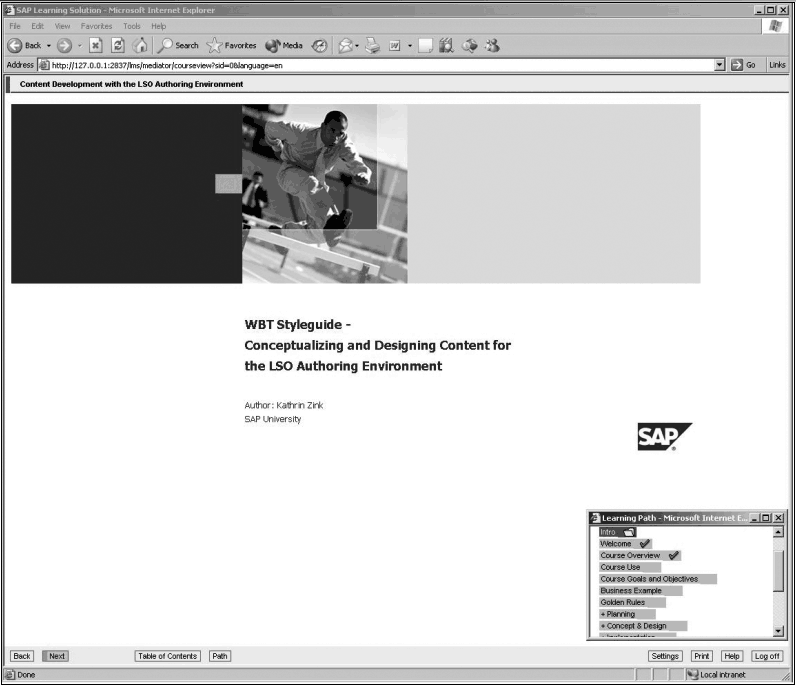
Figure 6
Content Player extracts course information and stores information about learners
The learner also may choose to take courses offline using Offline Player. Offline Player allows the learner to view content when not connected to a corporate intranet or internet. Offline Player looks the same as Content Player. While connected to Learning Portal, learners can download a course onto their laptop. Later, they can take the course offline, anywhere, and anytime.
Once the learners return to the office, they can upload their progress results via a synchronization process. This process synchronizes the results online and ensures that their training record is up to date. Employees do not need to complete the course offline prior to online synchronization. Offline Player tracks where the learner stopped and stores this information online in the learner account during the synchronization process.
Once employees have completed a class, they may have to append an electronic signature to the completion confirmation to validate that they reviewed the content and took the test. This e-signature functionality meets the Food and Drug Administration (FDA) requirements for 21 Code of Federal Regulations (CFR) Part 11 for pharmaceutical companies, which also may support regulatory requirements for other industries. The system automatically transfers course completion information, including e-signature time and date stamp, course pass/fail information, test scores, and any certifications based on completion of the course to the employee’s master data record. Administrators may access this data for reporting purposes and managers also may view this data and analyze it using SAP NetWeaver BI.
Note
Another intranet or internet outside of SAP NetWeaver Portal can host Learning Portal.
System Architecture
If you already have TEM in place, you can implement LSO in conjunction with your current implementation. LSO uses TEM as its foundation, so think of your current implementation as a head start to your LSO implementation. You’re just adding LSO on top of your existing TEM implementation and leveraging all of your previous work.
If you have an earlier version (4.6C and up) of TEM already in place, simply use Application Link Enabling (ALE) to connect the data to the ERP version on which LSO is implemented. If you don’t have TEM in place, implementing it is part of the LSO implementation.
LSO system architecture is based on LSO600, which is powered by SAP NetWeaver 2004s, which is SAP’s application and integration technology platform. Figure 7 highlights the elements of LSO:
• Learning Portal (LSOFE 600) which is an Add-On to Web Application Server (Web AS).
• Training Management (LSOTM 600) is part of mySAP ERP Central Component (ECC), Human Resources Extension.
• Content Player (LSOCP 600) is based on a Java 2 Platform Enterprise Edition (J2EE) Engine.
• Authoring Environment (LSOAE 600) is a Java application installed locally on an author’s PC. You can install this on Windows NT4.0/2000/XP. It requires Java Development Kit (JDK).
• Offline Player (LSOOP 600) is a Java application installed locally on a learner’s PC and you can install it on Windows NT4.0/2000/XP. It requires JDK.
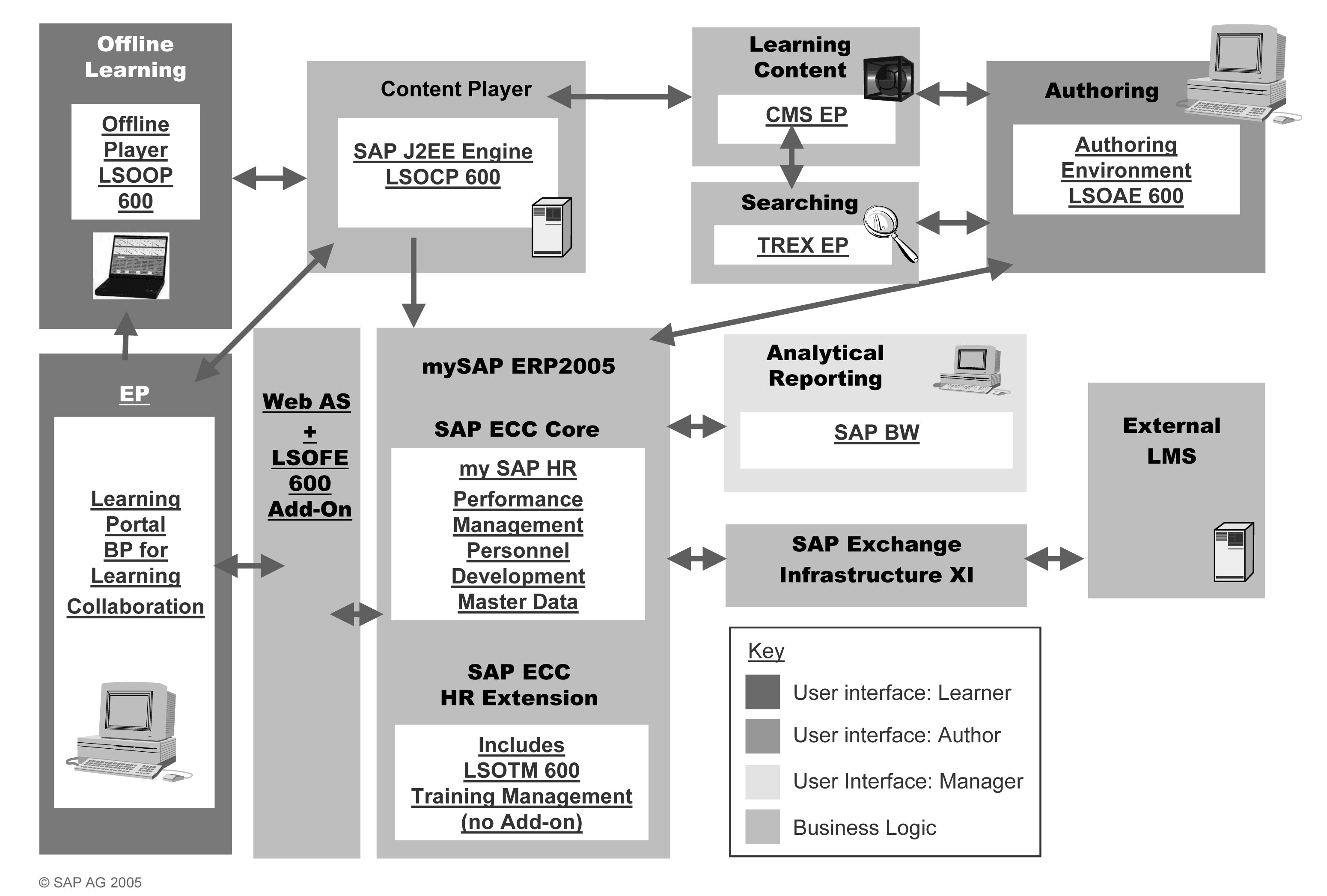
Figure 7
LSO’s architecture
Since LSO depends on the back end of mySAP ERP, the new functionality encompassed in LSO depends on the release. You can use an ALE scenario to separate the LSO instance from the HR data instance (whether it’s on the same release as LSO or an earlier release from 4.6C up). This enhances security and prevents direct access to the production system. If the two instances are on different releases, this landscape allows you to use newer functionality than what is available in the installed HR release.
System Requirements
We’ve outlined the LSO releases, their maintenance schedules, and their related system requirements below:
Learning Solution 2.0 (LSO200):
• Release to customer (RTC) 04/07/2003, Mainstream Maintenance until 03/31/2009
• Based on Basis 6.20
• Add-on to mySAP ERP Enterprise 4.7
Learning Solution 3.0 (LSO300):
• RTC 06/21/2004, Mainstream Maintenance until 03/31/2010
• Based on SAP NetWeaver 2004
• Core is part of ECC 5.0 in mySAP ERP 2004
Learning Solution 6.0 (LSO600):
• RTC 10/24/2005, Mainstream Maintenance until 03/31/2011
• Based on SAP NetWeaver 2004s
• Core is part of ECC 6.0 in mySAP ERP 2005
Note
You may also implement LSO as a stand-alone solution. In this scenario, you receive all of the components you need to use the software, including the back-end mySAP ERP components and SAP NetWeaver Portal and KM functionality.
System Landscape
LSO has both a mySAP ERP interface and a Web-based interface. As you consider your system landscape options, you want to consider this as well as your current system applications and the scope of what you will implement. We’ll discuss the following landscape options: standard landscape, ALE landscape, and stand-alone landscape.
Typically you should have at least two servers to support your LSO implementation. The first server contains your LSO600 back-end system as well as the rest of your HR systems, such as Organizational Management (OM) and Personnel Administration (PA). The ability to leverage existing HR data without any interfaces is one of the strengths of LSO. As such, maintaining all HR data on a single system with LSO is a benefit.
Although two servers is the norm, companies have successfully implemented LSO using only one server for all three components or using three servers, one for each component. As always, the main considerations are security and total cost of ownership. More servers allow for more firewalls, which may be an important consideration if you allow users to book training via LSO. Additional considerations include the amount of content you have, the number of users, whether you are using SAP’s Text Retrieval and Information Extraction engine (SAP TREX) that could require another server, and whether you are implementing an ALE scenario (which would require another server).
Whether your implementation stands alone or not, you should have PA and OM implemented. Optional components to enhance system functionality include Performance Management functions (the qualifications catalog, development plans, and the appraisal functions), Personnel Time Management (PT), SAP NetWeaver Portal, KM, Financial Accounting (FI), Controlling (CO), Sales and Distribution (SD), SAP NetWeaver BI, and Materials Management (MM).
You might choose to go with a separate instance for your LSO implementation for a variety of reasons. Perhaps your current HR release does not support the release of LSO you plan to implement. For example, you might have SAP HR 4.7 but you wish to implement LSO600, which is supported by mySAP ERP 2005. In this case, you need to host LSO on a separate instance. Other reasons might include security concerns or ease of maintenance.
If you implement LSO on a separate instance, you lose the benefit of having all SAP HR data on one system. However, you gain other advantages from implementing LSO on two different systems. As mentioned above, hosting LSO on a separate instance allows for greater security, a key concept particularly if you are allowing users to access your portal and book classes. Additionally, you may find it easier to keep up to date with Support Packages, as you do not have to test their impact on other aspects of your HR system.
If you choose to implement LSO on a separate instance from SAP HR, you need to set up an ALE scenario to enable this. Your ALE scenario should ensure that your SAP HR system passes the following data to your LSO system: a mini-master of personnel data, including the infotypes 0000 (actions), 0001 (organizational assignment), 0002 (personal data), and 0105 (communications data); the organizational structure (objects organizational unit [O], job [C], position [S], and qualifications [Q]); and reporting relationships (Figure 8). You only need to return qualifications data to your SAP HR system via a Remote Function Call (RFC) connection, as LSO becomes your system of record for all training data. This integration is relatively simple and can take two days or less to implement.
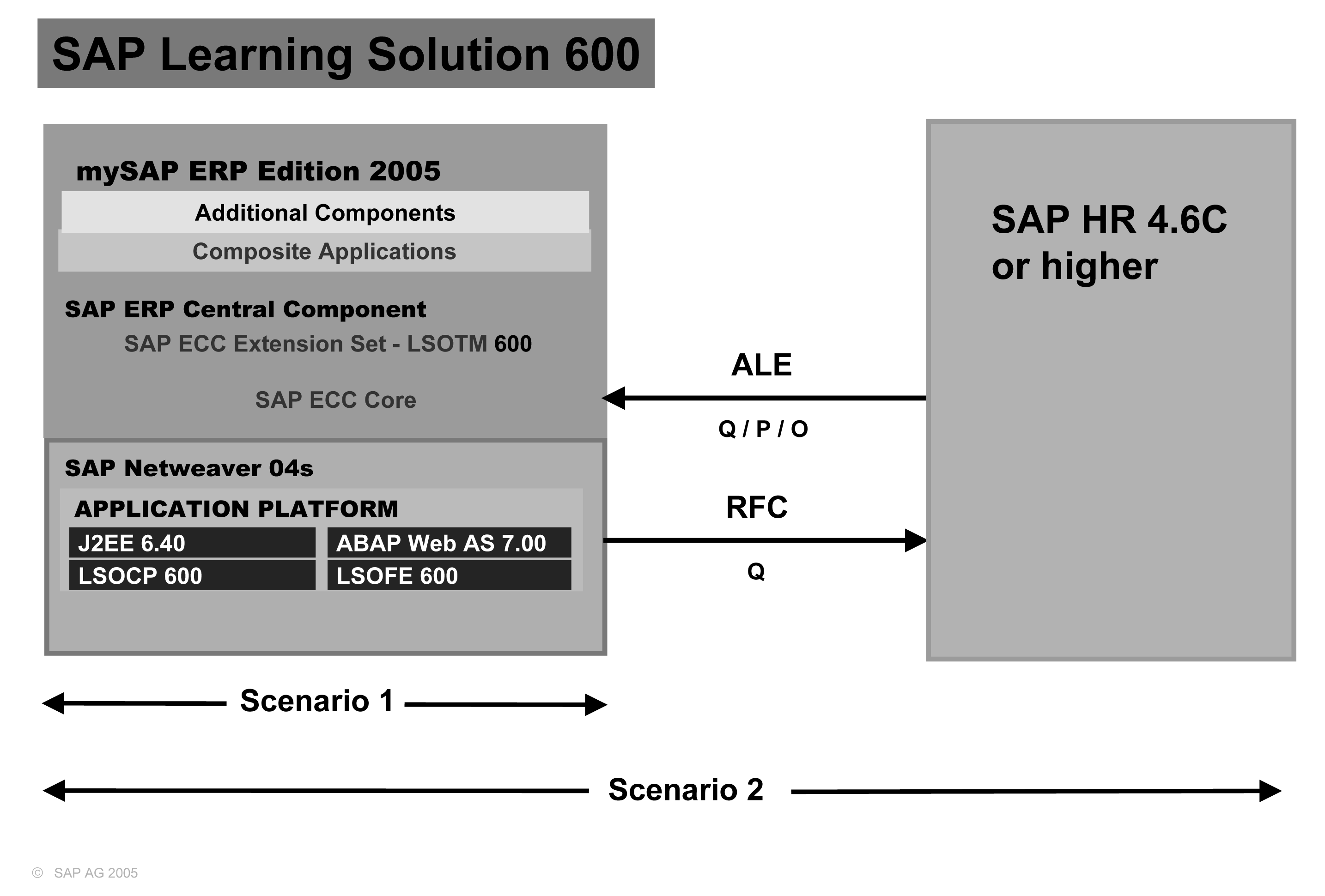
Figure 8
LSO600 ALE implementation scenario
Having basic OM functionality gives you the ability to push courses to people based on their role or departmental assignment in the company and the ability to leverage managerial notification and approval processes. You also may choose to use qualifications for your implementation to support competencies, certifications, and skill-gap analysis.
Some companies without an SAP HR system choose to implement LSO alone. Just as with a third-party vendor, you need name, rank, and serial number information in the system. Companies that choose this route need an integration scenario from their system of record to LSO. SAP stores the data passed from the system of record in PA and OM. If you only purchase LSO, you are able to use PA and OM to store your data even though you’re not licensed to use it for standard HR master data maintenance.
Implementation Planning
As you begin your implementation of LSO, focus on many of the same areas that you would during any other mySAP ERP implementation: the desired functionality; the back-end transactions; the current administration processes; and the configuration requirements. Because of these similarities, you will find that typical project planning processes will serve you well. These include planning, blueprinting, realization, final prep, go-live, and support.
However, as you go through these project phases, you also need to think about the end-user experience and functionality, change management within your organization as you move toward an integrated online learning solution, your current content, and the needs of your authors and instructional designers. Note that we will cover the last point in detail in a future article.
Ask your SAP representative to provide an initial high-level scoping to assist you in determining your project scope. Ensure that you engage a functional consultant with previous LSO implementation experience as well. The consultant should have blueprinting tools, process documentation, and training materials to bring to the table.
While this article gives you an overview of the required skill sets to implement LSO, you may want to send key team members to the SAP HR270 class, which gives a high-level overview of all LSO functionality in three days. As you start to dig into your implementation, you will find process documentation, best practices, and in-depth SAP tutors and presentations covering a variety of aspects of LSO available as an Online Knowledge Product at https://service.sap.com/okp. Note that most of the Online Knowledge Products build upon one another, so you will find useful information for implementing SAP Learning Solution 6.00 in the Online Knowledge Products for both SAP Learning Solution 2.00 and 3.00.
Finally, you should review your current OM and PA setup. As mentioned previously, whether you are implementing LSO alone or in addition to an existing implementation, you need at the very least a mini-master in PA that supports basic name, rank, and serial number type information. Infotypes 0000, 0001, and 0002 store this data. You need to capture communications data such as system user name (to map the person to their portal logon and email address) on infotype 0105, if you plan on sending notifications. The LSO system out of the box expects your system to store this data on subtypes 0001 and 0010 of the communications infotype, respectively. If you used other subtypes or custom subtypes, you can manage this via configuration and Business Add-Ins (BAdIs).
Just as with other SAP implementation projects, the key to a successful LSO implementation is a strong blueprint. As we review the configuration in later articles, you will notice that you can simplify the configuration if your blueprint targets the functions and processes supported by the IMG.
Implementation Skills
We’ll outline two categories of project roles that you should consider for your implementation. The first category is consultant roles, which typically come from a third-party implementation partner. The second category, internal roles, comes from within your organization.
Consulting roles should include an LSO consultant and an SAP NetWeaver Portal consultant. The portal consultant may be part time, depending on the expertise of your internal resources. Table 1 shows technical skills that your implementation team should have. You may also find you need a project manager, an SAP NetWeaver Basis consultant, a security consultant, a BSP developer, and an ABAP developer, as well as resources to help with SAP Exchange Infrastructure (XI), ALE, or workflow, and resources to aid in developing a global learning strategy for content management. These resources depend on the size and scope of your implementation as well as the expertise that currently exists in your company.
| Process-area skills |
Sample tasks |
| LSO and TEM |
• Gather business requirements
• Map requirements to system functionality
• Map data
• Configure systems
• Develop business processes |
| HR master data |
• Ensure HR master data meets the minimal LSO data requirements
• Identify areas that require BAdIs or configuration changes
• May design and set up mini-master to support implementation |
| PD |
• Review qualification and certification requirements
• Ensure existing data supports system design
• Implement a catalog to support system design
• Create appraisal functionality for course/student evaluations
• Develop plans to support system design specifications |
| OM |
• Ensure OM data supports system design
• May design and set up a mini-master to support implementation |
| Authorizations |
• Identify user roles
• Develop profiles to support these roles |
| Portal |
• Design and set up SAP NetWeaver Portal
• Configure CMS and KM functionality such as collaboration setup and design |
| Workflow |
• Review delivered workflow for managerial approval of bookings/cancellations
• Enhance delivered functionality, if needed, to meet system design requirements |
| XI |
• Register technical back-end systems to System Landscape
Directory (SLD)
• Maintain technical connectivity between back-end systems and XI
• Reproduce interfaces of external knowledge provider within integration repository
• Create mapping between SAP interfaces and external interfaces
• Import business systems as service into integration directory and maintain communication channels
• Configure XI scenario based on integration scenario within integration directory |
|
| Table 1 |
Process area skills that an LSO implementation requires |
Your internal roles include project sponsor, project manager, functional team lead, SMEs, change management lead, content developers, Basis and security support, portal support, network operations support, and help desk. You can determine the final number of internal team members and consultants after you define the scope of your implementation.
The required skill set suggested for your implementation falls under two categories: process areas and cross applications. Table 2 summarizes cross-application skill sets. Consultants who support the process areas should have experience in LSO, including PE, HR master data,PD, OM, and authorizations, and work-flow (optional), XI (optional), and SAP NetWeaver Portal (optional), which includes J2EE, Servlet engine, TREX, Content management (WebDAV), and KM. The LSO consultant will probably not know workflow, XI, and SAP NetWeaver Portal because these are more technical roles. However, you should be able to get a single consultant who knows all the HR functions and possibly authorizations, unless the scope of your project demands multiple consultants.
| Cross-application skills |
Process support |
| SD |
• Ensure current customer master and billing/credit functionality in SD supports customer/vendor business requirements |
| CO |
• Ensure current CO configuration
• Supports charge-back functionality for attendees and cost transfer functionality, if required |
| MM |
• Ensure that current MM configuration and material master support requirements to manage material inventory (such as attendee manual) |
| BI |
• Review delivered InfoCubes to ensure they meet all required reporting needs
• Develop new extractors/queries as needed |
| ALE |
• Implement ALE (two-instance landscapes only) |
| Programming |
• Develop custom reports
• Implement BAdIs
• Create new portal views (BSPs) per identified business requirements |
|
| Table 2 |
Cross-application skills that an LSO implementation requires |
Cross-application consultants might have experience in SD, CO, MM, SAP NetWeaver BI, ALE, infrastructure and system Landscape (R/3, mySAPERP, Web AS), and programming and Business Server Pages (BSPs), Java, ABAP, and Directory Access Protocol (LDAP).
Tammie Eldridge
Tammie Eldridge is a solution principal for SAP America responsible for HCM solutions in the retail, telecommunications, utilities, and finance industries. Prior to this, Tammie was the solution manager responsible for SAP Learning Solution, Performance Management, and SAP Tutor. She also served as a consultant implementing mySAP ERP HCM solutions as well as building ROI business cases to help organizations justify implementing HCM solutions. Before joining SAP, Tammie served as a training manager for a major manufacturing company as well as implemented the mySAP Logistics module. She received a bachelor’s degree in business administration in management and a master’s degree in Human Resources/Labor Relations from the University of Illinois.
You may contact the author at tammie.eldridge@sap.com.
If you have comments about this article or publication, or would like to submit an article idea, please contact the editor.

Sharon Wolf Newton
Sharon Wolf Newton, principal and CEO of hyperCision Inc., worked for SAP America for 10 years prior to joining hyperCision. At hyperCision, she currently supports multiple clients implementing SAP Learning Solution (LSO). While at SAP, Sharon was a platinum consultant in LSO and other Talent Resource Management processes. She supported many of SAP’s initial ramp-up customers during their LSO implementations. Other roles Sharon enjoyed while at SAP America included those of HCM practice manager and HCM curriculum product manager.
You may contact the author at snewton@hypercision.com.
If you have comments about this article or publication, or would like to submit an article idea, please contact the editor.


