Get a sneak peek into the enhanced features available in SAP Transportation Management (TM) 6.0. Explore how SAP TM can benefit and streamline your transportation processes.
Key Concept
SAP Transportation Management (TM) 6.0 is a new system for managing transportation processes. Currently in its Ramp-Up phase, SAP TM covers a broad range of transportation functions — from order quotation to freight charge management. With the emergence of SAP TM 6.0, organizations can more easily support basic processes such as master data management or order entry and intricate processes such as transportation optimization or complex freight charges. All required documents and functionality that stem from transportation requests, planning activities, and billing are also available in SAP TM 6.0.
You can implement SAP TM either standalone or integrated with SAP ERP. Both options support all transportation
activities required by an LSP or another company (shipper). SAP TM covers the movement of goods across all means of
transportation (e.g., air, train, truck, or ship) and the relationships between the partners involved in a
transportation chain.
For example, say you have a request to move a container from a company located in Chicago, US, to a company in
Cologne, Germany. In this case, several means of transportation should be involved in executing this request. First,
trucks or trains are necessary to transport the container by road from the company’s origin in Chicago to a port.
Next, a ship must transport the container across the Atlantic Ocean. Then a truck or train must carry the container
from the destination port to the company’s location in Cologne. At the same time transportation means are
changing, several business partners (e.g., consignee, carrier, shipper, or warehouse manager) must perform the
activities required to ensure the container is properly transported as planned.
As described in my example, the processes or phases related to the transportation task can be grouped into four
main categories: order entry, transportation planning, subcontracting activities, and billing or payment. SAP TM
addresses these phases through its order management, dispatching, subcontracting, and charge management functionality.
I’ll provide an introductory overview of SAP TM and explain how its new features can support your
transportation processes. I’ll illustrate the improved user interface (UI) with several screenprints that
represent a transportation process from its inception to completion.
Note
For more information about SAP TM, refer to https://help.sap.com and follow file path SAP Business Suite>SAP Transportation Management. Alternately, if you have login credentials, you can find additional details at
https://service.sap.com/scm.
TM UI
After working many years with SAPGUI, the traditional SAP UI, I found the SAP TM UI to be a nice
surprise. SAP TM transactions are executed in a new client called SAP NetWeaver Business Client (Figure
1). Technically speaking, SAP TM was built following the concept of enterprise service-oriented architecture
(enterprise SOA).
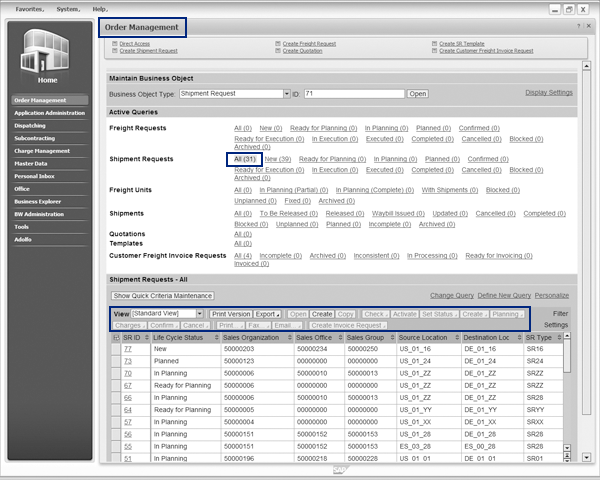
Figure 1
New SAP NetWeaver Business Client UI
Users interact with the transportation system through four key areas at any given time:
- Menus and submenus
- Business objects
- Queries
- Personal object worklist
For example, you can open the Order Management menu and select All (31)
in the Active Queries section to retrieve a list of all shipment requests (SRs). With these
personalized options, users can define their own objects and work with them. The new UI features enable users to
perform relevant tasks on an object or a group of objects by clicking on the Print Version,
Export, Create, Copy, or Planning buttons. For
example, you can use the Print, Email, and Create Invoice Request
buttons to simplify your common transportation processes.
With this new interface, the concept of running transactions is essentially extinct. On the other hand,
the emergence of enterprise SOA offers many possibilities such as new and improved Web interfaces that are easier to
use and have more flexibility. For example, an LSP could integrate the old SR entry from its current portal into SAP
TM.
Order Management Determines What to Move
First, let’s consider what to transport. The order management functionality captures information
from ordering parties through various channels such as Electronic Data Interchange (EDI), XML files, IDOC (when it
comes from an internal SAP ERP), or manually.
In this process, the SR document handles the required information for the transportation. Let’s
review this process using my example of moving a container from Chicago to Cologne. The SR for this scenario is
displayed in Figure 2.
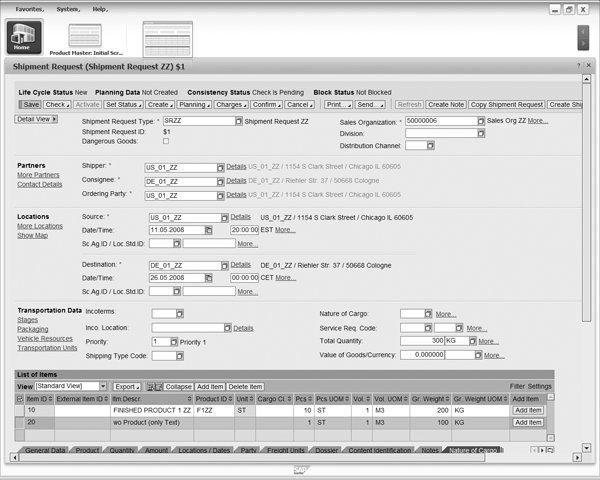
Figure 2
An example of a shipment request
First, you can see the main parties involved: shipper, consignee, ordering party, departure point
(source location), and destination. Additional fields such as Incoterms, Nature of
Cargo, or Shipping Type Code complete the information required for an international
transportation transaction.
The List of Items section includes the goods to be moved and the physical properties of
these items that are used for planning or charge calculations. At this point, you can add items coming from the product
master data or add only the description of the goods to be moved with no link to master data, which item
20 depicts in Figure 2. Similarly, the origin or destination allows using a One-ship-
to location so you’re not required to update that information in the location master data. Instead, you
can simply define it when you create the SR. After you assign the source or destination of an SR, SAP TM prompts you to
activate the One-ship-to location option if you want.
A quotation document could be created previous to the SR, to perform charge calculation or
transportation proposals, but this kind of document cannot be sent to the planning process. With this new document, an
LSP could provide a quote to the customer before initiating the transport, for instance. Prior to TM, SAP does not
offer comprehensive LSP functionality.
SAP TM can integrate with SAP ERP. This is especially important for non-LSP companies, such as those in
the manufacturing industry in which transportation activities focus on the distribution and delivery of sales order
items to the customer. In this case, the SR could be generated from the integration of SAP ERP deliveries. For example,
when you create deliveries in SAP ERP, they’re integrated to TM automatically through SAP NetWeaver Process
Integration (SAP NetWeaver PI). SAP NetWeaver PI maps the ERP delivery fields to SAP TM SR fields.
Freight Units Improve Planning
Previous to the planning, the items contained in the SR are converted into what is called freight units
(FUs). During this process, the items of the SRs are merged or split by the FU builder component in SAP TM. The FU
builder can merge or split the items based on different criteria such as weight intervals or volume intervals so you
can adapt the objects to be moved to any logistics constraints, such as the size or weight limit of the trucks. For
example, if you move pallets of 1000 KG and the SR contains a 3000 KG item, then the FU builder would build three FUs
of 1000 KG each.
Now I’ll describe where and when to load and unload. Dispatching and planning functionality
provides a solution for these tasks. Manual planning or optimization provides a flexible way to determine the sequence
of loading and unloading in a route. At this stage of the planning process, two profiles drive the dispatching and
planning process:
1) Selection profile that drives the selection of FUs to be planned
2) Planning profile that defines the planning logic
With the selection profile, you can select the period to plan and the locations you want to include. For
instance, you might include the FUs for the next two days from Chicago to Europe. On the other hand, the planning
profile defines how the planning runs. You use this profile to define which vehicles should be used and what costs must
be considered. Common costs that drive these considerations include costs per distance, weight, quantity; maximum
duration or distance; and services level penalties.
The dispatching and planning process in SAP TM generates a document called a tour, which contains the
different stages and activities (Figure 3). A tour includes data about planned distance, duration, and
dates, as well as the transportation activities that contain the expected events and times that occur during a tour.
These events typically consist of loading FUs, transporting FUs, and unloading FUs at a destination.
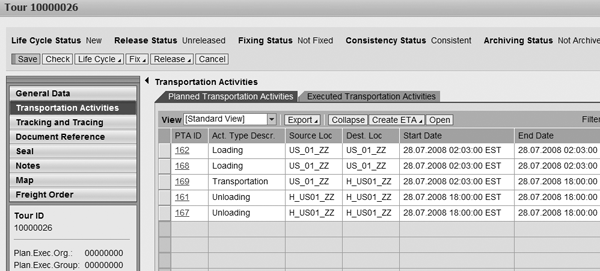
Figure 3
A tour displays planned and executed transportation activities
SAP TM integrates with Geographic Information Systems (GIS) and illustrates a graphical map of the
shipment route (Figure 4). Users can choose between the Manual Planning and
Optimizer Planning options to configure transportation planning. The transportation optimizer is at
the heart of automatic planning, and is similar to the SAP APO TP/VS. SAP TM’s optimizer takes into account the
same transportation constraints, including vehicle capacities, distances between locations, expected delivery dates and
times, and any potential incompatibilities or schedules that affect transportation activities. The optimizer simplifies
the planning process by providing an optimal plan for the selected freight units through the consideration of the best
transportation route and the least expensive type of vehicle.

Figure 4
The Transportation Planning screen integrates with GIS
Subcontracting Options
After you determine the route data either manually or automatically, now you must consider who
transports it. SAP TM contains a new subcontracting functionality that provides several different ways to manage the
relationships with the third parties responsible for executing transportation activities. Subcontractors typically
include carriers, third-party logistics providers (3PLs), air companies, and shipping companies. Many SAP TM objects
such as the booking order, shipment order (SO), and supplier freight invoice request, manage the aspects between an LSP
or a company and its suppliers.
The first element in this relationship is the booking order, which permits the creation of reservations
for a consignment based on agreed terms and conditions. SAP TM supports two categories: one for resource booking (e.g.,
a truck for two weeks) and one for capacity booking (e.g., containers in a vessel or plane). These booking orders could
be used during the planning process.
The SO corresponds to the outgoing transportation order that is sent to the carrier or service provider.
Do not confuse the SO with the SR. The SO relates to the outgoing order while the SR request deals with the incoming
order. Both objects are similar, however, and the SO collects the data required to request a goods movement to a third-
party provider. The SO data is similar to the SR data.
You might be wondering who is going to execute the transport. The tendering process provides an answer.
A tendering profile drives the selection process in SAP TM, which employs various means such as EDI, email, fax, or
Internet to ask providers about their availability to execute a transport. SAP TM provides three helpful tendering
options in the tendering profile:
- Peer-to-peer method (sequential, one-by-one, tender to pre-selected Transportation Service Provider
[TSP])
- Broadcast (simultaneous tendering to selected partners)
- Open tendering to all partners asking for quotas
When you execute the tendering process, you select a tendering profile that defines how SAP TM should
run it. This flexibility allows you to choose or collaborate with partners to determine the best available tendering
option. Compared to traditional methods such as phone calls or faxes, SAP TM provides various means of communication
(e.g., EDI, email, or Web collaboration) to simplify the subcontracting process and improve overall efficiency.
During the subcontracting determination process, SAP TM takes providers’ quotas or limits into
account. For example, these allocations could define the maximum or minimum amount of trucks available for a period of
time by a certain carrier (Figure 5).
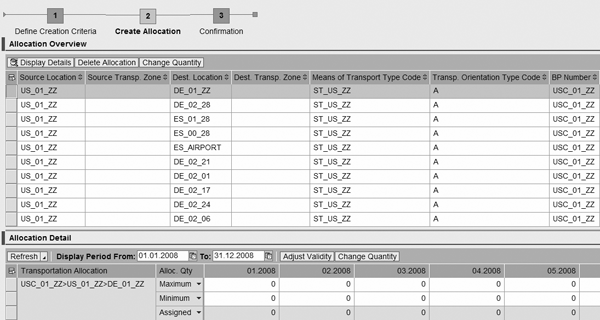
Figure 5
Example of monthly allocated capacity for a certain provider
Transportation Charge Management
Transportation charge management refers to the pricing and cost calculation of transportation processes.
This functionality is symmetrically built so that both the cost of the vendor and the price billed to the customer use
the same calculation engine. Logically, you maintain different rates for both business partners but you follow the same
steps to calculate the final price. Five elements are required to model different calculation processes. SAP TM uses
the same calculation logic to update master data. Users must edit these five elements:
1. Scales
2. Rates
3. Transportation charge calculation sheet (TCCS)
4. Tariff
5. Freight agreement
The transportation charge management logic is vastly different than SAP ERP functionality, in which
pricing and cost calculations are based on condition techniques. I’ll walk you through transportation charge
management with a simple example.
Say you have a scale of distance ranging from >100 KM, 101 to 300 KM, 301 to 500 KM, and so on.
Follow menu path Charge Management>Master Data>Rate to view how SAP TM represents these
distances in the Rate Values screen (Figure 6).
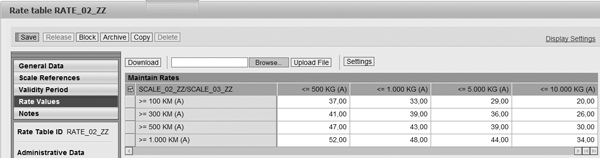
Figure 6
An example of a distance rates scale in SAP TM
The rates combine several scales so you can construct a price table or even a more complex matrix. In my
example, you can combine the previous scale for distances with other scales for weight. Follow IMG menu path
Transportation Management>Charge Management>Charge Elements to display the element types used in
charge calculations in SAP TM (Figure 7). You can generate a multidimensional scale with the origin of
the trip and destination. This functionality provides a new and flexible way to model complex pricing or cost
calculations.
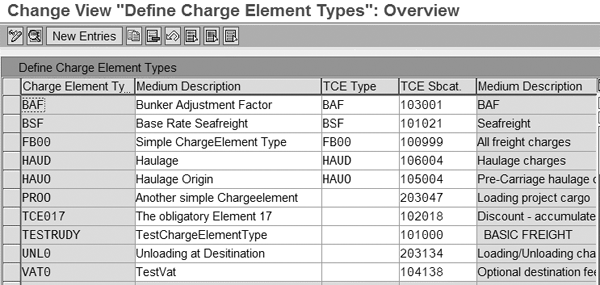
Figure 7
Define element types for charge calculations in SAP TM
Next, the TCCS links rates and different charges through several lines (Figure 8).
These charges depend on the transportation activities, nature of the cargo, incoterms, or others. A few examples of
charges are: distance, weight, insurance, vigilance, and fix costs or surcharges (e.g., bunker adjustment factor, which
typically occurs in sea freight charges).

Figure 8
The TCCS displays the cost and pricing variables relevant to the transportation activity
Then, based on preconditions such as source, destination, transportation mode, or services, the system
determines the tariff that contains the TCCS and therefore the final price structure.
The freight agreement represents the contractual relationship between the LSP and the supplier, for
example. It contains the contract information with the ordering party or LSP. Contracting conditions include payments
terms, limits for credit checking, validity period of the contract, and the tariff for charges calculation. The total
cost and pricing of all activities involved in transportation by ship are depicted in Figure 9.
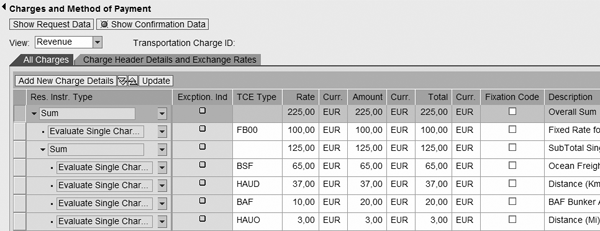
Figure 9
The result of a charge calculation in a shipment request
Organizational and Master Data in SAP TM
Master data typically contains the reasons why something happens in a process. There are very few
differences between the SAP TM master data and other SAP transportation systems such as SAP APO TP/VS or SAP ERP
Logistics Execution System (LES). However, SAP TM offers some exclusive enhancements such as new functionality for
driver management or more sophisticated transportation zones. The master data base for SAP TM consists of:
- Products (if needed as SAP TM accepts text lines with no product code)
- Locations
- Transportation lanes
- Resources (vehicles, drivers, and transportation units such as containers)
- Transportation zones
- Business partners (customer and suppliers)
- Schedules (train, vessels, and flight schedules)
Starting with the locations that refer to any node in the supply chain (e.g., plants, hubs, ports,
airports, customers, and vendors), it’s important to understand the concept of One-ship-to
location offered in SAP TM. With this functionality, sporadic destinations are not required in the master
data. For example, if a destination is used only once, you aren’t required to update it in the location master
data. Instead, you can simply introduce the location data (e.g., address) in the SR directly.
Most of the new concepts introduced in the SAP TM master data area refer to the resources. Together with
the vehicles that add new information such as the registration to the capacities and timetables and comparing to SAP
APO TP/VS, a new type of resource becomes available: the transportation unit, which can be employed for special
packaging instructions or unique containers used during the transport. On the other hand, the concept of a driver
appears with its qualifications so you can manage a pool of drivers and avoid errors when assigning these drivers to
the vehicle. For example, you could assign dangerous goods such as gasoline only to drivers with a special license. A
transportation zone groups a set of nodes (e.g., locations or customers), that provides flexibility through simplifying
transportation lanes (that link the two nodes). Using this functionality, you can add locations to a zone by region, by
range of postal codes, or by location code. For example, you could group all postal codes beginning with 33 that refer
to a certain region in a specific country in one transportation zone.
Enhanced Communication
With globalization, the complexity of transportation processes has grown up and the effective
communication with the partners involved is a key factor. Technologically speaking, SAP TM takes full advantage of the
SAP NetWeaver platform. SAP TM employs SAP NetWeaver Business Intelligence (BI) for reporting and SAP NetWeaver PI for
communication with other partners.
Note
Regarding the communication with other partners involved in the transportations activities, several means of communications exist such as mail, fax, EDI, and XML files. Communication follows international standards like EDIFACT. Most of the TM objects such as shipment requests, shipment orders, bookings, and invoices follow the international standard EDIFACT, which is developed under the United Nations (UN). Some of these objects are:
- IFTMIN for shipment request (in-bound process) and shipment orders (outbound process, subcontracting)
- IFTSUM for freight shipment request
- IFTMBF booking order
- UN/EDIFACT recommendation 23 for freight cost codes, as shown in Figure 7
Read more about recommendation 23 at www.unece.org/cefact. For detailed information about UN standards, refer to www.unece.org/trade/untdid/welcome.htm.
In addition to electronic communication, SAP TM objects offer standard printable forms such as roadway
bill, bill of lading, confirmation of request, and multimodal transport bill of lading or packaging labels
(Figure 10).
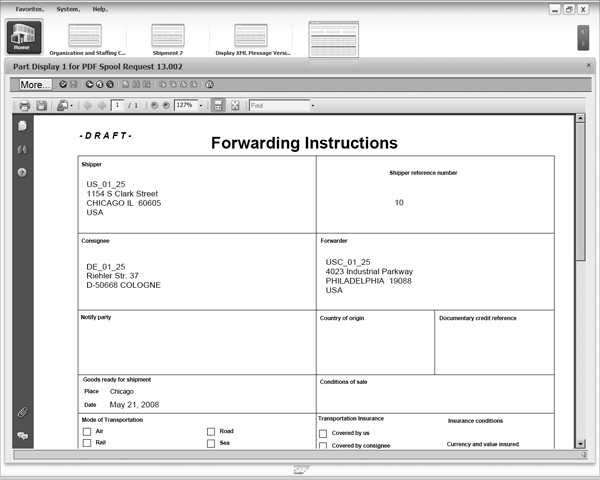
Figure 10
Forwarding instructions can be printed from a shipment request
Specially integrated with SAP ERP, SAP TM communicates the document flow through SAP NetWeaver PI. There
are different scenarios that can be modeled, depending on what step of the transportation process takes place in SAP TM
or SAP ERP. Say an SR from SAP ERP deliveries is generated for a manufacturing company and integrated to SAP TM. In
this scenario, the shipment order could be integrated for costing purposes in SAP ERP but the rest of processes (such
as dispatching and tendering) occur in SAP TM.
If you are using shipment document in SAP ERP and you prefer to continue managing the shipments in SAP
ERP, but at the same time want to take advantage of the tendering functionality in SAP TM, there is another scenario
available. In this scenario, only the shipment documents are integrated to SAP TM so you can use the tendering
functionality, but the rest of the process (such as planning or costing) still occurs in SAP ERP.
Say the billing and payment process in which the customer and supplier freight invoicing request are
sent to SAP ERP only, while the rest of the process such as planning, tendering, and costing occurs in SAP TM. In the
case, customer invoicing is converted into a Sales and Distribution (SD) billing document for the requesting company.
Conversely, a purchase order is created with its corresponding service sheet in SAP Materials Management (MM) for the
supplier. SAP ERP 6.0 supports the billing and payment process, which requires enhancement set ECC SE-603.
Trace and Tracking Features
The transportation processes, involving sometimes several levels of subcontracting, can make executing
the shipment difficult to control. For example, you can plan the activities; however, it’s not easy to achieve
visibility or feedback about exactly when they are executed and how. In this context, SAP Event Manager (EM) provides
the connection of SAP TM events and the real world (execution). SAP EM covers the notification of expected events
during the shipment and unexpected events that alter the compromises.
Expected events are the milestones that occur in a transportation process, such as pickup, departure,
arrival, proof of delivery, and so on. On the other hand, the unexpected events are other activities that can affect
the shipment, such as delays, traffic jams, storms, or a punctured tire. Figure 11 shows an example of
a proof of pickup in SAP EM.

Figure 11
SAP EM notifies you of a successful proof of pickup
Additionally, SAP EM helps to increase the efficiency of these events and provides various actions to
respond either manually or automatically to events that arise unexpectedly. For example, if a delay is reported, then
you could send an email informing the customer of it and re-plan other related activities in the shipment accordingly.
Another scenario included in SAP EM tracks the events related to a particular resource. This is
especially important in the case of transportation units (containers) so you know where one of these elements is
located at any point of time in your supply chain.

Adolfo Menéndez Fernández
Adolfo Menéndez Fernández is the application architecture manager at Repsol in Madrid. Previously, he worked at SAP Consulting Spain as the logistics consulting manager. He studied at the University of Oviedo, where he earned an electronic engineering degree. He is a certified SAP consultant in supply and demand planning (SNP and DP), order fulfillment (Global Available-to-Promise), production planning and detailed scheduling (PP/DS), as well as procurement and materials management (MM). Adolfo has more than 10 years of SAP implementation experience in the consumer product goods, pharmaceutical, automotive, furniture, textile, chemical, oil & gas, and steel industries using SAP ERP logistic modules (including PP, MM, and sales and distribution [SD]) as well as SAP SCM (DP, SNP, and PP/DS). He is APICS certified in Production and Inventory Management (CPIM).
You may contact the author at asturiasadolfo@yahoo.com.
If you have comments about this article or publication, or would like to submit an article idea, please contact the editor.


 Premium