Learn how to carry out product interchangeability in SAP Advanced Planning and Optimization (SAP APO) Supply Network Planning (SNP) when one product needs to be replaced with another from a particular date or when you need to plan a set of interchangeable products with the same technical properties.
Key Concept
There are two major interchangeability scenarios: product interchangeability and Form-Fit-Function (FFF) classes. In product interchangeability, one product is replaced by another based on different use-up strategies, whereas in FFF, you have several fully interchangeable products. Both scenarios are used according to different business requirements. Product interchangeability options supported by SNP are product discontinuation/forward interchangeable, supersession chain/fully interchangeable, and FFF classes/fully interchangeable.
SAP Advanced Planning and Optimization (SAP APO) Supply Network Planning (SNP) has two major interchangeability scenarios – product interchangeability and Form-Fit-Function (FFF) classes. In product interchangeability, one product is replaced by another based on different use-up strategies, whereas in FFF, you have several fully interchangeable products.
Both scenarios are used according to different business requirements. Product interchangeability options supported by SNP are product discontinuation/forward interchangeable, supersession chain/fully interchangeable, and FFF classes/fully interchangeable.
Overview of Interchangeability Scenarios
In this section I provide you with an overview of product interchangeability and FFF classes.
Product interchangeability is a process in which one product is replaced by another product from a specific date. It can be further divided into two categories as shown in Figure 1. Forward interchangeability occurs when a product can be replaced in only one direction—for example, Product X can be replaced by Y and not vice-versa. On the other hand, in full interchangeability one product can be replaced by another and vice-versa.

Figure 1
Product interchangeability
With FFF classes you have set of products that are technically similar (form, fit, and function). All the products within a FFF class would be interchangeable with each other and one of the products within the class would be the leading product. This is explained in detail in a later section of the article.
A Business Scenario
Consider my example of a simple supply chain network of a manufacturer consisting of a single plant and multiple distribution centers. Figure 2 diagrams the supply chain network that is discussed in this article. Products are manufactured at PLANTA and shipped to the distribution centers DC01 and DC02 based on demand and corresponding supply. PROD-X is an old product that is sold by the manufacturer. PROD-Y is a superior and advanced version of the same product. You need to plan to phase out PROD-X and plan for PROD-Y going forward and determine a proper planning strategy.

Figure 2
An example of a supply chain network
Master Data Objects Needed in SNP to Use Product Interchangeability
You have a set of products (A1, A2, and A3) that are almost identical to each other. Any one of these can be used to fulfill the demand of other. Among these three products you have A1, which is your leading product. You plan for this product based on total demand.
Before using product interchangeability, you need to have master data configured in the system for the following objects:
- Locations
- Products
- Transportation lane
- Resources
- Production Process Model (PPM)
Note
I assume readers know how master data is set up and configured in SAP APO. For this article I show only the screenprints of the master data used in the article.
Locations
To configure the master data for locations, execute transaction code /SAPAPO/LOC3. I have created Location PLANTA of location type (1001) and DC01 and DC02 of location type (1002) as shown in Figures 3, 4, and 5.
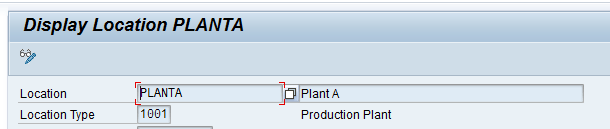
Figure 3
Location PLANTA

Figure 4
Location DC01
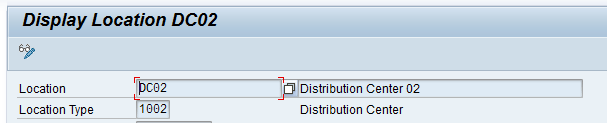
Figure 5
Location DC02
Products
To configure master data for products, execute transaction code /SAPAPO/MAT1. In this article, I have created products PROD-X, PROD-Y, PROD-A1, PROD-A2, and PROD-A3 at locations PLANTA, DC01, and DC02. Figure 6 shows one of the products, PROD-X at PLANTA.

Figure 6
PROD-X at PLANTA
Transportation Lane
To configure master data for a transportation lane, execute transaction code /SAPAPO/SCC_TL1. I have created transportation lanes from PLANTA to DC01 and DC02 and assigned all the products to each lane. Figure 7 shows the transportation lane from PLANTA to DC01 and all products assigned to it.

Figure 7
Transportation lane from PLANTA to DC01
Resources
To configure master data for resources, execute transaction code /SAPAPO/RES01. I have defined RESOURCE-A at location PLANTA as shown in Figure 8.
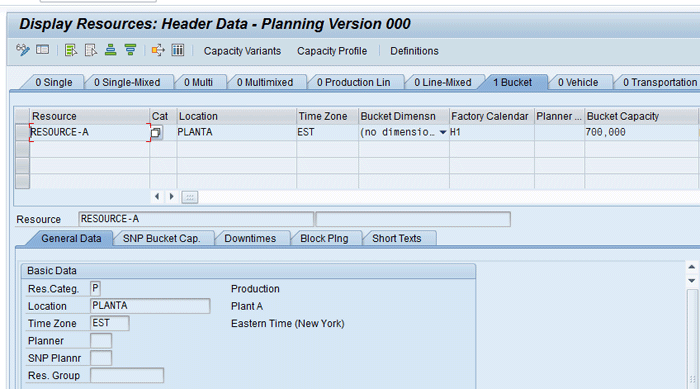
Figure 8
RESOURCE-A header data
Production Process Model (PPM)
To configure master data for a PPM, execute transaction code /SAPAPO/SCC03. I have created PPM for PROD-X and PROD-Y at location PLANTA. Figure 9 shows the PPM for PROD-X at PLANTA.

Figure 9
PPM for PROD-X at PLANTA
Note that SAP provides an alternative data structure in the form of Production Data Structure (PDS). You can use it as an alternative to PPM. It is generated via the Core Interface (CIF) from the SAP ERP Central Component (ECC) system. PDS provides slightly more advanced functionality in terms of supporting processes such as engineering change management and variant configuration. Use of PPM or PDS depends on the business requirement and for this article, I have chosen PPM.
I have shown all the master data created manually in SAP APO and assigned it to Active Model 000. However, this master data can also be created in ECC and then transferred to SAP APO via CIF. The diagram in Figure 10 shows the mapping between master data objects in ECC and SAP APO.
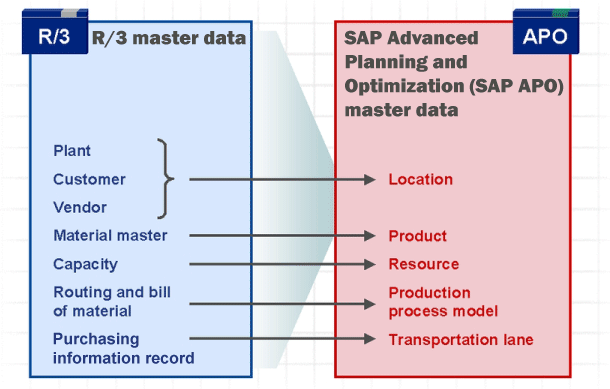
Figure 10
Master data mapping between ECC and SAP APO via CIF
Prerequisites for Using Product Interchangeability in SNP
To use product interchangeability in SNP, you need to configure the following settings.
Activate product interchangeability in Customization. Follow menu path SPRO > Advanced Planning and Optimization > Supply Chain Planning > Supply Network Planning (SNP) > Basic Settings > Maintain Global SNP Settings. In the screen that appears, select the Product Interchangeability Activated from the drop-down list of options as shown in Figure 11. Click the save icon to save the profile.

Figure 11
Activate product interchangeability in SNP
To run the heuristic interactively and see the results, you need to use standard SNP planning book 9ASNP_PS and data view PROD_SUBST. This planning book contains key figures relevant for product interchangeability such as substitution demand and substitution receipt. An interactive planning book can be accessed via transaction /SAPAPO/SDP94 as shown in Figure 12.

Figure 12
Product interchangeability planning book
Note
For this article I have shown a heuristics run via standard SNP Planning Book/Data View 9ASNP_PS/PROD_SUBST. However, it is also possible to make a copy of this standard planning book and then use it to carry out product substitution.
I use two common steps throughout the article for demonstration: Product View and Interactive Planning Book.
Product View: To see the requirements, receipts, and stock of a product available at particular location execute transaction /SAPAPO/RRP3. In the screen, enter the Plng Version (planning version) as 000, the Product as PROD-X, and the Location as DC01 (Figure 13).

Figure 13
The Product View screen
Interactive Planning Book – Loading Data and Running Heuristics: To run the location heuristics and see the results of product interchangeability, execute transaction /SAPAPO/SDP94 and load the data from planning book/data view 9ASNP_PS/PROD_SUBST as shown in Figure 14.
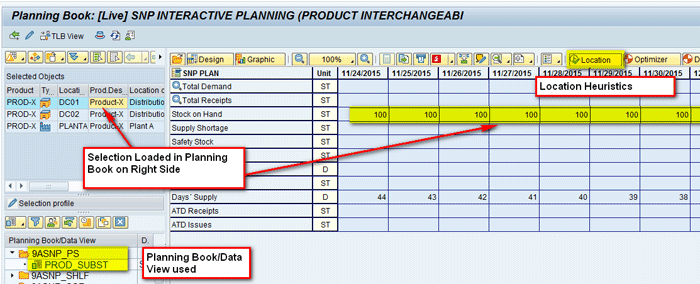
Figure 14
Load data in the planning book
Configuration of Interchangeability Group Master Data
To create interchangeability master data (supersession chain) execute transaction /INCMD/UI. In the next screen, click the create icon. In Figure 15, enter the Group name (SC) and Group Description (Supersession Chain). Click the Location tab.

Figure 15
Header data for the supersession chain
In the Location tab, click the add icon as shown in Figure 16.
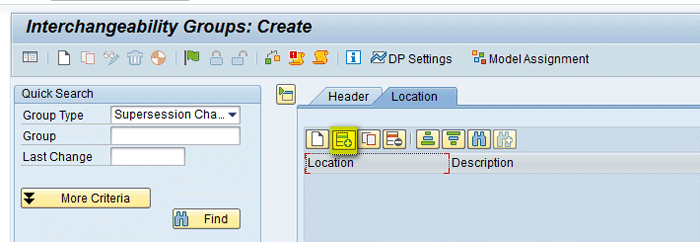
Figure 16
Add the location in the supersession chain
In the new row added below Location, give the name of the location (PLANTA) and press Enter. The description is then auto populated as shown in Figure 17.

Figure 17
Location PLANTA in the supersession chain
Similarly, add two more rows by clicking the add icon for DC01 and DC02 and your screen will look like Figure 18.
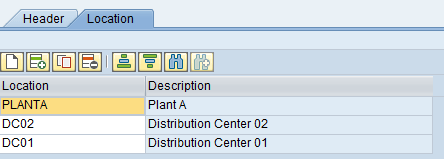
Figure 18
Multiple locations added in the supersession chain
Navigate to the Header tab. Under the Details section click the create icon to add a product. A new row is created. In this row (Figure 19), enter a name (e.g., PROD-X) in the field under Predec. Product (predecessor product). In the field under PrQuaFact (preceding quantity factor), enter 1 (to signify that one unit of PROD-X will be replaced by one unit of PROD-Y), and in the field under Suc. Prod (succeeding product), enter PROD-Y.

Figure 19
Product details added in the supersession chain
In the same screen, (Figure 20), fill in the other fields by scrolling to the right. Enter 1 in SuQuaFact. (succeeding quantity factor). The Valid-from Date is 01/01/2016, the Direction is Forward, and Use-up is No. After entering all the details, select the release flag icon and then click the Model Assignment button. Model assignment is used to assign the supersession chain created to Model 000 and then you can use the supersession chain for planning.
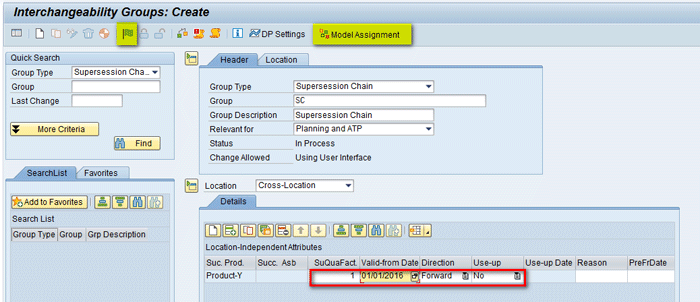
Figure 20
Save the product in the supersession chain
In the next screen, select Model 000 on the right side and select the arrow button to move it to the left side as highlighted in Figure 21.

Figure 21
Assign a model number to the supersession chain
In Figure 22, you can see that Model 000 is now assigned and present under Interchangeability Group SC. Save the changes by clicking the save icon.

Figure 22
Assignment of the model to the supersession chain is complete
After creation of a supersession chain, there is another transaction you can use to assign the interchangeability group to model 000. Execute transaction /SAPAPO/INCMD_MODEL. In the next screen (Figure 23) give the name of Interchangeability Group created (SC) and click the execute icon.

Figure 23
An alternative way to assign the model to the interchangeability group
In the next pop-up screen select Model 000 and then click the green checkmark icon as shown in Figure 24.
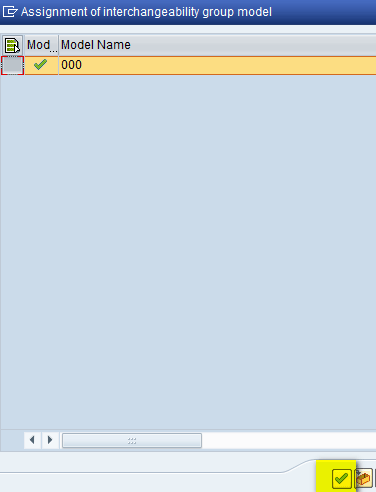
Figure 24
Model 000 assigned to the interchangeability group
Heuristic Run for Use-Up Strategy No
In use-up strategy No after the Valid-from date, the demand for PROD-X is transferred to PROD-Y via product substitution orders. The remaining inventory for PROD-X is not used.
In the above section, you saw while creating suppression chain Use-up No was selected as shown in Figure 20. In the Product View (Figure 25), you can see stock of 100 for PROD-X and forecasts of 50 on 12/05/2015 and 80 on 01/10/2016.
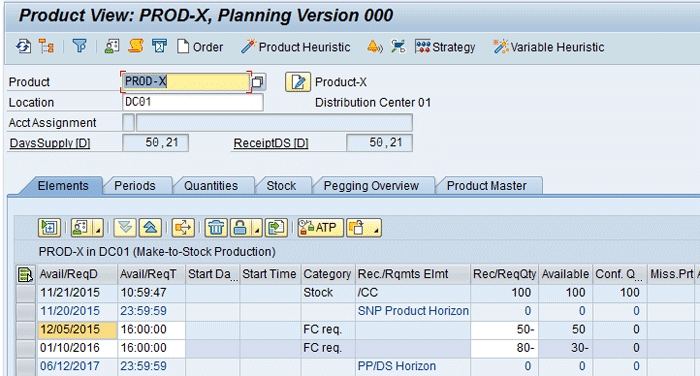
Figure 25
Initial scenario for stock and forecast for PROD-X at DC01
PROD-Y at DC01 does not have any stock/requirement as shown in Figure 26.

Figure 26
Initial scenario for PROD-Y at DC01
In the interactive planning book you can see that for PROD-X at DC01, demand of 50 on 12/05/2015 is met by the existing stock of 100 (Figure 27). After consumption, the stock is reduced by 50. However, for the demand in 01/10/2016 of 80, the existing stock of 50 is not used, and you see a supply shortage of 80. The reason for that in the supersession chain you defined the Valid-from date as Jan. 1, 2016, so PROD-X is not valid from Jan. 1, 2016. Any demand for PROD-X after Jan. 1 would be met by PROD-Y. Also since the use-up strategy is No, even though you have existing stock of 50 present for PROD-X it is not considered after Jan. 1, 2016. It is considered as dead stock. Now click the Location button to run the location heuristics (Figure 27).

Figure 27
Run location heuristics for PROD-X at DC01
After running the location heuristics, you can see Substitution Receipt (Planned) key figure is populated with the quantity of 80 (Figure 28). The predecessor product is PROD-X and the successor product is PROD-Y.

Figure 28
Location heuristic results for PROD-X at DC01
Now load data for PROD-Y at DC01 in the planning book. You can see that the Substitution Demand (Planned) key figure is populated with the quantity of 80 (Figure 29). This quantity of 80 is a requirement coming from PROD-X to PROD-Y as PROD-X is not valid in January 2016. Now click the Location button to run the location heuristics as shown in Figure 29.

Figure 29
Run location heuristics for PROD-Y at DC01
After running the location heuristics, you can see Distribution Receipt (Planned) key figure is populated with the quantity of 80 (Figure 30). Also you can see that to cover the requirement it has created a purchase requisition for the quantity of 80 for PROD-Y. The source is PLANTA.

Figure 30
Location heuristic results for PROD-Y at DC01
Now load data for PROD-Y at PLANTA in the planning book. Here you can see that the Distribution Demand (Planned) key figure is populated with 80 (Figure 31). Now click the Location button to run the location heuristics as shown in Figure 31.

Figure 31
Run location heuristics for PROD-Y at PLANTA
After running the location heuristics, you can see the Production (Planned) key figure is populated with 80. Also you can see that to cover the requirement it has created a planned order of 80 for PROD-Y with the source of supply using PPM of PROD-Y as shown in Figure 32.
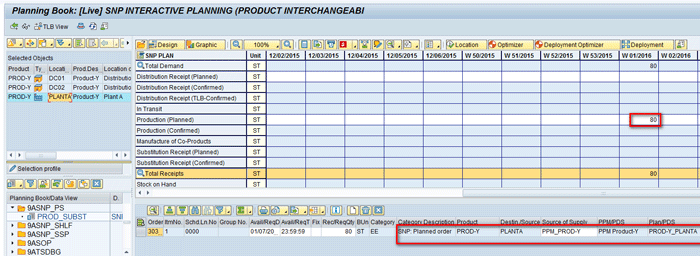
Figure 32
Location heuristic results for PROD-Y at PLANTA
You can see the same details in the Product View also for the respective product at the locations shown in Figures 33 to 35.
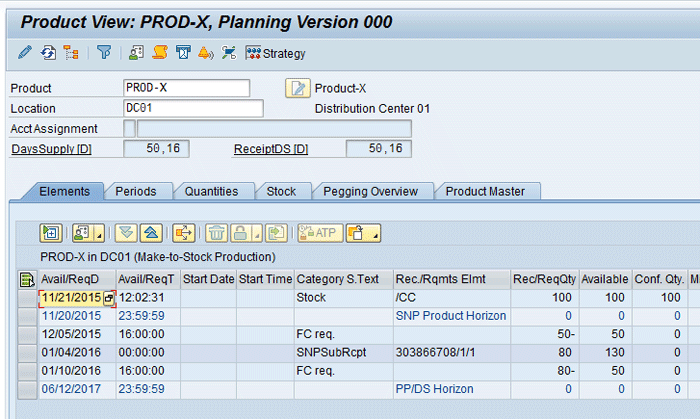
Figure 33
PROD-X at DC01
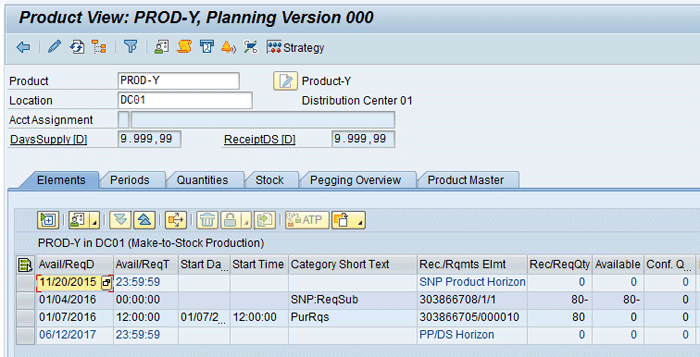
Figure 34
PROD-Y at DC01
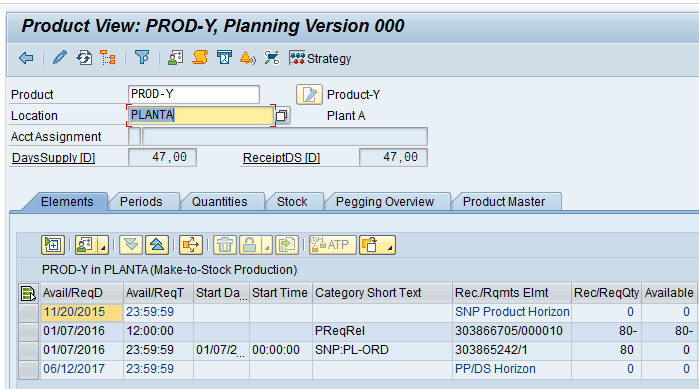
Figure 35
PROD-Y at PLANTA
Heuristic Run for Use-Up Strategy Restricted
In use-up strategy Restricted, after the Valid-from date the demand for PROD-X can still be met using the inventory of PROD-X until the use-up date. After the use-up date, the demand is transferred to PROD-Y via product substitution orders. The remaining inventory for PROD-X is not used.
To use the use-up strategy as Restricted, you need to modify the interchangeability group supersession chain created in the above section. To change it, execute transaction /INCMD/UI (Figure 36). Change the Valid-from date to 12/04/2015, the Use-up to Restricted, and the Use-up Date to 01/04/2016. After making the changes, click the save icon.

Figure 36
Supersession chain with use-up strategy Restricted
In the Product View, you can see stock of 100 for PROD-X and a forecast of 10 on 11/25/2015, 40 on 12/06/2015, and 50 on 01/14/2016 at location DC02 as shown in Figure 37.
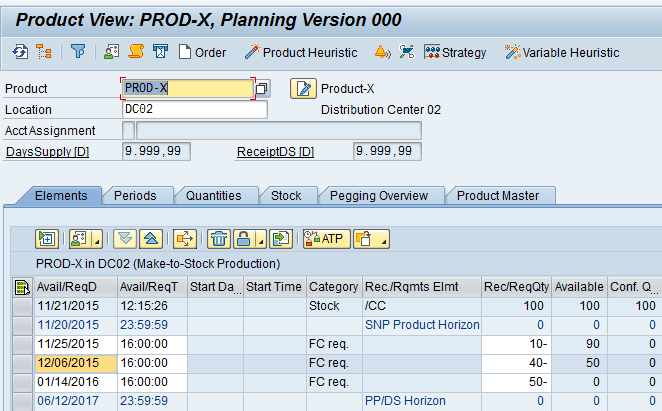
Figure 37
Initial scenario for stock and forecast for PROD-X at DC02
PROD-Y at DC02 does not have any stock/requirement as shown in Figure 38.
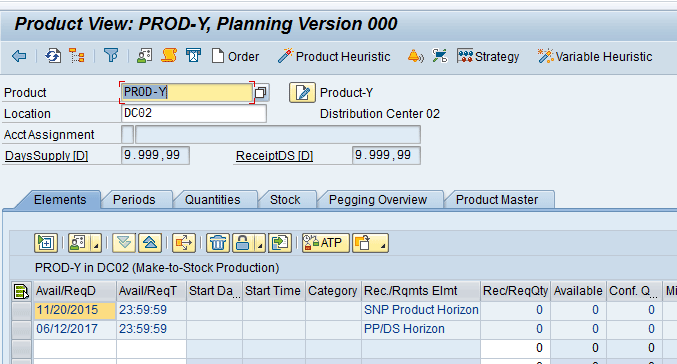
Figure 38
Initial scenario for PROD-Y at DC02
In the interactive planning book you can see that for PROD-X at DC02, demand of 10 on 11/25/2015 is met by existing stock of 100. (After consumption, the stock is reduced to 90.) Demand on 12/06/2015 is met by existing stock of 90. (After consumption the stock is reduced to 50.) However, the demand of 01/14/2016 for 50 is not met by the existing stock of 50. It is showing a shortage of 50. The reason for this is that in the supersession chain you defined the Valid-from date as 12/04/2015, the Use-up date as 01/04/2016, and the Use-up strategy as Restricted.
That means that until 01/04/2016 any existing stock of PROD-X can be used to fulfill its demand even though its validity is only until 12/04/2015. This is the reason why demand on 12/06/2015 is met by existing stock of 90. (After consumption, the stock is reduced to 50.) However, after 01/04/ 2016, any existing stock of PROD-X can’t be used and would be considered dead stock. In order to fulfill the requirement of 50 in 01/2016, you need to run the location heuristics as shown in Figures 39 and 40.
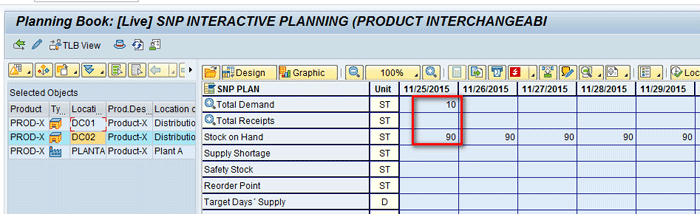
Figure 39
Running location heuristics for PROD-X at DC02
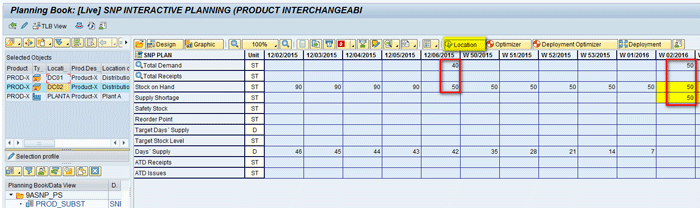
Figure 40
Running location heuristics for PROD-X at DC02
After running the location heuristics, you can see Substitution Receipt (Planned) key figure is populated with 50. The Predecessor product is PROD-X and the successor product is PROD-Y as shown in Figure 41.
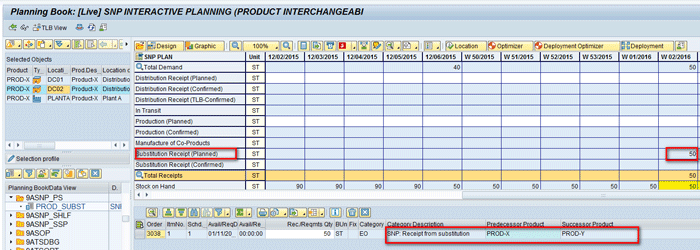
Figure 41
Location heuristic results for PROD-X at DC02
Now load data for PROD-Y at DC02 in the planning book. You can see that Substitution Demand (Planned) key figure is populated with 50. Also this quantity of 50 is a requirement coming from PROD-X to PROD-Y as PROD-X is not valid after 01/04/2016. Now run the location heuristics as shown in Figure 42.

Figure 42
Running location heuristics for PROD-Y at DC02
After running the location heuristics, you can see the Distribution Receipt (Planned) key figure is populated with 50. Also you can see that to cover the requirement it has created a purchase requisition for 50 for PROD-Y. The source is PLANTA as shown in Figure 43.
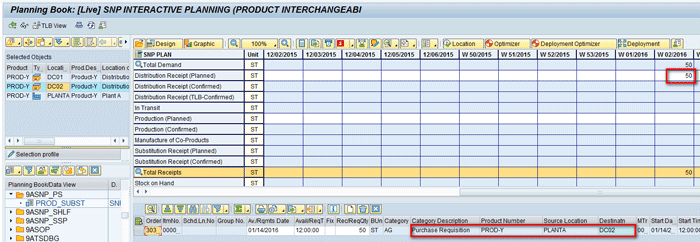
Figure 43
Location heuristic results for PROD-Y at DC02
Similarly load data for PROD-Y at PLANTA in the planning book and run the location heuristics that will populate the Production (Planned) key figure with 50. To cover the requirement it has created a planned order of 50 for PROD-Y with the source of supply using PPM of PROD-Y as shown in Figure 44.
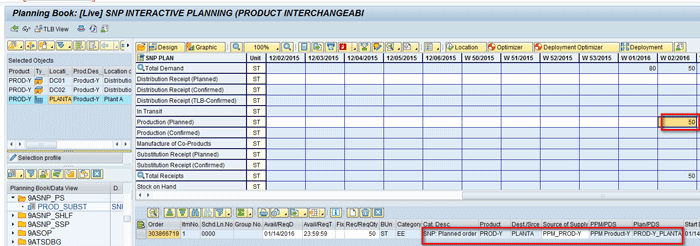
Figure 44
Location heuristic results for PROD-Y at PLANTA
You can see the same details in the Product View for the respective product in the locations in Figures 45 to 47.

Figure 45
PROD-X at DC02

Figure 46
PROD-Y at DC02
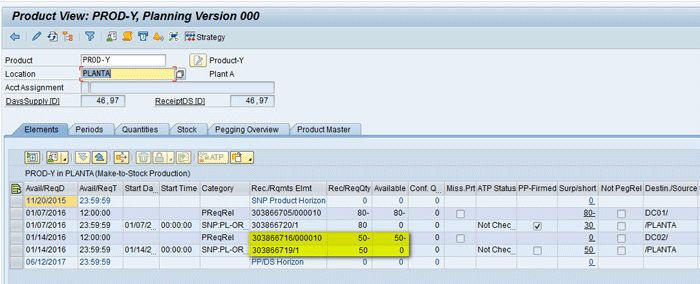
Figure 47
PROD-Y at PLANTA
Heuristic Run for Use-Up Strategy Yes
In use-up strategy Yes the demand for product X is transferred to product Y only if it can’t be met by the inventory of product X. In this strategy, the valid from date is ignored and the inventory of the predecessor product can be used until it’s completely consumed.
To use the use-up strategy as Yes, you need to modify the interchangeability group supersession chain. Execute transaction /INCMD/UI and in Figure 48 change the valid from date (e.g., 12/04/2015) and change Use-up to Yes. After making the changes, click the save icon.
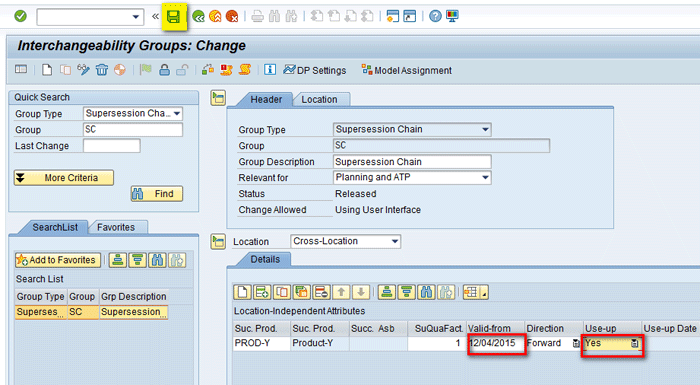
Figure 48
Supersession chain with the Use-up strategy as Yes
In the Product View, you can see stock of 100 for PROD-X and a forecast of 10 on 11/25/2015, 40 on 12/06/2015, and 50 on 01/14/2016 at location DC02 as shown in Figure 49.

Figure 49
Initial scenario for stock and forecast for PROD-X at DC02
PROD-Y at DC02 does not have any stock/requirement as shown in Figure 50.

Figure 50
Initial scenario for PROD-Y at DC02
In the interactive planning book (Figures 51 and 52) you can see that for PROD-X at DC02, the demand of 10 on 11/25/2015 is met by the existing stock of 100. (After consumption, the stock is reduced to 90.)
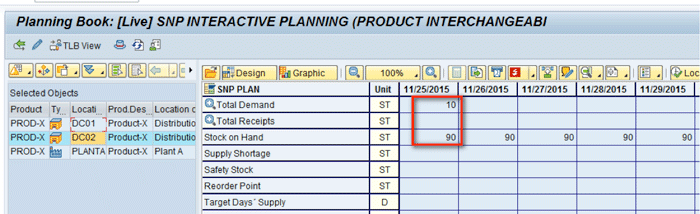
Figure 51
PROD-X at DC02

Figure 52
Running location heuristic for PROD-X at DC02
The demand on 12/06/2015 is met by the existing stock of 90. (After consumption the stock is reduced to 50.) The demand of 01/14/2016 of 50 is met by the existing stock of 50. (After consumption the stock is reduced to 0.) The reason for this is that you defined the use-up strategy as Yes in the supersession chain. That means all existing stock of PROD-X can be used until it becomes zero without any use-up date validity. Here, even if you run location heuristics, the system does not generate any receipts as there are no open requirements to be met. If you run location heuristics you get message shown in Figure 53.

Figure 53
Location heuristic message
Interchangeability Group Master Data – Full Interchangeability
In the above section, you saw that in all the scenarios the type of interchangeability used was forward interchangeability, which means PROD-X can only be replaced by PROD-Y and not vice-versa. In this section you will see how to use full interchangeability.
To do so you need to modify the interchangeability group supersession chain. Execute transaction /INCMD/UI and in Figure 54 change the Direction to Full. The Valid-from date should be 12/21/2015 and Use-up is Yes. After making the changes, click the save icon.
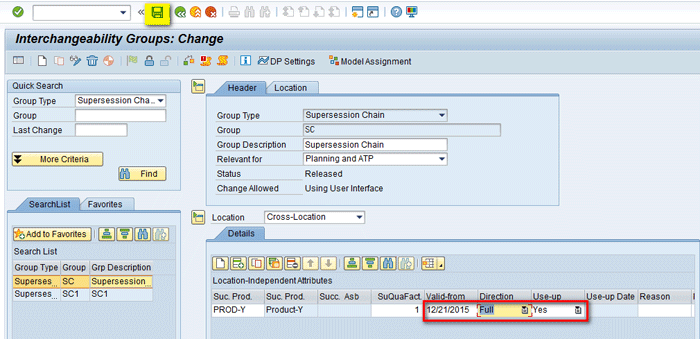
Figure 54
Full interchangeability group
In the Product View, you can see stock of 100 for PROD-X, a forecast of 50 on 12/15/2015, and a forecast of 40 on 12/22/2015 at location DC01 as shown in Figure 55.
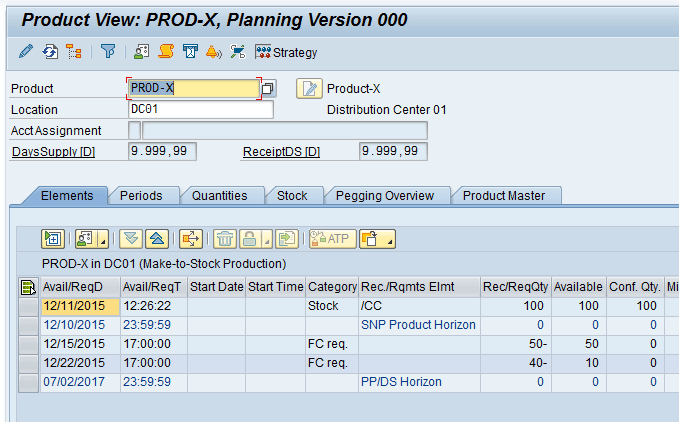
Figure 55
Initial scenario for PROD-X at DC01
PROD-Y at DC01 does not have any stock but there is a forecast requirement of 10 on 12/23/2015 as shown in Figure 56.
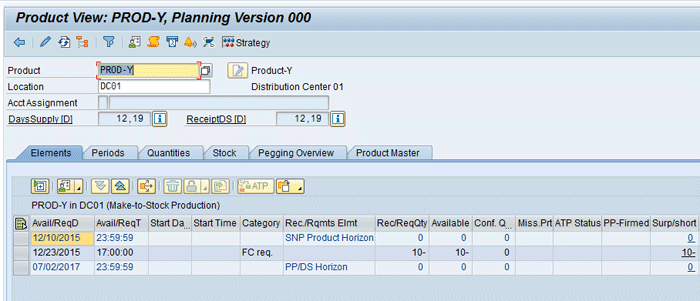
Figure 56
Initial scenario for PROD-Y at DC01
In the interactive planning book (Figure 57) you can see that for PROD-X at DC01, the demand of 50 on 12/15/2015 is met by existing stock of 100. (After consumption, stock is reduced to 50.) The demand on 12/22/2015 is met by existing stock of 50. (After consumption stock is reduced to 10.) The reason is that you defined the use-up strategy as Yes in the supersession chain. All existing stock of PROD-X can be used until it becomes zero without any use-up date validity.
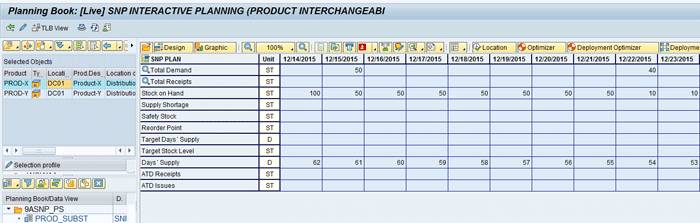
Figure 57
PROD-X at DC01 in the interactive planning book
In the interactive planning book for PROD-Y at DC01 (Figure 58), you can see a demand of 10 appears on 12/23/2015. Since no stock is present it is showing a shortage. Click the Location button to run location heuristics.

Figure 58
Run location heuristics for PROD-Y at DC01
After running location heuristics, the Substitution Receipt (Planned) key figure is populated with 10 as shown in Figure 59. The predecessor product is PROD-Y and the successor product is PROD-X. The reason is that you defined the direction as Full in the supersession chain so both PROD-X and PROD-Y can be used interchangeably to satisfy the demand of each other. Also since the use-up strategy was Yes, the existing stock of PROD-X can be used until it is zero even after the validity date, which was 12/21/2015.

Figure 59
Location heuristics results for PROD-Y at DC01
If you again load data for PROD-X at DC01, you can see the Substitution Demand (Planned) key figure is populated with the quantity of 10. This is the requirement coming from PROD-Y as shown in Figure 60.

Figure 60
Location heuristics results for PROD-X at DC01
Configuration of Interchangeability Group Master Data – FFF Classes
FFF class has a set of products that are similar technically (form, fit, and function). In the example discussed in this article, I have created an FFF class consisting of three products – A1, A2, and A3, where A1 is the leading product as shown in Figure 61.
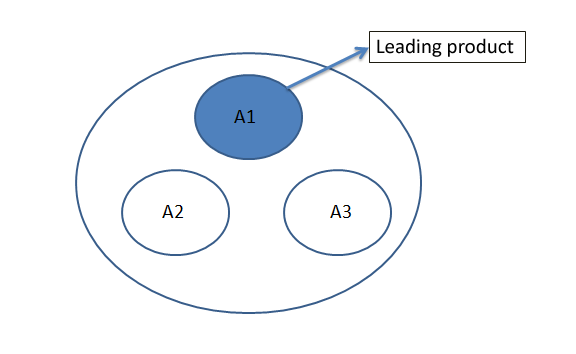
Figure 61
FFF class with A1 as the leading product
To create the FFF class, execute transaction /INCMD/UI. In the next screen click the create icon. Create the FFF class with Group name FFF and group Description FFF Class (Figure 62). Click the add icon in the Details section.
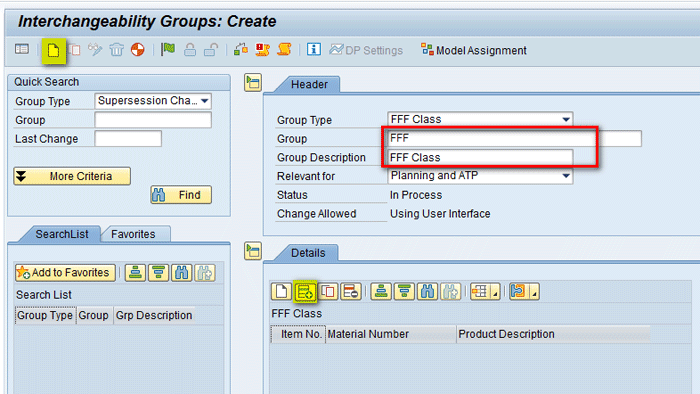
Figure 62
FFF class header
Add three rows for three products in the FFF Class (i.e., PROD-A1, PROD-A2 and PROD-A3. Click the icon highlighted in Figure 63 and then click the FFF Subsets button.
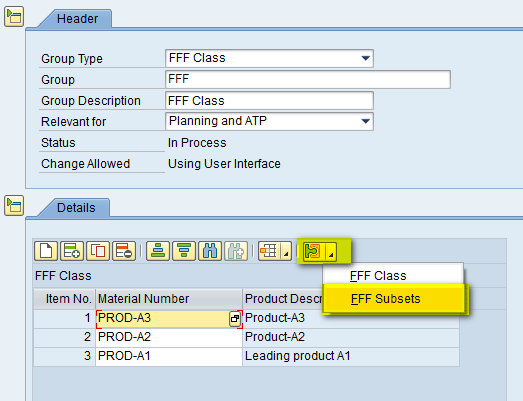
Figure 63
Products added to FFF Class
In the refreshed screen (Figure 64), enter the name of the FFF Subset as 1, the Subset Description as FFF_Subset1, the Location as DC01, and the Lead Product as PROD-A1. Click the Subset Members tab.
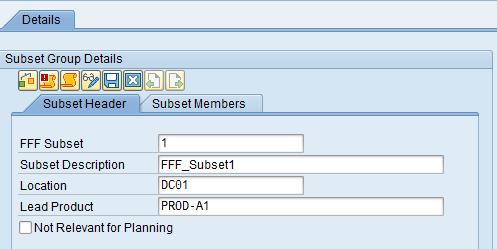
Figure 64
FFF Subset Header
In the Subset Members tab, click the add icon and add three rows. Enter details of the three products as shown in Figure 65.

Figure 65
FFF Subset Members
After you enter the above details, in the same screen click the release flag icon (not shown) and then click the Model Assignment button (not shown). In the new screen (Figure 66), select Model 000 on the right side and click the highlighted arrow icon.

Figure 66
Model assignment to FFF Class
You can see in Figure 67 that Model 000 is now assigned and present under the FFF_Subset. Click the save icon.

Figure 67
Assignment of the model to the FFF Class is complete
Carry Out a Heuristic Run in SNP for FFF Class and Result Interpretation
In the Product View, you can see a forecast requirement of 10 for PROD-A2 and 20 for PROD-A3 at DC01 (Figures 68 and 69).

Figure 68
PROD-A2 at DC01

Figure 69
PROD-A3 at DC01
Per the above scenario you have a requirement for two products (A2 and A3) within the FFF class and there is no stock present for any of the products. In the Product View you can see that for leading PROD-A1at DC01 there are no stocks or receipts (Figure 70).
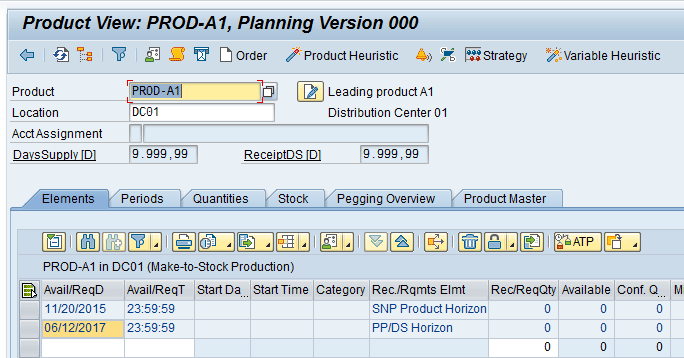
Figure 70
PROD-A1 at DC01
Load data for PROD-A2 at DC01 in the interactive planning book and run location heuristics. This creates a substitution receipt of 10 for PROD-A2. Since in FFF Class, A1 is the leading product, a demand of 10 is created for PROD-A1 at DC01 as shown in Figure 71.

Figure 71
Running location heuristics for PROD-A2 at DC01
Similarly load data for PROD-A3 at DC01 in the interactive planning book and run location heuristics. This creates a substitution receipt of 20 for PROD-A3. Since in the FFF class, PROD-A1 is the leading product, a demand of 20 is created for PROD-A1 at DC01 as shown in Figure 72.

Figure 72
Running location heuristics for PROD-A2 at DC01
Now load data for PROD-A1 at DC01 in the interactive planning book. The demands for PROD-A2 and PROD-A3 appear in the Substitution Demand (Planned) key figure (Figure 73).
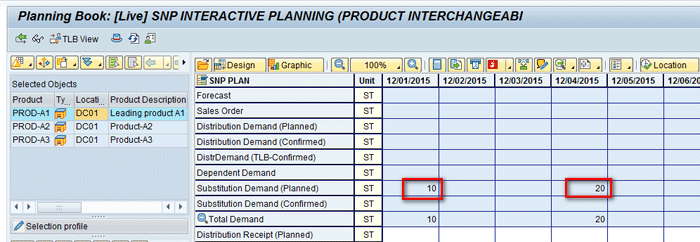
Figure 73
PROD-A1 at DC01
Run location heuristics for PROD-A1 at DC01. This creates a distribution receipt of 10 and the quantity of 20 for PROD-A1 with the source as PLANTA (Figures 74 and 75).
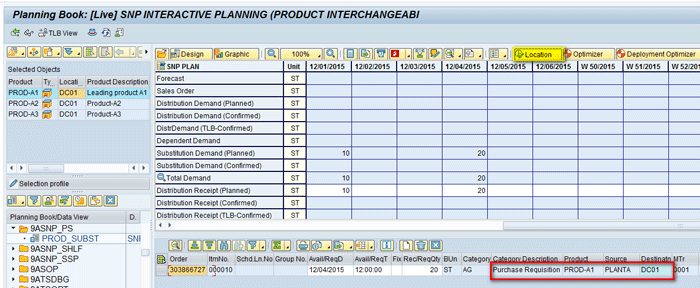
Figure 74
Running location heuristics for PROD-A1 at DC01

Figure 75
Location heuristic results for PROD-A1 at DC01
Similarly load data for PROD-A1 at PLANTA in the interactive planning book and run location heuristics. This creates a planned order of 10 and the quantity of 20 each to fulfill the demand from DC01 (Figure 76).
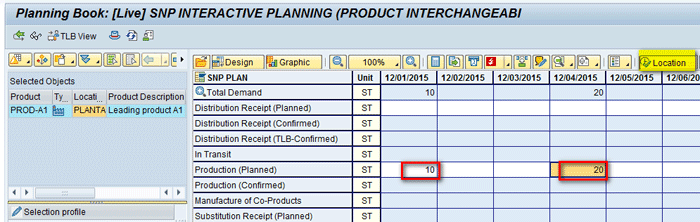
Figure 76
Location heuristic results for PROD-A1 at PLANTA
In the above section, you saw that there was no stock available to cover the demands of PROD-A2 and PROD-A3 so a demand was created for leading PROD-A1. There can be different scenarios in terms of requirements and stocks of products within the FFF class and output of heuristics will differ accordingly. Here is a list of some of these scenarios:
- There is a requirement for PROD-A2 (for example, 10) and A2 has stock of 10 while leading product A1 does not have any stock available. In this case, the stock of A2 will be used to cover the requirement and nothing needs to be procured.
- There is a requirement for PROD-A3 (for example, 10) and A3 has stock of 10 while leading product A1 does not have any stock available. In this case, the stock of A3 will be used to cover the requirement and nothing needs to be procured.
- There is a requirement for PROD-A2 (for example, 10) and A3 has stock of 10 while both A2 and leading product A1 do not has any stock available. In this case, the stock of A3 will be used to cover the requirement and nothing needs to be procured.
- There is a requirement for PROD-A3 (for example, 10) and A2 has stock of 10 while both A3 and leading product A1 do not has any stock available. In this case, the stock of A2 will be used to cover the requirement and nothing needs to be procured.
- There is a requirement for PROD-A2 (for example, 10) and both A2 and leading product A1 have stock of 10 available. In this case, the stock of leading product A1 will be used to cover the requirement and nothing needs to be procured.
Configuration to Carry Out Product Interchangeability in Capable-To-Match (CTM) and the SNP Optimizer
A CTM heuristic uses a multi-level, finite, constraint-based, top-down approach for planning. With this approach, you predefine supply categories and demand priorities. This is a priority-driven planning method that sorts demands based on priority (you can define criteria for priority).
The SNP Optimizer is a cost-based planning method in which the algorithm searches for all feasible planning results and selects the one that is most cost-effective
The concept of product interchangeability (i.e., supersession chain and FFF class) remains the same for CTM and the SNP Optimizer.
Product Interchangeability in CTM
You can plan the simple discontinuation of a product in CTM planning. The following points highlight the different scenarios that are supported and how to incorporate them in a CTM run:
- CTM supports forward interchangeability in a supersession chain along with different Use-up strategies (Yes, No, and Restricted). Using CTM you can plan for product discontinuation after a specific validity date.
- CTM also supports FFF classes
- CTM does not support full interchangeability. You cannot have two fully interchangeable products within the supersession chain.
- A prerequisite before running CTM for product interchangeability is that the supersession chain or FFF class be defined for the required products. The creation method of defining the supersession chain or FFF class is similar to what is described in the above sections.
- To execute the CTM using product interchangeability in the CTM profile creation via /SAPAPO/CTM you need to select the product interchangeability with the option for Use Discontinuation or Use FFF Classes under the Strategies and Special Strategies tabs as shown in Figure 77. If Do not use is selected, the CTM run does not use product interchangeability.

Figure 77
CTM profile
Product Interchangeability in the SNP Optimizer
SNP Optimizer uses an objective function that in turn is defined to either minimize cost or maximize profit. For an SNP Optimizer run, the steps for defining the supersession chain and FFF class are the same as discussed in above sections. To use product interchangeability during an SNP Optimizer run, execute transaction code /SAPAPO/OPT. In the Object Selection section of the screen that appears, select the Add Products from Supersession Chains check box (Figure 78).
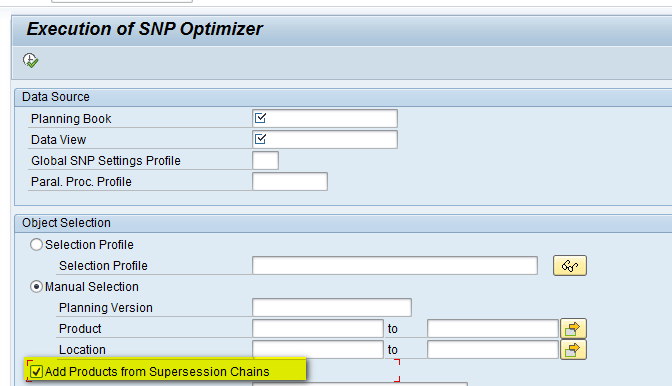
Figure 78
SNP optimization
In the above sections you saw that SNP supports multiple supersession chains. However, the cyclical chain in which the product returns back to the chain after being substituted with another product is only supported by the SNP Optimizer and not by an SNP heuristic. Table 1 shows the differences.

Table 1
SNP heuristics versus the SNP Optimizer for a supersession chain
Alok Jaiswal
Alok Jaiswal is a consultant at Infosys Limited.
He has more than six years of experience in IT and ERP consulting and in supply chain management (SCM). He has worked on various SAP Advanced Planning and Optimization (APO) modules such as Demand Planning (DP), Production Planning/Detailed Scheduling (PP/DS), Supply Network Planning (SNP), and Core Interface (CIF) at various stages of the project life cycle.
He is also an APICS-certified CSCP (Certified Supply Chain Planner) consultant, with exposure in functional areas of demand planning, lean management, value stream mapping, and inventory management across manufacturing, healthcare, and textile sectors.
If you have comments about this article or publication, or would like to submit an article idea, please contact the editor.




 Premium