SAP's Strategic Enterprise Management Business Consolidation (SEM-BCS) functionality consolidates financial results for reporting purposes. The author reveals key features and benefits of BCS. He also provides tips, advice, and references to optimize your implementation.
Many corporations consist of multiple legal entities. While each of these business units has its independent financial results, they must all be consolidated for management and legal reporting. With the increased focus on cost-effective, efficient close processes and trustworthy financial reporting, a great deal of interest has been generated in SAP’s Strategic Enterprise Management Business Consolidation (SEM-BCS) technology.
Previously, I worked with the R/3-based predecessors of this solution — both Enterprise Controlling Consolidations (EC-CS) and Financial Consolidations (FI-LC) — and recently consulted on a full lifecycle SEM-BCS implementation. Let me illustrate how BCS can make your life easier. I’ll introduce key concepts for customization and provide you with some SAP documentation to support your efforts.
1. Perform direct loads through the consolidation monitor. You can load your reported financial data directly into BCS without using a flat file upload. SAP note 610636 provides sample modification code to implement a customer-defined task, which is executed from the consolidation monitor just like a flat file upload. The data being loaded is validated by the BCS system and overwrites any existing entries in the period being populated.
There are a number of available data sources and customers develop their own ABAP code to enable this user- exit modification. The current version of sample code, which is available as an attachment in SAP note 610636, illustrates how to read from a local InfoProvider that can be either an InfoCube or ODS. Alternatively, a Remote Function Call (RFC) destination is likely already maintained for the source R/3 system, so a remote function module (RFM) could be used to source data directly from R/3 tables, such as GLPCT, GLT0, and/or GLFUNCT.
2. Upload user-defined attributes. If you enhance your Business Information Warehouse master data InfoObjects with custom attributes, it may be beneficial to maintain the master data via the flexible upload method in the consolidation workbench. This enables your power users to configure and load master data records through a friendly interface without accessing the BW Administrator Workbench. By default, your user-defined attributes will not appear in the list of available fields. SAP note 577649 describes a method whereby you can modify the standard configuration so that these custom attributes become available for inclusion in your upload structure.
3. Use synchronization programs for master data maintenance. To enhance performance, BCS uses a layer of master data separated from the underlying BW system. The layer consists of two sets of tables that are automatically replicated at key times, such as when you save changed master data in the consolidation workbench. The data created in BCS is used by the BW system for BEx reporting or other tasks. Unfortunately, this limits the user to entering master data through the BCS menus and does not allow for uploads using BW integration tools.
Standard synchronization programs are available to force the transfer of master data from BCS to BW and in a more limited fashion transfer changes from BW to BCS. Report UGMDSYNC is used in dialog for characteristics and UGMDSY00 is the batch equivalent. UGMDSY10 and UGMDSY20 are corresponding programs for replicating hierarchies.
Note
SAP support for these synchronization programs is limited, so it may be necessary to create a custom replication program if data maintenance through BW is justified. Programs should be tested thoroughly.
4. Call BPS functions from within the data monitor. The exit location identified in SAP note 610636 also can be used to incorporate further functionality by calling a Business Planning and Simulation (BPS) function from within the data monitor. I’ve used it to initiate a custom currency translation function defined within BPS.
You can use the standard SAP BPS function module API_SEMBPS_VARIABLE_SET as an initial call to set a variable value in BPS. Consider the fiscal year and period currently being processed in the consolidation monitor. The current value of these parameters can be read from the internal table lt_sel_execution, which exists as local data within the program where the modification is inserted. The parameter values are passed along to BPS and the standard function module API_SEMBPS_FUNCTION_EXECUTE can then be used to call a function within BPS.
Note
Be sure to call BPS function module API_SEMBPS_POST to update the database, as the previous function modules will only update the buffer and not commit changes.
5. Get more reporting flexibility with reference periods. In BW, time-dependent characteristic attributes and hierarchies are selected solely upon the key date of the report. Consolidation unit and group hierarchies do not conform strictly to this key date logic, which may lead to problems reporting business unit (consolidation group) results if a corporation’s structure changes. SEM-BCS version 3.2 solves the limitation of these special hierarchies by automatically including two new characteristics — “reference period” and “reference fiscal year” — in the virtual InfoCube, which is automatically generated for BCS reporting. This report is identified in your data basis under the “virtual” column.
The reference characteristics provide greater reporting flexibility in the event a corporation’s structure change. A business unit’s results for one period can be reported alongside the results from the same unit after a firm’s structure changed. No new version of the data is required and you do not need to post adjusting entries in previous periods. This feature goes beyond the abilities of key date reporting as it removes the limitation of showing the corporate structure from a single time period throughout your entire report — a real time-saver in our world of constant restructuring.
6. Calculate retained earnings automatically. R/3 source data will not contain a value for retained earnings until the end of the fiscal year when balances are carried forward to period 0. Consolidated financial reports issued for either management or legal purposes, however, often require a balanced retained-earnings entry each period. This entry can be generated automatically using the rounding configuration in the BCS currency translation function, which is able to create a current-year retained-earnings offset to the income statement. The offset updates the retained-earnings equity account.
To enable this functionality, set up a new rounding method that does not check key figures and can round both local currency and group currency key figures. The rounding methods are configured using the consolidation workbench via transaction UCWB. Leave the Key Figure to Check field blank and populate the Key Figure to Round fields with the appropriate entries (Figure 1).

Figure 1
Identify key figures with the rounding method
On the Rounding tab, set the Rounding Type to Selection1 = 0 (Figure 2).
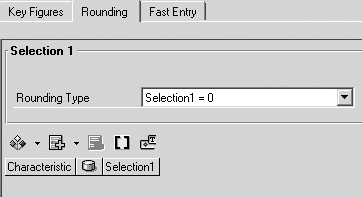
Figure 2
Determine the rounding methodology
Now, configure two rules for the rounding method. Figure 3 shows an overview of these rules once they are completed. Income statement accounts should be compared and the difference posted to your current-year retained-earnings offset account on the income statement. If the reporting has been done offline in a non-SAP system prior to your BCS implementation, you may need to create this account.
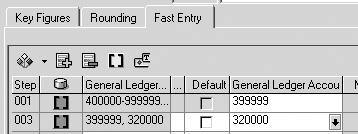
Figure 3
Fast Entry tab provides detailed rule steps
Compare the updated income statement account to the current-year retained-earnings account on the balance sheet and post the differences to the balance sheet account. It works best to create a new account master record to capture current-year retained earnings. The account can be added to R/3 or directly in BCS through the consolidation workbench and subsequently configured to carry forward into the cumulative retained-earnings account at fiscal year end.
Note
You must create this new account. If you attempt to use the same account for current year and cumulative retained earnings, your calculations will be incorrect in future years. The rounding method always considers year-to-date figures so balances carried forward throw off the current year balances and post a large, erroneous adjustment.
For legal entities where the local currency key corresponds with the group currency key, SAP note 654611 must be implemented in order to make this new currency translation task available for processing. SAP note 661230 also may be required if you continue to use an existing currency translation method in addition to creating one to calculate retained earnings. Implementating this change allows multiple currency translation tasks to be performed in the BCS consolidation monitor.
7. Summarize data with navigational attributes. Processes and reporting activities in the consolidation monitor run more efficiently when working with a streamlined dataset. While minimizing the data in your SEM- BCS InfoCube is clearly advantageous, you must also maintain an audit trail that links your financial reports back to the source data with minimal effort and preserves integrity.
One solution is to employ navigational attributes in a detailed InfoProvider that provides backup for your summarized BCS InfoCube. This detailed InfoProvider should contain enough granularity that users can access relevant data in R/3. By using navigational attributes in the InfoProvider, you can easily produce a summarized snapshot of the period’s financial results.
Let’s take a look at how a detailed InfoProvider can work in tandem with navigational attributes in a real-world application. In a Profit Center Accounting line-item report you can provide access to profit center and account details via characteristic 0ACCOUNT by enhancing 0ACCOUNT InfoObject with a navigational attribute for 0GRP_ACCT. By enhancing 0ACCOUNT InfoObject with a navigational attribute for 0GRP_ACCT, it is possible to report summarized result from the same InfoProvider. See Figure 4 for an illustration of this data architecture.
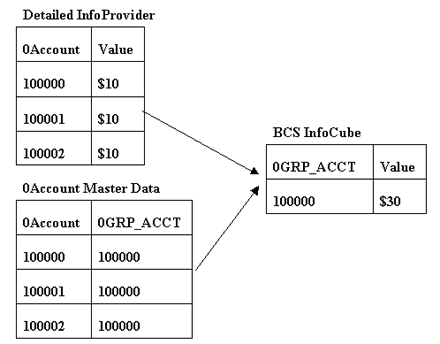
Figure 4
Use navigational attributes to summarize data in the BCS InfoCube
When creating the source data to populate your BCS InfoCube, combine individual accounts into a single navigational attribute for a group account that allows you to consider only the major accounts in BCS. This improves overall efficiency by simplifying the master data maintenance and reporting, streamlining configuration, and optimizing performance.
If further individual account details are necessary, the navigational attribute 0GRP_ACCT offers access to the detailed InfoProvider based upon the navigational attribute relationship between BCS accounts and detailed accounts. The resulting report shows which 0ACCOUNT entries make up the total group account balance. Drilling into R/3, you can pull up an accurate Profit Center Accounting line-item report restricted by the original account. From here the standard R/3 functionality to access original accounting and logistics documents becomes available.
Note
A user ID and password will be requested when jumping between systems.
8. Use time-dependent navigational attributes to provide a more dynamic structure. The integrity of a traditional reporting system owes a lot to the restrictive nature of its posted data because characteristics are not easily changed after a document is posted. Because of this inflexibility, restatements that direct an existing cost center to a new functional area pose a reporting challenge. You must run detailed reports or make restatement journal entries in order to produce comparable trend reports at the functional area level. There is a solution! To achieve both integrity and flexibility, maintain the relationship between cost center and functional area as a time-dependent navigational attribute of the cost center’s InfoObject.
Let’s consider reporting on the cost center (CostCtr 1000) depicted in Figure 5. Previously, it was a component of the sales, general, and administrative expenses (SG&A) functional area, but on January 1, 2005 it will be restated as part of the manufacturing overhead. The restatement requires all costs associated with CostCtr 1000 to move above the gross margin in the income statement per 2005 format. My solution is to keep the relationship between CostCtr 1000 and SG&A through a validity date of December 31, 2004. At that time, a new entry is created in the cost center InfoObject relating CostCtr 1000 to the manufacturing overhead.
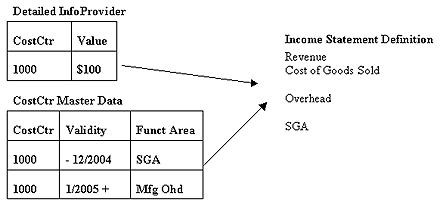
Figure 5
Time-dependent navigational attributes can enhance reporting
When running a BW report, the user can be prompted for a key date. If the income statement is written based upon the cost center functional area and the user chooses a key date prior to 2005, CostCtr 1000 appears in SG&A. If the user chooses a date after January 1, 2005, it’s in the manufacturing overhead. The posted data has not been altered, but the simple report now supports comparability over time with minimal effort. The entire report is defined by functional area and results can be viewed per the 2004 or 2005 standard without special adjustment journal entries or multiple versions.
9. Use virtual characteristics for dynamic income statements. There are certain accounts that are not posted to cost centers or that must have a consistent functional area regardless of their assigned cost center. Instead of using time-dependent navigational attributes when reporting on these areas, virtual characteristics may be more appropriate. A virtual characteristic exists as an InfoObject in the InfoProvider, but it is never filled in the underlying tables. User-exit code implemented in user exit RSR00002 via transactions CMOD or SMOD populates the characteristic each time a report based on it is executed.
Let’s return to the income statement in Figure 5. We will use a virtual characteristic named “reported functional area” to define this report. Assume that there is a posted functional area from R/3 as well as a functional area associated with the cost center master data attribute. The structure is represented in Figure 6.
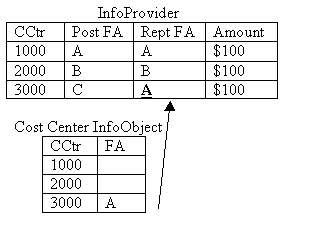
Figure 6
Virtual characteristics allow for more dynamic reporting
In the enhancement code, check to see if there is a cost center functional area for the data being reported. If so, use that functional area to populate the reported functional area (Rept FA) virtual characteristic. If no cost center functional area is found, use the posted functional area (Post FA). By defining the entire report using the reported functional area, we have created a dynamic report with accurate results.
It is possible — and in some cases advisable — to take this virtual characteristic solution a step further by storing the account/functional area relationship as a navigational attribute. In this case, you can implement your own logic to determine whether the account functional area is preferred over the cost center functional area. In effect, you replicate the user-exit logic from functional area substitutions in R/3 when populating this virtual characteristic.
Exercise caution when working with large sets of data or extensive logic because this code must be applied to each unique data combination in order to determine its resulting virtual characteristic value. This can become quite resource-intensive when reporting on large sets of data without sufficient complementary selections to restrict the data considered.
Matt Christensen
Matt Christensen is the director of Enterprise Performance Management at PRAGMATEK Consulting Group in Minneapolis. He has more than seven years of experience implementing a broad set of SAP financial modules, including configuration and development in R/3, Business Information Warehouse, and Strategic Enterprise Management. Matt holds an undergraduate degree in computer science and an MBA in finance.
You may contact the author at matt.christensen@pragmatek.com.
If you have comments about this article or publication, or would like to submit an article idea, please contact the editor.






 Premium