Learn about the new architecture of the SAP BusinessObjects Information Design Tool and see how it can improve Web Intelligence reporting.
Key Concept
The BusinessObjects Information Design Tool is a new modeling tool for the semantic layer that enables you to more efficiently create and deploy BusinessObjects universes compared to the tool’s predecessor, Universe Designer.
The semantic layer, also called a universe, acts as a backbone for BusinessObjects Web Intelligence queries and reports. One of the new features in BusinessObjects 4.0 is the BusinessObjects Information Design Tool, which allows you to more efficiently create universes.
The architecture and functionality of the Information Design Tool has been enhanced as compared to its predecessor, Universe Designer, which also helps users create universes. There are four main components of Information Designer, all of which didn’t exist in prior releases of BusinessObjects and contribute to the new tool’s effectiveness: query and calculation engine, business layer, data foundation, and data federation engine (Figure 1).
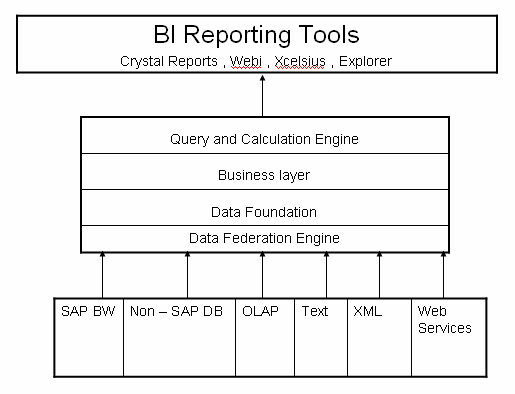
Figure 1
Information Design Tool architecture
Let’s explore these four components in more detail:
- The query and calculation engine works at the query execution time to perform the calculation.
- The business layer is based on a data foundation. The layer is mapped to the tables and columns in a data foundation and contains a collection of classes and objects that represent what an end user needs.
- The data foundation contains the universe structure of tables and joins (tables are connected to each other through joins). Once you connect to any data source you can extract the relevant tables from the data source and insert the appropriate join. Data foundation can be based on one or more relational connections. For OLAP sources, the connection is directly referenced by business layer and no data foundation is required.
- The data federation engine allows multiple data source functionality, which in practical terms means a user can create multisource-enabled relational universes. The data federation engine provides virtual data access – in other words, you can point out the data source at the design time and integration of data in real time, hence there no data replication takes place at this layer. Data remains stored in data sources and no changes or extract/transform/load (ETL) are applied to that data at their sources (Figure 2). The tables from the different data sources have different coloring schemes, which makes visualization easier for users. Using the schemes, you can differentiate the tables from different sources to build the data federation multisource universe data access. If you have the same table from two distinct sources, you can identify which source an individual table comes from based on the table’s color.
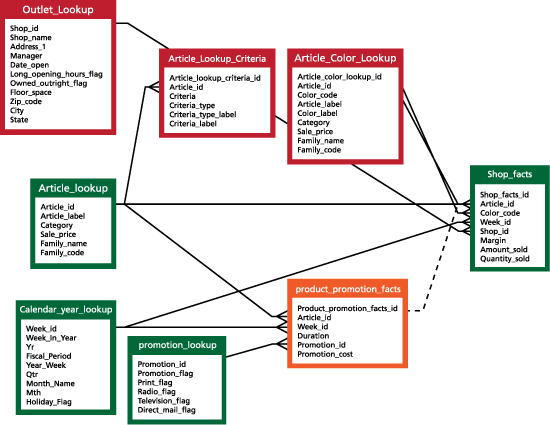
Figure 2
Multisource-enabled relational universe showing, by color, the different sources from which the table pulls data
Benefits Behind the New Tool
I find the following advantages of having the above four components integrated into the Information Design Tool:
- It provides a single development environment for BI solutions and data federation engine jobs for multisource universe data access
- The data federation engine provides access to different databases (e.g., Oracle, My SQL and SAP Business Warehousing) in one place
- Because the data federation engine is an entry point for all the data sources, you can use it to control common security and administration activities
- The performance for query reading has been enhanced because data integration takes place at the semantic layer
- It lowers the total cost of ownership for integration projects because there is not complex ETL to put in place
- It provides heterogeneous access over all sources
- It provides multiple-source access
Real-life Application of the Information Design Tool
Let’s look an example of how multiple sources can be beneficial, which is a main point behind BusinessObjects 4.0. In releases prior to BusinessObjects 4.0, one universe can be connected to one source only. Suppose that business needs a report that includes data from two source systems (e.g., Oracle and My SQL). What is the proposed solution?
Using prior versions of BusinessObjects, you create two different universes on two different data sources (e.g., one on Oracle and one on My SQL). Then you create two separate queries and get the data in a Web Intelligence report by calling both the queries in one Web Intelligence document.
A better solution comes from the new Information Design Tool via the data federation engine. The engine lets you create one universe on multiple data sources at the same time, and can perform Web Intelligence reporting on the top of it. As part of BusinessObjects 4.0, Web Intelligence is about one-and-a-half times faster than BusinessObjects XI 3.1 when using two data sources of relational type databases, which is a solid business case for upgrading.
Detailed configuration on which this key performance indicator is measured includes:
- Database Oracle 11g and My SQL
- Web Intelligence XI 3.1 + SP1 and Interactive Analysis 4.0
- Customer master data having about 5,000 rows (2,000 rows from My SQL and 3,000 from Oracle)
Reusability of Universes
OLAP universes created with BusinessObjects XI 3.X are supported in BusinessObjects 4.0 as well. Interactive analysis can be used for reporting from 3.X OLAP universes. However, to edit the OLAP universes, a user needs the old Universe Designer, not the new Information Design Tool (i.e., to edit a BusinessObjects XI 3.X universe, you need to use that release’s tools).
Also, you must save BusinessObjects 4.0 universe files with extension .unx, whereas you save the 3.X universe with extension .unv. There is also a process defined in BusinessObjects 4.0 for relational universes to convert XI 3.X universes to .unx.
Finally, Web Intelligence is supported by the following universes:
- BusinessObjects 4.0 .unx (multisource enabled relational universe)
- XI 3.1 .unv (OLAP and relational universes)
- XI 3.1 .unv (relational universes) converted to BI 4.0 .unx
Ashwani Sharma
Ashwani Sharma is SAP BI 7.0 Certified Consultant working with Accenture. He has experience in SAP BI and BusinessObjects integration implementations and SAP BusinessObjects 4.0 ramp-up programs.
You may contact the author at ashwani.sharma@accenture.com.
If you have comments about this article or publication, or would like to submit an article idea, please contact the editor.