Learn about some of the new capabilities of SAP BusinessObjects Dashboards 4.0, including data connectivity options, multilingual dashboards, and auditing and monitoring capabilities. Additionally, discover the platform integration that allows for caching and performance improvements.
Key Concept
SAP BusinessObjects Dashboards 4.0 (formerly named Xcelsius) allows users to create compelling data visualizations. As part of the SAP BusinessObjects 4.0 release there are several new capabilities for administrators.
SAP BusinessObjects 4.0 is delivering a broad set of new functionality for all the business intelligence (BI) client tools, with SAP BusinessObjects Dashboards 4.0 being the latest version of Xcelsius. SAP BusinessObjects Dashboards provides the necessary features and functions to provide your end users with interactive data visualizations. Keep in mind that SAP BusinessObjects Dashboards is not designed to aggregate information or handle very large volumes of data.
I will focus on the features of SAP BusinessObjects Dashboards 4.0 that are of most interest from an administrative point of view.
New Functionality for Administrators
From an administrator’s point of view, SAP BusinessObjects Dashboards 4.0 is delivering improvements and changes in four major areas:
- Data connectivity options
- Multilingual dashboards
- Auditing and monitoring capabilities
- Platform integration for caching and performance improvements
Data Connectivity Options
As shown in Figure 1, SAP BusinessObjects Dashboards provides the following data connectivity options regarding your SAP landscape:
- SAP BusinessObjects Dashboards can leverage a direct connectivity to SAP NetWeaver BW using the BI Consumer Services (BICS) inside the SAP NetWeaver BW stack.
- SAP BusinessObjects Dashboards can directly leverage the Universe as part of the 4.x release and establish a relational data connection to SAP NetWeaver BW InfoProvider.
- SAP BusinessObjects Dashboards can use the BI Web Services and connect via SAP BusinessObjects Web Intelligence to SAP Business Explorer (BEx) queries
SAP BusinessObjects Dashboards can use Live Office and in that way leverage Crystal Reports to connect to SAP ERP and SAP NetWeaver BW as well as use SAP BusinessObjects Web Intelligence documents to connect to SAP NetWeaver BW.
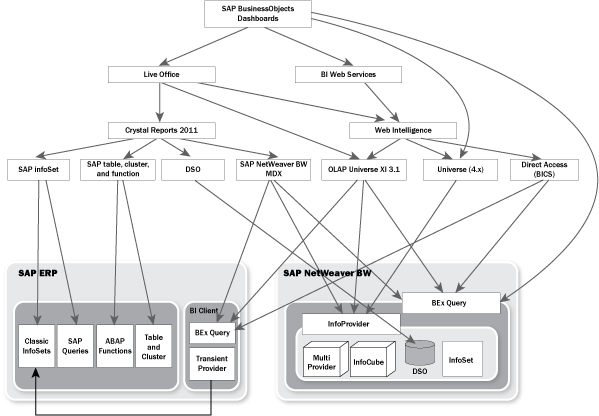
Figure 1
SAP BusinessObjects Dashboards data connectivity
If you’re looking to connect to SAP NetWeaver BW data, you should either use the direct link from SAP BusinessObjects Dashboards to BEx queries via BICS or use the relational Universe approach. If you’re looking to connect data from SAP ERP, Crystal Reports with Live Office is the only viable option as part of the SAP BusinessObjects 4.0 release.
If you’re looking for an option to leverage scheduled reports or publications (counterpart to Information Broadcasting in SAP NetWeaver, which allows you to distribute a report to several users in a single step), then Live Office is the recommended choice.
Multilingual Dashboards
With SAP BusinessObjects 4.0, the SAP BusinessObjects BI platform provides the Translation Manager — a very easy-to-use tool that allows you to translate your SAP BusinessObjects artifacts. You are now in the position to create a single object with the designer environments and then deliver it in as many languages as you would like.
Let’s assume you have an SAP BusinessObjects Dashboard that shows the sales revenue by customer (Figure 2).
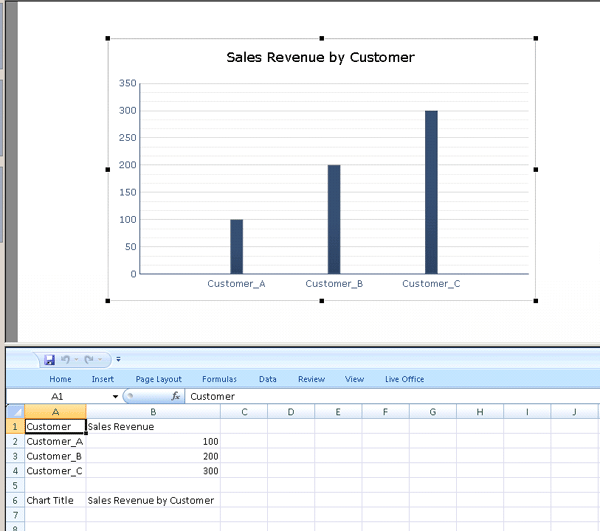
Figure 2
SAP BusinessObjects Dashboards object
As you can see, you have three string objects that are relevant for translation. The chart title (cell B6) and the two labels (cell A1 and B1) are those objects that you need to translate.
In the Translation Manager (Figure 3), you can then open the SAP BusinessObjects Dashboards object and the configured translation settings are shown (Figure 4).
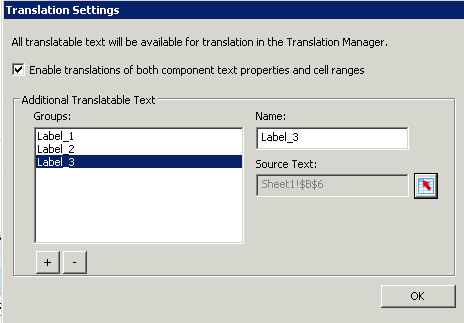
Figure 3
Translation settings
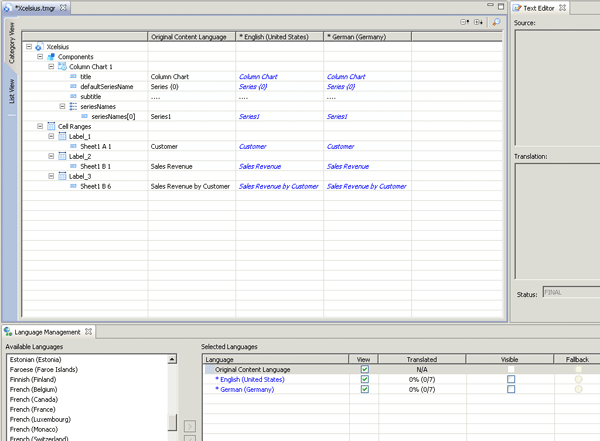
Figure 4
Translation Manager
Here you can see the three labels configured in the upper screen (Figure 4) and you can see the list of available languages. The user translating the string objects can configure for which languages the object is available. After the string objects have been translated, you can export all strings to the Central Management System (CMS) of your SAP BusinessObjects system and the single dashboard then becomes available in multiple languages.
In SAP BusinessObjects 4.0, the Translation Manager can translate Universes, SAP BusinessObjects Web Intelligence reports, Crystal Reports objects, and SAP BusinessObjects Dashboards objects.
Auditing and Monitoring Capabilities
SAP BusinessObjects 4.0 delivers a vastly improved environment for monitoring and auditing your SAP BusinessObjects BI platform. This is the first release in which you can audit and monitor the events related to SAP BusinessObjects Dashboards.
Figure 5 shows the Auditing configuration dialog as part of the Central Management Console (CMC). You can see the standard events that can be audited. For SAP BusinessObjects, you can audit the following events:
- Dashboard user: View, Refresh, Prompt, Logon, and Logout
- Dashboards designer: Create, Delete, and Modify
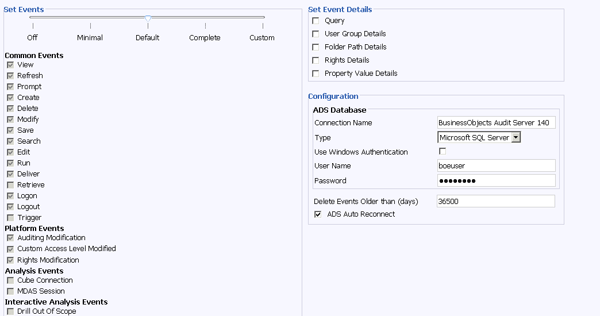
Figure 5
Auditing configuration dialog
In addition to the new auditing capabilities, the monitoring functionality of SAP BusinessObjects Enterprise has improved as well. Figure 6 shows the default dialog for the server monitoring inside the CMC of SAP BusinessObjects Enterprise, which now as part of the 4.0 release also includes the monitoring capabilities of your SAP BusinessObjects Dashboards components.
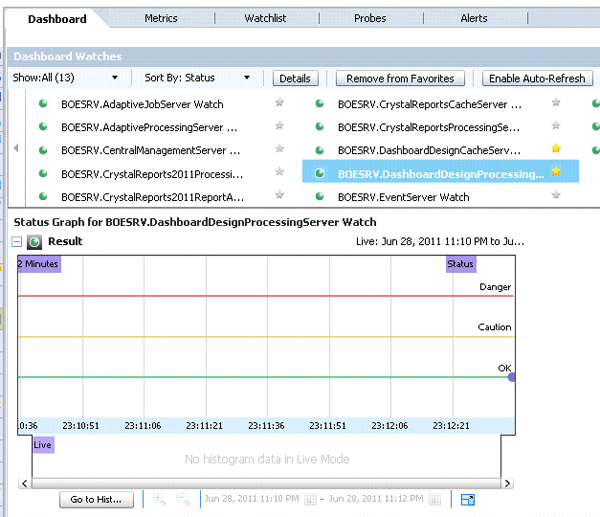
Figure 6
Monitoring in CMC
Figure 7 shows all the available metrics for the SAP BusinessObjects Dashboards Caching service and provides you with an idea of how you are now able to monitor and audit your SAP BusinessObjects Dashboards services in detail.
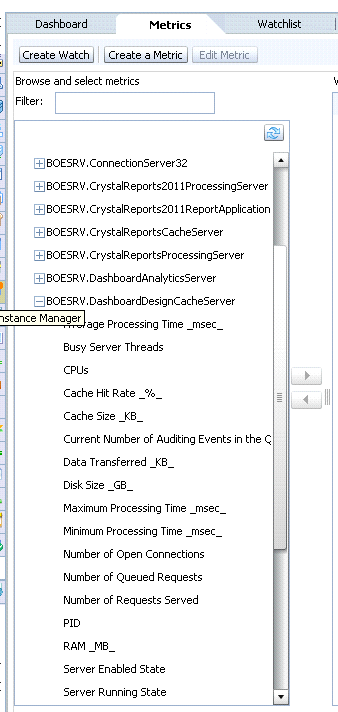
Figure 7
Available metrics
As you can see here, the auditing and monitoring capabilities have vastly improved and you can now include the SAP BusinessObjects Dashboards events as part of them.
Platform Integration for Caching and Performance Improvements
In addition to the new auditing and monitoring capabilities, the Xcelsius server components that were introduced as part of SAP BusinessObjects Enterprise Service Package 03 for caching purposes have also been enhanced to now work closely with the semantic layer integration (Figure 8).
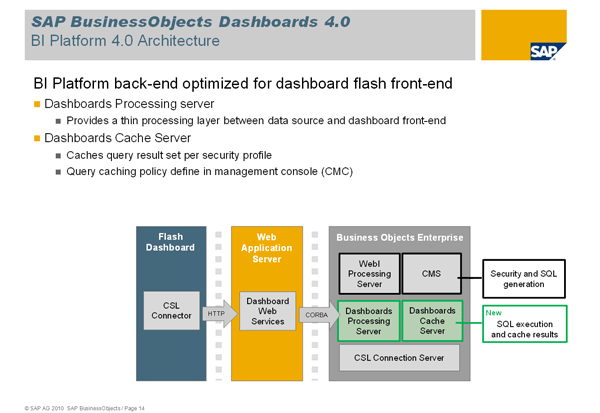
Figure 8
SAP BusinessObjects Dashboards server components
In summary, the SAP BusinessObjects 4.0 release — for you as an administrator — provides you with a closer integration with the semantic layer for data connectivity, stronger monitoring and auditing capabilities, the capability to deliver multilingual dashboards, and improved caching services as part of the SAP BusinessObjects platform.
Product Roadmap Disclaimer
The descriptions in this article of future functionality are the author’s interpretation of the publicly available product integration roadmap. These items are subject to change at any time without any notice and the author is not providing any warranty on these statements.

Ingo Hilgefort
Ingo Hilgefort started his career in 1999 with Seagate Software/Crystal Decisions as a trainer and consultant. He moved to Walldorf for Crystal Decisions at the end of 2000, and worked with the SAP NetWeaver BW development team integrating Crystal Reports with SAP NetWeaver BW. He then relocated to Vancouver in 2004, and worked as a product manager/program manager (in engineering) on the integration of BusinessObjects products with SAP products. Ingo's focus is now on the integration of the SAP BusinessObjects BI suite with SAP landscapes, such as SAP BW and SAP BW on SAP HANA, focusing on end-to-end integration scenarios. In addition to his experience as a product manager and in his engineering roles, Ingo has been involved in architecting and delivering deployments of SAP BusinessObjects software in combination with SAP software for a number of global customers, and has been recognized by the SAP Community as an SAP Mentor for SAP BusinessObjects- and SAP integration-related topics. Currently, Ingo is the Vice President of Product Management and Product Strategy at Visual BI Solutions, working on extensions to SAP’s product offering such as SAP BusinessObjects Design Studio and SAP Lumira. You may follow him on Twitter at @ihilgefort.
You may contact the author at Ingo@visualbi.com.
If you have comments about this article or publication, or would like to submit an article idea, please contact the editor.