SAP Mobile Asset Management can enhance maintenance processes through distribution of data to technicians and engineers in the field. If you are planning to implement it, your project strategy should take some key points into account.
Key Concept
Preventive and corrective maintenance are basic best practices for a supply chain. SAP Mobile Asset Management (MAM) links mobile devices such as PDAs with the appropriate SAP back-end components. It provides the infrastructure to enhance maintenance processes so that centralized staff can better support technicians and engineers in the field. By mobilizing technicians via MAM, companies can avoid redundant and error-prone administrative tasks and can increase the performance of supply chain processes by ensuring that equipment is in optimal condition.
Large companies with far-flung assets, such as factories, refineries, power stations, utilities networks, or transportation networks, go to great lengths to avoid unexpected downtime that could diminish supply chain performance. Maintenance supervisors prioritize orders and prepare preventive maintenance activities. Daily order documents are published and sent to field technicians or service engineers who do the work. The documents are filled out on site by people in the field and returned to the administrative support staff, who enter the data into a central system or application such as mySAP Product Lifecycle Management (PLM).
This manual procedure can result in lower productivity and is error prone. If technicians require spare parts and they don't have easy access to an ERP system, they need to contact the people who can check stock availability at the warehouse. If they need additional equipment information, they must identify the right place or person to find details about the equipment. If maintenance priorities change, reams of additional paperwork and unneeded travel time may result.
Now let's look at the process using mobile technology and Mobile Asset Management (MAM), part of the SAP Solutions for Mobile Business application suite powered by the SAP NetWeaver component SAP Mobile Infrastructure (SAP MI). Information contained in the daily reports is available in the back-end system, where supervisors monitor and adjust for changing conditions by setting priorities and introducing new tasks. Technicians use mobile devices to access the information via Wireless Fidelity (Wi-Fi) technology, General Packet Radio Service (GPRS), Local Area Network (LAN), etc. After synchronization, they receive an accurate picture in real time of what needs to be done. Technicians then transfer work-status notifications back to the system, along with other important data such as counter readings. Supervisors stay on top of the current job status and they can reprioritize tasks as required.
Let me give you a simple overview from an SCM business perspective of the functionality in MAM 2.0 and a preview of Release 2.5, which is in Ramp-Up and is expected to be released in the second half of 2005. I'll also provide recommendations about implementing MAM.
Note
MAM requires:
- A mobile device and other components required by any mobile system: SAP MI client, Java Runtime, and a local database
- SAP Web Application Server running the SAP MI server
- A back-end solution such as R/3 Plant Maintenance (PM) or R/3 Service Management
Why MAM?
MAM gives technicians access to the most important life-cycle management capabilities provided in mySAP PLM. It doesn't introduce new functionalities for maintenance personnel but does change the processes they use significantly. A standard version is available as well as industry-specific versions designed for utilities. While MAM is designed for handheld devices or PDAs, it also runs on laptop computers. You can modify and enhance various mobile front ends to meet your business needs.
Implementing MAM in a mobile maintenance or field service project can result in:
- Cost reductions thanks to fewer paper-based orders, optimized travel expenses, and minimized administrative back-office tasks
- Reduction in inventory in some instances because of better spare parts management
- Increased productivity of the maintenance or service staff
- Reduction in entry errors, leading to better quality information
- Shorter equipment downtimes as field technicians respond more quickly
MAM transfers plant and service maintenance functionality along with master data to mobile devices so engineers and technicians in the field can view a technical object that requires service and access its maintenance and repair history. You can access other relevant information about the installed equipment that needs maintenance or servicing and can enter details about items you have installed or removed. Work orders can be confirmed along with tasks and activities. New work orders and time and material confirmations can also be created.
Customer records with information such as address, contact person, or telephone number are offered by MAM along with inventory data. With it, a mobile device is capable of finding a mobile storage location and generating lists with a count of the available materials. Employees can track and manage customer consignments and run availability checks with mobile equipment. Field personnel can process customer service or plant maintenance notifications and create new ones. In addition, they can establish and maintain detailed notification lists.
Handheld devices are able to take measurements and counter readings on technical objects using MAM in the offline mode. The system can generate new documents for the measurement points of a technical object, and the latest measurement document history is available. MAM 2.5 includes new functionality that supports Radio Frequency ID (RFID). See the sidebar, "MAM and RFID."
MAM's User Interface
MAM has an intuitive user interface with a screen adapted to the limitations of mobile devices. It is optimized for PDAs but can also run on laptops and tablet PCs. MAM supports the Pocket PC 2003, Win32, and Mobile Linux (Sharp) environments. The screenprints in this article were captured on a laptop but the look and feel correspond to the final user interface in a PDA or tablet PC.
The main menu (Figure 1) enables users to perform master and transactional data management as well as to change local configuration to choose the best display parameters. Information is synchronized between the back end and the device. The technology is configured so usability issues are taken into account by considering the limitations of the devices such as the memory and screen size.
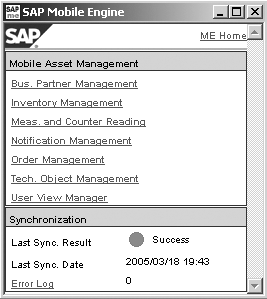
Figure 1
MAM main menu
MAM in concert with the PLM functionality Asset Lifecycle Management covers the full maintenance cycle — for example, for production machines and the distribution fleet — based on work orders created in the ERP system. It enables technicians and service engineers to process basic orders and supports notification management via a handheld or mobile device. Users display orders they've been assigned, and they can access data related to technical objects, contracts, and so on. They can also perform operations offline, such as changes to an order's status or update- notification activities related to a work order. Those changes are replicated to the back-end system during the next synchronization.
In addition to enhancing accuracy when capturing data, the technology allows mobile users to generate new maintenance orders if a malfunction occurs and corrective action is required (Figure 2). With this instant and accurate information, companies can analyze the maintenance processes and optimize or improve them. The system can display or print newly generated orders.
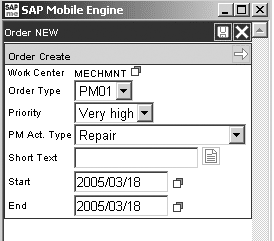
Figure 2
MAM provides users with order creation screens
Mobile devices can use locally replicated data, which is precise and eliminates the problems that arise from missing or reduced access to master data. Technicians and engineers consult the local data to learn more about equipment installed at functional locations as well as business partners, inventory levels, installed base, contracts, warranty information, and other information.
Menus enable users to obtain required details such as measurement points and counter readings (Figure 3). In the drop-down box on the top right screen corner, you can obtain access to all components. Mobile solutions do not transfer the full master data. Device limitations and performance issues make it important to balance the data requirements with device characteristics. I'll discuss this in more detail later.
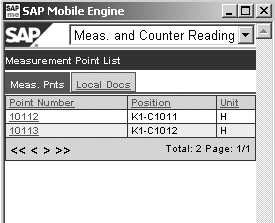
Figure 3
MAM provides a list of measurement points and can perform counter readings
MAM and MI
SAP MI provides the technology to model, support, and simplify synchronizing the data flow between the back-end system and the mobile computer. Figure 4 shows the technical layers of MI adapted to support MAM.

Figure 4
Mobile Infrastructure landscape with three layers
Note
To improve performance, you can install a small local database.
The first layer corresponds to the mobile device and the user interface. For example, Appl. 1 could be MAM while Appl. 2 could be another mobile solution such as Mobile Sales. The SAP MI client sublayer is responsible for communicating with the server and the MAM-based mobile device.
The second layer in Figure 4 is the middleware. It is managed by the SAP MI server, previously called the Mobile Engine. A mobile device sends data to the middleware, which passes it to the back-end solution, such as mySAP SCM, mySAP PLM, SAP Supplier Relationship Management (SRM), or a legacy system. The middleware also facilitates the inverse flow. Replication is supported by a business object-based synchronization process known as SyncBO, which synchronizes the various layers and guarantees the correct information flow.
Administration tasks for the devices, software, and users are performed by the middleware. New releases can be deployed automatically during synchronization, which reduces the problems associated with remote maintenance and software upgrade with hundreds of distant users and devices. During the first synchronization, the device is assigned a unique identification code and the proper client application (e.g., MAM) is installed along with the initial data load.
The third layer corresponds to the back-end system where the business processes and relevant applications reside. In this example, the application is mySAP PLM with R/3 PM and Service Management, but it could be another SAP or third-party application. Several mobile business applications are available, including mobile time sheets, mobile travel expense reports, mobile procurement, mobile sales orders for SAP R/3, a suite of tools for sales and service with mySAP CRM, and a specialized MAM solution tailored for utilities, called MAU.
For example, Mobiles Sales connected to SAP R/3 provides information about sales orders, customer data, and inventory to sales agents, allowing sales order creation in the field (Figure 5). Based on the standard infrastructure provided by SAP NetWeaver, you can develop new applications that fit specific requirements not met by the standard mobile solutions.
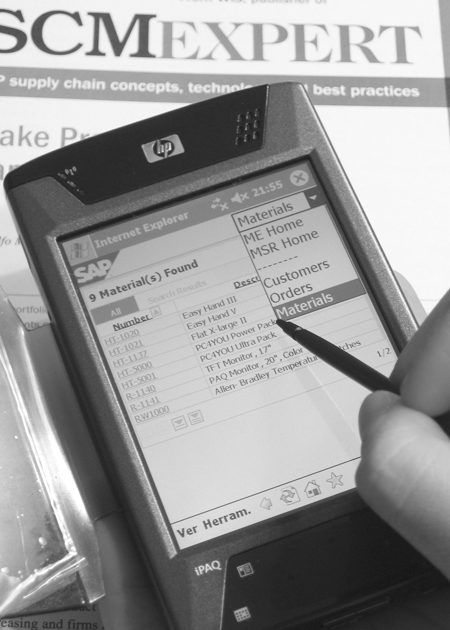
Figure 5
PDA running a mobile solution (Mobile Sales in R/3)
Settings Overview
Mobile solutions require settings in four areas related to the three technical layers:
- Device or equipment configuration of the hardware
- SAP MI configuration
- Mobile solution configuration — in my example, MAM
- Solution configuration for a specific scenario in the back end (PM and Service Management in this article)
Configuring the SAP MI client is similar to the SAP logon configuration for a personal computer. Technical information about the gateway server is entered along with client or logon language.
I'll focus on configuring MAM devices on the functional side. However, technical tasks must be performed on the SAP MI infrastructure that are critical to the success of the project, but they are beyond the scope of this article. Usually, these tasks are performed in the SAP MI server by consultants who specialize in SAP NetWeaver. They configure the communication and synchronization layer.
MAM doesn't require any complex configuration in mySAP PLM, but you may need to adapt your current maintenance processes and system settings to meet the new mobile capabilities. You may need to create more storage locations to model new processes. To make the MAM settings in mySAP PLM, follow the menu path IMG>Plant Maintenance and Customer Service>Maintenance and Service Processing>Mobile Assets Management.
The link between maintenance or service processes and the end user is built via several of the settings in Figure 6 on the next page. End users are assigned to a subset of data through selection variants for functional locations, equipment, and measuring points. Configuration goes through several profiles (MAM scenario, business process), allowing you to define how MAM runs on the device. The profiles group several parameters that set up the connection between MAM and SAP R/3. For instance, you could define how to manage orders or notifications. Device settings allow the configuration of the date, time, and number format for local/country specifications.

Figure 6
Configuration for integration between MAM and SAP R/3 summarized into three levels
Tip!
Make sure to take mobile device performance and memory into account. These devices can have limited capabilities because of the reduced size. Refer to SAP note 786841, "Release restriction note SAP Mobile Asset Management 2.5 SR1," and SAP note 746783, "Mobile Engine on Compact Flash Card — Composite Note." For more information about mobile solutions, visit https://help.sap.com and follow Documentation>SAP NetWeaver>SAP NetWeaver '04>People Integration> Multi-Channel access or visit https://service.sap.com/nw-mi.
Implementation Methodology
Project tasks performed during an SAP MI implementation do not differ a great deal from other projects. Any methodology can lead to a successful implementation, but you should consider these points carefully:
- Divide your design phase into two subphases: process definition and technical design. The proper technical design is critical to the final success of your project. The wide variety of hardware, such as PDAs, industrial handhelds, and tablet PCs, along with a long list of vendors, including Intermec, Symbol, Psion, and Hewlett-Packard, make device selection a major part of your technical design. You must also evaluate equipment characteristics such as autonomy, connectivity (Wi-Fi, GPRS, etc.), input method (bar-code reader vs. RFID scanner), screen type, and memory capacity. Determining the right device from the appropriate manufacturer is a big part of your technical design. During this phase, process definition should be aligned with the technical design, taking into account the advantages and limitations of the new technologies.
- Pilot your MAM solution with a small group of prequalified users who understand the technology and can help to prove the concept and test the technical solution (Figure 7). A successful pilot program allows for a smoother deployment of the full solution.
- Change management plays an important role in your implementation. Significant process changes are often required, along with new skills for technicians or field engineers. A good analysis of the training requirements helps in scheduling learning activities aligned with the staff's skills.
- Any mobile project covers heterogeneous areas. SAP MI introduces a technical aspect that may require a multidisciplinary team that can address areas such as programming (ABAP, Java) if new developments are required. The team also needs functional expertise (mySAP PLM, PM) and technical expertise to accommodate the PDAs and the SAP NetWeaver specialized SAP MI server. Coordinating the overlapping responsibilities of these different roles is the responsibility of the project manager and is a key factor in the overall success of the project.

Figure 7
MAM user configuration (e.g., inventory list configuration)
MAM and RFID
In maintenance-oriented RFID, applications use read/write tags along with a mobile device equipped with a RFID scanner. (See "RFID Primer for the SAP SCM Professional" for more details on RFID technology.) In most maintenance applications, tags provide enough memory for identification of the equipment (Figure 1). Recent maintenance activities data is stored in this memory, allowing a quick, secure interaction between the equipment and technicians. This interactivity converts fixed assets into "intelligent" assets.

Figure 1
Equipment information and maintenance history can be stored in RFID tags and accessed via mobile devices
MAM 2.5, to be released later this year, includes new functionalities that support RFID. While supply chain solutions require the SAP Auto-ID Infrastructure (AII) as an interface for RFID devices with the ERP system, MAM communicates directly with the RFID tag via the mobile device.
Based on the manner in which MAM is configured, users can be provided with new functionality by the activation of three scenarios:
- RFID tags manage orders and notifications, but orders are locked locally in the mobile device. In this method, technicians must be physically close to the inspected equipment.
- Data that creates a maintenance history can be written to a technical object's RFID tag via a mobile device.
- Data stored in the RFID tag can be used to create new orders or notifications.
Scenario 1 ensures the right maintenance procedure is performed on the right piece of equipment, while scenarios 2 and 3 focus on better performance by having accurate information in place. These scenarios regulate preventive maintenance so that the correct inspection is performed at the right time and place.
More detailed information about the implementation of this technology is available in SAP note 791037 "SAP Mobile RFID Interface Software/Installation/Deployment," and SAP note 793100, "MAM RFID tag initialization instruction."

Adolfo Menéndez Fernández
Adolfo Menéndez Fernández is the application architecture manager at Repsol in Madrid. Previously, he worked at SAP Consulting Spain as the logistics consulting manager. He studied at the University of Oviedo, where he earned an electronic engineering degree. He is a certified SAP consultant in supply and demand planning (SNP and DP), order fulfillment (Global Available-to-Promise), production planning and detailed scheduling (PP/DS), as well as procurement and materials management (MM). Adolfo has more than 10 years of SAP implementation experience in the consumer product goods, pharmaceutical, automotive, furniture, textile, chemical, oil & gas, and steel industries using SAP ERP logistic modules (including PP, MM, and sales and distribution [SD]) as well as SAP SCM (DP, SNP, and PP/DS). He is APICS certified in Production and Inventory Management (CPIM).
You may contact the author at asturiasadolfo@yahoo.com.
If you have comments about this article or publication, or would like to submit an article idea, please contact the editor.


 Premium