McKesson Pharmaceutical recently replaced a legacy SCM system and upgraded from SAP SCM 4.1 to SAP SCM 5.0. See how McKesson has fared for the first part of its upgrade, which included implementing Global Available-to-Promise.
Key Concept
Global Available-to-Promise (GATP) in Advanced Planning and Optimization checks the global availability of finished products, components, and resources in real time. SAP liveCache runs GATP processes that allow you to manage orders, create sales orders, and develop transportation and delivery schedules.
Let us share with you the challenges McKesson faced and the lessons learned with respect to the GATP aspect of the
implementation. We’ll also explain why we upgraded to SAP SCM 5.0 and what we had to do for our systems to
accommodate this upgrade. We will highlight the functional and technical challenges faced in the design, infrastructure
planning (hardware sizing), and rollout strategy. We will also discuss our implementation approach as well as solutions
for overcoming challenges faced during our implementation.
About McKesson
McKesson is one of the nation’s leading healthcare services companies, which delivers medicines, medical
supplies, and health information technology to patients in a variety of healthcare settings. Headquartered in San
Francisco, CA, McKesson employs more than 32,000 people worldwide. McKesson Pharmaceutical, the largest business
unit, operates 33 distribution centers and services over 36,000 customers. Each distribution center houses about 25,000
items. We process an average of 100,000 orders daily and roughly 1.5 million line items daily. As such, our company
produces the largest volume of transactions by industry standards.
GATP is a cornerstone to the entire SCM process at McKesson. Before we started this project, we had a legacy system
and SAP SCM 4.1. One of the reasons we looked at GATP was that our legacy order fulfillment process did not provide us the
flexibility to do backorder processing. This forced us to use a “fill or kill” order fulfillment strategy,
which limited us to filling orders with the inventory on hand. In this old system, customers were notified when inventory
was unavailable and were accustomed to reordering the product the next day. The implementation of the GATP module in SAP
SCM gave us the flexibility to move to an order fulfillment system with backorder processing, in turn, allowing us to
maximize revenue and increase customer satisfaction. Figures 1 and 2 illustrate how our
systems looked before and after GATP.
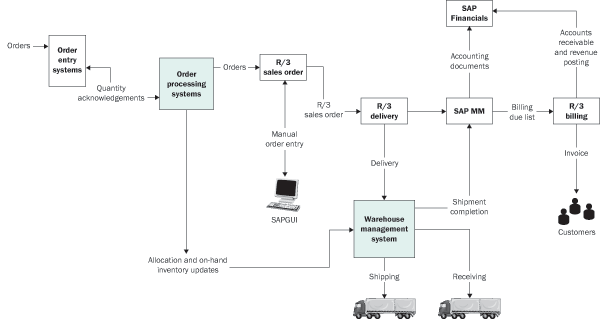
Figure 1
Pre-GATP order process

Figure 2
Post-GATP order process with SAP APO
Implementation Approach
GATP provided one of the greatest challenges in using the SAP SCM module because we had such a large number
of order lines. Our project included product and location substitution — through rules-based ATP — and product
allocations. For the product and location substitution, we replaced complex legacy program logic through configurable
rules-based ATP schemas. We set up condition-based rules to support substitution to alternate products or supply desired
products from alternate locations in our distribution center network. Product allocations allowed us to control how we
allocated products from alternate locations when the products were out of stock (or not stocked at all) at the
customer’s home distribution center.
Figure 3 shows our SAP landscape and Figure 4 shows the new hardware
required for the SAP SCM 5.0 upgrade. We assumed that the GATP application would scale to our volume in the performance
testing environment in SAP SCM 4.1. Therefore, we presumed that we could transmit the performance test results to
production environments. We kept the performance test systems in sync with changes we made to the production system. This
ensured that our performance test systems were always updated when we needed to do our performance testing.

Figure 3
System landscape prior to the SCM upgrade
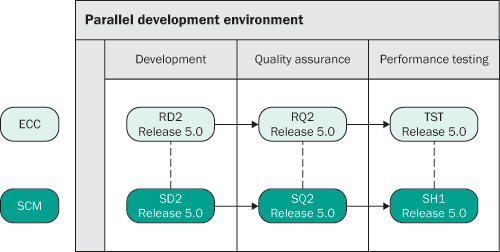
Figure 4
New system landscape created for the SCM 5.0 upgrade
Rollout Strategy
Our rollout strategy involved rolling out Core Interface (CIF) for materials, sales orders, stock, and
purchase orders. We also activated the ATP model for all distribution centers, as required for a GATP implementation.
However, as a result of unforeseen challenges, some of which are described later in the article, we’ve delayed the
rollout of additional distribution centers until the fall of 2007.
The major challenge of the implementation was implementing GATP in a fully operational environment. The
order processing needed to gradually migrate from the old to the new GATP system. As both systems made inventory decisions
regarding the same pool of inventory, the inventory had to be fully synchronized between the systems on a real-time basis.
To mitigate the impact on our customers and on our business, we planned to roll out order confirmations
based on GATP by customer and distribution center. With this method, SAP SCM became the system of record for all inventory
allocation decisions for the test distribution center. Pre-selected customers at this test distribution center received
order confirmations from SCM GATP when they placed orders. All other customers continued to receive their confirmations
from our legacy systems.
In addition, to ensure accuracy in product allocations and product availability checks, these orders
executed neutral product allocation checks in GATP. Neutral checking is a process in which SCM performs a GATP check, but
at the end of the process, material quantity for the order is reserved or removed from inventory — even if the
amount should have been lower after all the GATP rules were checked. This approach works best when you roll out the GATP
implementation over a long period of time and you have another system that is the system of record during the rollout.
This ensures that the system of record controls the amount of inventory allocated to an order.
Our rollout strategy was to convert customers in an individual distribution center over a predefined period
of time, so we expected the impact to be relatively small. Our strategy was based on a small number of customers with a
few thousand orders. However, with neutral ATP checks in place, we were essentially going live with GATP for all
customers. Therefore every customer’s order would have to do a call to GATP. “Neutral” only meant the
confirmation of quantities would come from our legacy system. This alone caused a huge impact, the magnitude of which
became apparent during performance testing. We were actually going live with a big bang approach for all distribution
centers.
This strategy caused our SAP ERP Central Component (ECC) system to slow down. Working with SAP support, we
determined that the tables that CIF, BW, and other applications used for communication purposes needed special index
management. In response, we revised the rollout strategy by decoupling the CIF model activation by distribution center and
application.
First, we identified all the distribution centers servicing the customers that would be receiving
confirmations from GATP. Second, we activated sales orders, POs, stock, and ATP check CIF models by distribution center
(one at a time), which allowed us to monitor our systems for any issues before we put the next distribution center on the
CIF. Finally, we reviewed and managed indexes for ARFC tables (tables ARFCSSTATE and
ARFCSDATA). This review has become an ongoing process.
Note
The ARFC tables are used in the transactional Remote Function Call (tRFC)/queued Remote Function Call (qRFC) process. tRFC and qRFC allow one system, such as ECC, to pass data to a function in another system, such as SCM. The ARFC tables hold the actual tRFC/qRFC data in the calling and receiving systems.
We carried out performance testing by upgrading our test environment to handle 120% of our current
production sales order volume. During our performance testing, we determined that the scalability of the GATP application
could not be proven for our full volume of sales order line items and would not meet our service level requirements for
performance.
We also encountered a problem in our object management system, in which locking in liveCache caused IDocs
to fail and prevented orders from being confirmed. SAP recommended that we upgrade to SAP SCM 5.0 to resolve this. As a
result of the problems we ran into, we revised our implementation as described in the next section.
Revised Implementation Approach
Here are the three steps we followed in our revised implementation:
Step 1. Upgrade to SAP SCM 5.0
Step 2. Obtain additional hardware for full scalability testing
Step 3. Schedule scalability testing
Step 1. Upgrade to SAP SCM 5.0. As part of the upgrade, we had to procure additional
hardware for SCM and ECC development. Both systems allowed us to develop for the upgrade without breaking our current path
to production. As required when upgrading to SAP SCM 5.0, we also had to apply Support Packages to ECC for plug-in support
to bring us to current Support Package levels. Table 1 lists the key Support Packages. We didn’t
require any new functionality from SCM 5.0 — we upgraded strictly to alleviate technical issues related to SAP SCM
4.1.
| SAP_ABA |
640 |
18 |
Cross-Application Component |
| SAP_BASIS |
640 |
18 |
SAP Basis Component |
| ST-PI |
2005_1_640 |
2 |
SAP Solution Tools Plug-In |
| PI_BASIS |
2005_1_640 |
9 |
Basis Plug-In (PI_BASIS) 2004_1_640 |
| SAP_BW |
350 |
18 |
SAP_BW 350 |
| SAP_APPL |
500 |
11 |
Logistics and Accounting |
| PI |
2004_1_500 |
14 |
R/3 Plug-In (PI) 2004_1_500 |
|
| Table 1 |
Key Support Packages needed for SAP SCM 5.0 upgrade |
Step 2. Obtain additional hardware for full scalability testing. This hardware reflects
the exact production environment for ECC and SCM.
Step 3. Schedule scalability testing. Based on discussions with SAP, who was our partner
in the performance testing, we scheduled six weeks of testing.
Issues, Solutions, and Lessons Learned
Here are two important lessons learned from this point in the project.
Lesson 1. Don’t assume that SAP will continue to support an undocumented feature from a
previous release. Partial confirmations are no longer allowed with user exit
EXIT_/SAPAPO/SAPLATPT_002. In SCM 4.1, this user exit allowed us to manipulate order quantities. To
rectify this, we implemented pre-selection for items that we cannot confirm with rules-based ATP (RBA) in
EXIT_/SAPAPO/- SAPLATPT_002.
Lesson 2. Communicate with the business partners and external customers. Extensive
communication, which is our standard procedure, was even more vital to mitigate potential customer impact. It also helped
us manage expectations when we changed our strategy or time frame.
Where Are We Heading From Here?
We successfully completed our go-live with SCM 5.0 in June 2007. Scalability testing is scheduled to end in
mid-to-late summer 2007. If we achieve our performance goals from the scalability testing, we will continue rolling out
with more customers and distribution centers. We are in the process of executing a full scalability test, partnering with
SAP. If the test is successful, we expect to complete the rollout of all customers and distribution centers within the
next 12 months. We are pleased with the current state of the project and are excited about the opportunities ahead as we
continue down this path.
John Marwick
John Marwick is a senior ABAP developer at McKesson Corp. in San Francisco, CA. He currently is the project manager for the GATP performance and scalability test project and is the development lead for other projects. He has more than 10 years of SAP experience across multiple modules and applications, including SD, MM, HR, FI, and GATP.
You may contact the author at John.Marwick@McKesson.com.
If you have comments about this article or publication, or would like to submit an article idea, please contact the editor.